

WP Social Ninja 4.1.0: Smarter Reviews Control, Spam Management, Cleaner Feeds, Better SEO, and More


You know how much effort goes into keeping feeds fresh, reviews under control, and everything looking good on mobile.
So we thought, how can we make all of that easier, smarter, and faster?
That’s the idea driving WP Social Ninja 4.1.0!
There are no big visual changes here. Instead, we focused on polishing the parts you rely on most, which are reviews, feeds, moderation, performance, and visibility, so everything feels cleaner, highlighted and more controlled.
From feeds to reviews, WP Social Ninja 4.1.0 makes it easy to keep everything running exactly how you want. Refresh feed template, filter Facebook posts, control device-specific content, and moderate reviews, all in a few simple clicks.
Ready to see what’s new?
Complete Review Status Management
It’s now easy to see exactly what’s happening with your reviews. WP Social Ninja 4.1.0 introduces a dedicated Reviews section in the dashboard where everything is neatly organized and easy to track.
All these reviews appear in a dedicated Reviews section on your dashboard, well structured with separate tabs for Approved, Pending Approval, and Spam.
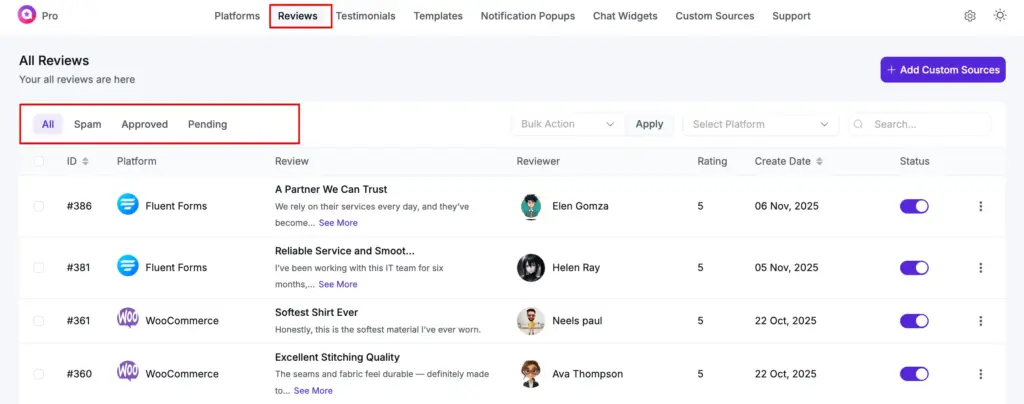
Approved: Reviews that are live and visible on your website
Pending: Reviews waiting for your approval before going live
Spam: Reviews you’ve identified as spam or inappropriate
You no longer have to dig through multiple templates or guess where a review lives. All your reviews are well organized in one place, so you always know what’s going on.
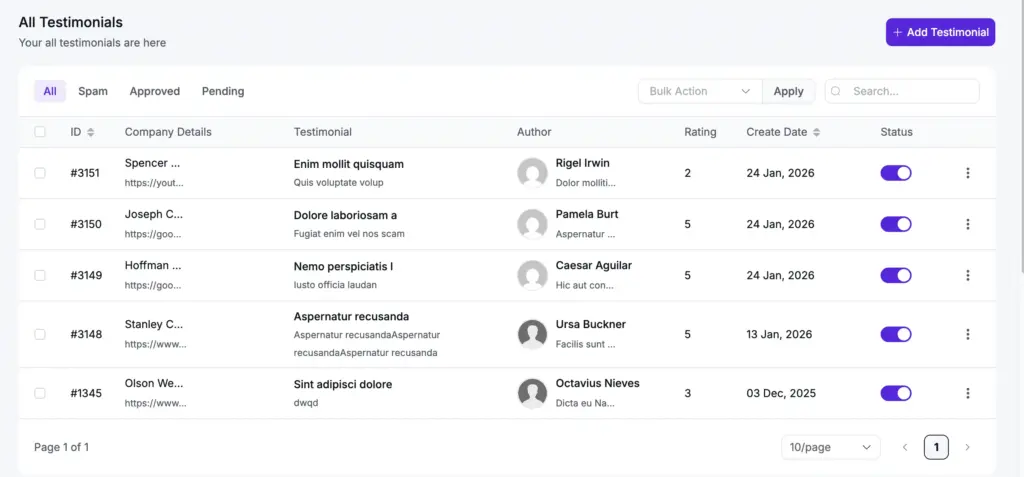
The same filtering options are now available for Testimonials as well, which is especially helpful if you collect Testimonials using Fluent Forms. You can easily review submissions, decide which testimonials to show, and mark unwanted ones as spam.
Intelligent Review Moderation That Works for You
Reviewing everything by hand is helpful, but it’s not always practical. With the new Advanced Review Moderation system, you can set clear rules and let reviews flow the way you want.
You’ll find three moderation options inside your review template’s Global Settings.
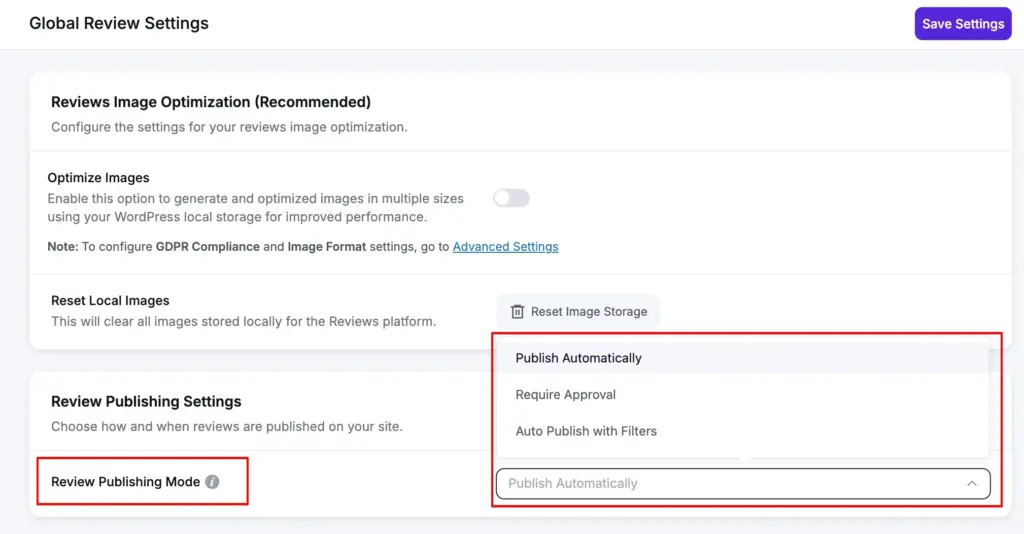
Publish Automatically
Best for businesses that already trust their customers. Reviews are published as soon as they’re submitted, so there’s nothing for you to manage manually. Once it’s set, your reviews take care of themselves.
Require Approval
Gives you complete control. Every single review waits for your manual approval before appearing on your site. Great for businesses that need to carefully monitor their review display.
Auto Publish with Filters (The Smart Choice)
Reviews can be published automatically, but only when they fit your criteria. If something doesn’t look right, it’s kept in moderation so you can review it first.
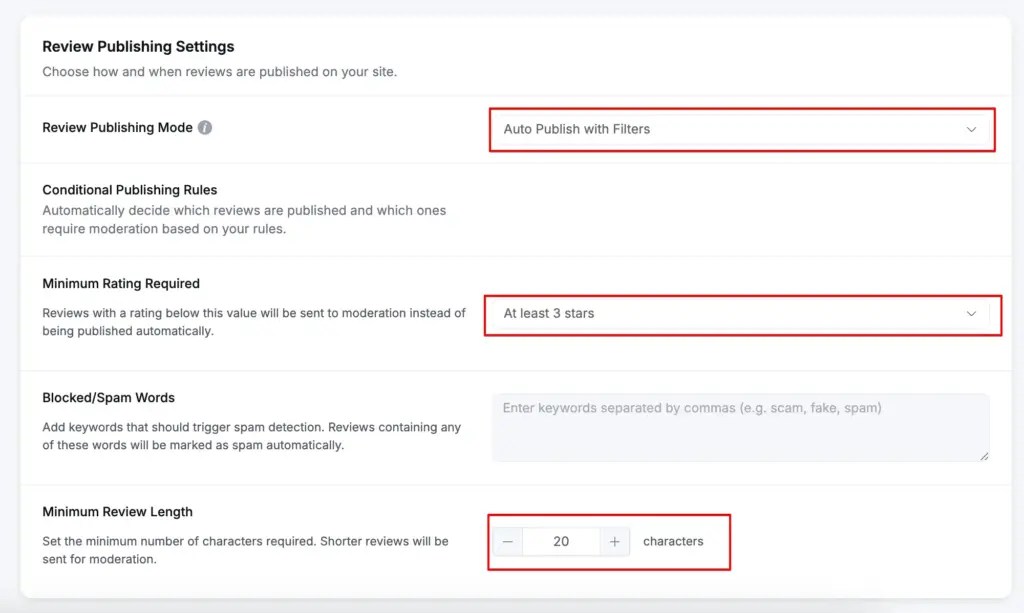
When you select Auto Publish with Filters, you’ll find three more customization options:
Minimum Rating Required: Choose the lowest star rating that will need your approval. For example, you can allow only 4 and 5-star reviews to publish instantly, while lower ratings are sent to moderation for your review.
Spam Keyword Detection: Add specific words or phrases that trigger automatic spam marking. If someone uses these keywords in their review, it goes straight to spam without cluttering your pending queue.
Minimum Review Length: Set a minimum character limit to encourage thoughtful feedback. Very short reviews like “Good” or “Nice” are held for moderation so you can decide if they’re worth displaying.
Each of the options works differently and intelligently. The purpose is to save you from reviewing hundreds of spam or low-quality submissions while ensuring genuine, helpful reviews appear automatically.
For more details, you can also check our documentations.
Easy Spam Management with Bulk Actions
Spam is unavoidable, but you can control it with smart moves. That’s why we’ve made spam control quick and stress-free.
From the new Reviews section, you can mark any review as spam with just one click.
Made a mistake or reviewed it again later? You can unmark it just as easily and send it back to pending or publish it right away.
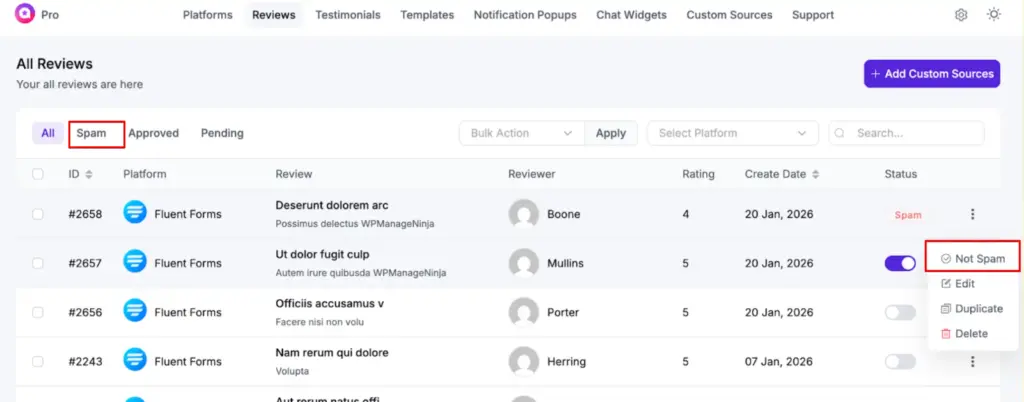
Managing reviews just got a whole lot faster. With Bulk Actions, you can select multiple reviews at once and take action on all of them together.
Mark 20 spam reviews in seconds, approve a batch of pending reviews with a single click, or move multiple items into different statuses without any effort.
Everything happens from one central page, making your review workflow smoother, quicker, and surprisingly satisfying.
Better SEO with Advanced Product Review Schema
Your reviews are powerful trust signals, but are search engines seeing them? With WP Social Ninja 4.1.0, they definitely will.
We’ve completely upgraded our schema markup capabilities to help your reviews dominate search results.
Previously, you could add a basic review schema with your business name, logo, and essential information. That was good, but we wanted better.
Now you can add your customer reviews to your schema snippet. This means potential customers searching on Google can see a preview of what your real customers are saying about you, directly in the search results.
Here’s what’s new:
Schema.org Aggregate Rating Markup: Display your overall star ratings and total review count right in search results. When someone searches for your business or product, they see your rating before even clicking. This will help you build instant trust and increase click-through rates.
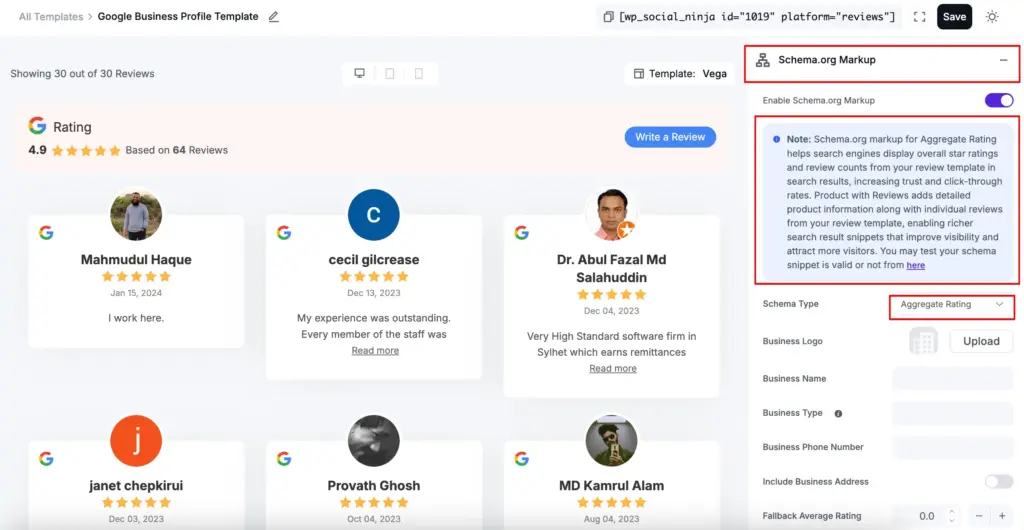
Product with Reviews Schema: This goes even deeper by including detailed product information alongside individual review snippets from your review template. Search engines can display richer result snippets showing specific customer comments, ratings, and product details.
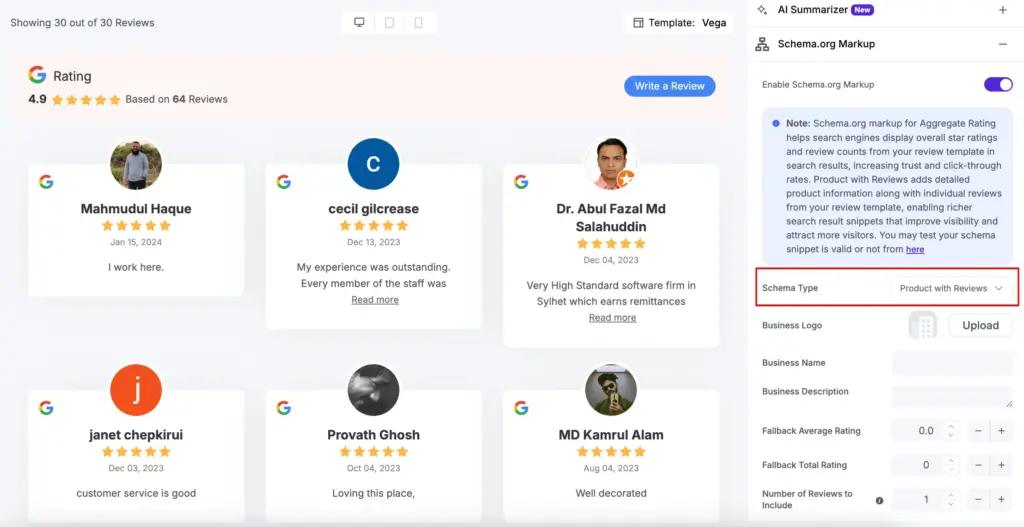
These upgraded schema types help search engines understand and display your reviews more effectively, giving you better visibility and attracting more potential customers.
Specific Feed Template Cache Control for Better Performance
Website speed matters, and caching helps. But sometimes you need to refresh a specific template without clearing everything.
WP Social Ninja 4.1.0 introduces feed template cache clearing. Instead of clearing all cached data at once, you can now clear the cache for a specific feed template.
For example, is the Facebook feed stuck on old posts? Go to Templates, find the template that is giving you trouble, click the three dots and click Clear Cache. Boom! Your feed updates instantly. Fast, accurate and intuitive, just the way managing social feeds should be!
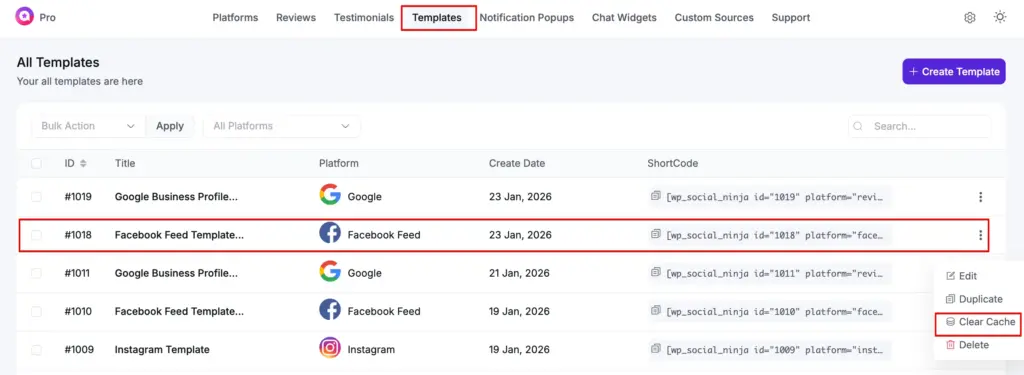
This works for each feed individually, giving you full control over cache refresh without slowing down your entire site.
Smarter Facebook Feed Displays
Facebook Feeds got more flexible with new sorting and display options.
For event feed, in your Filter section, you now have additional ways to organize your feed. Also, we have introduced Auto-generative activities stories to deselect the posts you don’t want to put in your Facebook feed.
Facebook Event Default
This option shows events exactly as Facebook orders them, joining your existing options of Newest, Most Popular, Least Popular, or Random. Choose it from the Event posts order.
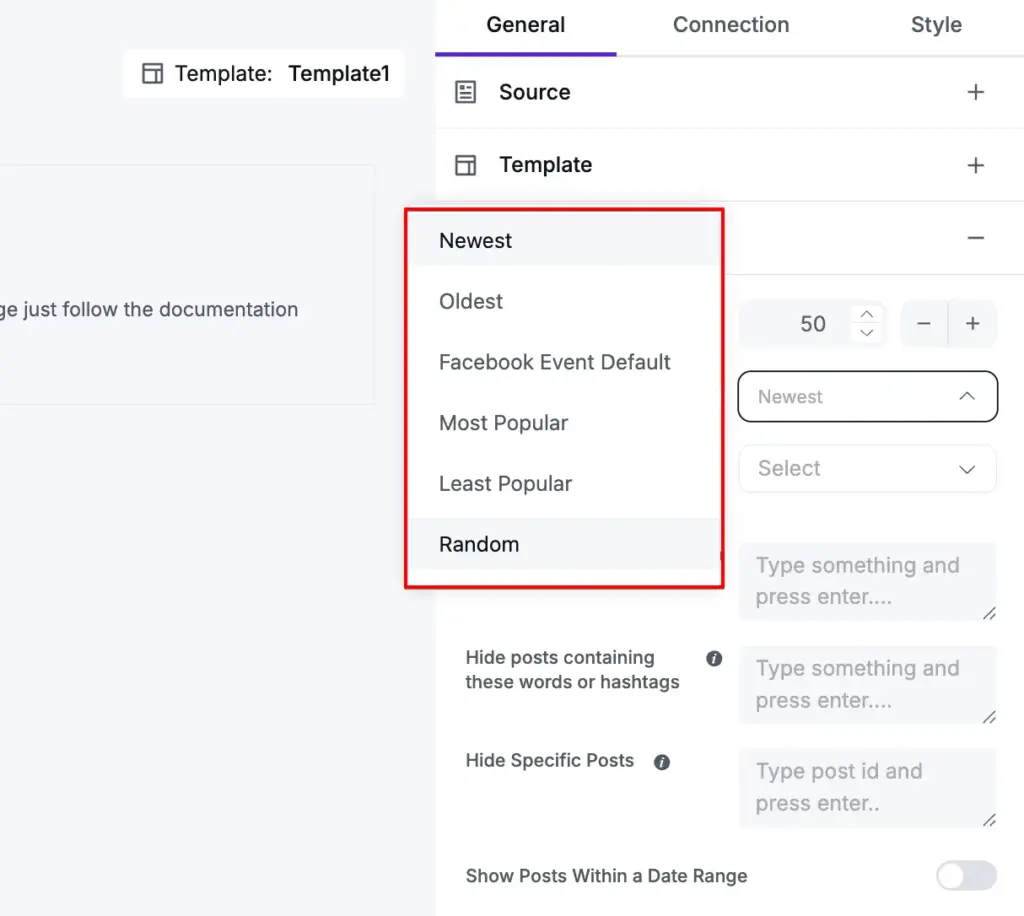
This option will help you create Facebook event displays that match exactly how you want to present information to your audience.
Auto-Generated Activity Stories
Here’s a neat upgrade to your Facebook feed that keeps everything cleaner and more focused.
Sometimes, your feed can get cluttered with updates you don’t really want to show, like status updates, profile photo changes, or cover photo updates. With WP Social Ninja, those unnecessary posts no longer have to take up space.
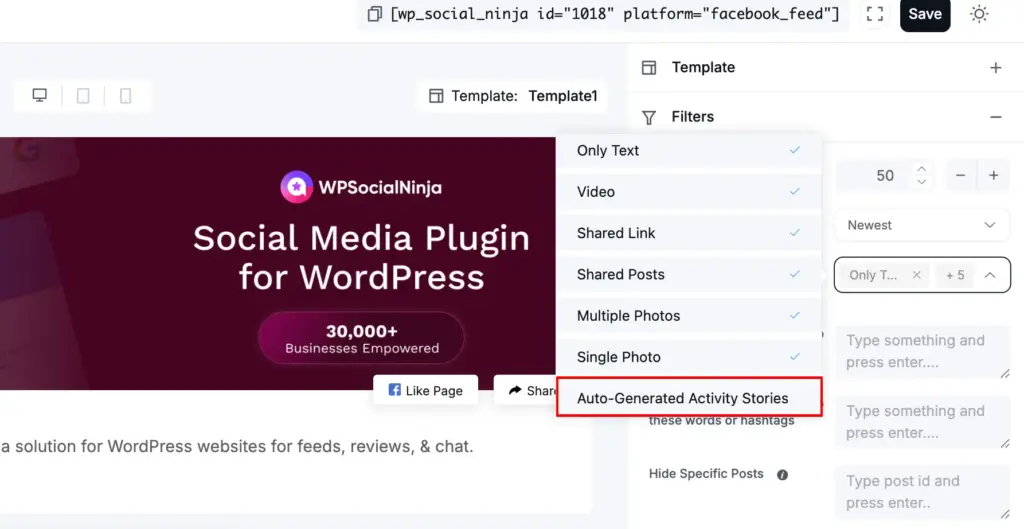
The new improvement comes in the Display post with an option under Filters. Simply choose the types of posts you want to show, like Only Text, Video, Shared Link, Shared Posts, Multiple Photos, or Single Photo and skip the Auto-Generative Activity Stories.
With this, your Facebook feed will display exactly what matters to you, keeping it clean, organized, and easy for your audience to enjoy.
Responsive Device-Specific Load More Control
Mobile and desktop users don’t browse the same way, and now your feeds don’t have to either. With WP Social Ninja 4.1.0, you can set different “Load More” limits for mobile and desktop devices.
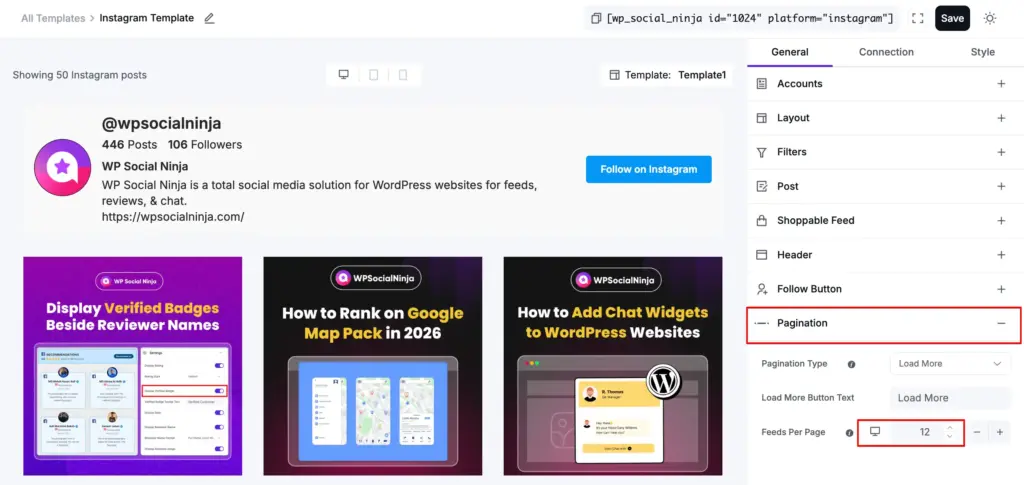
Set different numbers for mobile and desktop separately. For example, show 6 reviews per page on mobile devices where screen space is limited, but display 12 reviews per page on desktops where users have more screen space to browse.
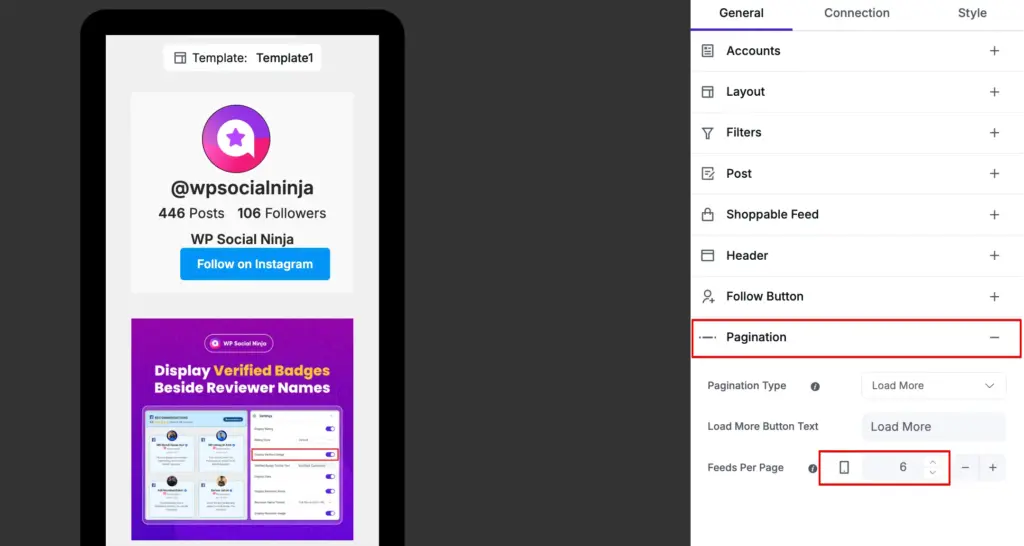
This works for both feed templates and review templates, giving you complete control over the user experience on every device. No more forcing mobile users to load through dozens of items or making desktop visitors click “Load More” too frequently.
Simply configure your preferred numbers in the template settings, and the plugin automatically serves the right amount of content based on the device being used.
Advanced Style Controls for Reviews & Feeds
What’s more? Well, design flexibility just got a serious upgrade!
We’ve expanded the style settings for both review and feed templates, giving you more control over how everything looks, without touching a line of CSS.
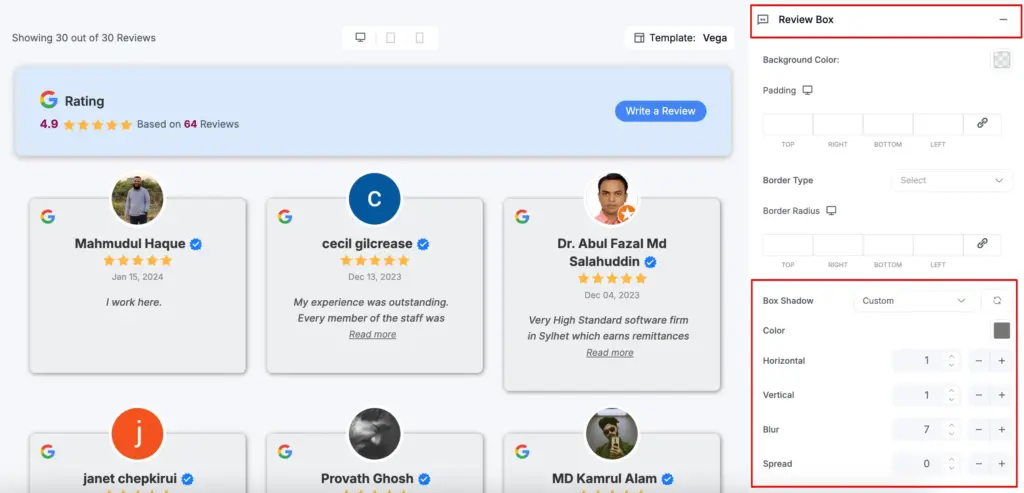
You can now fine-tune visual details like box shadows, border radius, hover effects, and spacing to better match your site’s design.
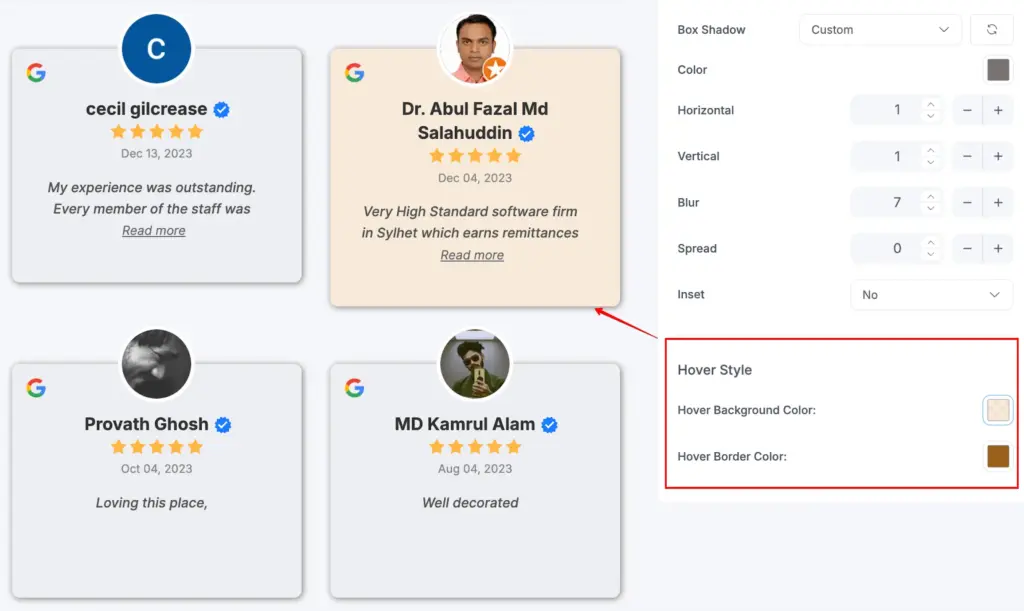
Want your content look more highlighted, clearer separation between items, or subtle hover interactions that feel more polished? It’s all there.
So, your reviews and feeds won’t just work better, they’ll look better too, right out of the box.
Bug Fixes and Performance Improvements
Beyond the exciting new features, we’ve refined the existing experience with important improvements and fixes:
- Optimized SQL queries for review counts, rating breakdowns, and business information
- Preserved manual review approval status during sync to prevent unintentionally re-approving disabled reviews
- Improved WooCommerce template handling and business information processing
- Fixed and improved Airbnb business information handling via the GraphQL API
- Improved Facebook event feed handling and account filtering logic
- Fixed an issue where WooCommerce product reviews were incorrectly inserted into non-review comments and processed as reviews
- Fixed an issue where cron events were being deleted incorrectly
- Fixed “h is not iterable” error when masonry elements do not exist
- Fixed review count update issues when enabling or disabling reviews
- Fixed incorrect post ID usage in asset loading logic for WooCommerce products
- Fixed chat widget Viber configuration issue
- Fixed the time picker, date range type design issue
- Filter out Instagram trial reels from the account feed
- Fixed review show/hide reviews based on the keyword issue
Manage Reviews, Feeds, and Performance with Confidence
WP Social Ninja 4.1.0 is designed to make everyday tasks simpler. Whether you’re managing reviews, fine-tuning social feeds, refreshing a specific template, or improving performance, everything is now easier to control and quicker to handle.
This release delivers small but powerful improvements that collectively deliver a smoother overall experience. Less friction, fewer repetitive actions, and more control, so managing your site feels calm, organized, and easier.
Win your customers’ hearts with exceptional features
Discover how WP Social Ninja can assist you in designing outstanding customer experiences.

We’d love to hear what you think about these new features! Share your thoughts on our Community. You can also join our Facebook Community to let us know your feedback. And if WP Social Ninja is helping your business grow, we’d be incredibly grateful if you could leave us a review.
Thanks to your support, we’re more inspired than ever to build features you’ll actually love. Stick around, there are many more exciting updates coming your way!

Subscribe To Get
Weekly Email Newsletter
Connect, Customize, and Display Social Feeds, Reviews, and Chat widgets










Leave a Reply