
How to Leave an Anonymous Google Review (Without Exposing Identity)


Do you want to leave a Google review without anyone knowing it’s you? You are not alone; Many people want to share honest feedback safely, without worrying about being identified.
And that’s completely normal.
But keep this in mind: Google no longer accepts fully anonymous reviews. Signing in is required, and Google still knows your identity.
Still, this doesn’t mean that your real name and personal information will be displayed for everyone to see. There are safe, smart ways to protect your privacy when leaving reviews.
In this guide, we’ll show you easy ways to share your honest reviews without revealing your identity.
TL;DR
Can you leave an anonymous review on Google?
Not completely, but you can hide your name and keep your identity private from people.
Quick privacy steps:
- Create a separate Google account only for reviews.
- Use a nickname instead of your real name.
- Remove your profile picture.
- Make your Google profile information private.
You won’t be invisible to Google, but your review looks anonymous to everyone else.
Why Doesn’t Google Allow Fully Anonymous Reviews Anymore
Before 2018, people could publish reviews labeled “A Google User”. But this doesn’t work anymore. Google removed anonymous reviews to prevent fake ratings, spam, and reputation abuse.
So the question becomes:
Instead of “How do I leave a completely anonymous review on Google?”
The real question is “How do I protect my privacy while leaving a Google review?”
That’s what the rest of this guide covers.
How to Leave An Anonymous-style Review on Google Safely
For keeping your identity hidden with safety, there are some methods that work every time and stay within Google’s guidelines. Follow them to know how to anonymously leave a Google review.
Method 1: Create A Privacy-Focused Google Account (The Best & Easiest Method)
This is the preferred option for users who value privacy, as it allows reviews to be posted without revealing personal information.
How to set it up:
- Create a new Gmail account used only for reviews.
- Use a nickname or a shortened name (for example, “M. Ray,” “J. Patel,” “Alex R.”).

- Skip the profile photo, or use a generic landscape image.
- Leave all personal info blank.
- Avoid adding your phone number if Google allows you to skip it.
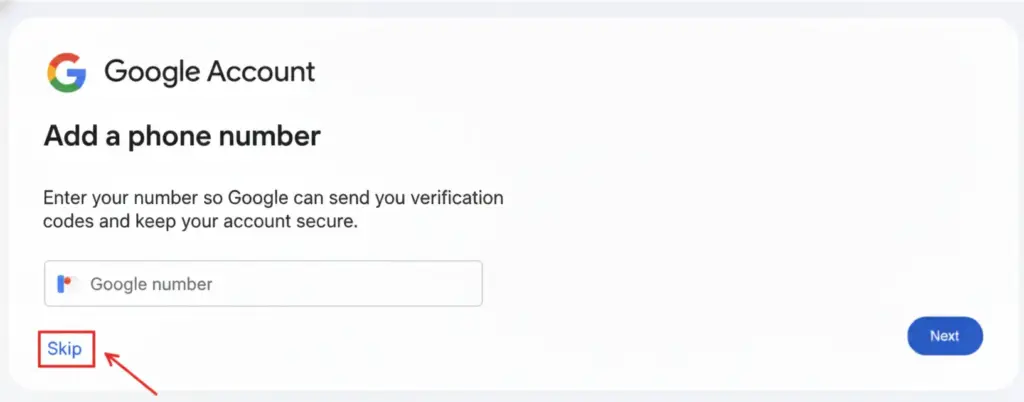
- Use this account only to leave reviews
Tip: Pick a display name that looks real enough not to be flagged. Google dislikes “Anonymous,” “Hidden User,” or fake-looking names.
If you want to edit your reviews later and need help, you can read this blog: How to Edit Google Reviews & Respond: Complete Guide.
Method 2: Make Your Existing Google Account Less Identifiable
If you don’t want another account, you can simply hide your real identity.
What you can do is:
- Open Google Account → Personal Info.
- Change your name to initials or a nickname.
- Remove your photo.
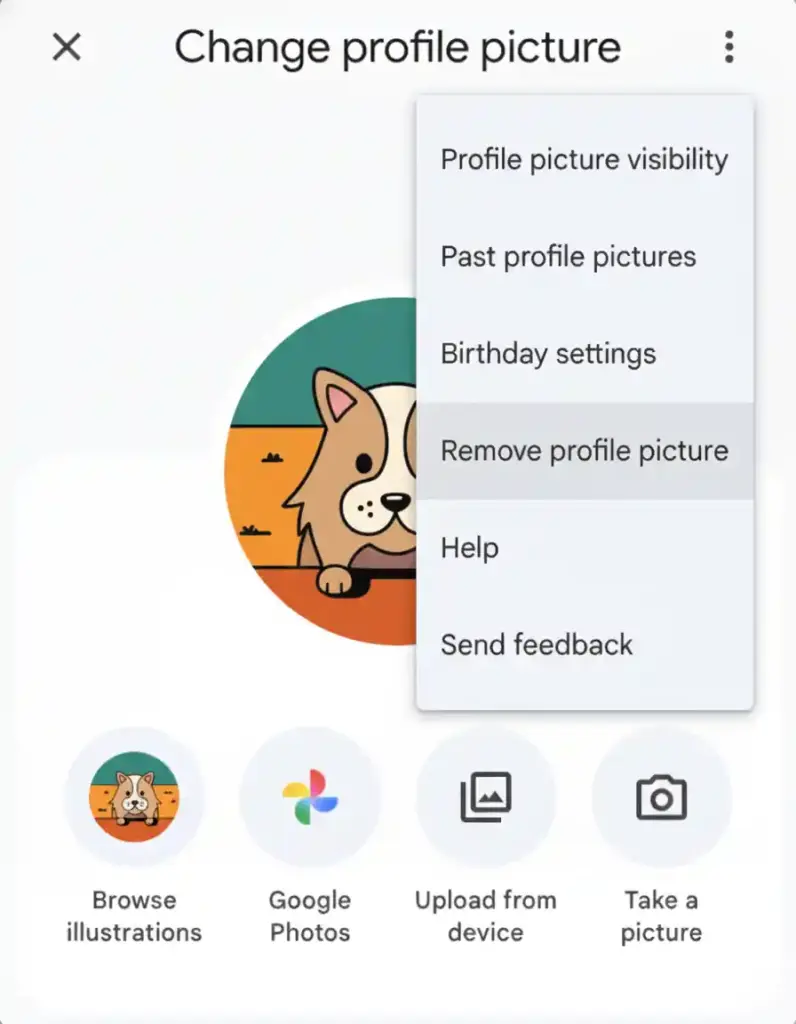
• Set visibility to “Only you” in the “About Me” section.
• Delete any personal details: date of birth, phone number, work info.
These updates can take 1-2 days to appear on Google Maps.
Having issues seeing your Google reviews? Check this blog: How to See My Google Reviews? (A Guide to Find, Manage & Utilize Customer Feedback).
Is It Legal to Leave A Review Under A Fake Name?
Yes, using a nickname or shortened name is completely allowed as long as your review is genuine. Google doesn’t require you to use your full legal name, but it does expect honesty and real experiences.
Just make sure you don’t:
- Pretend to be someone else.
- Create multiple accounts to harm a business.
- Review places you’ve never actually visited.
Google can remove any review that breaks its policies, even if the name looks anonymous. To know more about Google guidelines, read our blog on Google review policy.
Common Mistakes That Can Expose Your Identity
Losing your privacy doesn’t usually happen all at once. It slips away, bit by bit, through little things you do every day. If you’re trying to keep your Google review anonymous, you need to watch out for a few common mistakes.
- For beginners, don’t use your main Gmail account, especially if it shows your full name. That’s like signing the review with your real identity, especially if you use that account for other Google stuff.
- Watch what you share in the review, too. Even small details, like mentioning your family, talking about your daily routine, or telling a story only you would know, can give you away.
- Talking about your job or your workplace? That’s another trap. If you say something like, “I stop by after work at the bank next door,” you’ve basically handed over a big clue.
- And then there’s your profile photo. If you use the same picture everywhere, like Google, Facebook, LinkedIn, and Instagram, it’s easy for someone to connect the dots with a quick image search.
- Linking your phone number to your account is risky, too. Once your number’s attached, it’s just one more way someone can trace your review back to you.
- Also, don’t go posting a bunch of reviews right after making a new account. That looks fishy and can draw attention fast.
However, if you want to know the whole process of leaving a review for a business, you can read our blog: How to Write A Google Review for A Business (Best Practice)
How Anonymous Are You Really?
To other people, your review can look almost anonymous. To Google, it isn’t.
Even if you use a nickname and hide your profile details, Google can still see:
- The Google account you used.
- Your IP address and device information.
- General location signals are connected to your activity.
The privacy steps you take only hide your information from the public, not from Google itself. That’s just how the system works. Google keeps your information in the back end so its system can work properly, but it doesn’t share any of that with the public.
Best Practices for Writing Helpful Reviews (Anonymous Or Not)
You don’t have to give up your privacy to write helpful reviews. You can remain anonymous and still share something useful, something that people actually trust.
Here’s how to do it:
- Stick to the truth. Pay attention to the real details, not just your feelings. Clear, honest facts make your review credible.
- Get specific information, but don’t share too much. It helps to mention details, just leave out anything personal, like your workplace, your schedule, or where you live.
- Skip naming employees unless it’s really necessary. Talk about the service or process instead. This keeps things professional.
- Be fair. Even if your experience was bad, mention the good things that happened. A balanced response appears more realistic.
- Keep your reviews updated. If things change, the business may fix an issue or get in touch; add it to your given review. This shows that you are honest, and people will trust you more.
Ultimately, clear and thoughtful reviews help others make better choices and give businesses something they can actually use, whether you use your real name or something else.
Also read: 11+ Effective Tips about How to Get Reviews on Google.
Wrap Up: Keep Your Reviews Honest And Private
Writing a Google review isn’t completely anonymous, but you don’t necessarily have to use your real name. There are a couple of simple steps to follow to go stealth and still share your opinion.
Well, that’s up to how your account is set up. You could use a nickname, avoid using a profile picture, and check your privacy settings. Then you can post reviews without others knowing it’s you. And your review will help others figure out where to go, who to trust, and what to avoid because that’s what matters.
You don’t have to sacrifice your privacy to be real. You can be both real and private, and your reviews can still be helpful to people.
Quick FAQs: How to Leave An Anonymous Business Review on Google
Can You Actually Leave An Anonymous Review on Google?
Not completely. You need a Google account to post a review, so Google will always know who you are, even if no one else knows. If you don’t want your real name there, set your profile to a nickname, go with just your initials, or create a separate account just for reviews.
How Do I Leave A Google Review without Showing My Real Name?
The best move is to use a nickname or create a new Google Account just for reviews. If you’re serious about keeping things private, then don’t use your main account.
What Are The Steps to Post A Google Review?
Search for the business → scroll to the reviews section → click “Write a review” → choose a star rating → write your feedback → click “Post.” That’s all there is to it.
Why Doesn’t Google Allow Anonymous Reviews Anymore?
Google wants to prevent spam, fake reviews, and manipulation of business ratings. Now, every review must come from a real, verified account.
Is Changing My Name Enough to Stay Anonymous?
Of course. It hides your identity from other users, but Google still knows who you are internally through your account and activity.
Can I Leave A Google Review Without Signing in?
No. Google Maps and Search require you to sign in with a Google account before submitting a review.
What’s The Safest Way to Leave A Private Or “Anonymous-style” Review?
Create a separate “review-only” Google account, remove all personal information, and use it solely for posting reviews to protect your privacy.

Subscribe To Get
Weekly Email Newsletter
Connect, Customize, and Display Social Feeds, Reviews, and Chat widgets


Trending Posts
-
 Mashfik Upal Aumy
 -

-
 Mashfik Upal Aumy





Leave a Reply