
SEO Local Business Listings: Get Found by Local Customers


Someone nearby is already looking for what you offer. They grab their phone, type a quick near me search, and a list of businesses pops up.
Have you ever wondered, are you on that list, or nowhere to be seen?
When your local business listing isn’t set up right, search engines less likely to show your business. And when that happens, people who are ready to call, visit, or book usually end up choosing someone else.
Your business listing is how Google figures out who you are, where you’re located, and whether your business looks trustworthy. That’s why it plays such a big role in searches like Coffee shop near me or Plumber in Michigan.
This isn’t just about visibility; it leads to real action. Around 76% of people visit a local business within a day of searching for it.
In this guide, you’ll learn what an SEO local business listing is, what actually helps you rank, and how to improve your listings without making things complicated.
TL;DR
- SEO local business listing is how your business appears in searches from people looking for nearby services on Google, Apple Maps, Bing, and review platforms.
- These listings act as your first impression in local search, showing your NAP (name, address, phone), hours, reviews, photos, and services to ready-to-buy customers.
- Optimized local listings help you rank higher, build trust, and attract customers who are ready to call, visit, or book.
- Start with Google Business Profile first. Then optimize Apple Business Connect, Bing Places, social media profiles, and niche review sites.
- NAP consistency, accurate categories, complete profiles, photos, and reviews are the core factors that influence local rankings.
- AI and GEO search tools (like Google AI Overview and ChatGPT) rely on structured business listings to recommend local businesses.
- Regular updates and review management matter more than creating listings once and forgetting them.
Local SEO Listing Checklist
Before diving into details, let’s check the actionable things that need to be in your checklist:
- Claim and verify Google Business Profile
- Set up Apple Business Connect profile
- Create Bing Places for Business listing
- Fix NAP consistency across all platforms
- Choose accurate primary + 2-3 secondary categories
- Upload 10+ high-quality photos (outdoor, interior, products, team)
- Set complete operating hours + holiday schedules
- Write keyword-rich business descriptions
- Add all relevant attributes and amenities
- Claim profiles on 2-3 industry-specific directories
- Respond to all reviews within 24 hours
- Set a monthly reminder to audit and update listings
What Is SEO Local Business Listing and Why Does It Matter?
An SEO local business listing is basically an online profile of your business. It tells search engines who you are, where you are located and what you offer. Platforms like Google, Bing, and Apple Maps use these listings to show businesses in local search results, map packs, and near me searches.
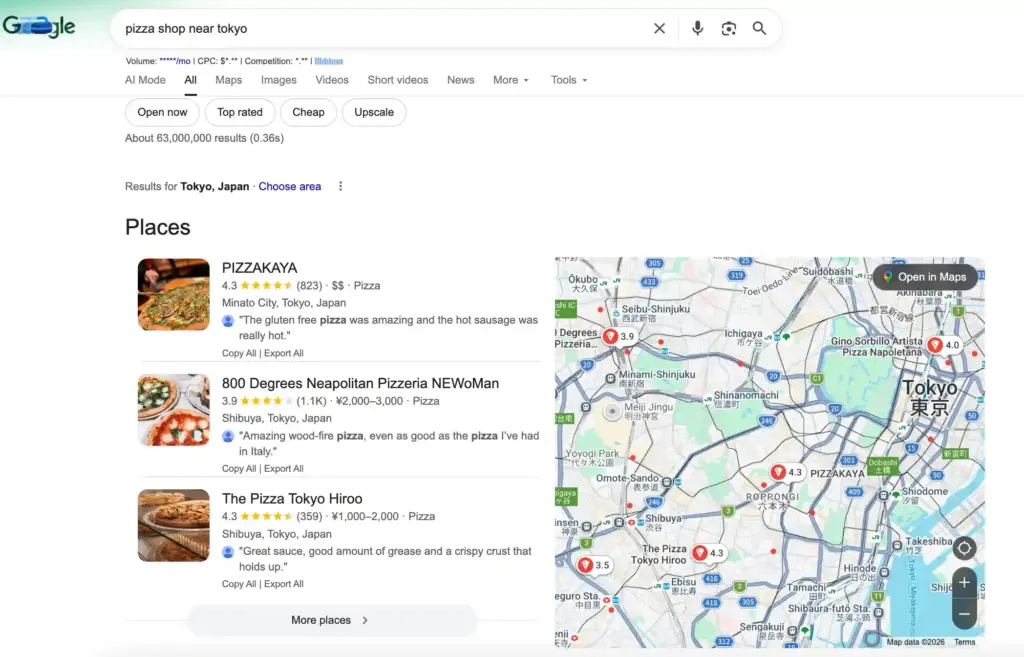
Local business listings rely on structured business data. This includes your name, address, phone number (NAP), business category, hours, reviews and location details. Search engines use this information to match your business with people who are looking for exactly what you offer.
Ready to improve your Google Business Profile listing and boost local visibility?
Importance of Business Listing in SEO:
Local business listings are important because they decide whether people can find and trust your business. When your information is accurate and consistent across all platforms, search engines feel confident in showing your business in local results.
Even better, these lists reach people who are ready to take action. They’re not just browsing, they’re searching for a service in your area right now. When your list is set up correctly, your business appears right when someone is deciding who to call, where to go, or which option to choose.
Bonus Tips: If you are running a plumbing business, you can check our detailed guide on plumbing marketing and learn about how to get more clients through Local SEO and other impactful strategies.
Why Local Listings Matter for AI & GEO Search
When someone searches for something like Best pizza place in downtown Portland, the results are based on real businesses. Google and AI tools look at actual listings to decide which places will appear.
Your business listing is often one of the first things to be checked. If information is out of date or doesn’t match with other platforms, your business could be abandoned, even if you’re doing everything else right.
AI has also made location search smarter. It uses your listings to understand where you are located, what areas you serve, what you offer and when you are open. When your listings are clear and up-to-date, AI can confidently show your business to people who are already searching for the same things you do.
Looking to boost your local SEO and appear in Google Map Pack?
How to Use Local SEO Keywords in Business Listings
Local SEO keywords are search terms that include what you offer and where you offer it.
Using these keywords naturally in your business listings helps more people find you in local searches, because your listing matches the way real customers are actually searching.
Examples: if you’re running a coffee shop, your local SEO keywords could be Coffee shop in (x area), Best espresso near me in ‘X’, Organic coffee café in ‘X’.
Where to place them:
Business description: Mention the services along with the location, naturally. Example for a book store:
We’re a neighborhood bookstore in Brooklyn Heights, sharing carefully chosen books and a welcoming place for readers young and old.
Services section: Add local modifiers. Such as, Emergency plumbing services in (specific area) and surrounding areas.
Posts: Use location-specific language. Like, Join us on Saturday for our annual Riverside neighbourhood block party.
Avoid: Never add keywords to your business name unless officially part of it. For example: Joe’s Pizza Brooklyn Near Me. This violates Google’s guidelines.
Learn more about Google review policies (Google Review Policy: Rules, Violations & Best Practices).
Essential Platforms for SEO Business Listings
If you want better local visibility, these are the platforms you should focus on first.
Google Business Profile
When people look for a local business, Google is usually the first stop. That’s why your Google Business Profile matters. Search Engine Land notes that optimizing your Google Business Profile and business listing improves visibility in local search, map packs, and helps Google rank your business for location-based search queries.
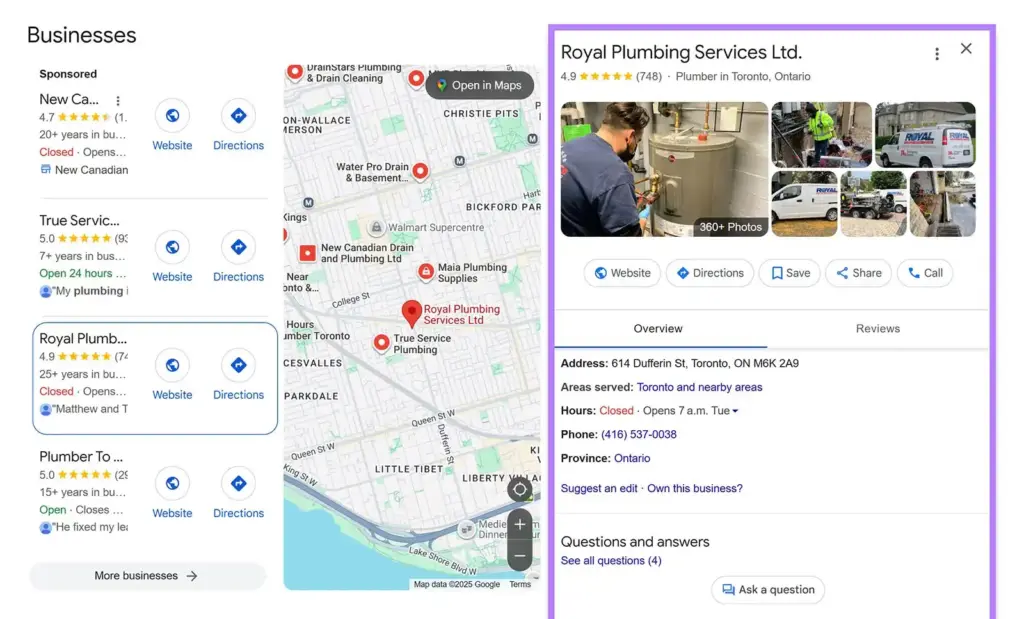
Fill in all the details, post updates occasionally, and respond to reviews, these little steps make it easier for people nearby to find you.
Apple Business Connect
If your audience uses an iPhone, it’s important to show up on Apple Maps, Siri, and Wallet. It’s not as crowded as Google, so it’s easier to show up, and people trust what they find here.
Add clear photos, set up your profile at business.apple.com properly, and include Apple Pay if possible.
Bing Places
Bing is often overlooked, but many people still search through it, especially on Microsoft Bing. Bring your Google information, choose the right categories, and look at reviews from time to time.
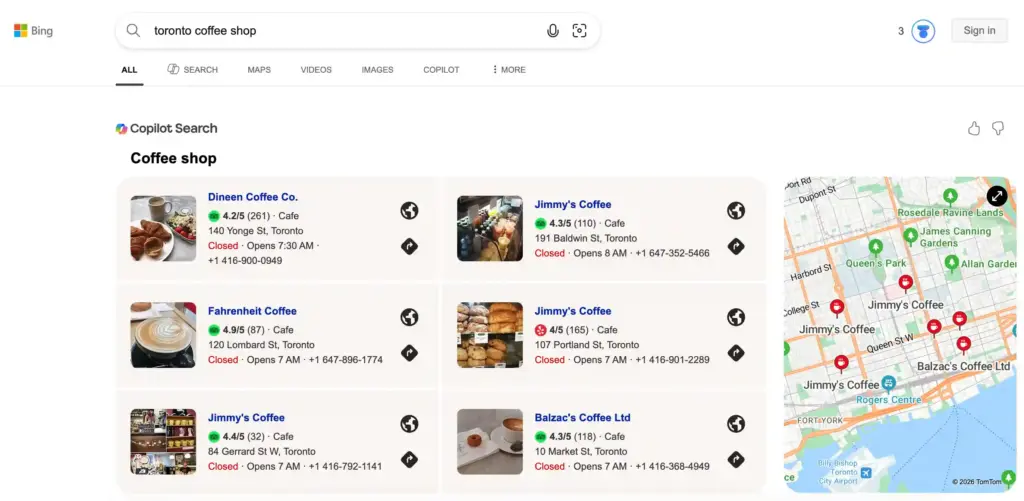
This is an additional way to ensure that your business is found by people who are actively searching.
Social Media Platforms
People are mostly active on Facebook, Instagram, and LinkedIn when looking for local businesses. It’s a great way to connect them directly through these social handles.
Make sure your contact info is correct, tag your location when you post, and reply to messages as quickly as possible.
Want to engage customers on social media, handle complaints, and grow advocacy?
Core Components of Perfect Local Listings
A business listing in SEO only delivers results when it contains complete, accurate information. These elements separate ranking listings from invisible ones.
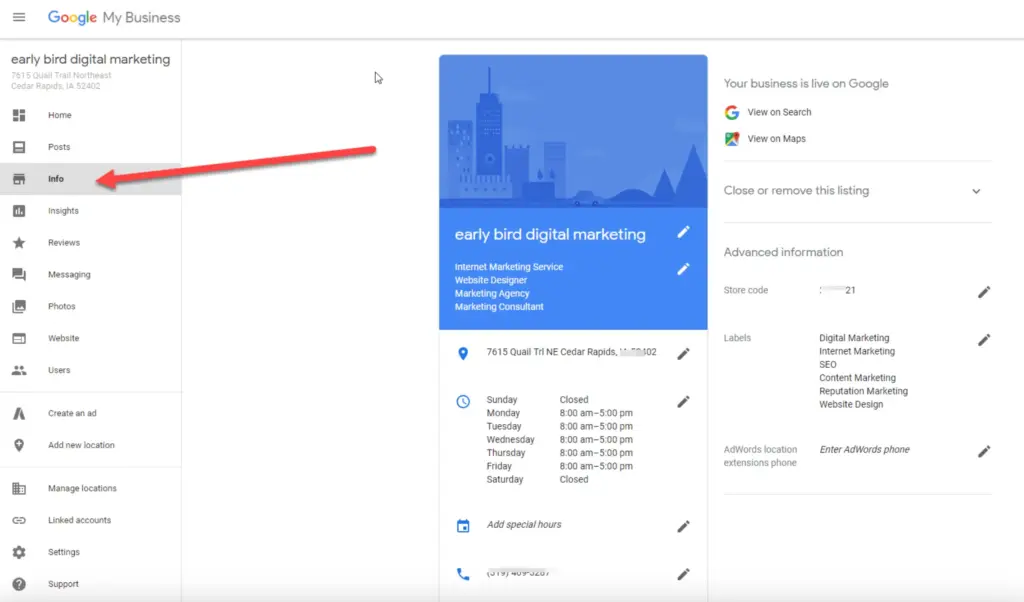
NAP Consistency
Your business Name, Address, and Phone (NAP) should be the same on every platform. No differences should be found anywhere.
What matters most for local listing rankings:
- High impact: Google Business Profile optimization, reviews, NAP Stability
- Medium impact: Categories, photos, attributes
- Supporting signals: Directories and citations
Common mistakes to avoid:
- Street vs St. variations
- Suite 100 vs Ste 100
- Old phone numbers or addresses
- Different business name formats
Best practice: Choose a correct NAP format and use it in your website, all business listings, and social profiles.
Accurate Business Categories
Categories tell search engines what you do and control which searches display your listing.
How to optimize:
- Select one highly specific primary category
- Add 2-3 relevant secondary categories
- Avoid broad categories when specific categories exist
Example:
- Coffee Shop (primary), Bakery (secondary)
- Don’t use restaurants (too broad) or 10+ random categories
Complete Profile Details
A fully filled-out profile ranks better than incomplete ones.
Essential elements: A clear business description (150-300 words with local keywords), all features, products/services, service area, payment options, accessibility features, website URL.
Quick wins: Mention nearby destinations and neighbourhoods, highlight differentiators, and update seasonal offerings.
High-Quality Visuals
Upload clear and updated photos to help customers understand your business before they visit.
What to upload: Business exterior, interior pictures, products or services in action, team photos, and customer photos with product (with permission).
Best practices: Minimum 720px resolution, enough lighting, 10+ photos minimum, add new photos monthly.
Accurate Operating Hours
Make sure your opening and closing hours are always correct everywhere.
Include: Regular weekly hours, holiday hours, special event hours, service-specific hours. Add “by appointment” if applicable.
Important: Update immediately when hours change.
Managing Your Listings Effectively
Creating seo local listings is just the start. Consistent maintenance determines whether your local SEO services for small businesses actually deliver results.
Manual vs. Automated Local Listing Management
| Approach | Cost | Time | Best for | Consistency Risk |
| Manual | Free | High | Single-location businesses | Medium-High |
| Tools | Monthly fee | Low | Multiple locations | Low |
Manual: Set monthly reminders to audit listings, respond to reviews, add photos, and update information on your key platforms.
Automation: Tools like Moz Local, Yext, and BrightLocal sync information across hundreds of platforms from one dashboard. Update once, propagate everywhere. They also monitor for unauthorized changes.
Learn the complete process of Google Reviews management for better reputation
Review Management
Think of reviews like word-of-mouth online. They don’t just affect your search ranking; most people, around 93%, read them before deciding to buy or visit.
So, here’s how you can handle them well:
- Ask customers for reviews and include a direct link to make it easy
- Thank people for positive feedback
- Handle negative reviews calmly and professionally
- Never buy fake reviews, they can get you into serious trouble
Also, read: Buy Google Reviews (What You Must Know Before You Risk Your Business)
Turn Your Listing into Revenue
SEO local business listings directly bring customers to your door. When your info is correct, complete, and up to date, people find you exactly when they need you.
Start with Google Business Profile, Bing Places, and Apple Business Connect. Make sure your name, address, and phone number are the same everywhere, add all the details, upload real photos, and respond to reviews.
People are searching for businesses like yours right now. Keep your listings in shape, and they’ll help driving visibility, trust, and real revenue over time.
Frequently Asked Questions
What is a local business listing in SEO?
It’s the profile people see when they find you on Google, Apple Maps, or Bing. It shows basic informations like your address, phone number, hours, photos, and reviews. Search engines use this to decide if your business is real and worth showing to nearby customers.
How many business listings do I need?
You don’t need dozens. Start with Google. Then add Bing and Apple Maps. After that, pick relevant sites that actually fit your business, like Yelp for food places or a medical directory for clinics.
Are SEO directory listings important for local SEO?
Yes. They act as trust signals for search engines and make it easier for customers to find and contact your business online.
Are paid local SEO services worth it for small businesses?
If you only have one location, you can usually handle it yourself. Use paid tools when you manage multiple businesses or feel stuck keeping everything consistent.
How often should I update listings?
Check them once a month. Update anything that changes right away. Add new photos when you can, and post on Google every week or two.

Subscribe To Get
Weekly Email Newsletter
Connect, Customize, and Display Social Feeds, Reviews, and Chat widgets


Trending Posts
-

-
-
 Mashfik Upal Aumy





Leave a Reply