
65+ Airbnb Reviews Examples for Guests and Hosts in 2026


Last summer, I was talking to my cousin, who hosts multiple Airbnb properties in Indonesia. He mentioned how difficult it was to write a negative guest review without worrying about future bookings.
It also reminded me of my first Airbnb review, where I overthought every sentence because I didn’t know what to include.
Even now, when AI tools can help polish writing, the core problem still remains for both guests and hosts. What should you actually include in a review, and what should you leave out?
That’s exactly what this guide is here to solve. In this article, you’ll find practical Airbnb review examples you can use right away. Whether you’re writing as a guest or responding as a host, you’ll get templates that feel natural and easy to be polished using AI tools.
And if you’re a host, there’s a bonus. I’ll also show you how to display your Airbnb reviews on your website in a way that builds trust and attracts more bookings.
Let’s get started.
Key takeaways
- Airbnb reviews are written by both guests and hosts, and both sides get a 14-day window after checkout to submit their feedback. Once published, reviews are public and directly impact trust and booking decisions.
- A strong Airbnb review focuses on real experience and includes specific details like comfort, communication, and overall stay quality instead of generic praise.
- This guide covers 60+ Airbnb reviews examples across different situations, including long stays, short trips, families, solo travellers, business trips, and more, so readers can easily find what matches their case.
- You’ll also learn how to write balanced and constructive reviews that point out issues clearly without sounding harsh or emotional.
- For hosts, the article includes practical response examples to handle positive, neutral, negative, and even misleading reviews in a calm and professional way.
- Airbnb reviews play a major role in improving visibility, building credibility, and influencing booking decisions, especially for listings aiming for higher ratings or Superhost status.
- Instead of leaving reviews only on Airbnb, hosts can display them on their own websites to strengthen trust and convert more visitors into bookings.
- With tools like WP Social Ninja, you can connect, manage, and showcase Airbnb reviews automatically using API integration without manual updates.
- By customizing how reviews are displayed, filtered, and highlighted, you can turn them into a strong marketing asset that supports both SEO and user trust.
Interesting facts about Airbnb reviews you should know
Before you start writing or using Airbnb reviews, it helps to understand how the system actually works. There are a few important facts that directly affect how reviews are written, published, and seen by others.
- Airbnb provides a 14-day window after checkout for both guests and hosts to submit reviews
- Reviews follow a blind system, meaning neither party can see the other’s review until both are submitted or the 14-day period ends
- Once both reviews are submitted, they are published simultaneously
- Reviews are public by default and appear on listings and user profiles
- Reviews cannot be edited after publication, but they can be withdrawn in some cases
- There is a limited editing window (typically up to 48 hours), only if the other party has not yet submitted their review
- If one party submits a review and the other does not, the review is still published after the 14-day deadline
- Guests rate hosts across categories like cleanliness, communication, check-in, accuracy, location, and value
- Hosts review guests based on cleanliness, communication, and adherence to house rules
- Listings with consistently high ratings (around 4.8 stars or above) are more likely to earn Superhost status
- Airbnb’s ranking algorithm considers review quality, recency, and consistency for search visibility
- Reviews that violate Airbnb’s policies (such as irrelevant content, bias, or manipulation) can be reported and removed
Tips for writing Airbnb reviews better
Airbnb allows users to rate their experience across different categories such as cleanliness, communication, accuracy, location, check-in, and value. Along with these ratings, you can also leave a written review to explain your experience in more detail.
Your Airbnb review should be fine as long as you follow this checklist:
- Start with a clear summary of your overall experience, then support it with one specific detail that actually reflects your stay
- Focus on what truly impacted your experience, like comfort, communication, or accuracy, instead of repeating the listing details
- Keep your tone balanced and honest, and if something was off, explain it briefly without sounding emotional
- Write for future guests or hosts by sharing what you wish you knew before booking or hosting
- Keep it natural and concise, and end with a clear takeaway, such as whether you would recommend or host again
Airbnb review templates for guests
In this section, you’ll find Airbnb review examples based on different types of stays and experiences. Find the one that matches your situation and use it as a base for your own review.
1. Airbnb reviews for long stay guests
- I stayed at [Residence Name] for almost a month, and honestly, it just made life easy. The kitchen had everything I needed, the WiFi didn’t give me trouble once, and I never felt like I was “just staying” somewhere. It actually felt comfortable to live in.
- Booked [Property Name] for a longer stay, and I was a bit worried at first, but it turned out to be a great decision. The place stayed clean and functional the whole time, and the host was quick to respond whenever something came up. It made settling in much easier.
- I stayed here for a few weeks, and what I appreciated most was the consistency. No surprises, no small annoyances building up over time. Everything just worked, and that matters a lot when you’re not just there for a night or two.
2. Airbnb reviews for short weekend stays
- Stayed at [Property Name] for a quick weekend trip, and it was exactly what I needed. The check-in was smooth, everything was ready when I arrived, and I didn’t have to deal with anything stressful. Made the short stay really enjoyable.
- I booked this place for a two-night stay, and it worked out perfectly. The location was convenient, and everything inside was simple but comfortable. For a short visit, it honestly checked all the boxes.
- I was only here for the weekend, but everything went as expected from start to finish. No delays or confusion, just a clean and easy stay. Would definitely pick this again for a short trip!
3. Family & group guest review templates
- We stayed here as a family, and I was honestly worried it might feel cramped, but it didn’t. Everyone had enough space to settle in, and the common areas made it easy to spend time together. It made the trip feel a lot more relaxed.
- Booked this place for a group trip, and it worked out better than expected. [Property Owner] was helpful when we had a few questions, and coordinating between everyone was easier than I thought. No one felt uncomfortable or out of place.
- Stayed here with a few friends, and what stood out was how easy everything felt once we got in. No confusion, no small issues piling up, just a comfortable space where we could actually enjoy our time together.
4. Solo traveller Airbnb review examples
- I stayed here alone, and that first night, feeling mattered a lot. I didn’t feel out of place or uncomfortable at any point. The area was quiet, and everything was easy to figure out, which made the stay much more relaxing.
- As a solo traveller, I usually overthink safety and check-in, but this place made it simple. [Property Owner] shared clear instructions, and I didn’t have to guess anything. That kind of clarity really helps when you’re on your own.
- Booked this for a solo trip, and it gave me exactly what I needed. A calm space, no distractions, and just enough comfort to settle in quickly. I actually enjoyed spending time indoors here.
5. Business & work trip guest reviews
- I stayed at [Property Name] during a work trip, and it made things easier than I expected. The WiFi was stable the entire time, and I could work without interruptions. After long days, it was nice to come back to a place that felt calm.
- Booked this place for a few workdays, and it quietly did its job. No distractions, no issues with basic things, just a space where I could focus and get things done. That’s all I really needed.
- I was travelling for work, and [Property Owner] made the stay more comfortable than I thought it would be. Quick responses, clear communication, and no back-and-forth when I needed something. It helped me stay focused on work instead of logistics.
6. Amenity-focused Airbnb reviews (WiFi, kitchen, comfort)
- I didn’t think much about the amenities before booking, but they ended up making a big difference. The WiFi was reliable, the bed was comfortable, and everything just worked the way it should. It made the stay feel easy.
- Stayed at [Property Name], and the small details really stood out over time. Good WiFi, a comfortable setup, and basic things already in place. I didn’t have to go out of my way for anything.
- What I appreciated most was how everything was already taken care of. From the internet to overall comfort, nothing felt missing. It’s one of those stays where you don’t notice problems because there aren’t any.
7. Location & neighbourhood-based review examples
- Stayed at [Property Name], and the location made things much easier than I expected. Most places I needed were within a short distance, and getting around didn’t take much effort. It saved me a lot of time during the stay.
- I wasn’t sure about the area before booking, but it turned out to be quite comfortable. It felt safe, and I didn’t have to worry when heading out or coming back late. That gave me some peace of mind.
- What stood out to me was how convenient everything felt once I arrived. Shops, transport, and basic needs were all close by, so I didn’t have to plan too much. It made the whole stay more relaxed.
8. Airbnb reviews for first-time guests
- This was my first Airbnb stay, and I honestly didn’t know what to expect. But everything was straightforward, and I didn’t feel confused at any point. It made the whole experience much easier than I thought.
- I was a bit unsure before booking since it was my first time, but [Property Owner] made things simple from the start. Clear instructions, quick replies, and no awkward moments. It helped me feel more comfortable right away.
- First time using Airbnb, and I’m glad I chose this place. Nothing felt complicated, and I didn’t have to figure things out on my own. It gave me a good first impression of what Airbnb stays can be.

Get exclusive social media marketing tips and tutorials in your inbox!
9. Budget-friendly stay review examples
- I booked this place mainly because it fit my budget, and I wasn’t expecting much. But it turned out to be better than I thought. The essentials were all there, and nothing felt uncomfortable.
- Stayed at [Property Name] to keep costs low, and it did the job well. Clean enough, decent setup, and no major issues during the stay. For the price, it felt like a fair deal.
- I was trying to save money on this trip, and this place worked out just fine. [Property Owner] was helpful when needed, and I didn’t feel like I had to compromise too much to stay within budget.
10. Luxury Airbnb experience review templates
- Stayed at [Property Name], and you notice the difference the moment you walk in. The interior felt well-designed, the bed was extremely comfortable, and everything had a premium touch without feeling overdone. It made the stay feel a bit special.
- I don’t usually go for higher-end places, but this one stood out. From the lighting to the overall setup, everything felt intentional and polished. It’s the kind of place where you actually enjoy spending time inside.
- [Property Owner] has clearly put effort into the details here. Clean finishes, quality furniture, and a calm atmosphere throughout the stay. It felt more like a quiet upgrade than just another place to stay.
11. Cleanliness-focused Airbnb reviews
- I stayed at [Property Name] near the beach, so I expected some sand and mess, but the place was surprisingly well-kept. Everything felt clean and fresh when I arrived, which honestly made a big difference after a long day outside.
- The area had quite a bit of rain during my stay, so I was a bit concerned about dampness and cleanliness. But the space stayed dry, clean, and well-maintained the whole time. It made the stay much more comfortable than I expected.
- [Property Owner] clearly pays attention to cleanliness, even in conditions where it’s not easy. With the weather and surroundings, I thought things might feel a bit off, but everything was in good shape. That gave me a lot of comfort in the place.
12. Host communication & hospitality review examples
- I reached out a couple of times before arriving, and [Property Owner] got back to me without delay. The replies were clear, so I didn’t have to figure things out on my own.
- Stayed at [Property Name], and communication just felt easy. I never had to chase for answers, and everything was explained in a way that made sense.
- What I appreciated was the balance. The host was available when needed, but didn’t check in too much. It felt comfortable rather than formal.
13. Pet-friendly stay review templates
- I was a bit hesitant before booking because not every place is truly pet-friendly. But [Property Owner] was completely okay with my dog from the start. No uncomfortable moments, which made me feel at ease right away.
- Took my cat along for this stay, and I was expecting some restrictions, but it didn’t feel that way. The host didn’t make it a big deal, and that helped me relax during the stay.
- Travelling with a pet usually means being extra careful all the time, but here I didn’t feel that pressure. The environment and the host’s attitude made it feel normal, not like I was doing something inconvenient.
14. Airbnb reviews for unique stays (cabins, treehouses, villas)
- I had never stayed anywhere like this before, so I didn’t really know what to expect. But once I arrived, it just felt special. The whole experience had this calm, almost wholesome feeling that stayed with me even after I left.
- Booked [Property Name] out of curiosity, and I’m really glad I did. It felt different from the usual stays in a good way, something more personal and memorable. It’s one of those places you end up talking about later.
- Staying here felt like a small escape from routine life. The setting, the atmosphere, just being there made me slow down a bit. It’s not just a place you stay, it’s something you experience.
15. Constructive Airbnb reviews with suggestions for improvement
- The stay was mostly comfortable, but the bathroom wasn’t as clean as I expected when I arrived. Also had to message a couple of times to clarify the check-in details. Once that was sorted, things were fine, but it could be smoother.
- I actually liked the place overall, especially the location, but the WiFi was unreliable during my stay. Since I had some work to do, that became a bit frustrating. If that gets fixed, this would be an easy recommendation.
- Nothing was seriously wrong, but a few things added up over time. The bed wasn’t very comfortable, and there was noticeable noise at night. It didn’t ruin the stay, but it’s something future guests should be aware of.
Bonus Tips: If you are curious to learn examples of positive reviews that work across all platforms, feel free to explore our positive reviews examples guide.
Airbnb reviews templates for hosts (with response examples)
As mentioned earlier, Airbnb allows both hosts and guests to review each other. What you write as a host can directly influence a guest’s future bookings and also show how others see your listing. Let’s look at how to handle different situations.
1. Positive review templates for great guests
- [Guest Name] stayed for a few weeks, and the experience was steady throughout. The place was looked after well, and there were no surprises at any point. Long stays like this are always appreciated.
- Hosted [Guest Name] and their group, and they managed everything responsibly. They coordinated well among themselves and left things in good shape when they left. I’d be comfortable hosting a group like this again.
- [Guest Name] stayed during a work trip, and everything was simple from the hosting side. Clear communication, on-time arrival, and a smooth overall stay. It made the process easy to manage.
2. Neutral or balanced host review examples
- [Guest Name] stayed for a few nights, and everything went fine overall. Communication was clear, and there wasn’t anything I had to follow up on during the stay.
- Hosted [Guest Name], and the stay was easy to manage. They followed the house guidelines, and things stayed in order throughout.
- The stay with [Guest Name] went without any issues. Arrival, stay, and check-out all went as planned, and I didn’t run into anything unexpected.
3. Constructive feedback for guests (polite criticism)
- [Guest Name] was polite during communication, but check-in took longer than expected since the arrival time kept changing. A bit more clarity beforehand would help hosts prepare better.
- The stay was mostly fine, though I did notice a bit more noise than expected late in the evening. It didn’t turn into a major issue, but something to be mindful of in shared or quiet areas.
- [Guest Name] stayed for a few days, and overall things went okay, but a couple of small items were missing after check-out. It may have been unintentional, but it’s worth double-checking before leaving.
4. Response templates for guest reviews
- Thanks for your review, [Guest Name]. Glad to hear you had a comfortable stay and everything worked out well for you. You’re welcome back anytime.
- Really appreciate you mentioning the location and setup. That’s something we try to get right for every guest, so it’s good to know it helped during your stay.
- Thank you for sharing your experience. It’s always nice to hear what stood out for guests, and I’m glad the place met your expectations.
5. How to respond to negative or 1-star reviews
- Sorry to hear this didn’t meet your expectations, [Guest Name]. I’ve taken note of what you mentioned and will look into it to avoid similar issues going forward.
- Thanks for sharing your experience. I understand where you’re coming from, and I’ll review this on my end to see what can be improved.
- I appreciate you pointing this out. While this doesn’t usually come up, it’s still something worth checking, and I’ll make sure it gets addressed.
6. Handling false or misleading guest reviews professionally
- Thanks for your feedback, [Guest Name]. Just to clarify for future guests, the property doesn’t include parking, and this is mentioned in the listing before booking. I understand it can be inconvenient, but I try to keep everything transparent up front.
- I saw your comment about cleanliness and wanted to add some context. The space was cleaned right before every check-in, and no concerns were raised during your stay. If something felt off, I would have appreciated knowing at the time so I could address it immediately.
- Appreciate you sharing your experience. I’d just like to mention that the check-out time is fixed and communicated in advance to help manage back-to-back bookings. That said, I understand plans can change, and I try to be flexible when possible.
Pro Tips: As an Airbnb host, reviews from your guests are the lifeline for your business. So, check our guide on how to ask for reviews if you are struggling with the lack of positive feedback.
How to add Airbnb reviews to your WordPress website
If your website runs on WordPress, adding Airbnb reviews is easier than it sounds. With a dedicated Airbnb reviews plugin like WP Social Ninja, you can collect, manage, and display your reviews without extra effort.
Airbnb reviews are one of the strongest tourism marketing assets you already have. If you’re not showing them on your own website, you’re missing sales every day. These reviews act as social proof, support your SEO, and help potential guests make a decision without second thoughts.
WP Social Ninja connects your Airbnb guest reviews to your WordPress website using API integration. This means your reviews stay updated automatically, without needing manual edits or dealing with code.
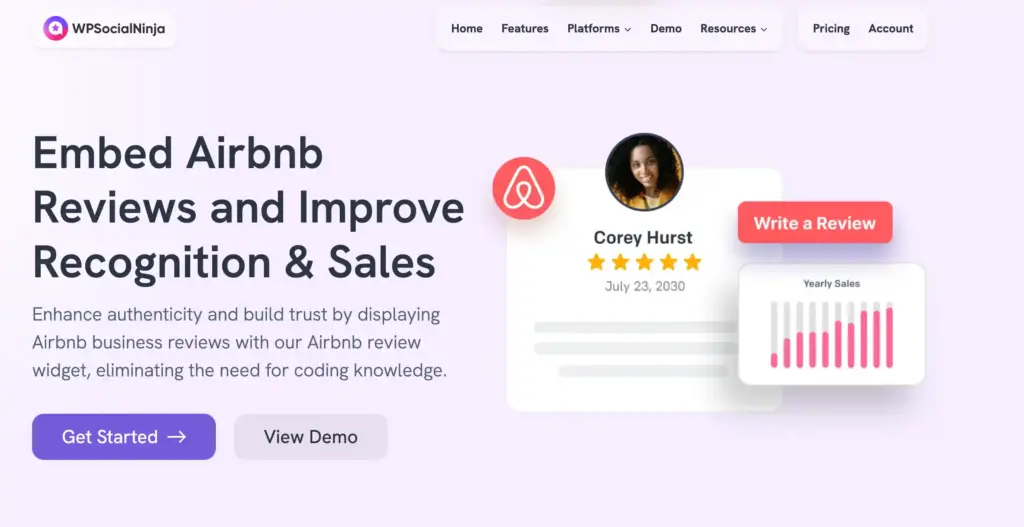
Here’s how WP Social Ninja can help your business grow with Airbnb reviews:
- Connect multiple properties and display all your Airbnb reviews in one place, so visitors can instantly see your overall reputation
- Show verified reviewer badges next to guest names to build trust and make your reviews more believable
- Add review schema markup so your ratings can appear in Google search results and improve visibility
- Use AI-powered summaries to highlight key feedback for visitors who prefer quick insights
- Filter reviews by rating, keywords, or relevance to show the most impactful feedback first
- Set up moderation rules to automatically showcase your best reviews as new ones come in
- Customize the design and layout so your reviews match your website and feel consistent
- Use ready-made templates to get your review section live without extra effort
- Optimize reviewer images to keep your pages fast and smooth
- Generate QR codes and place them in your property so guests can leave reviews more easily
And the best part is, despite all these features, WP Social Ninja is priced in a way that makes sense for growing businesses.
I see it more as an investment that keeps adding value over time rather than just another cost. And this is just a part of what it offers. There are more helpful features you can explore as you go.
Now, I’ll walk you through how to connect your Airbnb reviews with WP Social Ninja step by step.
Step 1: Install and activate WP Social Ninja on your WordPress website
You can add WP Social Ninja to your WordPress website in two ways:
- From your Dashboard
- From WordPress Repository
Here’s how to install it from your Dashboard:
- Navigate to the WordPress Admin panel. From the WordPress Dashboard, go to Plugins > Add New
- Next, in the search input field, type WP Social Ninja and wait for a moment for it to come up
- Now, click on the Install Now button
- Then Activate
If you decide to install from the WordPress Repository:
- Search WP Social Ninja in the WordPress Repository, and it will appear at the top. Once you click it, hit the Download button
- Now go to the Dashboard and go to Plugins > Add New > Upload Plugin > Choose the zip file
- After that, click the Install Now button and then Activate
Win your customers’ hearts with exceptional features
Discover how WP Social Ninja can assist you in designing outstanding customer experiences.
Step 2: Connect your Airbnb reviews with a secure API
In this step, you’ll connect your Airbnb reviews with WP Social Ninja using a secure API method. Since Airbnb does not provide a public API, this process involves collecting a few keys from your listing and adding them to your WordPress site.
Don’t worry, just follow the steps carefully. Follow these steps to connect your Airbnb reviews:
1. Open your Airbnb listing. Go to your Airbnb property page using a desktop browser like Chrome or Firefox. This is the listing you want to collect reviews from.
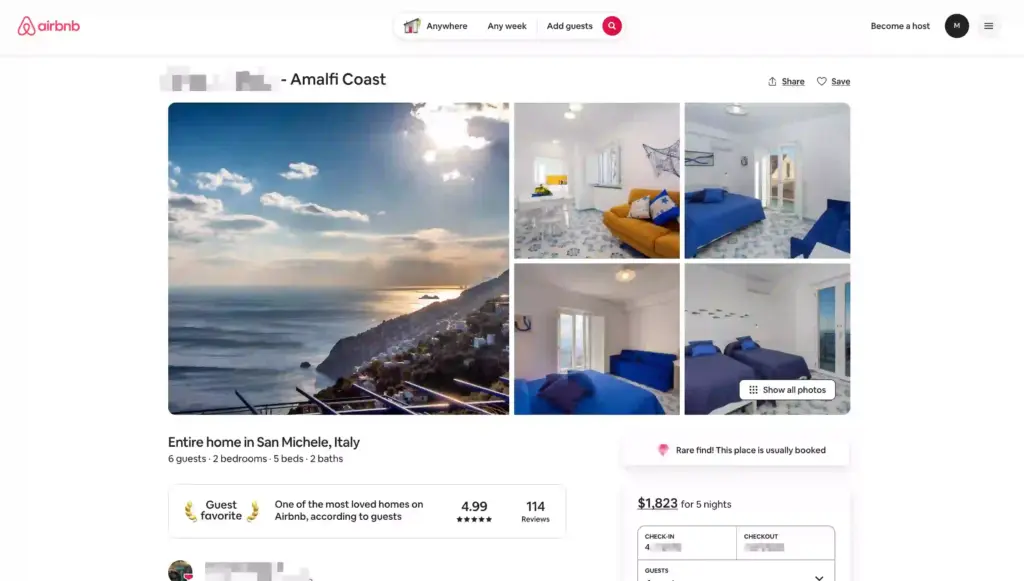
2. Open Developer Tools. Right-click anywhere on the page and click Inspect. Then go to the Network tab from the top menu.
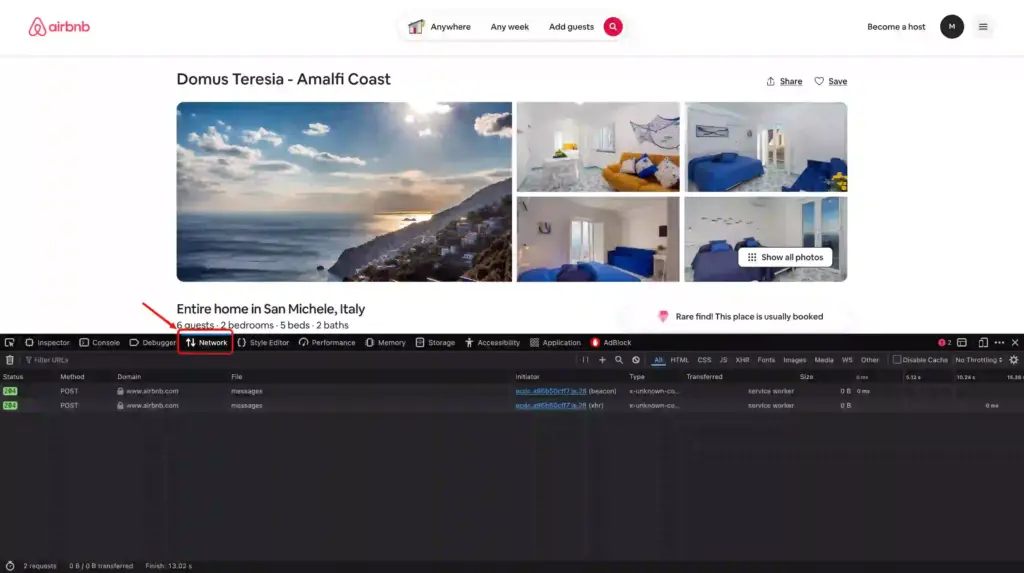
3. Search for review requests. In the Network tab, type StaysPdpReviewsQuery in the search/filter bar and refresh the page. Click on the request that appears.
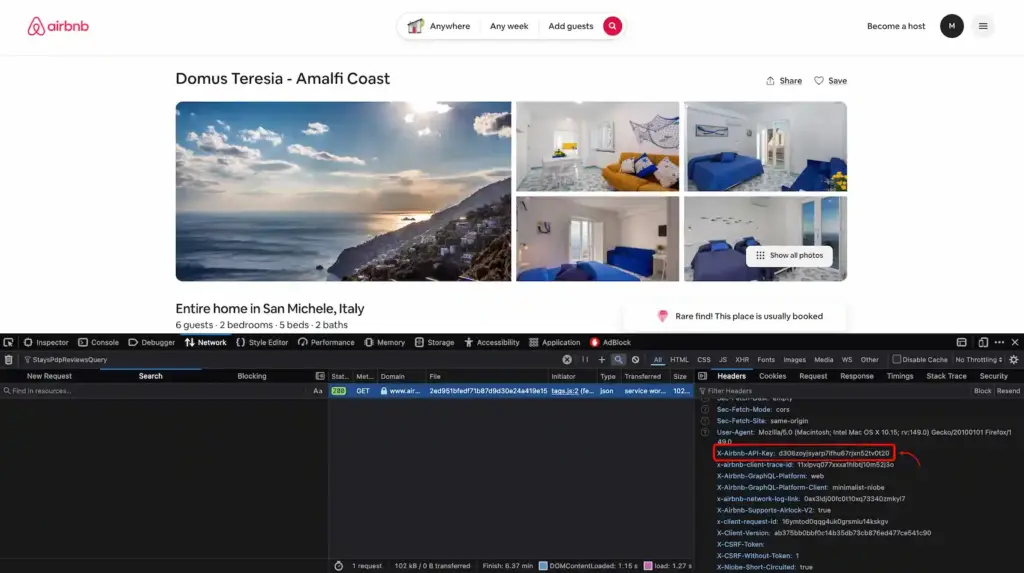
4. Copy your API Key. Go to the Headers section and scroll down the tab till you find x-airbnb-api-key. Copy this value. This is your API key.
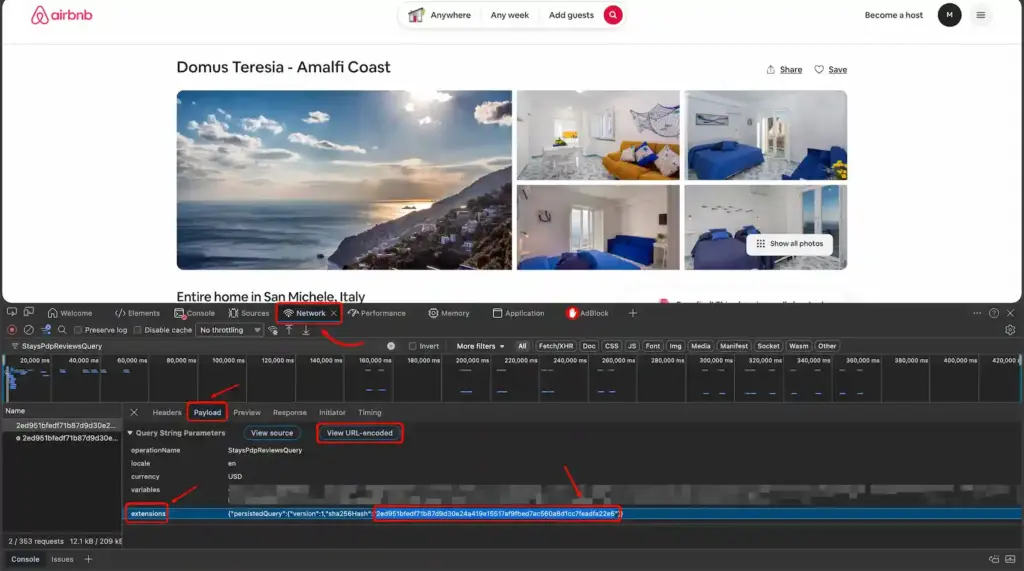
5. Copy your Secret Key. Now go to the Payload (or Request) tab. Navigate to extensions → persistedQuery and copy the sha256Hash. This is your secret key.
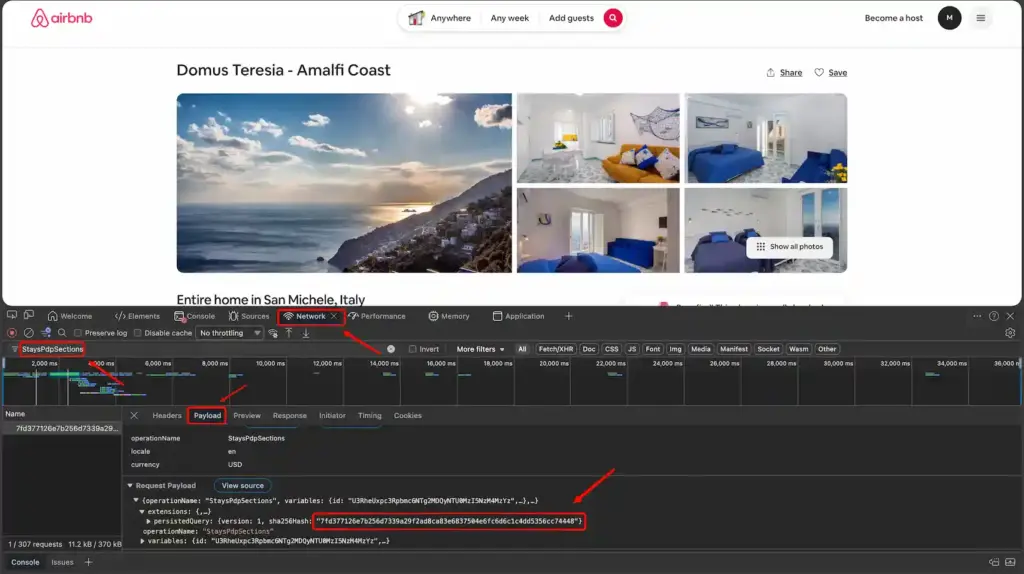
6. Repeat for business info key. Now search for StaysPdpSections in the Network tab, refresh the page, and open the request/payload. Copy the sha256Hash again. This will be your business info secret key.
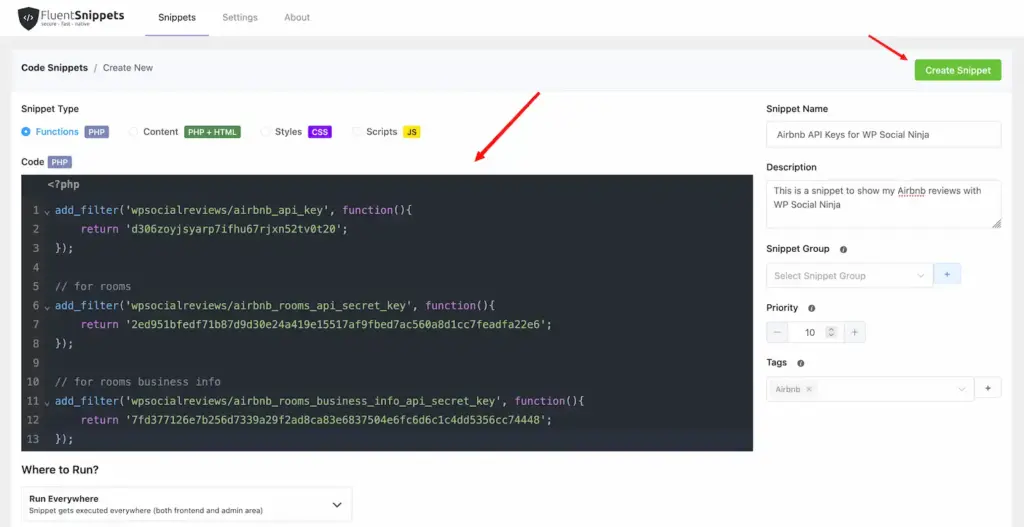
7. Add keys to your WordPress site. Go to your WordPress dashboard and install a code snippets plugin like FluentSnippets. Then create a new snippet and paste the code mentioned below. Replace the placeholder values (after the return section) with your API key and secret keys.
add_filter('wpsocialreviews/airbnb_api_key', function(){
    return 'd3......';
});

// for rooms
add_filter('wpsocialreviews/airbnb_rooms_api_secret_key', function(){
    return 'cc.....';
});

// for rooms business info
add_filter('wpsocialreviews/airbnb_rooms_business_info_api_secret_key', function(){
    return '9a....';
});

// for experiences or services
add_filter('wpsocialreviews/airbnb_experiences_api_secret_key', function(){
    return 'bc.....';
});
8. Save and activate the snippet. Once you’ve added your keys, save the snippet and activate it. This will allow WP Social Ninja to fetch your Airbnb reviews.
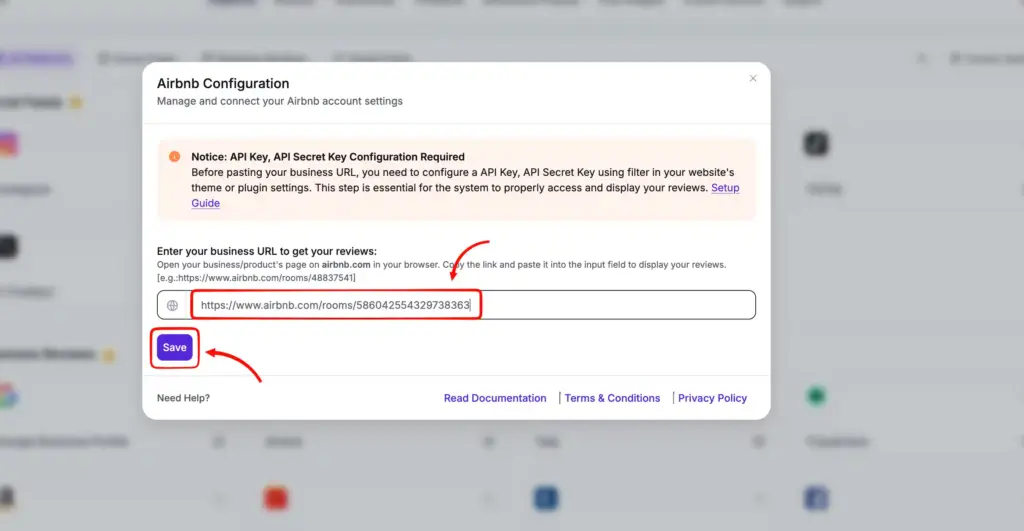
9. Connect your Airbnb listing. Now go to WP Social Ninja → Airbnb, paste your listing URL, and click Save. Your reviews will be connected automatically.
I understand it might feel like a lot if you are a total non-technical person. But trust me, once you start following this exact method, it will feel pretty easy. And for more clarity and details, feel free to follow this Documentation.
Step 3: Customize your template to suit your business
Once your reviews are connected, you need to present them properly. WP Social Ninja will let you design customized templates to match your website, highlight your best reviews, and organize everything so visitors can quickly understand your value.
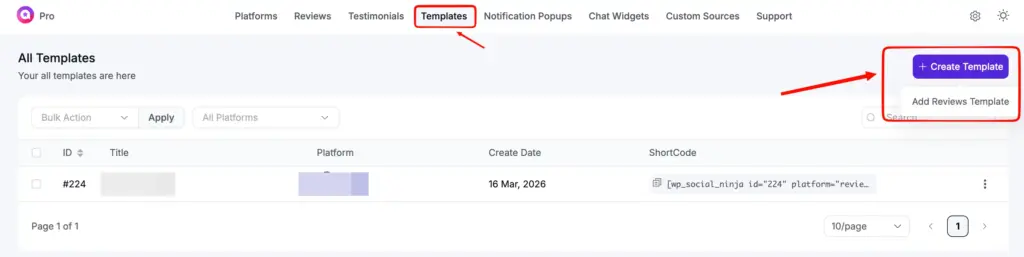
To create your Airbnb reviews template, head towards the WP Social Ninja dashboard, click the Templates tab, hover over Create Template, and choose Add Reviews Template.
You’ll now land on the editorial panel. Select Airbnb from the Platforms under the General section, and all your connected reviews will be fetched here.
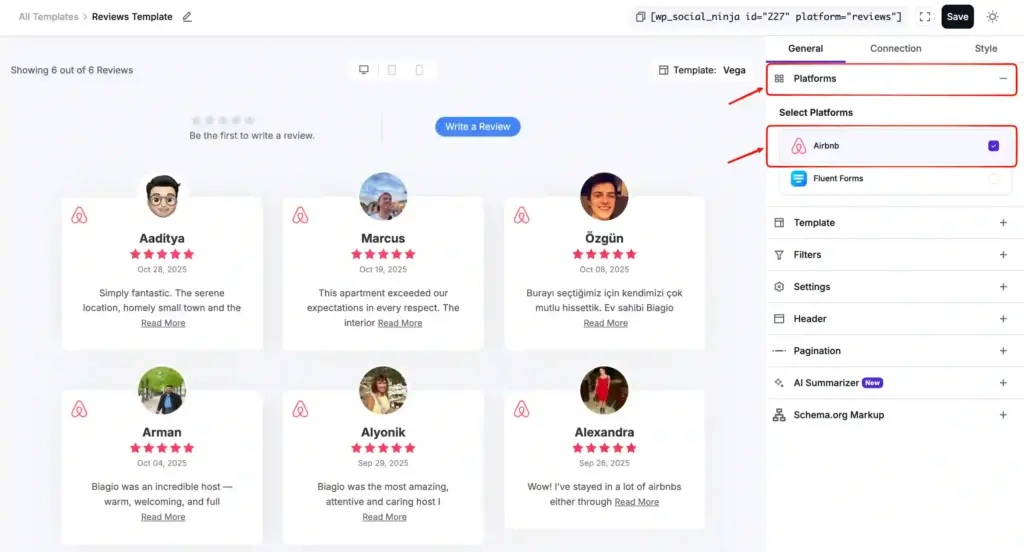
You should have noticed three tabs: General, Connection, and Style. Under each tab, there are multiple customization options.
Under the General tab, you’ll find the following customization options:
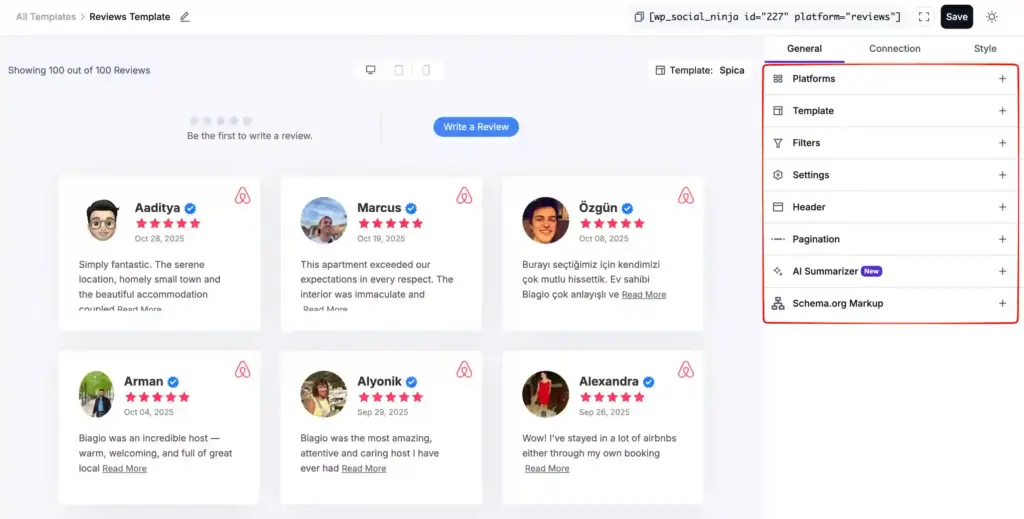
- Template: You’ll be able to choose from 10+ pre-built stylish templates to get started with your template fast.
- Filters: You can choose how many reviews you want to show, sort them by ratings and keywords, differentiate by categories or products, and more.
- Settings: Control how your reviews appear, like showing ratings, reviewer names, badges, and images. You can also adjust how much content is visible and fine-tune the layout so your reviews look more credible and easy to scan.
- Header: Control how the top section of your reviews looks. You can show your rating, total reviews, title, and even add a “Write a Review” button that can direct your visitors to your Airbnb listing or any custom URL you want.
- Pagination: Control how your reviews load on the page. You can choose to show a “Load More” button and decide how many reviews appear at a time to keep things clean and easy to browse.
- AI Summarizer: Show a quick summary of your reviews so visitors can get the main idea fast. It supports OpenAI and OpenRouter, and you can choose how the summary appears.
- Schema Markup: Add structured data to your reviews so ratings and review counts can appear in Google search results, helping you build trust and get more visibility.
Under the Style tab, you can control how your reviews look on your website. From fonts and colours to spacing and layout, you can adjust everything to match your site’s design.
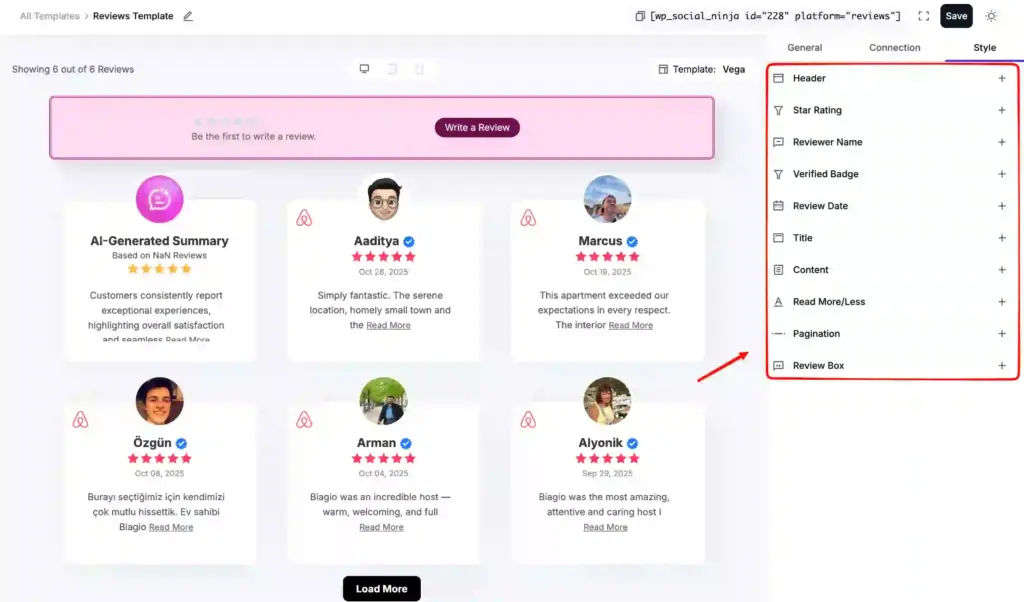
You can style different elements like ratings, reviewer names, badges, and review text individually. This gives you full control to make your reviews look clean, consistent, and aligned with your brand.
If you want to see how these customizations look in real use, you can check out the demo templates on their site. It will help you understand how advanced WP Social Ninja can be when it comes to styling.
After customization, click Save, copy the shortcode, and paste it anywhere on your website. And that’s it! Here’s how I showed it on my site:
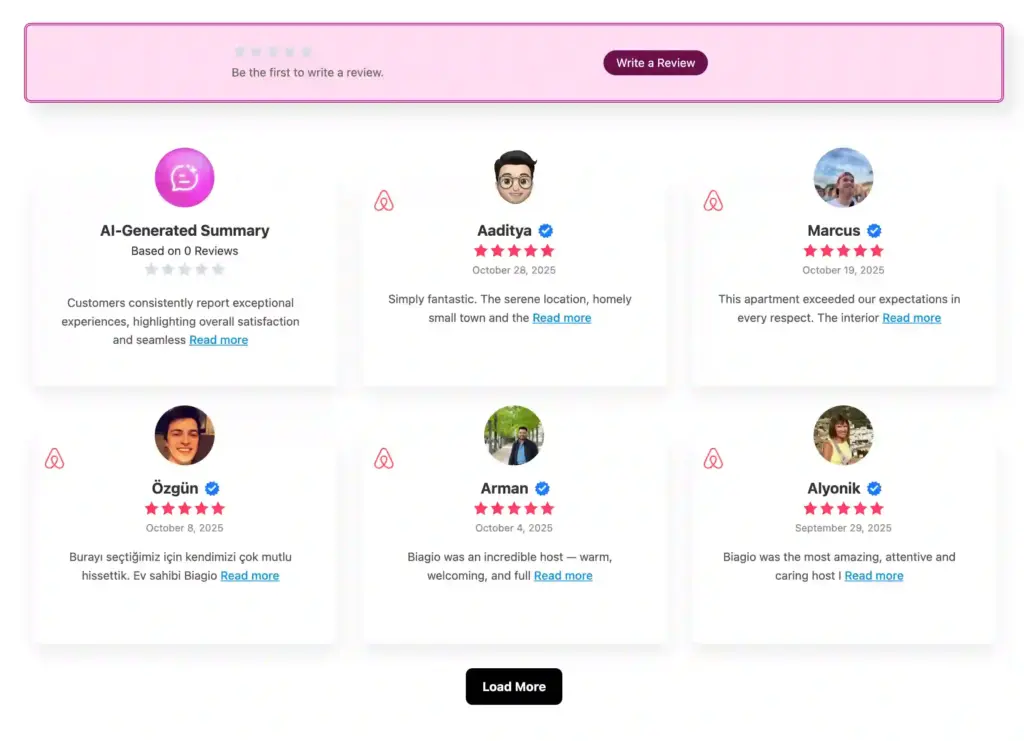
Wrapping up
Writing Airbnb reviews becomes much easier once you know what actually matters. Whether you’re a guest or a host, the right words help others make better decisions and build trust.
But reviews shouldn’t stay only on Airbnb. If you’re a host, showing them on your own website can directly influence bookings and how people see your business. Trustworthy tools like WP Social Ninja exist to help you out.
Now you have everything you need. Use these examples, adapt them to your situation, and start making your reviews work for you instead of leaving them unused.
Frequently Asked Questions (FAQs)
Can Airbnb reviews affect how much I can charge per night?
Yes. Properties with consistently strong reviews can justify higher pricing because guests trust them more and expect a better experience.
Do Airbnb reviews expire or lose value over time?
Reviews don’t expire, but newer reviews carry more weight. Recent feedback helps guests understand your current standards.
Can I leave a review if my stay was cancelled or changed?
In most cases, reviews are only allowed after a completed stay. If a booking is cancelled early, you may not get the option to leave feedback.
Do Airbnb reviews impact Superhost status directly?
Yes. Ratings and review consistency are key factors in achieving and maintaining Superhost status.
Can I mention issues like safety concerns in an Airbnb review?
Yes, but keep it factual and relevant to your stay. Avoid exaggeration and focus on what actually happened.
What kind of reviews attract more bookings for hosts?
Reviews that mention specific experiences, comfort, and reliability tend to influence booking decisions more than generic praise.

Subscribe To Get
Weekly Email Newsletter
Connect, Customize, and Display Social Feeds, Reviews, and Chat widgets

Trending Posts
-
 Mashfik Upal Aumy
 -
-
 Mashfik Upal Aumy





Leave a Reply