

Top 8 WordPress eCommerce Plugins in 2026


It takes a lot of effort and sacrifices to build a business. As an owner, you have gone through a lot to keep it going. After thoroughly thinking, you decided to take it online. That’s already a huge step.
You chose WordPress. It looked simple. You searched for a WordPress eCommerce plugin. Installed one. Started adding products.
Then after some days, you started noticing several issues. You face difficulties uploading products, or pages seem broken. Customers are complaining about payment failures.
In our 10 years of experience in the WordPress industry, we’ve seen it thousands of times. It’s not because WordPress is bad. But because the plugin you installed is not what it promised.
So, we decided to go classic to help the business owners. We tested multiple plugins really hard and chose the top 8 eCommerce WordPress plugins for eCommerce brands.
Stick with us till the end to find out which one you need for your business right now.
TL;DR
- Not all WordPress eCommerce plugins are equal. The right choice depends on what you sell and how you plan to grow.
- FluentCart is ideal for performance-focused stores with subscriptions and zero transaction fees.
- WooCommerce is the most flexible and widely used option, but serious stores often need paid extensions.
- WP Social Ninja increases trust with reviews, social feeds, and chat widgets. It improves conversions, not store management.
- Easy Digital Downloads is best for pure digital products and secure file delivery.
- FluentCommunity works well for memberships and online courses with built-in engagement tools.
- FluentCRM helps automate email marketing without monthly SaaS fees.
- ShopLentor enhances WooCommerce design and checkout experience.
- FluentAffiliate lets you launch and manage your own affiliate program inside WordPress.
- Start simple. Choose based on your business model. Add supporting tools only when needed.
How we evaluated the eCommerce plugins for WordPress
We showed no mercy while testing these plugins. First, we installed each plugin users commonly rely on when setting up eCommerce for WordPress stores. Fresh WordPress installs. Existing business sites. Low-resource hosting. High-order simulations.
We wanted real-world pressure, not demo results.
Then we evaluated them using pre-defined criteria. Every plugin was scored individually. No assumptions. No bias. Just hands-on usage.
We assessed them based on:
- Core features and selling tools
- Ease of use for beginners
- Customization flexibility
- Support for physical, digital, and subscription products
- Marketing integrations
- Scalability under growth
- Performance under bulk orders
- Our personal hands-on verdict
Finally, we averaged the scores. And one important note. We are never paid for placement in our articles. No brand pays us to rank them higher. No one buys links here.
We value the trust you put in us. That is why every evaluation is based on real testing and honest judgment.
The 8 best WordPress eCommerce plugins
Before we start discussing details, let’s have a look at the overview of the best 8 eCommerce plugin for WordPress:
| No | Plugin Name | Key Features | Pricing | Our Rating |
| 1 | FluentCart | – Subscriptions & recurring billing – Built-in Stripe & PayPal – Advanced revenue analytics – High-performance architecture | Free version available. The pro version starts from $199 per year. | 4.9/5 |
| 2 | WooCommerce | – Open-source store engine – Highly customizable – Large extension ecosystem – Scales with add-ons | Free and open source. Paid extensions are required for additional functionalities. | 4.4/5 |
| 3 | WP Social Ninja | – Multi-platform customer review feeds – Shoppable Instagram & social feeds – Multi-channel chat widgets – Testimonials & notification popups | Free version available. The pro version starts from $44 per year after discount. | 4.9/5 |
| 4 | Easy Digital Downloads | – Secure digital downloads – Built-in discount system – Detailed sales reports – Software licensing support | Free version available. The pro version starts from $99.50 per year after discount. | 4/5 |
| 5 | FluentCommunity | – Paid membership spaces – Built-in course builder – Gated content access – Community engagement tools | Free version available. The pro version starts from $139 per year after discount. | 4.8/5 |
| 6 | FluentCRM | – Abandoned cart recovery – Automated payment receipts – Post-purchase email funnels – Customer segmentation | Free version available. The pro version starts from $90 per year after discount. | 4.8/5 |
| 7 | ShopLentor | – Custom shop page builder – Checkout optimization tools – Abandoned cart recovery – Conversion-focused widgets | Free version available. The pro version starts from $99, and additional paid addons are available. | 4.2/5 |
| 8 | FluentAffiliate | – Launch affiliate program – Custom commission rules – Referral & coupon tracking – Automated payout management | Free version available. The pro version offers a lifetime subscription starting from $199. | 4.7/5 |
Now, we will break down the details of these plugins. So without any further ado, let’s start.
1. FluentCart
FluentCart is one of the next generation and performance-first eCommerce plugins for WordPress. If you’ve ever felt slowed down by WooCommerce’s complexity or frustrated by transaction fees, FluentCart was built with exactly those pain points in mind.

A quick overview of FluentCart
FluentCart is designed for store owners who want performance without complexity. It supports physical products, digital downloads, subscriptions, installment plans, and licensed software. It charges zero transaction fees on both free and Pro plans. You only pay your payment processor.
| Pros ✅ | Cons ⬇️ |
| • Zero transaction fees on all plans • Faster order processing with dedicated database tables • Supports physical, digital, subscriptions & licensing in one plugin • Fully self-hosted and all data stays on your server • GDPR and EU DPA compliant • Built-in Stripe, PayPal, and 6+ more gateways • Subscription management with retry logic and churn tracking • Full REST API for developers | • Some advanced features (installments, licensing, advanced analytics) require the Pro plan • Square and AirWallex integrations are still coming soon • Fewer third-party extensions than WooCommerce |
Read our FluentCart overview to explore its advanced features in detail.
What makes FluentCart stands out
Most ecommerce plugin WordPress systems rely heavily on WordPress’s default database structure. FluentCart uses its own optimized database tables for orders, customers, and subscriptions.
In simple terms, your store runs more smoothly when orders increase.
The plugin claims 3 times faster order processing compared to the market leader. In our testing, checkout was noticeably faster.
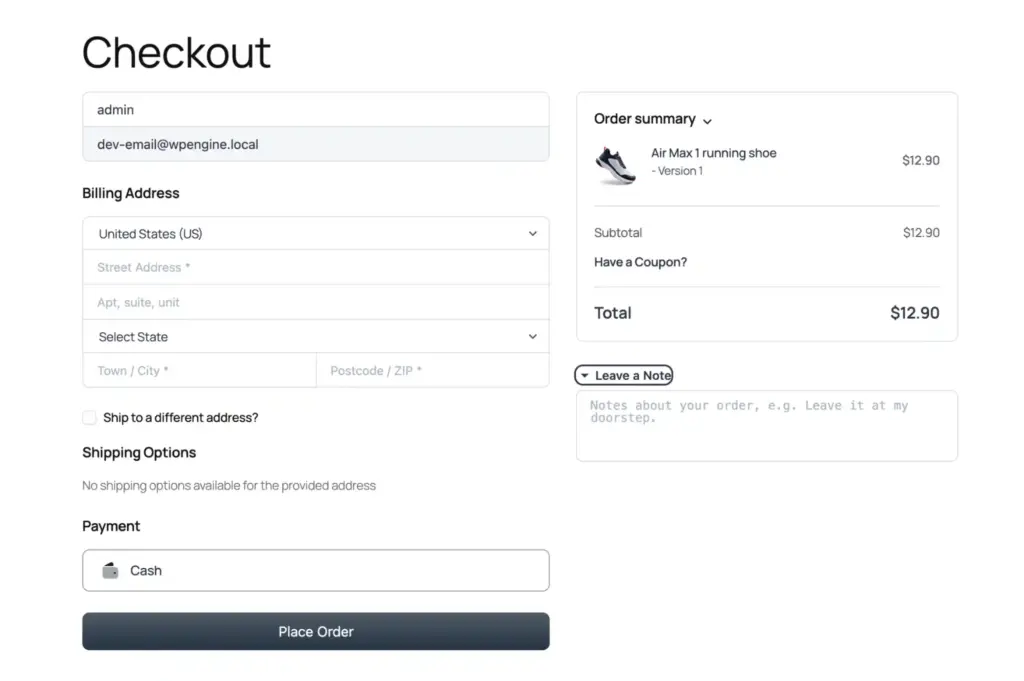
This matters more than people realize. A slow checkout kills conversions.
What you can sell with FluentCart
FluentCart supports:
- Physical products
- Digital downloads
- Recurring subscriptions
- Installment payments (Pro)
- Licensed software (Pro)
- Hybrid products
If you run a SaaS product, a course subscription, or sell maintenance services, it handles recurring billing very well.
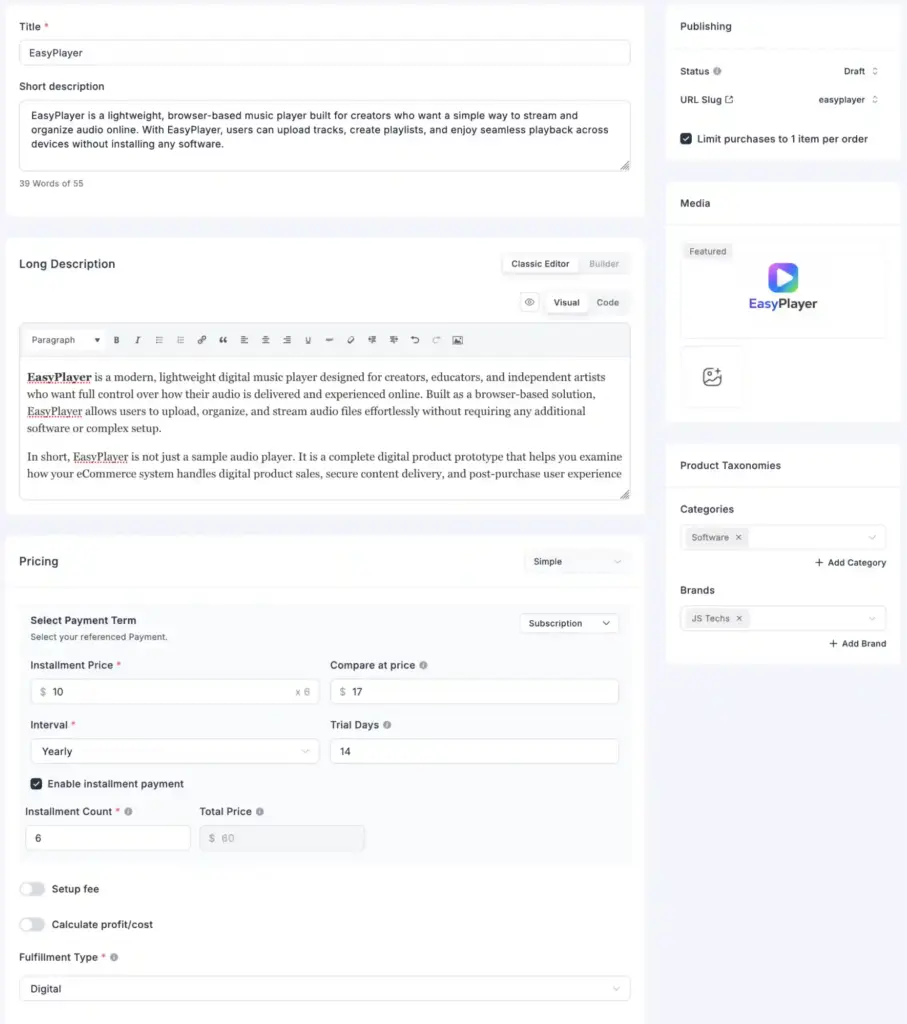
It also supports setup fees, flexible billing intervals, and subscription retry logic. Failed payments are automatically retried. That alone can recover lost revenue.
Payments and checkout
Stripe and PayPal are built in. No extra extension required.
It also supports Paddle, Paystack, Mollie, RazorPay, Authorize.Net, and Mercado Pago. Square and AirWallex are coming soon.

One-click checkout is available. The checkout page feels lightweight.
Most importantly, there are zero transaction fees from FluentCart itself. Many plugins advertise “free” but charge a percentage unless you upgrade. FluentCart does not.
Store management, operations, and data privacy
The dashboard is clean. You can:
- Manage orders
- Track inventory
- Disable out-of-stock products automatically
- Configure taxes including EU VAT
- Create shipping regions and custom methods
- Process manual or automatic refunds
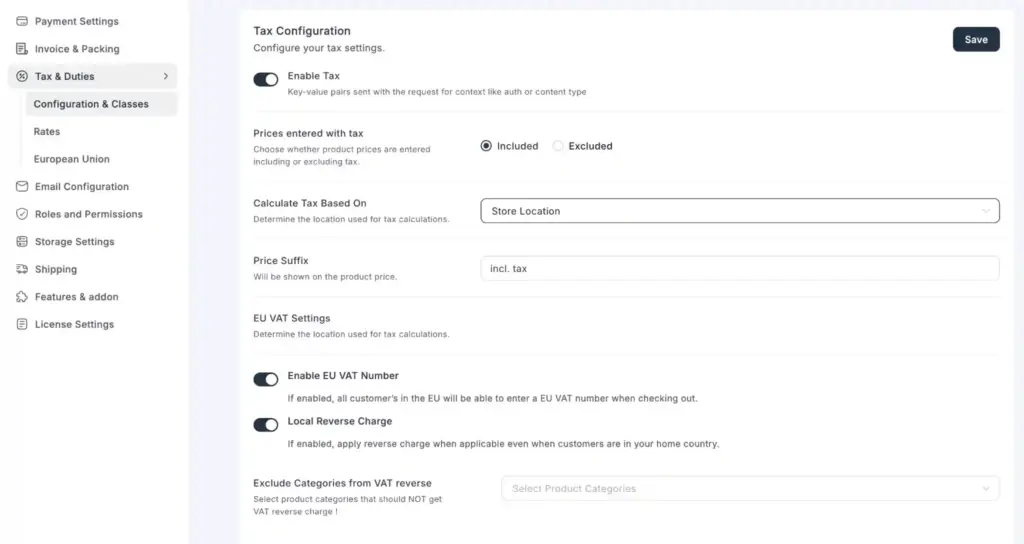
For developers, there is a REST API and hook system. But beginners do not need to touch that. Everything important is accessible without digging through menus.
FluentCart is fully self-hosted. No checkout data is sent to external servers. No hidden tracking scripts. If you care about GDPR and data control, this is a big advantage.
Rating breakdown for FluentCart
Here is how we scored FluentCart based on hands-on testing:
- Features & Functionality: 4.9 / 5
- Ease of Use: 4.8 / 5
- Customization Flexibility: 4.8 / 5
- Marketing & Growth Tools: 4.9 / 5
- Scalability & Performance: 4.9 / 5
Overall Rating: 4.9 / 5
Our verdict on FluentCart
FluentCart is a strong choice if you want speed, built-in subscriptions, and zero transaction fees. It performs especially well for recurring revenue and digital-first businesses. For many modern stores, it can be the first choice.
2. WooCommerce
For many people, WooCommerce is the default choice when searching for the best eCommerce plugin for WordPress. If you have searched how to build an online store, you have seen this name.
It is free at its core. Open-source. Backed by Automattic. And deeply connected with WordPress itself.
A quick overview of WooCommerce
WooCommerce is a flexible eCommerce plugin for WordPress. It lets you sell physical and digital products. You can expand it with add-ons for subscriptions, memberships, and bookings. It is free to start, but serious stores usually need paid extensions.
| Pros ✅ | Cons ⬇️ |
| • Free and open-source and no monthly platform fees • 100+ payment gateways supported • Huge marketplace of extensions and themes • Smooth WordPress integration • Full data ownership, you can export and migrate anytime • Regular updates and long-term platform stability • Free mobile app for managing your store on the go | • The free plugin has limited features, essential extensions add up in cost • Can become slow and heavy with too many plugins installed • Performance can degrade at high order volumes without optimization • WooPayments is not available in all countries • WooCommerce Shipping is US-only • Transaction fees may apply depending on your payment gateway • Deep learning curve when adding multiple extensions |
What you can sell with WooCommerce
With WooCommerce, you can sell:
- Physical products
- Digital downloads
- Affiliate products
At its core, WooCommerce also works as a simple WordPress shopping cart plugin, handling checkout, cart management, and order processing.
If you want subscriptions, memberships, or bookings, you need extensions. Most of them are paid. For simple stores, the free version works well. For advanced stores, budget matters.
Payment gateways supported in WooCommerce
Stripe and PayPal are the most common options. Square is also popular. WooPayments works in selected countries.
You can accept cards, wallets, bank transfers, and even cash.
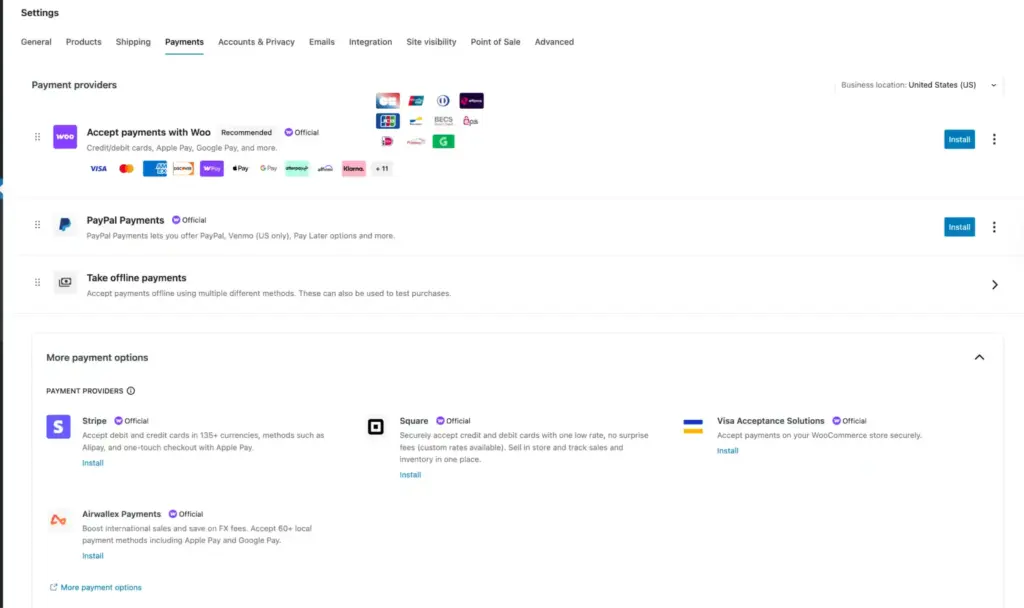
But here is the honest part. Some gateways require paid extensions. Setup can get technical depending on your region. Flexibility is strong. Simplicity depends on your setup.
Shipping and tax features of WooCommerce
WooCommerce supports shipping zones and custom rates. U.S. stores can print USPS labels from the dashboard. Other carriers can be integrated through add-ons.
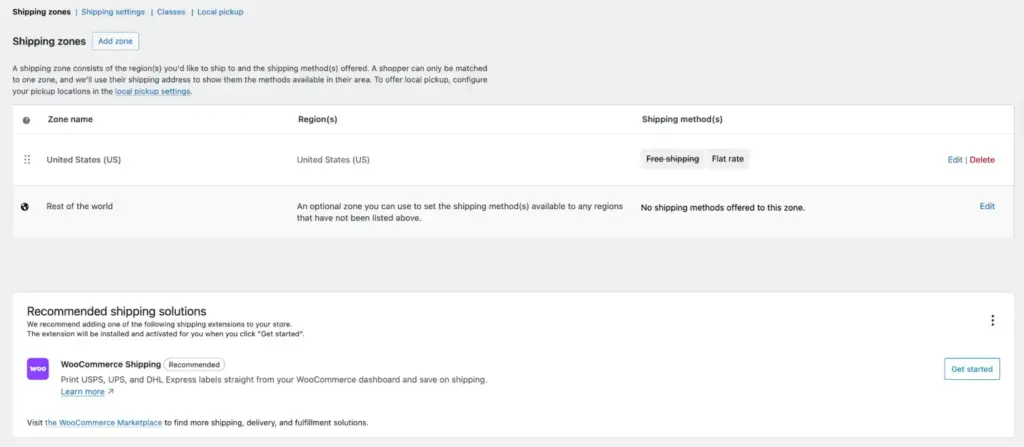
Tax can be automated. But international tax rules can become complex.
Extensions, ecosystem, apps, and marketing
This is WooCommerce’s biggest strength. There are hundreds of add-ons. Almost any feature already exists.
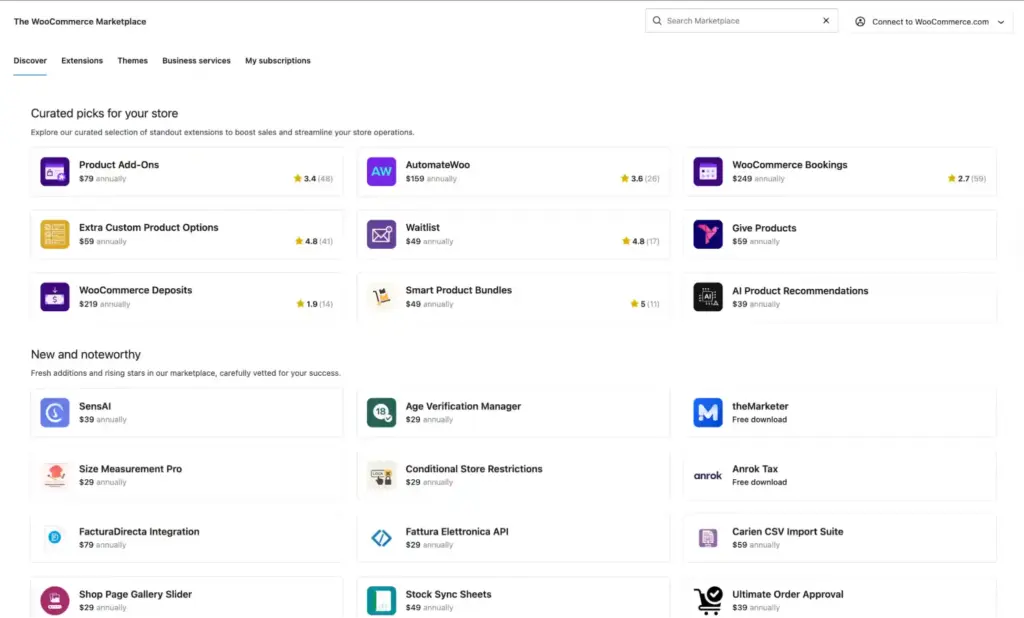
But “free” does not always mean low cost. Subscriptions, advanced reports, and some checkout tools require premium extensions. Your yearly cost can grow fast if you stack many add-ons.
There is a free mobile app for WooCommerce. You can track orders and get sale alerts. WooCommerce also connects with Google Ads, Mailchimp, HubSpot, and Facebook.
Rating breakdown for WooCommerce
Here is how we scored WooCommerce based on hands-on testing:
- Features & Functionality: 4.8 / 5
- Ease of Use: 4.2 / 5
- Customization Flexibility: 4.9 / 5
- Marketing & Growth Tools: 4.3 / 5
- Scalability & Performance: 4.0 / 5
Overall Rating: 4.4 / 5
Our verdict on WooCommerce
WooCommerce is the safest starting point for most beginners. It is powerful and flexible. Just plan your budget. The core is free, but serious stores often require paid extensions.
3. WP Social Ninja
WP Social Ninja is not your traditional WordPress eCommerce plugin. It does not manage products or payments. But it plays a powerful role in increasing trust signals and sales.

If your store gets traffic but conversions feel low, trust is usually the missing piece. WP Social Ninja focuses on that. It’s features are designed to help your visitors feel confident before they click “Buy.”
A quick overview of WP Social Ninja
WP Social Ninja is a complete social proof plugin. It lets you display reviews, social media feeds, chat widgets, notification popups, and testimonials on your store. Its main goal is simple. Build trust. Increase conversions.
| Pros ✅ | Cons ⬇️ |
| • All-in-one social proof solution including feeds, reviews, chat, popups in one plugin • Supports 30+ platforms, including Google, Instagram, YouTube, WhatsApp Chat, WooCommerce reviews, and more • Shoppable Instagram Feed for direct product linking (Pro) • AI review overview for quick sentiment summaries (Pro) • QR code feature for offline review collection • GDPR compliant with local image storage option • Works with Elementor, Gutenberg, Beaver Builder, and Oxygen • Review Notification popups create urgency and increase conversions • Free version is genuinely useful without a credit card | • Not a standalone eCommerce plugin and needs FluentCart, WooCommerce, or similar alongside it • Most powerful features (Shoppable feed, multi-platform reviews) require the Pro plan • Can be overwhelming for new users looking for only one feature |
Why trust matters more than traffic in eCommerce
Getting traffic is expensive. Ads cost money. SEO takes time. But if visitors do not trust your store, they leave.
We have seen this many times. A clean product page. Good pricing. But no reviews. No proof. No brand activity.
WP Social Ninja fixes that by showing:
- Real customer reviews from Google, Facebook, Yelp, Amazon, AliExpress, and more
- User-generated content from Instagram, Facebook, TikTok, and YouTube
- Testimonials from customers or industry experts also
- Chat widgets from with WhatsApp, Messenger, Telegram, and more
These elements are called social proof. When people see others buying, reviewing, and engaging, trust in your brand increases. And when trust increases, conversions follow. Feel free to visit their demo page to visualize how customized social proof looks like in action.
You can try their free version to get started primarily. However, advanced features will require you to upgrade to their pro version.
Explore our visual guide about social proof on websites to learn where you should integrate your social proof on your website for maximum impact.
Social feeds features of WP Social Ninja
You can connect to Instagram, Facebook, YouTube, TikTok, and more.
Key features of social media feeds by WP Social Ninja:
- Connect multiple social accounts without limitation
- Multiple pre-built templates and layouts to get started immediately
- Auto-fetch new posts and videos automatically
- Save images locally for faster loading speed
- Advanced filtering by hashtag, keywords, and more
- Customizable subscribe and follow buttons
- Shortcode support for easy placement anywhere
- Compatible with most page builders and themes
- GDPR-compliant setup for privacy protection
We have found the shoppable Instagram feed especially useful. You can link products directly from your feed. That shortens the buying journey.

Bonus Tips: Explore different types of social media feeds that you can consider adding to your business website.
Business reviews features of WP Social Ninja
According to recent studies, reviews influence the buying decisions of 97% of customers.
If they do not see real feedback, they hesitate. WP Social Ninja lets you show real customer reviews on your website. This builds trust fast and helps visitors feel safe to purchase.

Key features of customer reviews by WP Social Ninja:
- Combine reviews from multiple platforms into one feed
- Show star ratings, reviewer name, and profile image
- Filter reviews by minimum rating, keywords, products, categories, and more
- AI-powered review summary for quick insights
- QR code generation to collect new reviews offline
- Schema markup support for better SEO visibility
- Auto-sync new reviews automatically
- Multiple pre-built templates
- Advanced customization features
- Verified reviewer badges
- GDPR-compliant and performance optimized
Besides, you’ll be able to automate review publishing by setting filters. This will make sure that your visitors always see the best side of your business. Feel free to check out their customer reviews page for more details.
Chat widgets features of WP Social Ninja
Sometimes customers just have a quick question. About shipping. About price. About availability. If they do not get an answer fast, they leave.
Chat widgets feature of WP Social Ninja can solve this. They let visitors message you instantly and get clarity before they buy.
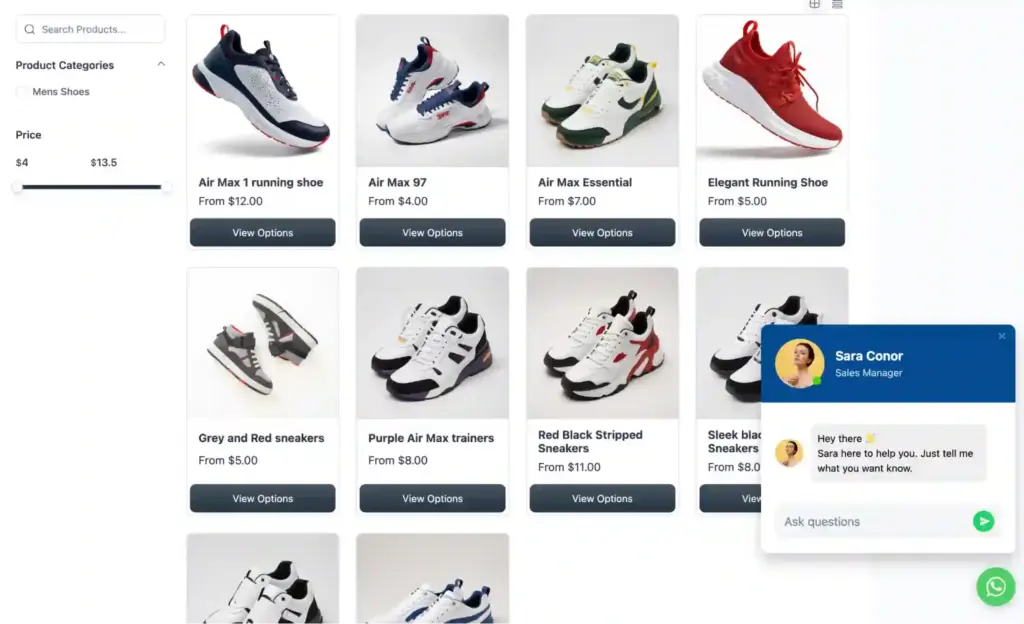
Key features of chat widgets by WP Social Ninja:
- Multiple account connections for better customer support
- Flexible chat bubble positioning on your website
- Language selection to match your audience
- Custom chat button visibility based on pages, posts, or products
- Device-based control to hide the widget on desktop or mobile
- Optional chat label to highlight availability and guide users
- Chat popup mode to keep users engaged on your site
- Lightweight setup with fast performance and no coding required
These chat widgets are simple to set up and can significantly reduce cart abandonment. Visitors who get a quick answer to their question are far more likely to complete a purchase.
Rating breakdown for WP Social Ninja
Here is how we scored WP Social Ninja based on hands-on testing:
- Features & Functionality: 4.9 / 5
- Ease of Use: 4.9 / 5
- Customization Flexibility: 4.8 / 5
- Marketing & Growth Tools: 5.0 / 5
- Scalability & Performance: 4.8 / 5
Overall Rating: 4.9 / 5
Our verdict on WP Social Ninja
WP Social Ninja is one of the easiest ways to increase trust in your store. It does not manage products or payments, but it directly improves conversions. Reviews, social feeds, and chat widgets remove doubt before purchase. So, we recommend this plugin for long-term business growth.
Win your customers’ hearts with exceptional features
Discover how WP Social Ninja can assist you in designing outstanding customer experiences.

4. Easy Digital Downloads (EDD)
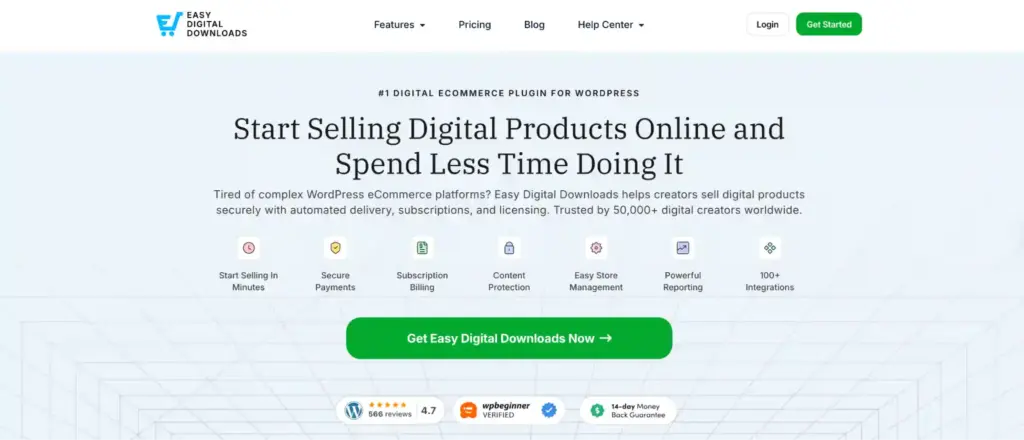
Easy Digital Downloads, often called EDD, is built for one thing. Selling digital products. If your store only sells files, not physical items, this plugin makes your life easier.
A quick overview of Easy Digital Downloads
Easy Digital Downloads is a purpose-built ecommerce plugin for WordPress for digital creators. It handles secure file delivery, discount codes, reporting, and customer management.
No physical product complexity. Just a clean system for selling downloads.
| Pros ✅ | Cons ⬇️ |
| • Specifically designed for digital products without complexity • Secure file delivery with automatic access revocation on refund • Verified Stripe, PayPal, and Square integrations • Supports 15+ payment methods including Apple Pay, Klarna, and Venmo • 11 native Gutenberg blocks for flexible store layout • Unlimited products and transactions with no listing fees | • Not suitable for physical products and physical sellers need FluentCart or WooCommerce • Pro pass is required for subscriptions, licensing, and VAT compliance • EU VAT compliance tools are locked behind a paid plan • No built-in affiliate or community features (requires third-party plugins) • Limited design customization compared to page-builder-based alternatives |
What you can sell with Easy Digital Downloads (EDD)
With EDD, you can sell:
- E-books and PDFs
- Music and audio files
- Video content
- Software and plugins
- Design templates and graphics
- Course materials
- Product bundles
The Pro version adds software licensing and recurring subscriptions. If you are new to the business and sell WordPress plugins or SaaS licenses, this might become very useful.
File protection and delivery feature of EDD
This is one of EDD’s strongest areas. Each buyer receives a unique download link. The link is tied to their purchase. If you refund an order, access is automatically removed.
For digital creators, this is critical. File sharing can destroy revenue. EDD handles this properly.
Payment gateways supported in EDD
EDD integrates with Stripe, PayPal, and Square.
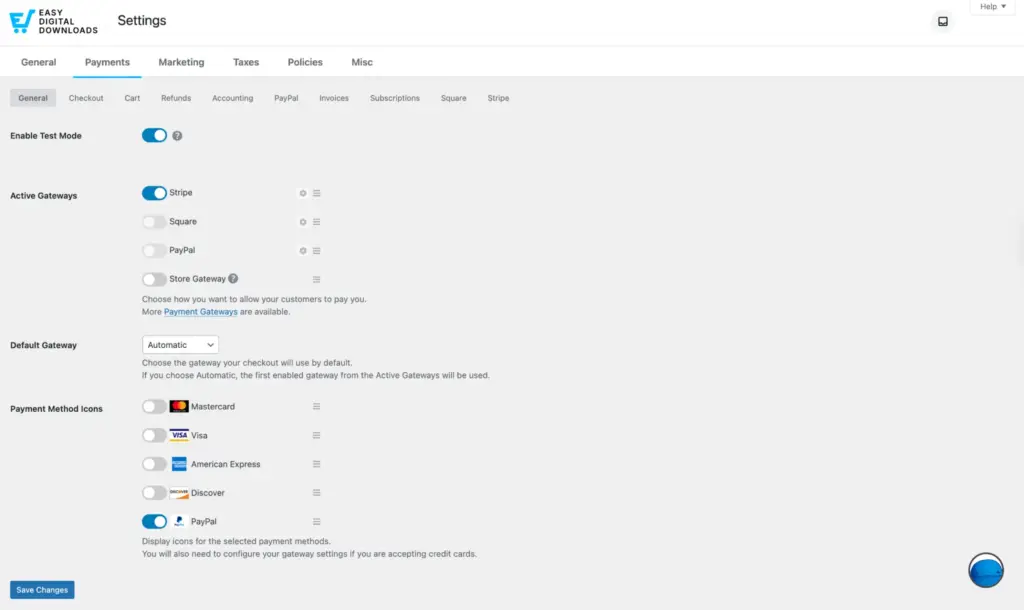
However, on the free version, gateways include an extra 3% transaction fee on top of the standard fees.
If you upgrade to Pro, that 3% fee is removed. You then only pay the normal processing fee. Some additional gateways also require paid extensions.
Reporting dashboard and marketing features of EDD
The reporting dashboard is practical and easy to read.
You can track:
- Revenue
- Sales by product
- Customer growth
- Tax reports
- Revenue by country
- Revenue by payment method
Recurring revenue reports are available on Pro plans. You can also compare date ranges. This helps when evaluating promotions.
EDD also includes a flexible discount system.
You can set:
- Start and end dates
- Product-specific limits
- Minimum purchase thresholds
On Pro plans, you can offer free downloads as lead magnets. If your strategy includes recurring subscriptions or software licensing, Pro becomes necessary.
Rating breakdown for Easy Digital Downloads
Here is how we scored EDD based on hands-on testing:
- Features & Functionality: 4.2 / 5
- Ease of Use: 4.8 / 5
- Customization Flexibility: 3.9 / 5
- Marketing & Growth Tools: 3.8 / 5
- Scalability & Performance: 3.3 / 5
Overall Rating: 4 / 5
Our verdict on Easy Digital Downloads
If your store sells only digital products, Easy Digital Downloads is one of the cleanest choices. It removes unnecessary complexity and focuses on secure file sales. However, if you wish to scale your business, think twice as it tends to lag under pressure.
5. FluentCommunity
FluentCommunity is built for creators who want to sell access, not just products. If your business includes online courses or paid memberships, this plugin combines both community and learning tools in one system.

Instead of installing multiple plugins, you manage everything inside WordPress.
A quick overview of FluentCommunity
FluentCommunity combines a community platform and a built-in LMS. Members can join groups, take courses, post updates, and message each other. It works best for paid memberships and course-based businesses when connected with an eCommerce plugin for WordPress.
| Pros ✅ | Cons ⬇️ |
| • Combines LMS and community platform in one plugin saving duplicate costs • Real-time chat and private messaging built in • Gutenberg-based course editor making it easy for beginners • One-click migration from BuddyBoss and BuddyPress • Dark mode, leaderboards, badges, and gamification features • Native integrations with the Fluent ecosystem for advanced functionalities • Drip content scheduling for structured learning experiences | • Advanced features (leaderboards, badges, Giphy, media) locked behind Pro plan • No built-in course certificates or completion badges in the free version |
Major community features of FluentCommunity
FluentCommunity includes:
- Unlimited groups or spaces
- Activity feeds
- Real-time private messaging
- Mentions and hashtags
- Polls
- Role-based permissions
Gamification features like leaderboards and badges are available in Pro. These help increase engagement. If you are building a paid membership site, engagement is everything.
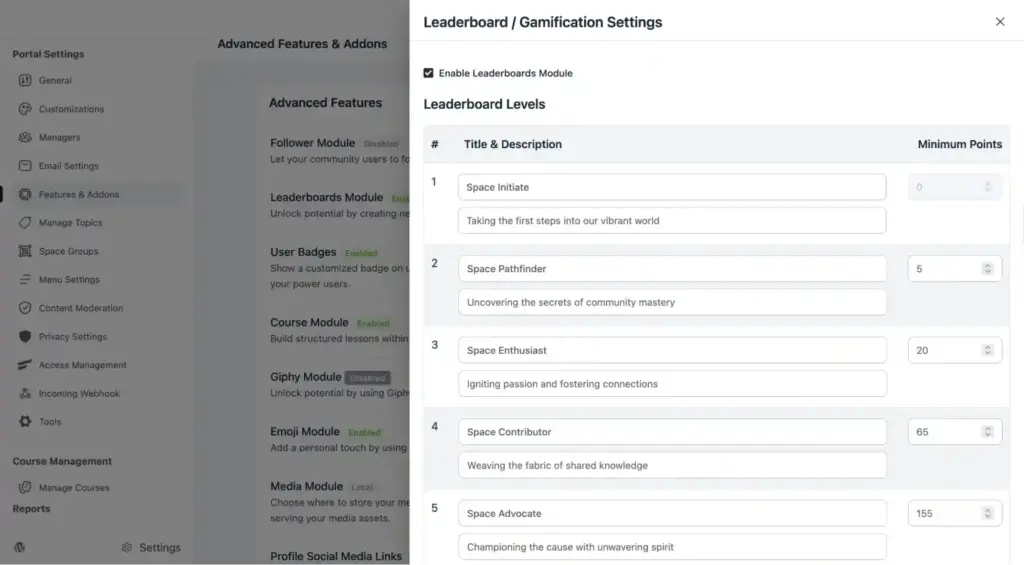
You also get branding controls. Custom welcome messages. Dark mode. Custom URLs. Small details, but they make your platform feel professional.
Learn more about eCommerce gamification and how you can implement different strategies to grow your business.
LMS features of FluentCommunity
The built-in LMS uses the Gutenberg editor. That means building a course feels like creating a normal WordPress page.
You can:
- Create structured lessons and modules
- Schedule drip content
- Track student progress
- Control enrollment types
- Lock content for members only
Student management is centralized. You can monitor progress and manage access from one dashboard. For course creators, this removes the need for a separate LMS plugin.
Integrations and migration features
FluentCommunity works closely with other Fluent tools. Even in the free version, it connects with FluentCRM, FluentCart, Fluent Support, FluentSMTP, and FluentForms.
For course payments, it has native integration with Paymattic. That means you can sell course access directly without installing a separate eCommerce plugin for WordPress.

This ecosystem approach keeps everything connected.
Your community, courses, email marketing, support system, and payments can all work together inside WordPress. No complex setup. No third-party bridges.
FluentCommunity also offers one-click migration from BuddyBoss and BuddyPress. This lowers the risk if you are already running a community elsewhere.
Rating breakdown for FluentCommunity
Here is how we scored FluentCommunity based on hands-on testing:
- Features & Functionality: 4.8 / 5
- Ease of Use: 4.7 / 5
- Customization Flexibility: 4.7 / 5
- Marketing & Growth Tools: 4.9 / 5
- Scalability & Performance: 4.8 / 5
Overall Rating: 4.8 / 5
Our verdict on FluentCommunity
FluentCommunity is a smart choice for course creators and membership businesses. It simplifies your setup by combining learning and community tools in one place. If your model depends on engagement and recurring access, this plugin makes sense.
6. FluentCRM
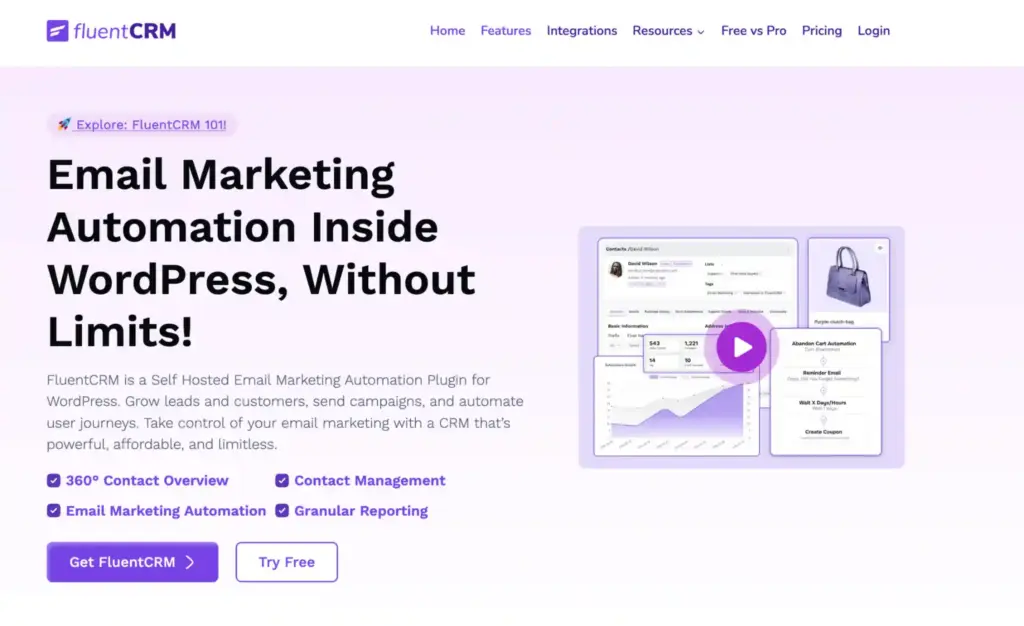
FluentCRM is built for store owners who are tired of paying monthly email marketing fees. It runs completely inside WordPress. No external dashboard. No per-contact pricing.
Most email tools charge you based on your contact list size. As your store grows, your monthly bill grows.
FluentCRM does not charge per contact. You pay a fixed yearly price. Whether you have 100 contacts or 100,000.
A quick overview of FluentCRM
FluentCRM is a self-hosted email marketing and CRM system for WordPress. It lets you send campaigns, build automation funnels, and manage unlimited contacts. It connects directly with your WordPress ecommerce plugin to track purchases and customer behavior.
| Pros ✅ | Cons ⬇️ |
| • Self-hosted and no per-contact pricing • Unlimited contacts and campaigns on all plans • Visual automation funnel builder and no coding required • Deep integration with WooCommerce, FluentCart, and EDD • Detailed contact profiles with tags, lists, and purchase history • All data stays on your server for complete privacy control • Free core version available to get started | • Advanced automations and integrations require the Pro plan • Steeper learning curve compared for complete beginners • Email deliverability depends on proper SMTP setup |
Email marketing features of FluentCRM
You can:
- Send targeted campaigns
- Schedule newsletters
- Build multi-step automation funnels
- Trigger emails based on user actions
Common use cases include:
- Welcome sequences
- Post-purchase follow-ups
- Upsell campaigns
- Cart abandonment recovery
- Re-engagement emails
The visual funnel builder makes automation simple. You map it out step by step.
Contact management features of FluentCRM
Every contact gets a detailed profile. You can see:
- Purchase history
- Tags
- Lists
- Activity logs
- Notes
You can segment contacts based on behavior. Then send targeted emails to each group.
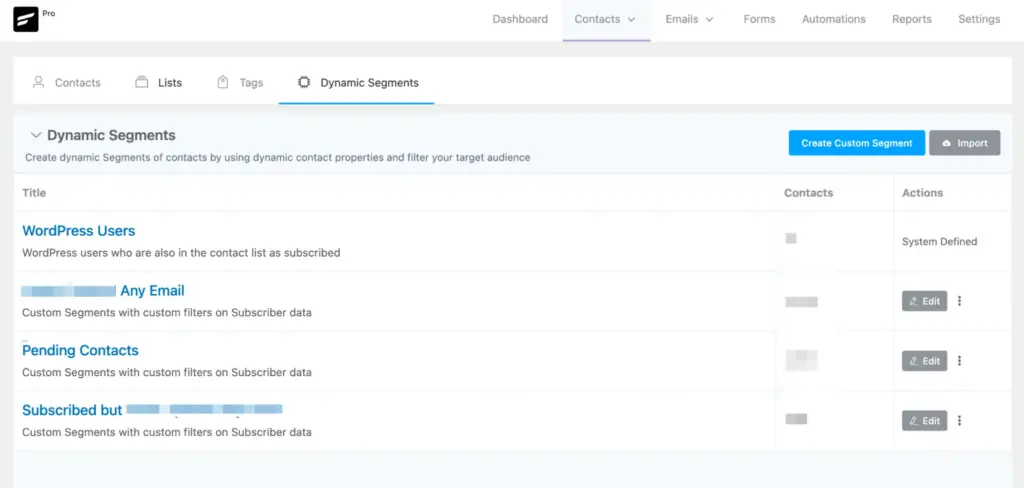
his level of targeting increases conversions.
Rating breakdown for FluentCRM
Here is how we scored FluentCRM based on hands-on testing:
- Features & Functionality: 4.9 / 5
- Ease of Use: 4.6 / 5
- Customization Flexibility: 4.8 / 5
- Marketing & Growth Tools: 4.9 / 5
- Scalability & Performance: 4.8 / 5
Overall Rating: 4.8 / 5
Our verdict on FluentCRM
FluentCRM is one of the smartest investments for a growing WordPress store. It reduces costs and gives you full control over your email marketing. If you plan to scale your business, this plugin pays for itself quickly.
7. ShopLentor
ShopLentor is built for WooCommerce users who want more design control. It is not a standalone WordPress eCommerce plugin. It works on top of WooCommerce.
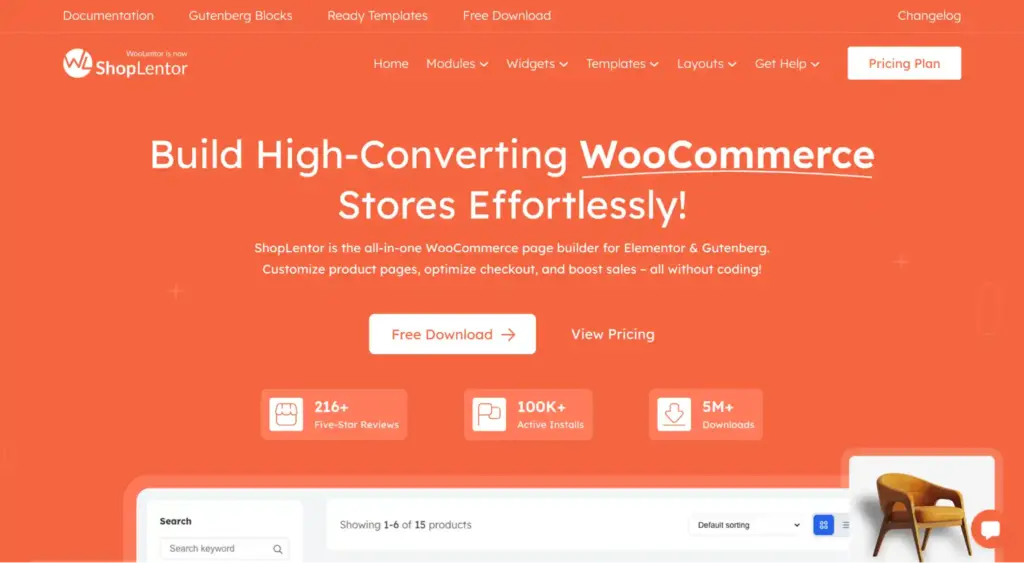
If you use WooCommerce and feel limited by default layouts, ShopLentor gives you full control without coding.
A quick overview of ShopLentor
ShopLentor is a WooCommerce page builder for Elementor and Gutenberg. It includes design tools, conversion features, and store enhancements in one plugin. It helps you customize product pages, cart pages, checkout, and more.
| Pros ✅ | Cons ⬇️ |
| • Replaces multiple plugins with one all-in-one WooCommerce enhancer • 120+ Elementor widgets + 85+ Gutenberg blocks • Abandoned cart recovery built-in (free module) • Multi-currency with geolocation detection • 110+ ready-to-import templates for fast setup • Free version covers core design and conversion features | • Only works with WooCommerce and not compatible with FluentCart or EDD • Best features (multi-step checkout, order bump) require Pro • Heavy plugin that adds noticeable weight to your WordPress installation • Elementor dependency means Elementor Pro is needed for some template features • Can conflict with certain WooCommerce themes that use similar customization approaches |
What does ShopLentor exactly do?
WooCommerce works well. But the default design is basic. Customizing product pages or checkout often requires a developer or a premium theme. ShopLentor fixes this.
You get drag-and-drop control over:
- Product pages
- Shop pages
- Cart
- Checkout
- My Account
- Thank you pages
You can redesign your entire store layout without touching code.
Free features of ShopLentor
The free version is not just a teaser. You will get:
- Abandoned cart recovery
- Sales notification popups
- Flash sale countdown timers
- Variation swatches
- Wishlist and product compare
- Multi-currency switcher
- Product stock progress bar
The abandoned cart module alone can recover lost revenue. It sends recovery emails and shows cart analytics.
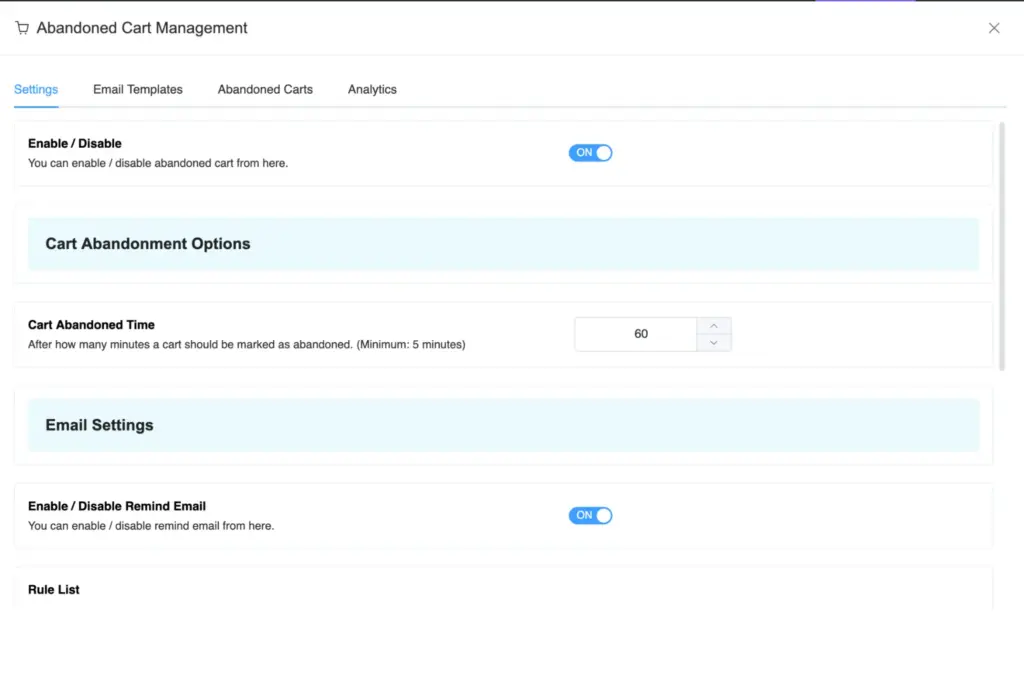
For small business owners, the free version can be so helpful.
Noteworthy pro features of ShopLentor
The Pro version adds more checkout control and upsell tools. You can use:
- Multi-step checkout
- Quick checkout
- Order bumps
- Partial payments
- Advanced product filters
- Checkout field manager
These features directly impact conversion rate. If your store is growing, these tools become valuable. Though you might not get an excellent experience than FluentCart, it will still be handy.
Elementor and Gutenberg support
ShopLentor includes over 120 Elementor widgets and 85 Gutenberg blocks. You can customize almost every WooCommerce page.
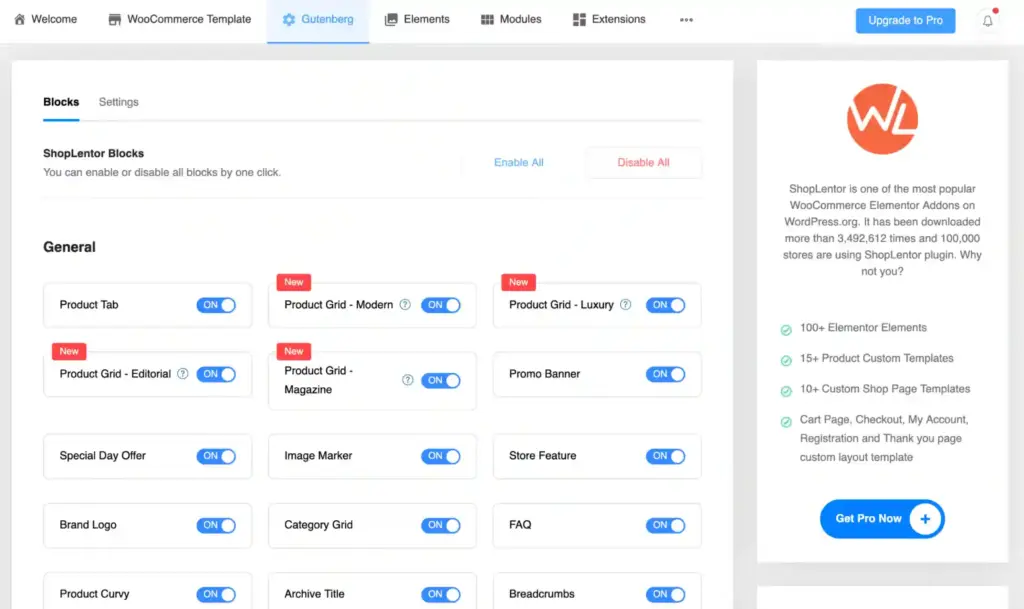
This allows you to replace your theme’s default layouts completely. For agencies or store builders, this should save a significant amount of time.
Rating breakdown for ShopLentor
Here is how we scored ShopLentor based on hands-on testing:
- Features & Functionality: 4.4 / 5
- Ease of Use: 4.1 / 5
- Customization Flexibility: 4.6 / 5
- Marketing & Growth Tools: 4.2 / 5
- Scalability & Performance: 3.7 / 5
Overall Rating: 4.2 / 5
Our verdict on ShopLentor
ShopLentor makes sense if you want your WooCommerce store to look better and convert better. The free version is strong. The Pro version is useful for serious growth. Just test your page speed after installing it, especially if you enable many modules.

Get exclusive social media marketing tips and tutorials in your inbox!
8. FluentAffiliate
FluentAffiliate helps you run your own affiliate program. If you want others to promote your products and earn commission, this plugin gives you control.

It runs inside WordPress. No external platform. No monthly SaaS bill.
A quick overview of FluentAffiliate
FluentAffiliate is a self-hosted affiliate management plugin. You can add unlimited affiliates, set commission rules, track referrals, and manage payouts. It works fine with major WordPress eCommerce plugins.
| Pros ✅ | Cons ⬇️ |
| • Self-hosted with no per-transaction affiliate platform costs • Unlimited affiliates on all plans • Coupon code tracking for influencer and content creator campaigns • Real-time reporting and analytics dashboard • One-click migration from AffiliateWP • Automated commission and payout notifications • Multi-domain tracking under one installation • Free version covers core affiliate management needs | • WooCommerce and EDD integrations require the Pro plan • No built-in two-factor authentication for affiliate logins • Advanced automation (auto-approvals, FluentCRM integration) requires Pro |
Affiliate management features of FluentAffiliate
The setup wizard is quick. You can:
- Add unlimited affiliates
- Approve or reject applications
- Set flat or percentage commissions
- Create product-level commission rules
- Give affiliates their own dashboard
Each affiliate gets a referral link. They can track their own performance.
Tracking, commissions, and integrations
FluentAffiliate tracks clicks, visits, and sales in real time. You can clearly see who brings traffic and who brings revenue.
You can set flat or percentage commissions. You can even set different rates per product or category.
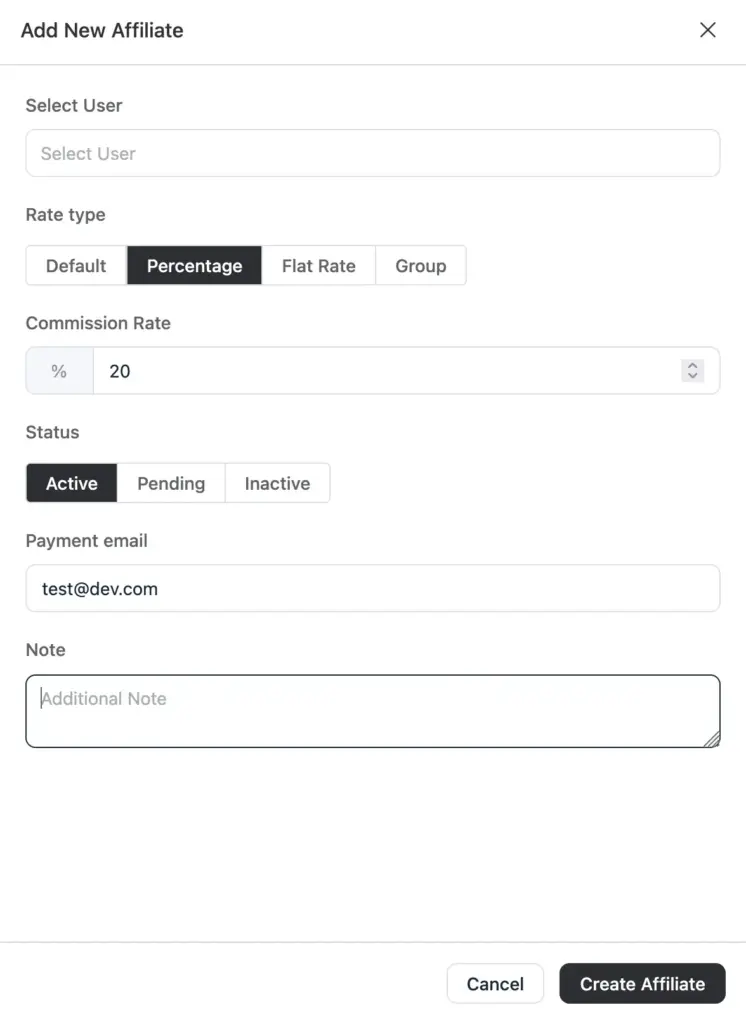
Coupon tracking is included. This works well for influencer campaigns. Give each partner a unique code. Track results easily.
Everything runs from one dashboard.
The free version works with FluentCart, FluentForms, Paymattic, and FluentBooking. The Pro version connects with WooCommerce and Easy Digital Downloads.

So whether you sell products, downloads, or memberships, it fits into your setup.
Rating breakdown for FluentAffiliate
Here is how we scored FluentAffiliater based on hands-on testing:
- Features & Functionality: 4.7 / 5
- Ease of Use: 4.8 / 5
- Customization Flexibility: 4.6 / 5
- Marketing & Growth Tools: 4.8 / 5
- Scalability & Performance: 4.6 / 5
Overall Rating: 4.7 / 5
Our verdict on FluentAffiliate
FluentAffiliate makes sense if you want partners to help grow your sales. It keeps everything inside WordPress. No monthly platform fees. If you already run a WordPress store, this is a practical addition.
Some other helpful plugins for WordPress website owners
Choosing the right WordPress eCommerce plugins is just the first step. A real business website needs a few supporting tools. These are not fancy extras. They handle daily tasks. They protect your store. They keep things running smoothly.
Here are some you should consider:
- For building forms like customer information, contact forms, or surveys: FluentForms
- For managing customer support tickets inside WordPress: FluentSupport
- For collecting simple payments without a full store setup: Paymattic
- For creating product comparison tables or pricing tables: Ninja Tables
- For improving search engine visibility: Rank Math or SEOPress
- For protecting your site from malware and attacks: Wordfence or iThemes Security
- For improving speed and clearing cache: WP Rocket or W3 Total Cache
- For email sending reliability: FluentSMTP
- For automatic backups and recovery: UpdraftPlus
You do not need everything at once. Start simple. Add tools when your business actually needs them.
Scale your sales with the right eCommerce plugin
Choosing the right tool for WordPress for eCommerce can feel confusing at first. But now you understand the differences. There is no single best option. There is only what fits your business.
If you need flexibility, WooCommerce works well. If you want speed, flexibility, and performance, FluentCart is a strong choice. If trust is your weak point, WP Social Ninja can help. And if email, community, or affiliate growth matters, you can trust the Fluent ecosystem.
Start with what you need today. Keep your setup simple. Add tools only when they solve a real problem.
Make your choice. Take action. Then focus on serving your customers better every day.

Subscribe To Get
Weekly Email Newsletter
Connect, Customize, and Display Social Feeds, Reviews, and Chat widgets


Trending Posts
-

-
 Mashfik Upal Aumy
 -
 Mashfik Upal Aumy






Leave a Reply