

13 Best Local SEO Tools in 2026 (Tested and Recommended)


Choosing local SEO tools is not as simple as it used to be. You used to pick a rank tracker and a citation tool, and you were mostly set.
Then the search changed. Now people ask ChatGPT or Claude for a good plumber nearby, or read an AI Overview that already shortlists three businesses. The map pack is not the whole game anymore.
So now the choice feels harder than it should. Maybe you are an agency owner using tools that barely cooperate with each other. Maybe you run a local business that just wants to get found nearby. Either way, you can feel the pressure.
I have worked with local businesses for 5+ years, and I have felt that pressure too. I lived through the shift and came out the other side. Today, I will share the 13 tools that carried me through it.
By the end, you will know which local SEO tools you need right now.
TL;DR:
- Choosing local SEO tools is harder in 2026 because discovery now runs through AI Overviews, chat assistants, and reviews, not just the map pack.
- Start free with the Google trio: Business Profile Insights, Search Console, and Analytics 4. They show how people find you, how you rank, and what visitors do next, for nothing.
- For serious local work, a dedicated platform like Semrush or BrightLocal. One pulls rank tracking, citations, audits, and AI visibility into one place.
- Keep your listings consistent with Whitespark, Moz Local, or Yext, and track your rankings street by street with Local Falcon.
- On WordPress, WP Social Ninja pulls your customer reviews from Google, Facebook, Yelp, and other platforms onto your own pages and adds review schema, turning earned reviews into the kind of local trust signals search engines and AI now consider seriously.
- Localo guides your Google Business Profile, Surfer strengthens your local pages, and Ahrefs handles competitor research.
- Pick the four or five tools that fit your business, start with the free ones, and pay only when a free tool is holding you back.
How does local SEO work in 2026? What your tools need to do
Local SEO in 2026 runs across more than the map pack. People now find local businesses through Google, maps, AI Overviews, and chat assistants. Which ones get shown depends on accurate listings, steady reviews, and local pages that answer real questions, not rankings alone.
That is why your tools need to cover four things: visibility, trust, search behaviour, and clear reporting.
Before AI changed search, most local SEO tools were built around a handful of jobs:
- Track local rankings (geo-grid scans)
- Build citations (NAP submissions)
- Monitor reviews across platforms
- Optimize Google Business Profile
- Audit local pages (schema, NAP)
- Report rankings to clients
- Research local keywords
- Check NAP consistency
- Analyze competitor strategy
- Monitor local backlinks
- Validate local schema
- View ranking heatmaps
That workflow was built around Google Map Pack SEO. It still works, but it’s simply not enough anymore.
Search behavior has moved, and the numbers show it. Around 50% of consumers now start their discovery with AI tools. Picture a real customer today.
They search Google, see an AI Overview, glance at a map result, ask ChatGPT, Claude, or Gemini for a name, skim your reviews, open your site, and call you.
That creates a measurement problem. It also creates a trust problem.
If your business details are inconsistent, your reviews are thin, and your local pages do not answer clear questions, AI search has less reason to mention you or trust you. So your tools carry more weight now.
The best tools for local SEO in 2026 should help you with the following tasks:
- Build a business entity that search engines and AI assistants can clearly understand
- Turn customer reviews into trust signals and reputation insights
- Measure visibility across Google, Maps, AI Overviews, and chat assistants
- Discover the questions local customers are asking before they choose a business
- Connect search visibility with real outcomes such as calls, bookings, and revenue
Here is the real shift. Local SEO is no longer only about being found. It is about being chosen. And my goal here is to help you build a local SEO workflow for 2026 without paying for tools you do not need.
Bonus Tips: Learn what an SEO local business listing is, how it works, and how to use it properly to improve the visibility of your business.
What Are the Best Local SEO Tools in 2026? 13 Tools Compared
Here is the quick map. Use it to spot the tools worth a closer look before you read the full breakdowns.
| Tool | Best for | Key local SEO use case | Best-fit user | Free or paid |
| Semrush One | All-in-one visibility | Local, organic, and AI search tracking | Agencies, serious businesses | Paid |
| Google Analytics 4 | Post-click behavior | Local landing page and conversion data | Everyone with a site | Free |
| BrightLocal | Dedicated local SEO | Rank tracking, citations, audits, reviews | Agencies, multi-location business owners | Paid |
| Google Search Console | Organic visibility | Queries, indexing, page performance | Everyone with a site | Free |
| WP Social Ninja | Reviews, testimonials, and social feeds | Social proof management | Local businesses on WordPress | Freemium |
| Google Business Profile Insights | GBP performance | Calls, directions, profile views | Every local business | Free |
| Localo | Guided GBP work | Task-based GBP optimization | Small businesses, beginners | Freemium |
| Whitespark | Citation building | Citation discovery, NAP consistency | Businesses needing the local authority | Paid |
| Yext | Enterprise listings | Real-time sync across directories | Multi-location, franchises | Paid |
| Moz Local | Budget listings | Listing distribution, duplicate cleanup | Cost-conscious local businesses | Paid |
| Surfer | Content optimization | Local landing and service page content | Content teams | Paid |
| Ahrefs | Research | Backlinks, competitors, and keyword research | Competitive markets, agencies | Paid |
| Local Falcon | Geo-grid tracking | Street-level rank visibility | Businesses and agencies | Paid |
That is the quick view. Now let me take each tool one by one: what it does well, who it is for, and where it falls short. By the end, you will know which ones you need for your business.
Let’s take a look at them.
1. Semrush One
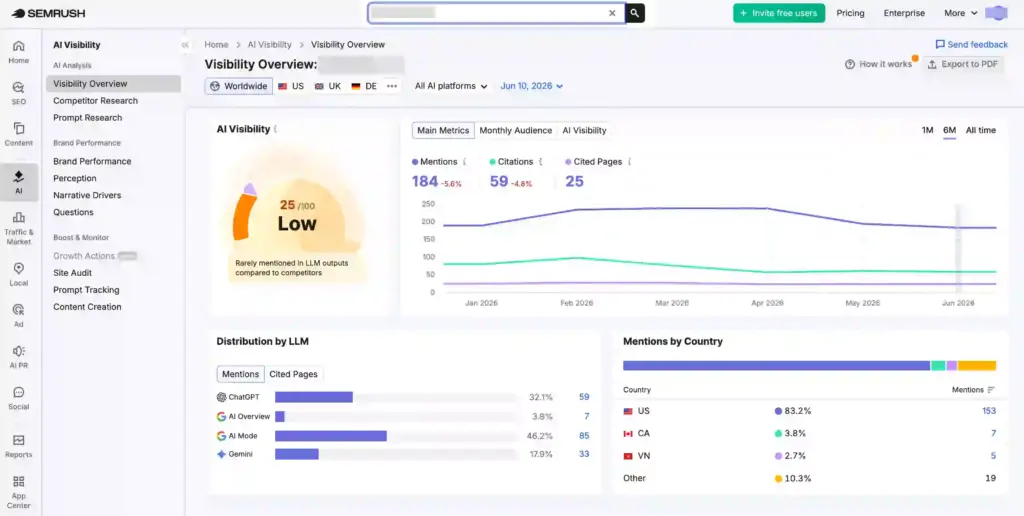
This is the tool I open when a client needs everything in one place. It puts the SEO toolkit, the local toolkit, and AI visibility tracking under one login, so you are not jumping between five tabs to get a full picture.
What I use it for: Competitor research, keyword research, listing management, local map rank tracking, and checking if a business shows up in AI answers. For an agency, that is a lot of daily work handled in one spot.
Why it matters for local SEO in 2026: It tracks how you show up inside AI Overviews, Google’s AI Mode, ChatGPT, and Gemini. You can even narrow that down to a specific area. When people find local businesses through AI and the map pack, that kind of tracking is hard to match.
Best for: Agencies and larger businesses that want one platform across organic, local, and AI search. If you are shopping for all-in-one local SEO agency tools, this is the heavy hitter.
Key strengths:
- AI visibility tracking down to a local level
- Local listings, map rank tracking, and GBP tools in one place
- Strong competitor and keyword research for local markets
Limitations: It is one of the pricier options, and the local toolkit is usually a paid add-on, billed per location. If you run a small business that just needs citations and GBP help, it is more than you will use.
My verdict: If you handle local SEO for several clients, this is a strong pick for your main platform. If you are a single small business, start small and grow into it.
2. Google Analytics 4
Google Analytics 4 is where you find out what happens after someone clicks. Local SEO does not end when a visitor lands on your page. It ends when they call, book, or fill out a form. GA4 shows you whether that happens.
What I use it for: Watching how visitors move through your local landing pages, which pages turn into calls and form fills, and where people quietly leave without doing anything.
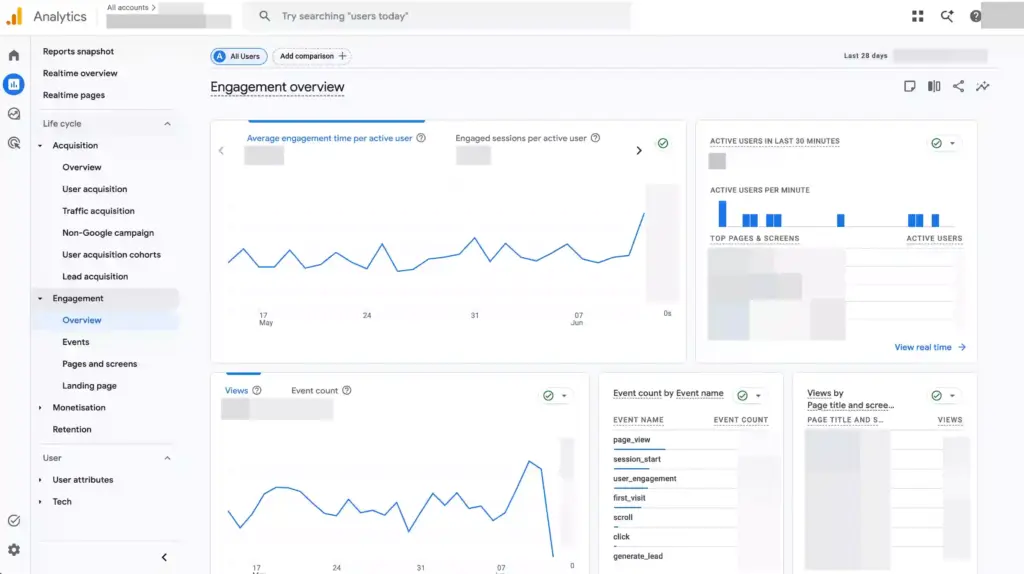
Why it matters for local SEO in 2026: Rankings and AI mentions bring people in. What they do next is the part that pays. A page can rank well and still lose every visitor, and GA4 shows you that gap, so you fix the page instead of chasing more traffic.
Best for: Anyone with a website, from a solo owner to an agency reporting to clients.
Key strengths:
- Conversion tracking for calls, forms, and clicks
- Landing page performance for your local pages
- See which channels actually bring your local visitors in
Limitations: The dashboard takes some getting used to, and clean, trustworthy reports need a bit of setup. Get your key events right, or the numbers will point you the wrong way.
My verdict: Not optional. GA4 is one of those local SEO tools every site should have running. Set it up properly once, save the views you use, and it quietly earns its place for good.
Special Tips: If your site is built with WordPress, learn how to add Google Analytics to your site so that you can monitor key metrics right from your dashboard.
3. BrightLocal
If you are serious about local SEO but do not want a giant marketing suite, BrightLocal is the one I point people to most. It was built for this exact job, and you feel that the moment you open it.
What I use it for: Tracking local rankings across the map pack, Maps, and organic results. Checking citations for NAP consistency. Running local audits and keeping an eye on reviews. Then, turning all of it into a report that a client can actually read.
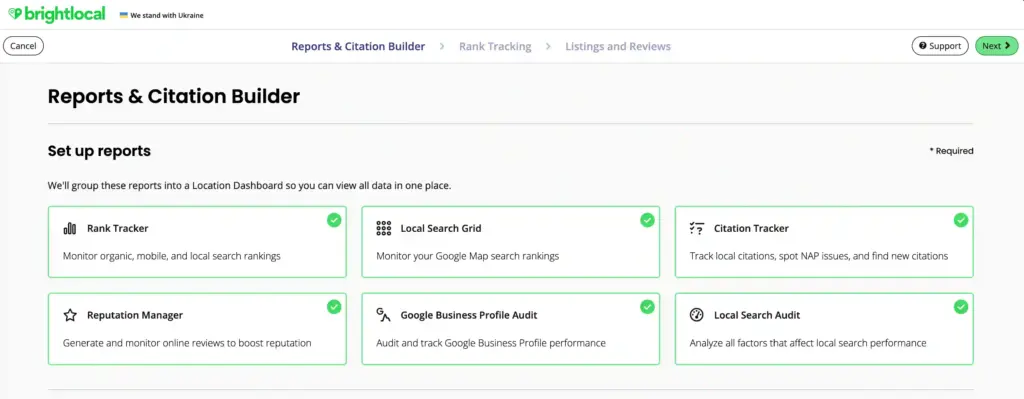
Why it matters for local SEO in 2026: It handles citations, reviews, and rankings in one place, so you are not stitching three tools together. If you run an agency, it doubles as one of the cleanest local SEO reporting tools around, and the white-label reports alone save you hours every month.
Best for: Agencies and multi-location businesses, plus any local business that wants one focused platform.
Key strengths:
- Local rank tracking with your competitors is shown side by side
- Strong local SEO audit tools, including a Google Business Profile audit that flags what to fix
- A citation builder that submits your business to directories, not just monitors them
Limitations: Some review features sit on higher plans, and the dashboard feels busy the first time you open it. It is also lighter on AI visibility tracking than Semrush One.
My verdict: The best dedicated local SEO platform for most agencies. If you only buy one paid local tool, this is the safe pick.
4. Google Search Console
This is the most underrated free tool in local SEO. People treat it as a technical checkbox when it is really a window into how Google sees your local pages.
What I use it for: This is usually my first stop on any local site. I look at which searches are actually bringing people in, how my local pages are holding up, and whether Google is struggling with any of them.
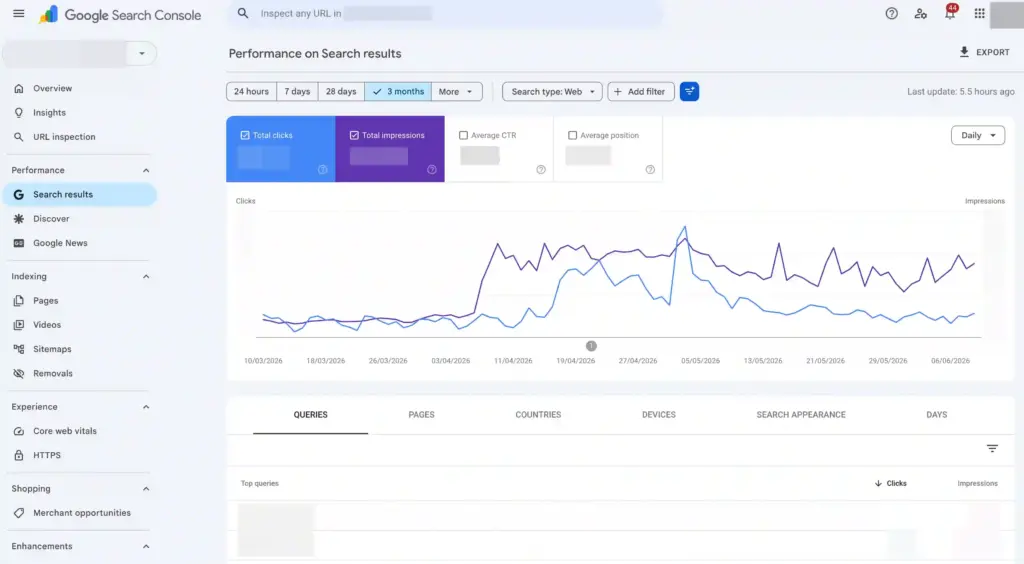
Why it matters for local SEO in 2026: If a page is not indexed, it cannot rank, and an AI engine cannot pull from it either. Search Console is where you confirm your local pages are visible at all. Google has also started adding AI performance data into the tool, so it keeps pace with how search works now.
Best for: Everyone with a website. This is a free essential.
Key strengths:
- Average position and click-through rate for each query, so you can spot pages that are ranking
- A URL inspection tool that tells you if a page is indexed and lets you request it
- Core Web Vitals reports that flag slow local pages before they drag down rankings
Limitations: Google hides some query data, especially for small sites with low traffic, so the smallest businesses see an incomplete picture.
My verdict: Run it from day one. Of all the Google local SEO tools, this is the one I check first.
5. WP Social Ninja
Your reviews only work if people see them. Most of them sit on Google, Yelp, or Facebook, away from the site where someone makes a decision. WP Social Ninja is a WordPress plugin that brings those reviews onto your own pages, where the audience can see them.
What I use it for: I use this plugin to show customer reviews from Google, Facebook, Yelp, Tripadvisor, and custom sources on a WordPress site so visitors can see them. It can also add a review schema snippet, so those reviews can support local rich results.
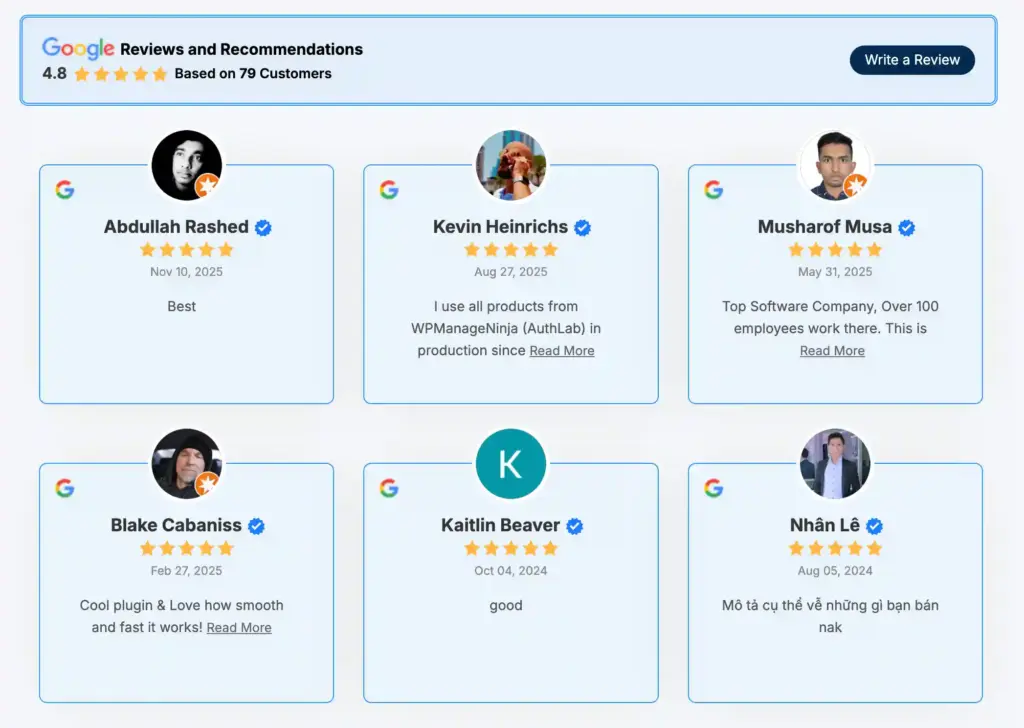
Why it matters for local SEO in 2026: Reviews are trust signals, and trust signals matter more now that AI helps decide who looks credible. About 97% of consumers regularly read online reviews when judging a local business. Getting those reviews onto your own pages, with schema, helps both your visitors and the systems reading your site.
Best for: WordPress agencies and businesses that want reviews and trust handled on the site itself.
Key strengths:
- An AI review summarizer that turns a wall of reviews into a short, readable summary
- Filters to feature your best reviews by star rating, or hide ones with certain keywords
- QR codes for collecting reviews from customers in person
Limitations: A few of its more advanced review features, like the AI summarizer, QR code creation, and schema snippet, sit in the Pro version.
My verdict: A strong fit for what it is built to do, which is turning reviews into visible trust on a WordPress site. If social proof management is a part of your core strategy, it is one of the simplest ways to put the reviews you have already earned where people can see them.
Win your customers’ hearts with exceptional features
Discover how WP Social Ninja can assist you in designing outstanding customer experiences.
6. Google Business Profile Insights
Your Google Business Profile is often the first thing a local customer sees. Insights is where you learn what they do with it. For a lot of small businesses, this is the most direct local data you will ever get.
What I use it for: When a client wonders whether their listing is pulling its weight, this is where I look. It shows me what people do after they find the profile, and which of those actions actually turn into business.
Why it matters for local SEO in 2026: Google Business Profile listing is the engine of local discovery, and it is where AI pulls from when someone asks for a business “near me.” Knowing how customers interact with it tells you where to spend your effort, like photos, categories, or getting more reviews.
Best for: Every local business with a physical location or a service area.
Key strengths:
- The exact search terms people used to find your profile
- Calls, direction requests, and website clicks are counted as they happen
- A breakdown by Google Search vs Google Maps, and desktop vs mobile
Limitations: The data is thin and only goes back about six months. Connect it to Looker Studio through the API, and you get far more history and detail.
My verdict: A must for any local business. Just do not expect deep analysis until you export the data somewhere with more room.
7. Localo
Localo takes a different angle from most tools here. Instead of dumping data on you and walking away, it tells you what to do next. If you are a busy owner, that is exactly what you need.
What I use it for: I point owners here when they want to improve their Google Business Profile but do not know where to start. It hands them a short list of tasks each week, tracks their local rankings, and pings them if the listing gets edited.
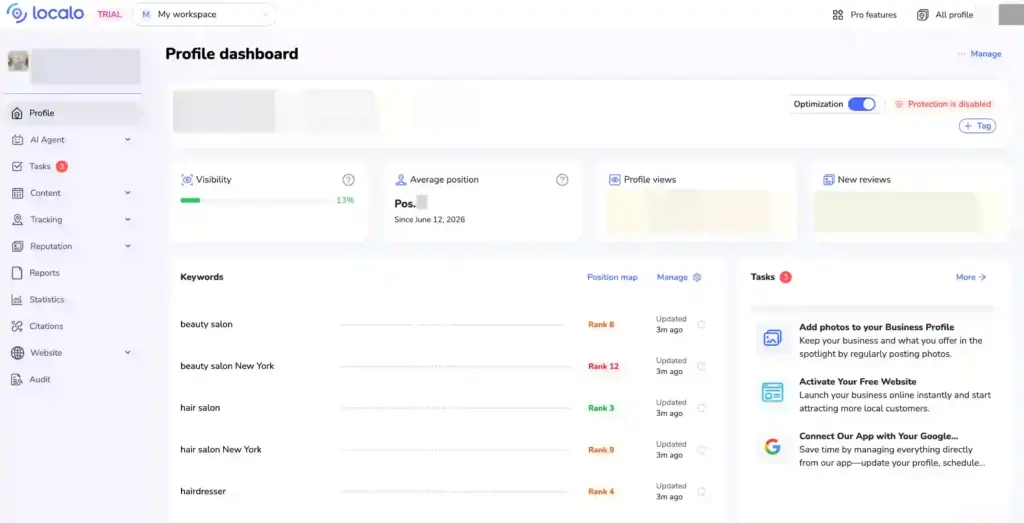
Why it matters for local SEO in 2026: Most small businesses do not lack data. They lack time and direction. A task-based tool turns local SEO into a short weekly to-do list, which is how the work actually gets done when there is nobody dedicated to it.
Best for: Solo owners and small teams who want guidance, not another dashboard. Localo is one of the friendliest local SEO tools for small businesses I have used.
Key strengths:
- AI help for writing Google posts and replying to reviews
- A view of how you rank against nearby competitors
- Keyword suggestions to work into your profile and posts
Limitations: It is focused on GBP, so it is lighter on citations and audits. One real caution. Google has become sensitive to automated profile changes, so read every suggestion before you publish it instead of applying changes blindly.
My verdict: A useful starting point for an owner-run business. Use it for direction, but keep a careful hand on anything it changes on your profile.
8. Whitespark
Whitespark has focused on local SEO for a long time, and the citation work is still the part I value most. Citations sound old-fashioned in an AI world, but they still help search engines, and AI tools tell one business from another.
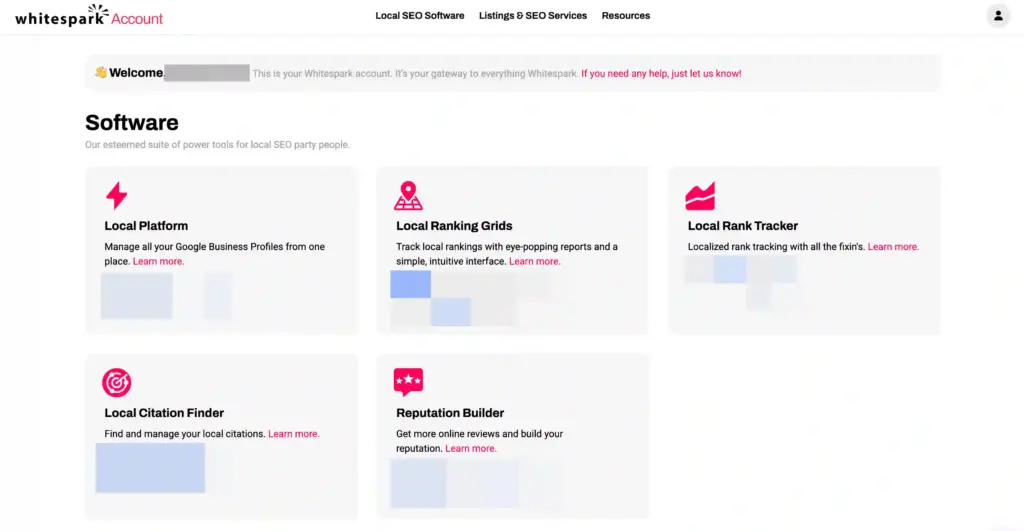
What I use it for: Mostly citations. I use it to find directories where competitors are listed, and I am not, check that my business details match everywhere, and track local rankings.
Why it matters for local SEO in 2026: Consistent listings across the right directories still build local authority, and even unlinked mentions help AI understand your business. The real value is on the discovery side, knowing where you should be listed but are not.
Best for: Businesses and agencies that still need to build local authority and clean up NAP data.
Key strengths:
- A done-for-you citation-building service, if you do not want to submit listings yourself
- Reputation Builder to request and keep track of customer reviews
- Google Business Profile management alongside the citation work
Limitations: Tools are sold separately, which adds up, and the interface feels dated next to newer platforms. Doing the submissions yourself is slow, so a lot of teams outsource that part.
My verdict: Worth it for the citation discovery if the local authority is a gap for you. For hands-off citation management, BrightLocal is the easier road.
9. Yext
Yext is the platform built for businesses that have outgrown manual listing management. It plugs into a huge network of directories, maps, and apps, and keeps your business details consistent across all of them.
What I use it for: Keeping a big brand’s details correct everywhere at once. When a business has 50 or 100 locations, Yext lets me push a single update across every directory instead of fixing each listing by hand.
Why it matters for local SEO in 2026: Clean, structured business data helps search engines and AI understand your locations and show them correctly in local search. At enterprise scale, the real-time sync saves you the lag of fixing listings one by one.
Best for: Multi-location brands, franchises, and enterprises with dozens or hundreds of locations.
Key strengths:
- A central Knowledge Graph that holds every business information in one place
- Location landing pages and a store locator built straight from your listing data
- Review monitoring and responses across every location in one place
Limitations: It is expensive and usually contract-based, which makes it overkill for a small or single-location business. Most SMBs get the same practical result from a cheaper tool.
My verdict: The right call once you are juggling many locations. Below, roughly twenty locations, look at BrightLocal or Moz Local instead.

Get exclusive social media marketing tips and tutorials in your inbox!
10. Moz Local
Moz Local is the budget-friendly way to keep your listings clean and consistent. It focuses on one job, listing management, and keeps it simple enough that anyone can run it.
What I use it for: Keeping a business’s details identical everywhere. I push the right name, address, and phone number out to directories and aggregators, then clear out the duplicate listings that confuse customers and search engines.
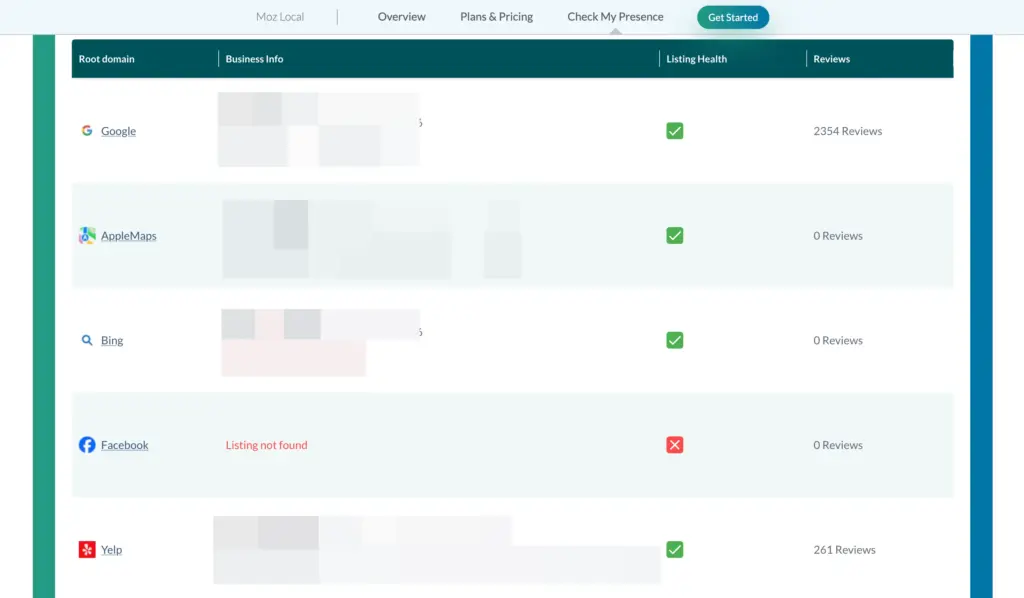
Why it matters for local SEO in 2026: When your name, address, and phone number do not match across the web, it quietly hurts your local trust and rankings. Keeping all of that clean is dull, behind-the-scenes work, and Moz Local takes care of it without anything complicated to learn.
Best for: Cost-conscious businesses that want consistent local data without a full platform.
Key strengths:
- Review monitoring across your listings, so you can reply from one place
- Posts you can publish to Google Business Profile and Facebook without logging into each
- Listing performance reports that show views and clicks over time
Limitations: It is less complete than BrightLocal or Semrush for deeper local work, and the per-location pricing adds up if you have several.
My verdict: A solid, low-fuss entry point for listing management. Move to something fuller when you also need rank tracking and audits.
11. Surfer
Surfer looks at the pages already ranking for your keyword and shows you what yours needs to compete with them. It points to the topics you are missing and how thorough the page should be. For local SEO, that is how you turn a thin service or location page into one strong enough to rank and get quoted by AI.

What I use it for: Making local pages worth ranking. I run service pages and location pages through Surfer so they cover the topic fully and read as relevant to both Google and AI.
Why it matters for local SEO in 2026: AI answers quote content that is clear, well-organised, and useful. Thin location pages do not get cited. Surfer helps you build pages that have a real shot at being the source an answer pulls from.
Best for: Content teams and anyone publishing a steady stream of local and service pages.
Key strengths:
- A real-time content score that updates as you write, based on the pages already ranking
- Term suggestions that tell you which words to include, and roughly how often
- An audit tool that grades an existing page and lists what to fix
Limitations: It does nothing for rank tracking, citations, reviews, or GBP. It only helps if you are creating content, and it is only as good as the strategy behind it.
My verdict: Optional. It is worth it if local content is part of your plan, and easy to pass on if you are not publishing pages regularly.
12. Ahrefs
Ahrefs is my daily research tool. It is built for competitive research, and in a crowded local market, that is exactly what helps you see why rivals outrank you and how to catch up.
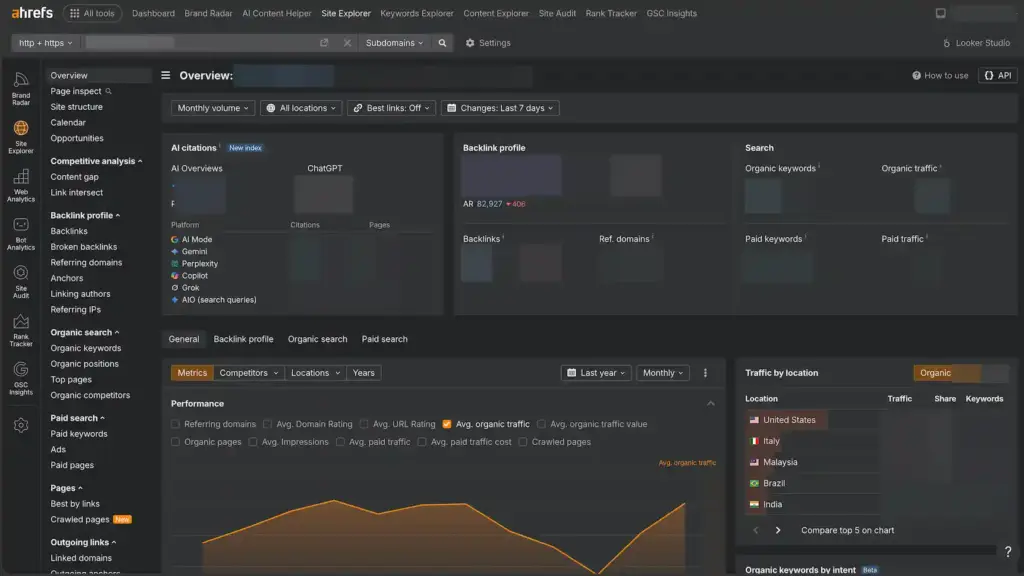
What I use it for: Mostly competitor research. I look at where rivals earn their backlinks and local mentions, find the location keywords they rank for and I do not, and size up new keyword ideas.
Why it matters for local SEO in 2026: In a competitive market, knowing where your rivals get their authority tells you what to build next. The link intersect, and content gap features turn a vague “they keep outranking us” into a concrete target list.
Best for: Agencies and businesses in competitive local markets that need real research depth.
Key strengths:
- One of the largest and fastest-updating backlink databases anywhere
- A site audit that flags technical problems holding your local pages back
- Keyword difficulty scores so you know which local terms are realistic to target
Limitations: It has no listing management, review monitoring, or GBP features, and its volume data is country-level rather than city-level, which is a real drawback for local work. There is also a learning curve.
My verdict: Excellent for the research side of local SEO, not for running the campaign itself. Pair it with a dedicated local tool.
13. Local Falcon
Local Falcon does one thing, and it does it better than anyone. It checks your Google Maps ranking from many points across your area and turns the results into a color-coded map. You see at a glance where you rank well and where you do not.
What I use it for: Spotting exactly where I win and where I lose. The map shows the streets where a client ranks on top and the ones where a competitor takes over, so I know where to focus next.
Why it matters for local SEO in 2026: Local rankings shift block by block, and a single “you rank third” number hides that. The visual heatmaps make it obvious where to focus, and they are far easier to show a client than a table of positions.
Best for: Local businesses and agencies that need precise, location-level rank data.
Key strengths:
- Scheduled scans that track how your rankings shift over time, not just today
- Share of Local Voice, a single score for how visible you are across the whole area
- Apple Maps tracking, which most tools ignore
Limitations: It is rank tracking only, with no citations or review management, and the credit-based pricing can climb if you have several locations and scan often.
My verdict: The best tool for understanding your local rankings geographically. Add it once a single ranking number is no longer enough, and you need to see the map.
Free vs paid local SEO tools: what should you actually use?
Start free, and pay only when you outgrow it. For a single small business, free local SEO tools cover more than most people expect.
Google Business Profile shows how customers find you. Search Console shows how you rank. Analytics 4 shows what people do once they reach your site. Learn those three first, and do not spend a cent until they stop being enough. Paid tools earn their place when the free ones cannot keep up.
Start paying once you need one of these:
- Clear, client-ready reports instead of manual screenshots
- Tracking across more than one or two locations
- Citation and NAP cleanup at scale
- Real backlink and keyword research on competitors
- Review management across several platforms
- White-label reports for agency clients
- Geo-grid rank tracking down to the street
- AI visibility tracking across AI Overviews and chat assistants
The most common mistake I see is paying for power you are not ready to use. Buy the paid tool when a free one is holding you back, not a day before.
Build the local SEO setup that fits you
You came here unsure which local SEO tools were worth your time. Now you know what each one is for, and that you never needed all thirteen. You needed the few that fit how you work.
That clarity matters more in 2026 than ever. Local SEO is not just about ranking now. It is about showing up across search, maps, and AI answers, and being trusted enough to get picked.
So do not chase the biggest collection. Pick the four or five tools that fit your business and add more only when something holds you back. Do that, and you will show up right where your customers are looking.

Subscribe To Get
Weekly Email Newsletter
Connect, Customize, and Display Social Feeds, Reviews, and Chat widgets


Trending Posts
-

-
 Mashfik Upal Aumy
 -
 Mashfik Upal Aumy






Leave a Reply