

WP Social Ninja 4.5.0: 5 New Review Layouts, 4 New Badges, RTL Support, and More


Social proof only works when visitors actually notice it, and the right way to show a review changes from page to page. A sales page wants one review up top. A footer wants a quiet scroll. A shop wants a compact badge. WP Social Ninja 4.5.0 gives you a format for each, with less setup to get there.
So this version gives you more ways to show the same social proof, with less setup. Reviews get three new layouts. Your Instagram feed gets new templates, a List layout, and one-click color schemes, with five features moving from Pro to free.
There are two new notification popups and four new badges. AI review summaries now run on WordPress’s own AI connection, with no separate API key.
TL;DR:
- Three new review layouts: Feature Grid, Score Slider, and Marquee (Pro).
- New free Instagram looks: Author Card, Author Bar, the List layout, an Inline header, and Color Scheme presets.
- Five Instagram features moved from Pro to free, including the Follow button and header counts.
- Two new notification popups: Review Spotlight and Rating Pulse (Pro).
- Four new review badges, Badges 3 to 6 (Pro).
- AI review summaries now run on WordPress’s own AI connection, with no separate API key (Pro).
- Trustpilot and Booking.com reviews work again, and the template editor is faster (Pro).
Trustpilot and Booking.com reviews work again, and the template editor is faster. Most of 4.5.0 is about where your social proof shows up, and how little setup it takes to get there.
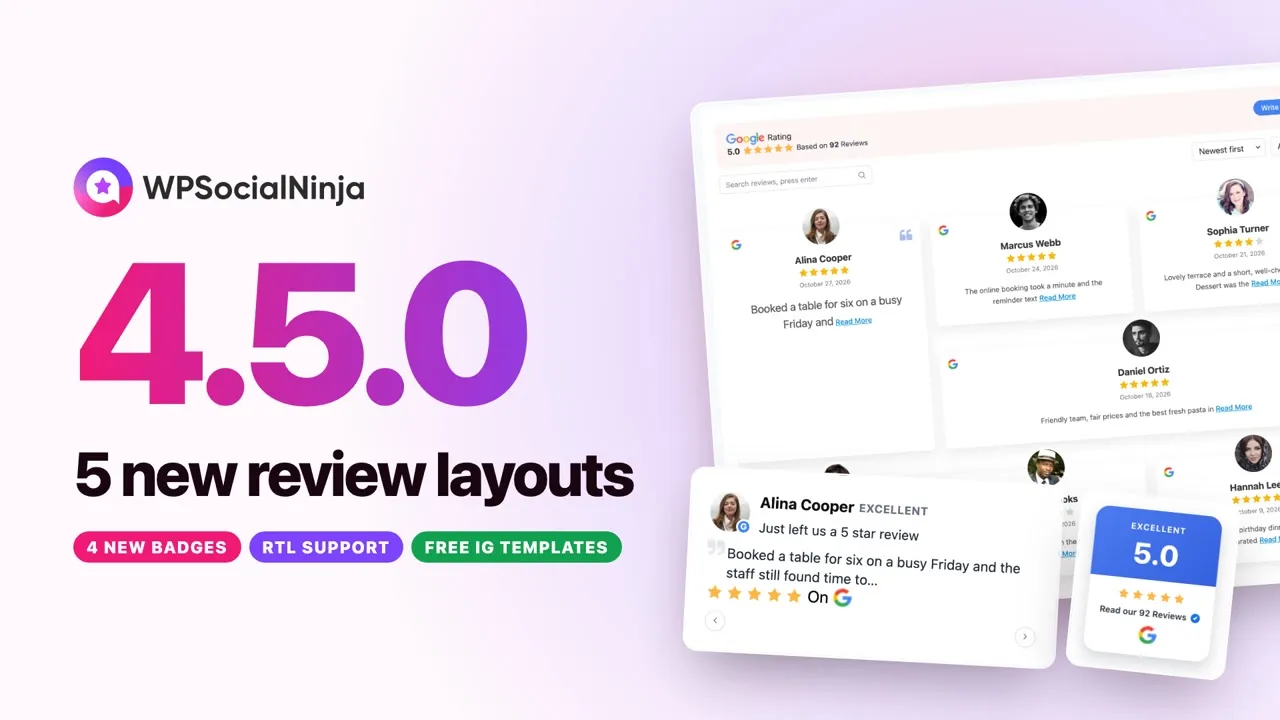
Three new ways to lay out your reviews
Every reviews template now offers three new layout styles. Each one gives the same reviews a different job on the page. All three are part of WP Social Ninja Pro.
Feature Grid
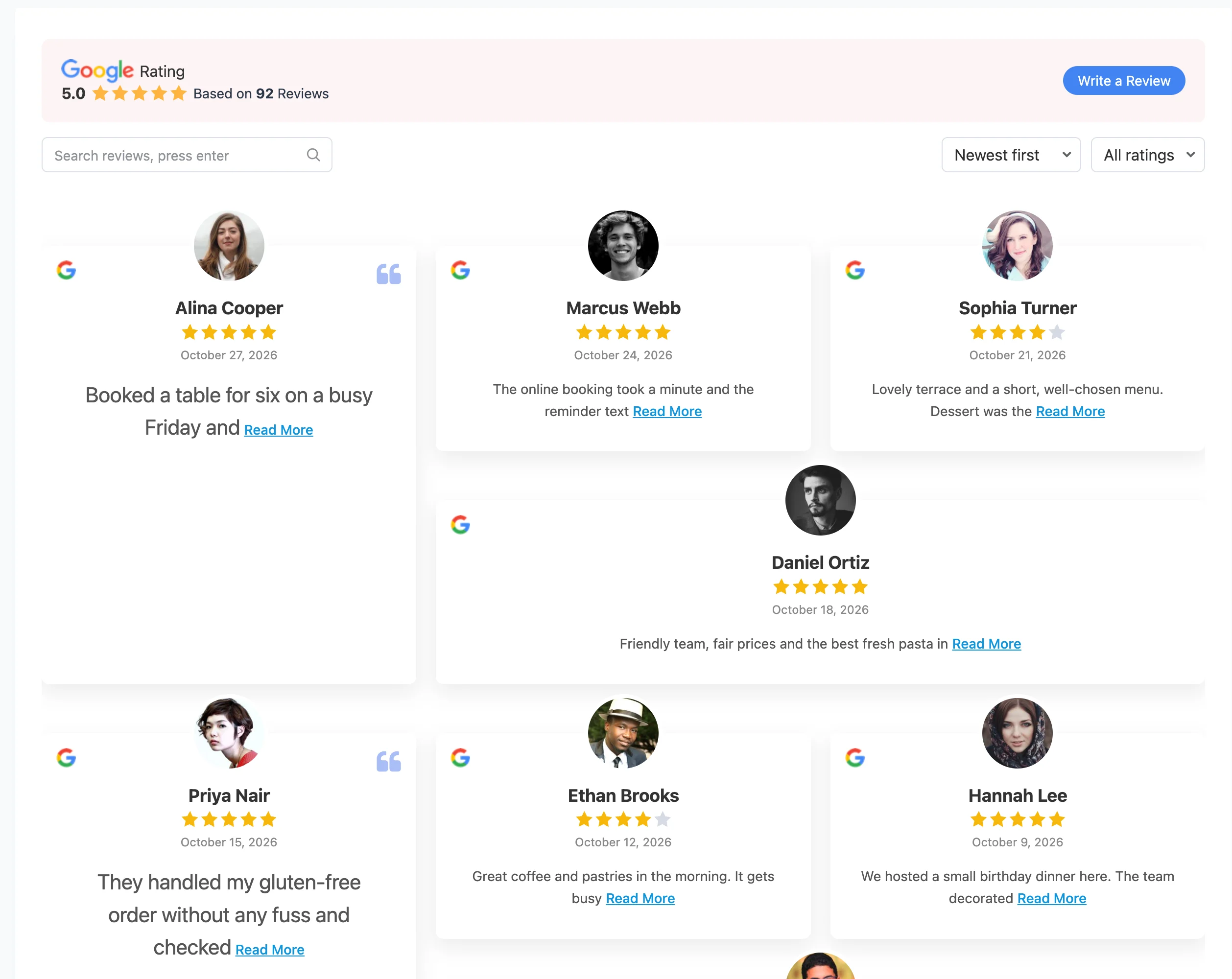
Feature Grid puts one review in a large card and arranges the rest around it. Use it when one review tells your story best. It works well near the top of a sales page.
Score Slider
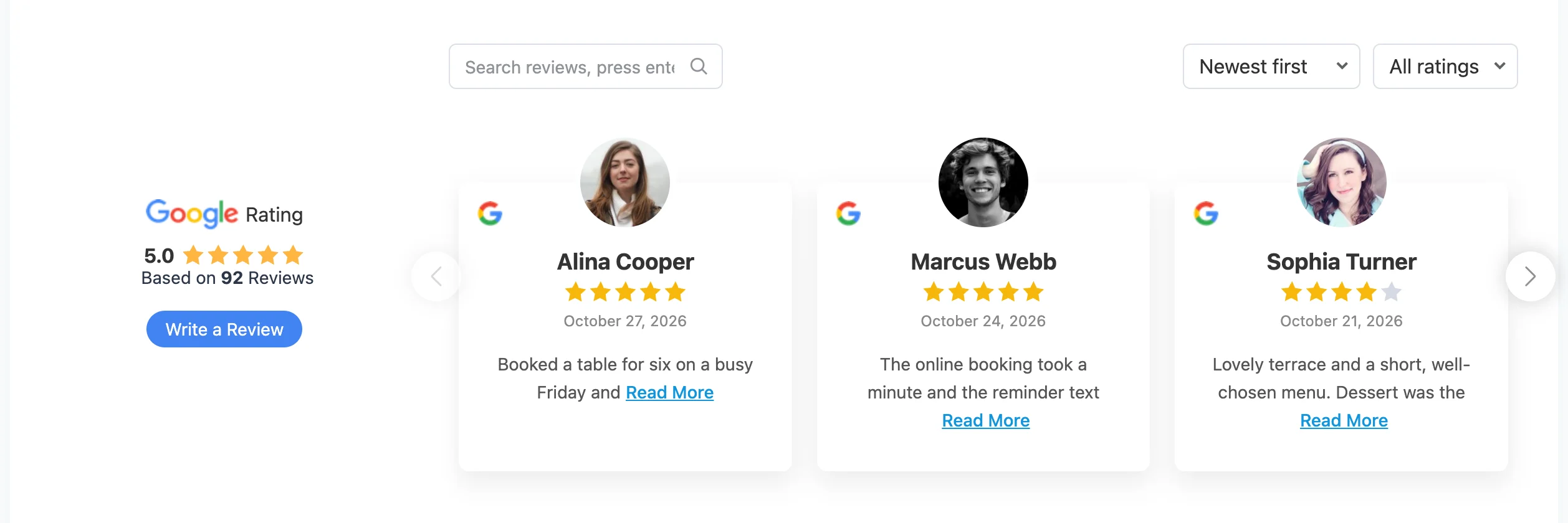
Score Slider pins your overall rating to the left of a review slider. Visitors see the score first, then the reviews behind it. The slider edges now fade out softly instead of cutting card shadows off.
Marquee
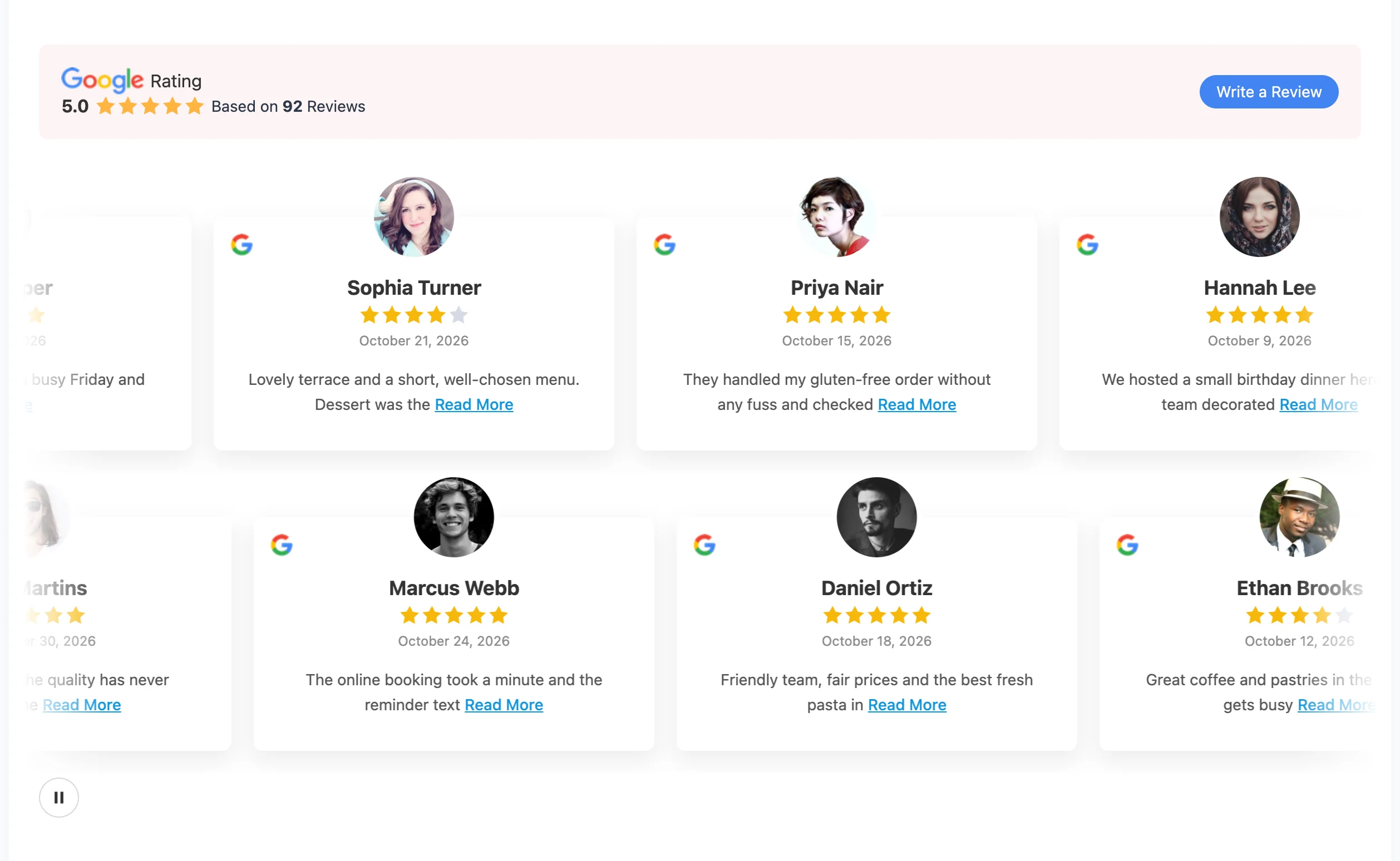
Marquee scrolls your reviews in a continuous stream. It suits a homepage band or a footer, where visitors glance rather than read. A pause button lets anyone stop the motion and read a review at their own pace.
How to Use Them
Open any reviews template and pick a Layout Type. Feature Grid and Score Slider appear as styles for the Grid and Slider layouts. Marquee is its own Layout Type. Your platforms, filters, and styling carry over unchanged.
New looks for your Instagram feed (Free)
Your Instagram feed gets new templates, a new layout, and a new header. All of it is in the free plugin.
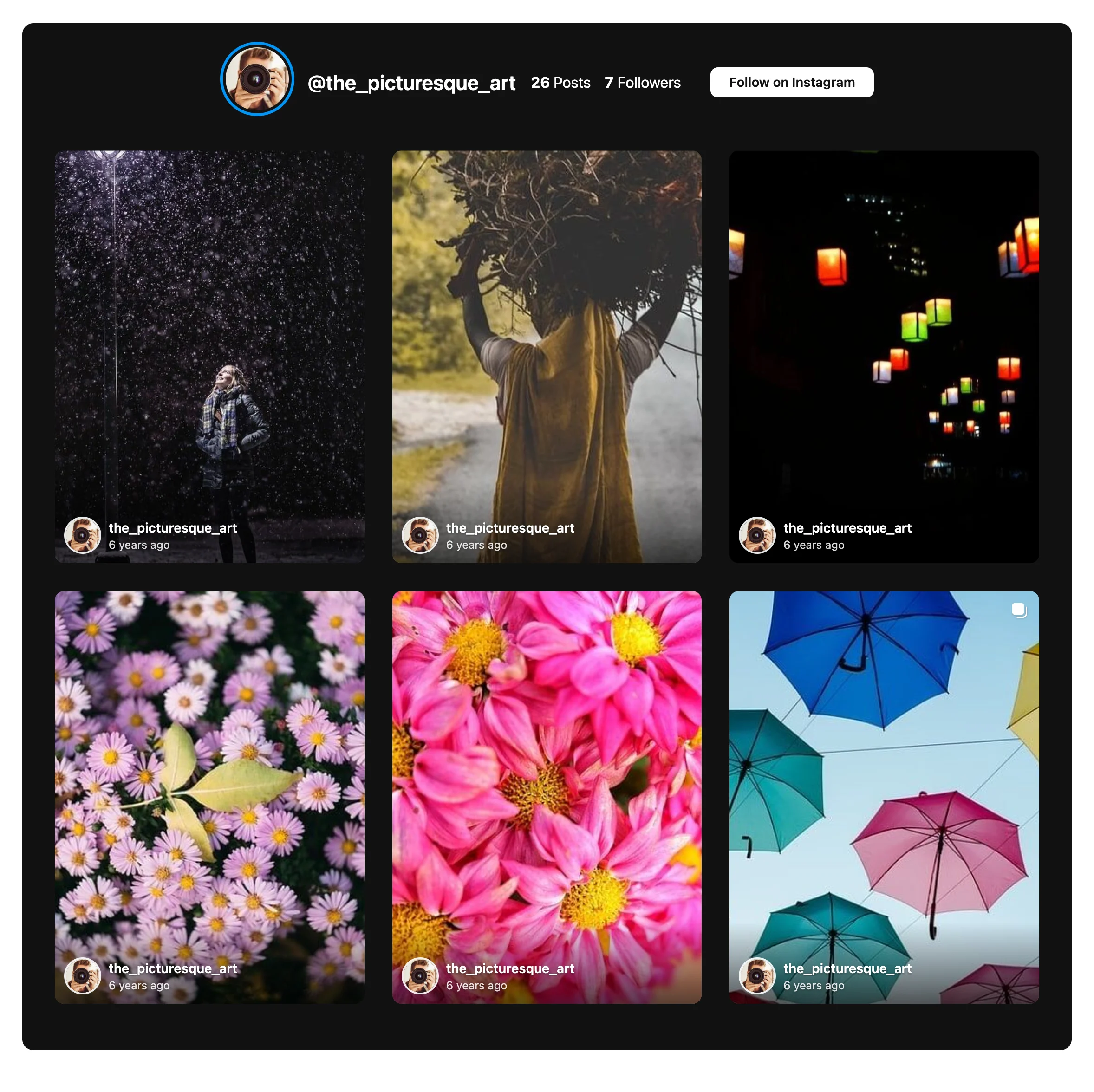
- Author Card shows the account’s avatar, username, and post time under each photo.
- Author Bar lays that same row over the photo and hides it on hover.
- The List layout shows one post per row. Card templates put the photo beside the text.
- The Inline header puts the avatar, username, counts, and Follow button in one centered row.
- Color Scheme presets give the feed a Light, Dark, Card Shadow, Soft Background, or Bordered look in one click.
Light is the default scheme, so existing feeds keep their look. The new templates and the List layout also appear in the onboarding wizard.
More Instagram Features (Now Free)
Five Instagram features that used to need Pro now work in the free plugin:
- The Follow button, with the text “Follow on Instagram”. Custom button text and position stay in Pro.
- Header counts for posts and followers.
- The post date, with its own Display Date switch.
- Random post order. Most Popular and Least Popular stay in Pro.
- Caption trimming after a set number of words.
Show off a single review, or your whole rating
Notification popups now come in two new styles. Both are part of WP Social Ninja Pro.
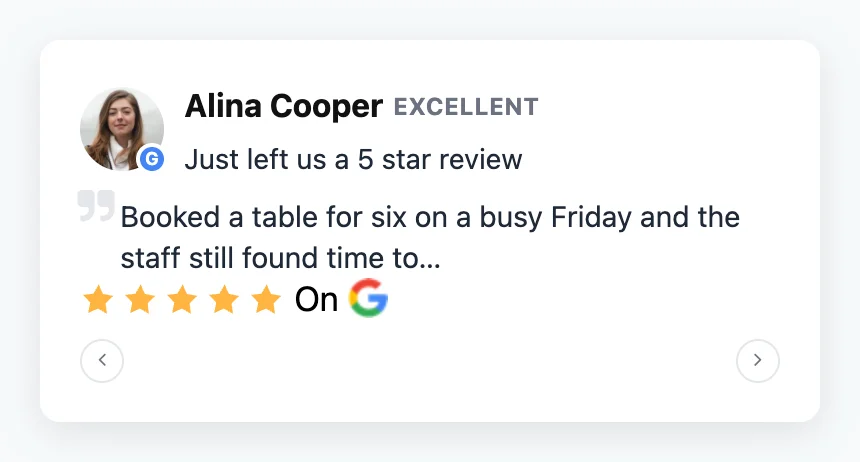
Review Spotlight puts one review front and center. It shows the reviewer, a quality label such as Excellent, and the review text. Visitors can step through your reviews with the arrows.
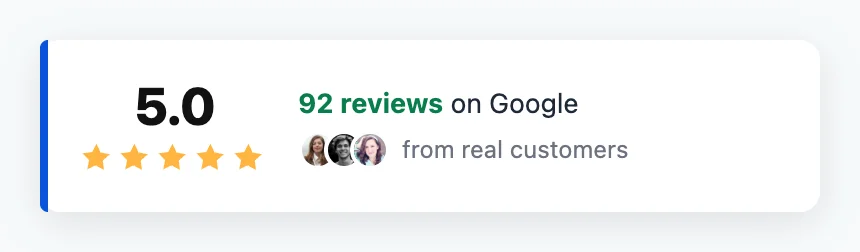
Rating Pulse shows your overall score, your review count, and a few reviewer faces. It appears once and stays put. When the popup combines several review sources, it shows a small logo for each one.
Kinder to Your Visitors
We also made every notification popup more polite:
- It pauses while the browser tab is hidden.
- It stays closed once a visitor closes it.
- It respects the visitor’s reduced-motion setting.
- It works fully with the keyboard.
Four new review badges
Badges are the smallest piece of social proof on your site, so they need to fit anywhere. Badges 3 to 6 give you four new shapes. All four are part of WP Social Ninja Pro.
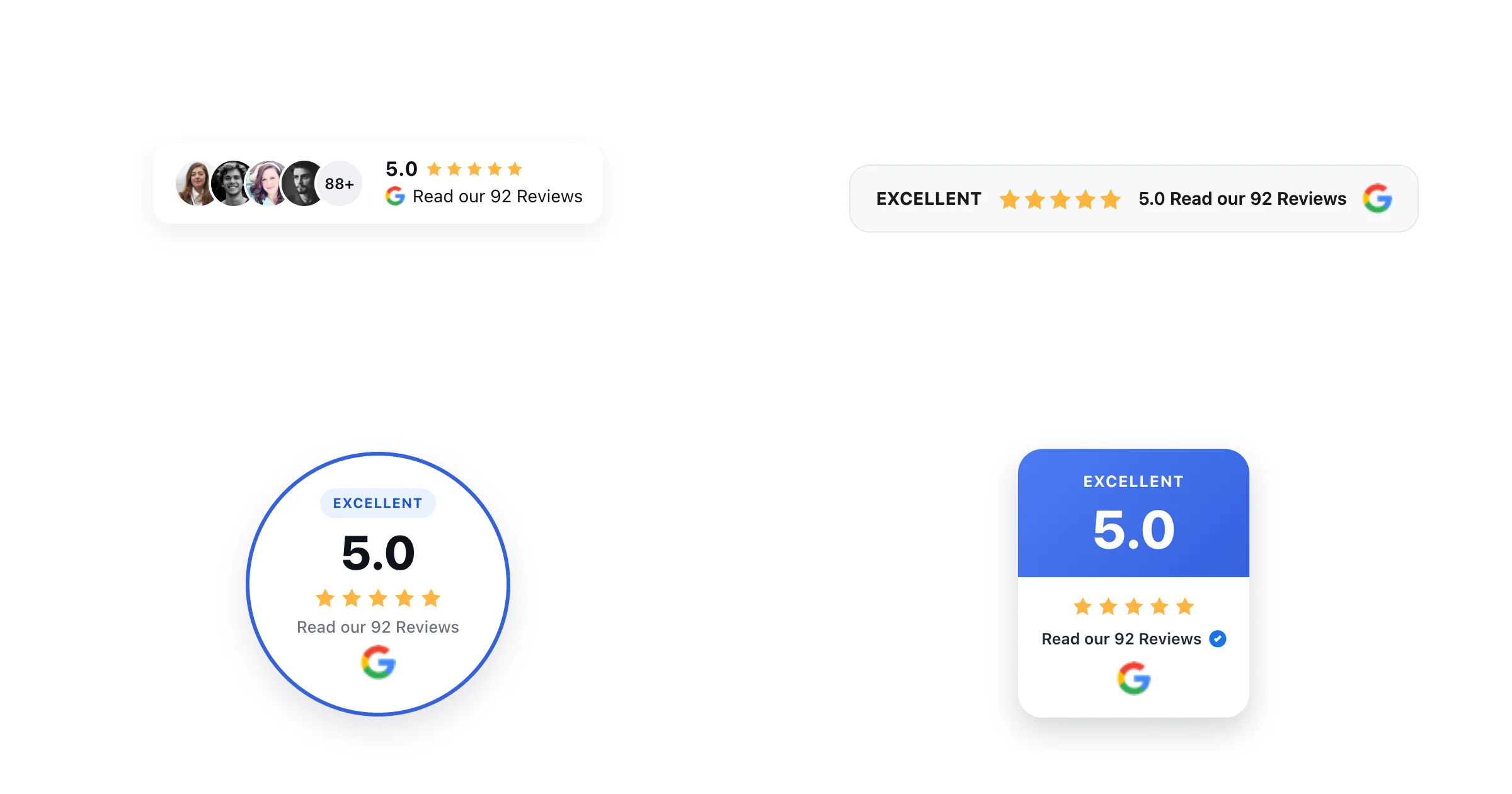
- Badge 3 stacks reviewer photos next to your rating.
- Badge 4 is a slim score strip for headers and footers.
- Badge 5 is a round sticker.
- Badge 6 is a rounded-square sticker with a bold score panel.
The Badge Style tab now shows only the controls your chosen layout uses. It also adds Quality Label, More Reviews Count, and Header Band controls.
Right-to-left (RTL) support
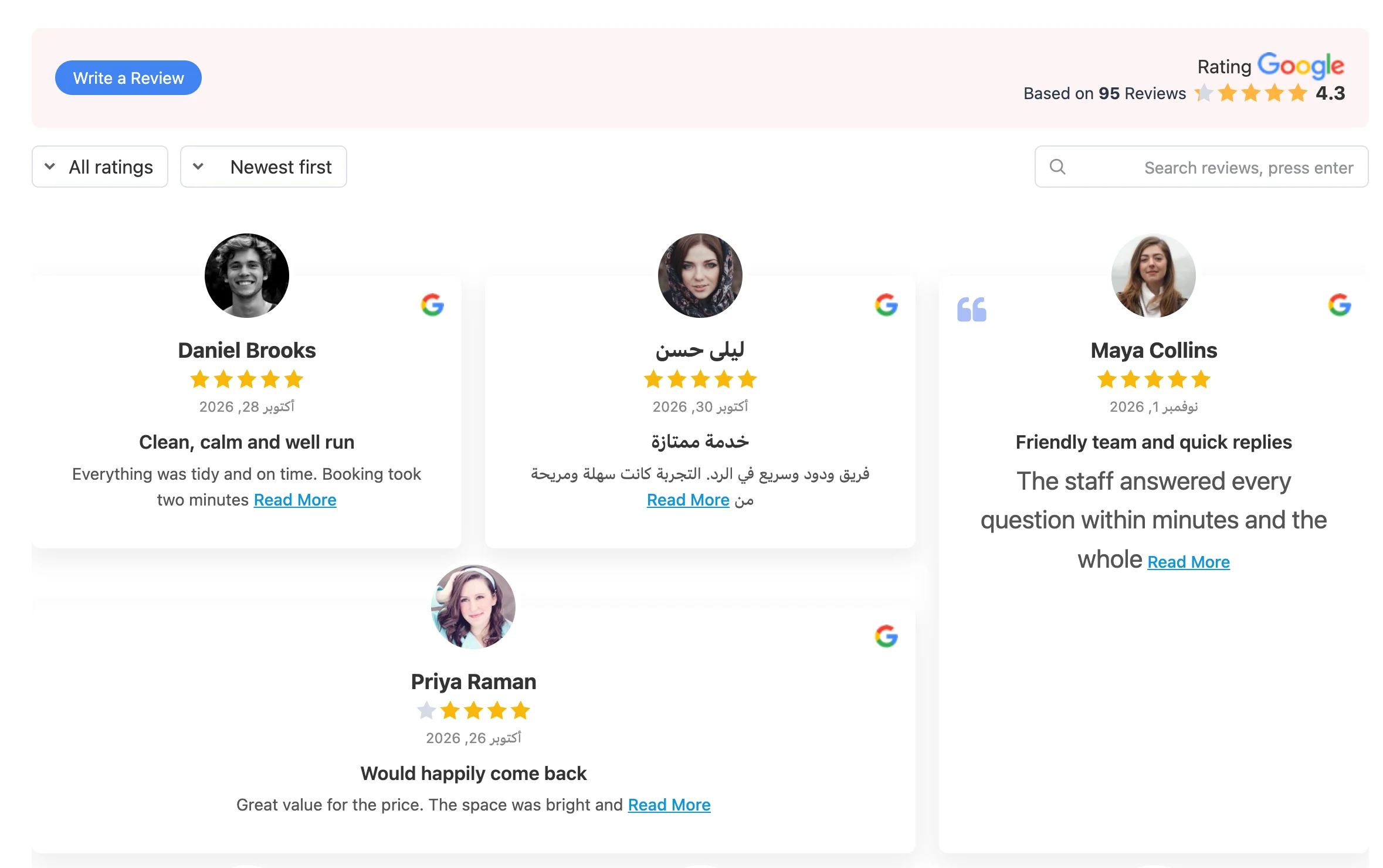
WP Social Ninja now works in Arabic, Hebrew, Persian, and other right-to-left languages. On an RTL site, every review template, feed, badge, popup, and chat widget reads from right to left.
What It Covers
- Mixed languages read correctly. An English review on an Arabic site keeps its word order. So do names, @handles, hashtags, and emoji.
- Your chosen corners stay put. A chat bubble, notification popup, or badge you place bottom-left stays bottom-left.
- Page builders follow. Elementor and Beaver Builder widgets mirror too, including Elementor spacing controls.
- The admin mirrors. If your WordPress profile language is RTL, the WP Social Ninja admin and its editor previews mirror as well.
There is nothing to set up. WP Social Ninja picks the direction from your site and profile language.
Summarize reviews with WordPress AI
AI review summaries no longer need their own API key. Sites on WordPress 7.0 or later can pick WordPress AI as the AI platform. WP Social Ninja then uses the AI connection you already set up in WordPress. This is part of WP Social Ninja Pro.
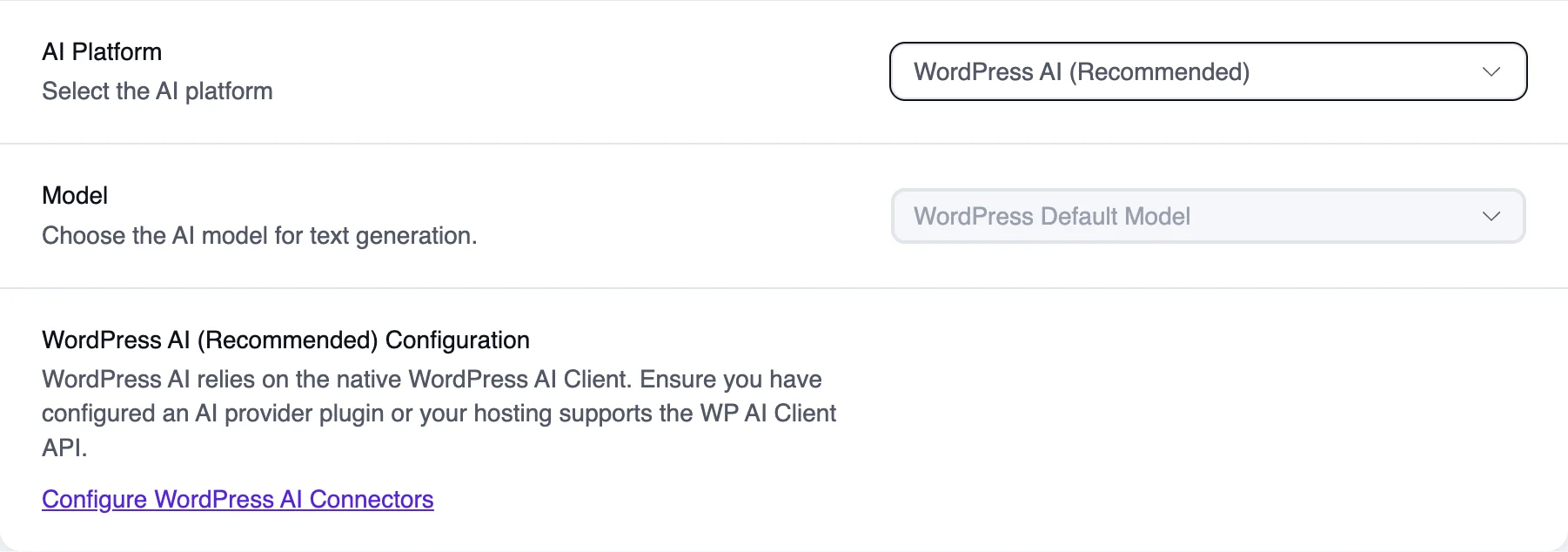
Prefer OpenAI or OpenRouter? Both are still there. The model list now has the latest models. It also marks models that providers no longer support, so you know when to switch.
We also fixed a bug that could break pages with an AI summary. If your AI provider stopped offering the model you picked, those pages stopped loading. Now WP Social Ninja switches to another model, and your summaries keep working.
A quicker, more forgiving template editor
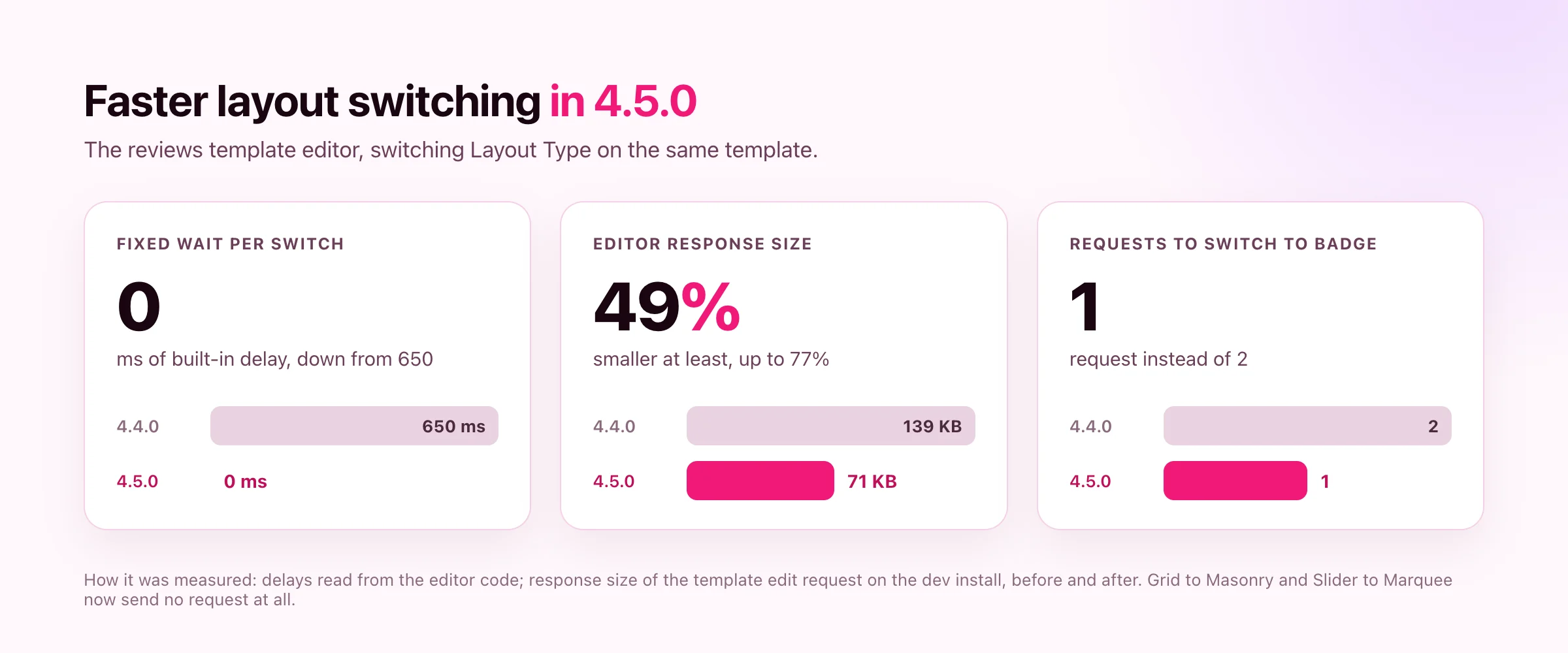
Switching Layout Type in the reviews editor used to wait about 650 ms on every switch before doing anything. That wait is gone. Grid to Masonry and Slider to Marquee no longer ask the server for anything. When the editor does need fresh reviews, the response is at least 49% smaller.
The preview also keeps up with you now. Change several settings while it loads, Minimum Rating included, and it keeps all of them.
Reset All Styles
Went too far with the styling? The Style tab now has a Reset All option at the top. It puts every style on the template back to the platform’s defaults, and the preview updates right away. Nothing changes on your site until you click Save.
Reset All works in the Reviews, Facebook, Instagram, TikTok, Twitter, and YouTube editors. It is part of WP Social Ninja Pro.
Trustpilot and Booking.com reviews work again
Trustpilot and Booking.com reviews work again. We now fetch these reviews through our own service. Each sync collects the latest 20 reviews, and auto sync keeps adding new ones over time, so your review count grows. Booking.com now imports reviews in every language, too. This is part of WP Social Ninja Pro.
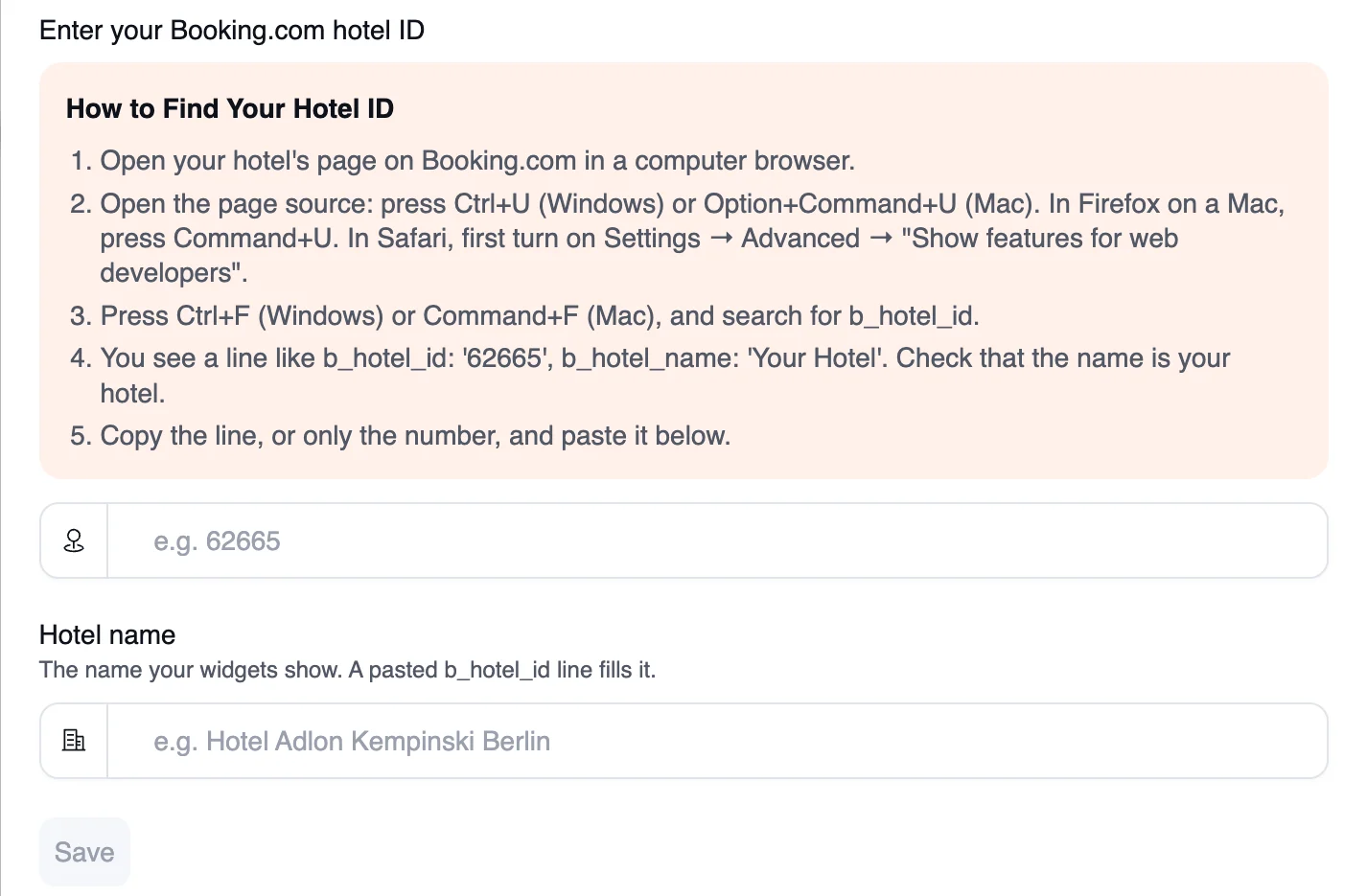
You now connect a Booking.com property with its hotel ID. The connection form walks you through finding it in five short steps. Paste the number, or paste the whole line from the page source. That line fills in the hotel name too.
Connecting a hotel you saved before? WP Social Ninja asks which saved property it replaces, so your templates keep working.
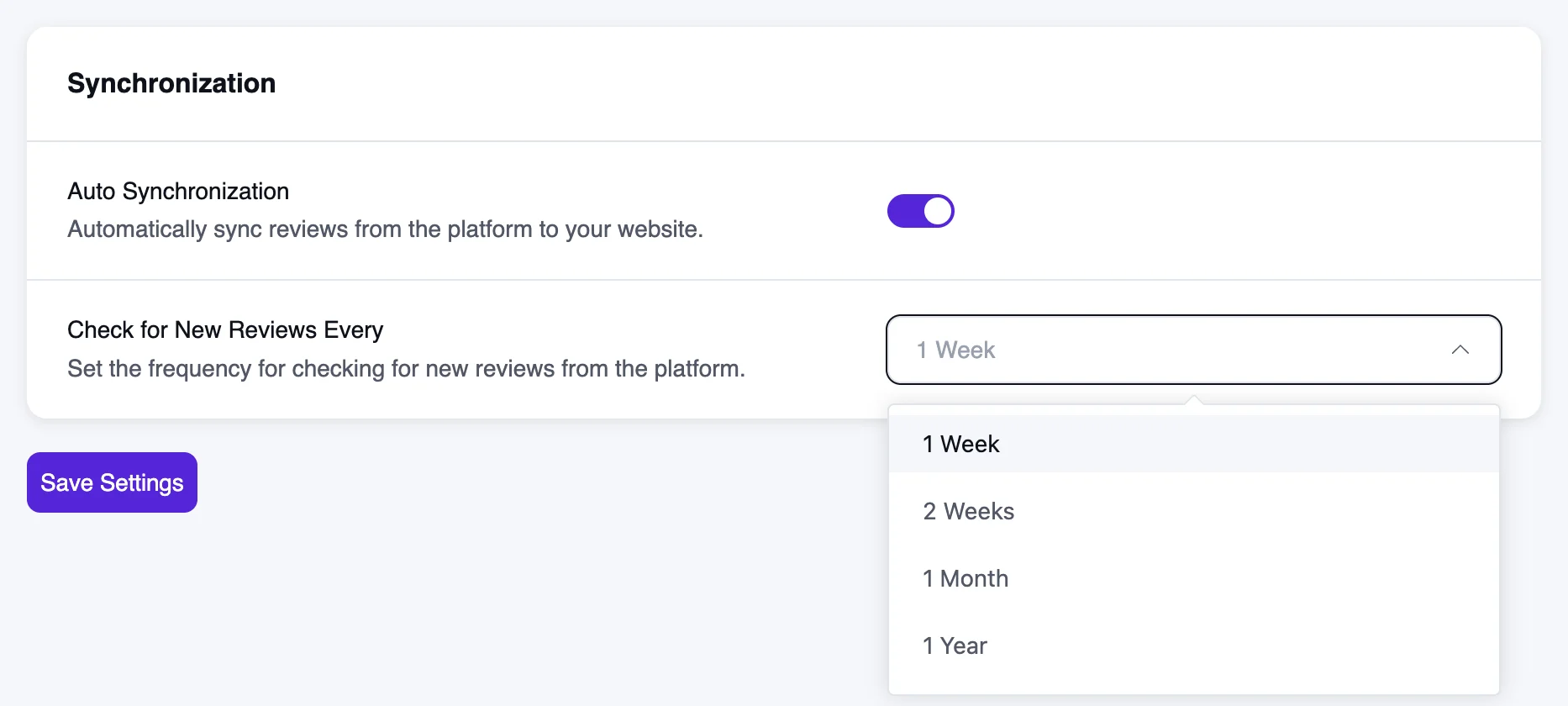
The shortest sync interval for these two platforms is now one week. You don’t need to do anything. If your site checked more often, WP Social Ninja moves it to one week on its own.
Bug Fixes and Performance Improvements
Performance and Improvements
- Set Up Review Hub for WooCommerce and FluentCart now creates its template with the Polaris skin.
- Instagram connections now renew their access tokens automatically before they expire at 60 days.
- The chat widget’s front-end script no longer loads jQuery and starts up about 37% faster.
- Upcoming YouTube live streams now show a “Scheduled for” label on the front end.
- The mobile Number of Posts in the feed editors follows desktop until you change it.
- The templates page shows a single Add Template button when only one template type is available.
- Google and Facebook review syncing now loads every page up to your review limit, keeps older saved reviews, and gives large syncs more time to finish.
- Review templates no longer slow down pages with many reviews.
Bug Fixes
- Fixed issues found during our internal security audit.
- Fixed Instagram masonry layouts showing every post at the same height.
- Fixed Instagram Classic Grid caption links on the hover overlay and the Caption Card row gap.
- Fixed a placeholder avatar in the Instagram header for feeds made in onboarding.
- Fixed custom source names and logos in grid templates and badges.
- Fixed Facebook feed cards losing rounded corners and shadows with Columns Gap set to No Gap.
- Fixed duplicated reviews losing their categories.
- Fixed image optimization touching images from other platforms.
- Fixed the badge printing its template ID without Pro.
- Fixed badge colors and typography from the Style tab not applying when Button Source Type is None, Page, or Custom URL, and the Rating Title style not applying to Badge 2 (Pro).
- Fixed admin screens opening at the previous page’s scroll position.
- Fixed dark mode colors, missing translations, and a settings page crash in the admin.
- Fixed plugin data cleanup on uninstall when some tables are missing.
What’s New in WP Social Ninja 4.5.0
WP Social Ninja 4.5.0 gives your reviews and photos more places to shine, with less setup.
Try the new layouts and tell us which one you use. Drop by our WP Social Ninja Community, share what’s working, and share what isn’t. If WP Social Ninja is helping your business, leaving a review on WordPress.org means a lot to us.
Win your customers’ hearts with exceptional features
Discover how WP Social Ninja can assist you in designing outstanding customer experiences.
Until then, keep collecting reviews, keep building trust, and let WP Social Ninja handle the rest.
Full Changelog
Free
- Added List layout, Author Card and Author Bar templates, an Inline header layout, and Color Scheme presets for Instagram feeds.
- Enabled the Instagram Follow button, header counts, post date, random post order, and caption trimming for free users.
- Improved Instagram connections to renew access tokens automatically before they expire.
- Improved Google and Facebook syncing to load every page up to the review limit and keep older saved reviews.
- Improved the chat widget to load about 37% faster without jQuery.
- Improved notification popups to pause in hidden tabs, remember dismissals, respect reduced motion, and work with the keyboard.
- Improved the editors: faster Layout Type switching, a preview that keeps every setting, and a mobile Number of Posts that follows desktop.
- Added right-to-left (RTL) support for Arabic, Hebrew, Persian, and other RTL languages, on the front end and in the admin.
- Moved Custom Feed for TikTok to a new TikTok app. The old TikTok app will be deleted on December 15, 2026, so TikTok accounts connected before this update must be reconnected to keep their feeds updating.
- Fixed issues identified during the internal security audit.
- Fixed review templates slowing down pages with many reviews.
- Fixed custom source names and logos in grid templates and badges.
- Fixed Instagram masonry post heights, Classic Grid caption links, and the placeholder header avatar.
- Fixed Facebook feed grid cards losing rounded corners and shadows with No Gap.
- Fixed the badge printing its template ID without Pro.
- Fixed duplicated reviews losing their categories.
- Fixed image optimization affecting images from other platforms.
- Fixed admin dark mode colors, missing translations, scroll position, and a settings page crash.
- Fixed plugin data cleanup failing on uninstall when some tables are missing.
Pro
- Added Feature Grid, Score Slider, and Marquee review layouts, plus Review Spotlight and Rating Pulse notification popups. (Pro)
- Added Badges 3 to 6: an avatar stack, a score strip, and circle and rounded-square stickers. (Pro)
- Added WordPress AI (WordPress 7.0+) as an AI review summary provider, and updated the model list with the latest models. (Pro)
- Added Reset All to the Style tab of the Reviews, Facebook, Instagram, TikTok, Twitter, and YouTube editors. (Pro)
- Added Booking.com connection by hotel ID. Booking.com now imports reviews in every language. (Pro)
- Added a “Scheduled for” label to upcoming YouTube live streams. (Pro)
- Improved Trustpilot and Booking.com syncing so reviews work again. Each sync adds the latest 20 reviews, with a minimum interval of 1 week. (Pro)
- Improved the badge Style tab to show only relevant controls, and added Quality Label, More Reviews Count, and Header Band controls. (Pro)
- Improved Set Up Review Hub for WooCommerce and FluentCart to use the Polaris skin. (Pro)
- Fixed a fatal error in AI review summaries when a provider retires the selected model. (Pro)
- Fixed badge styles not applying in some cases. (Pro)
- Fixed custom styles clashing when several widgets share a page. (Pro)

Subscribe To Get
Weekly Email Newsletter
Connect, Customize, and Display Social Feeds, Reviews, and Chat widgets






Leave a Reply