

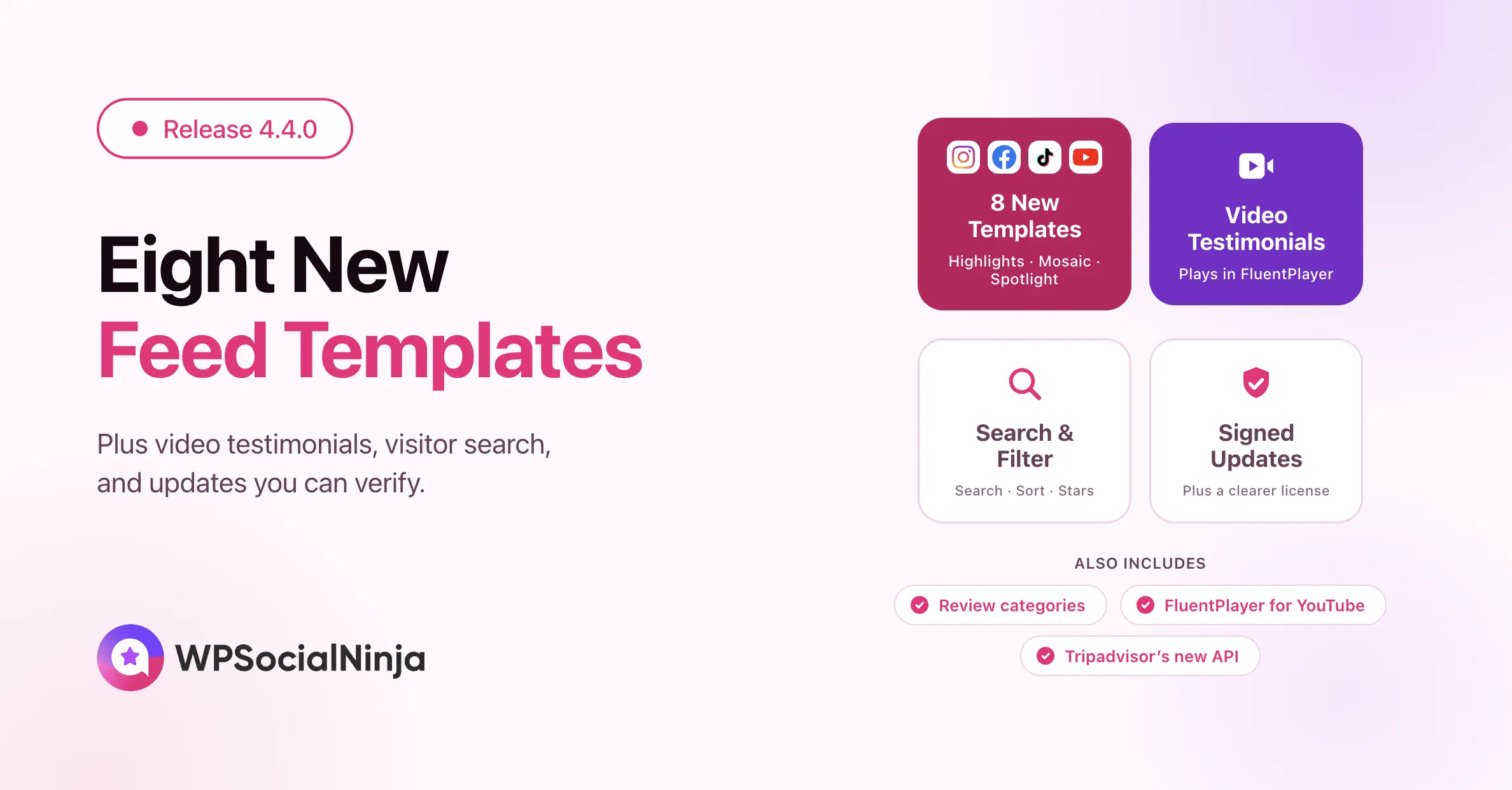
WP Social Ninja 4.4.0: 8 New Templates, Video Testimonials, Visitor Search & Filters, and More


Most of this release came straight out of your requests. You told us that visitors want to look through reviews themselves. You told us that a few hundred reviews get hard to manage without labels. And you asked for video in testimonials, because a customer speaking on video says more than a paragraph ever will.
So WP Social Ninja 4.4.0 brings eight new feed templates across Instagram, Facebook, TikTok, and YouTube. You also get video testimonials and a search and filter toolbar that your visitors drive. Your license screen now tells you far more than it used to, and every Pro update arrives signed. Here is what each one does for your site.
Eight new feed templates and clearer template names
Your social feed should match your site, not fight it. This release adds eight new layouts across four platforms.
- Instagram: Templates 3 and 4, plus a new Highlights layout (Pro). See the Instagram feed layout docs.
- Facebook: Templates 3 and 4, including a mosaic that reveals post text on hover (Pro). See the Facebook feed layout docs.
- TikTok: Templates 3 and 4, including the Spotlight Hero layout (Pro). See the TikTok feed template docs.
- YouTube: Templates 4 and 5 (Pro). See the YouTube feed layout docs.
Names that describe the layout
Picking between “Template 1” and “Template 4” told you nothing. Feed templates now carry names that describe their layout, so you can choose one without opening each preview.
A minimal feed header
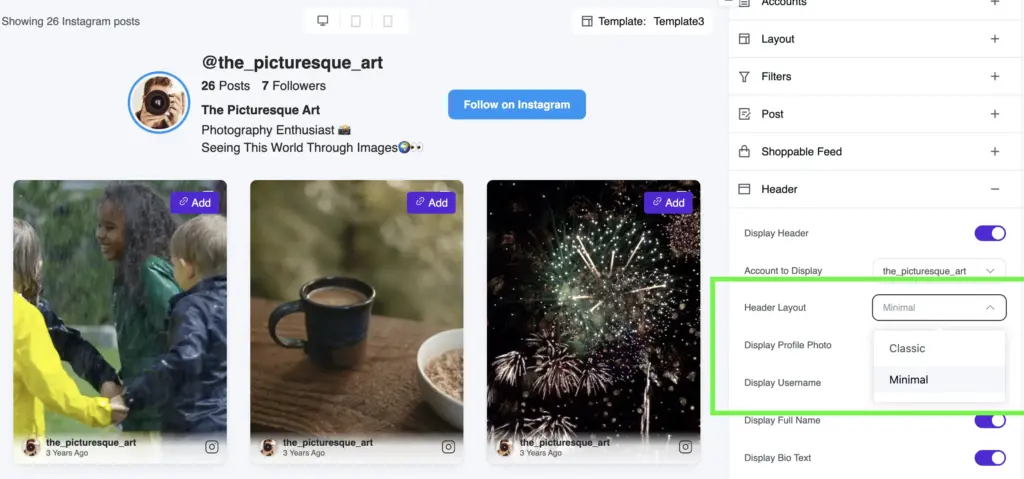
A new Minimal header layout trims the feed header down to its essentials. It works on YouTube, Instagram, Facebook, and TikTok feeds.
We also went through the new templates for keyboard access. Feed cards, popups, album controls, video controls, and shoppable actions all respond to the keyboard now.
Show video testimonials on your site
A written testimonial builds trust. A customer saying the same words on video builds more. Video testimonials let you attach a clip to any testimonial you collect.
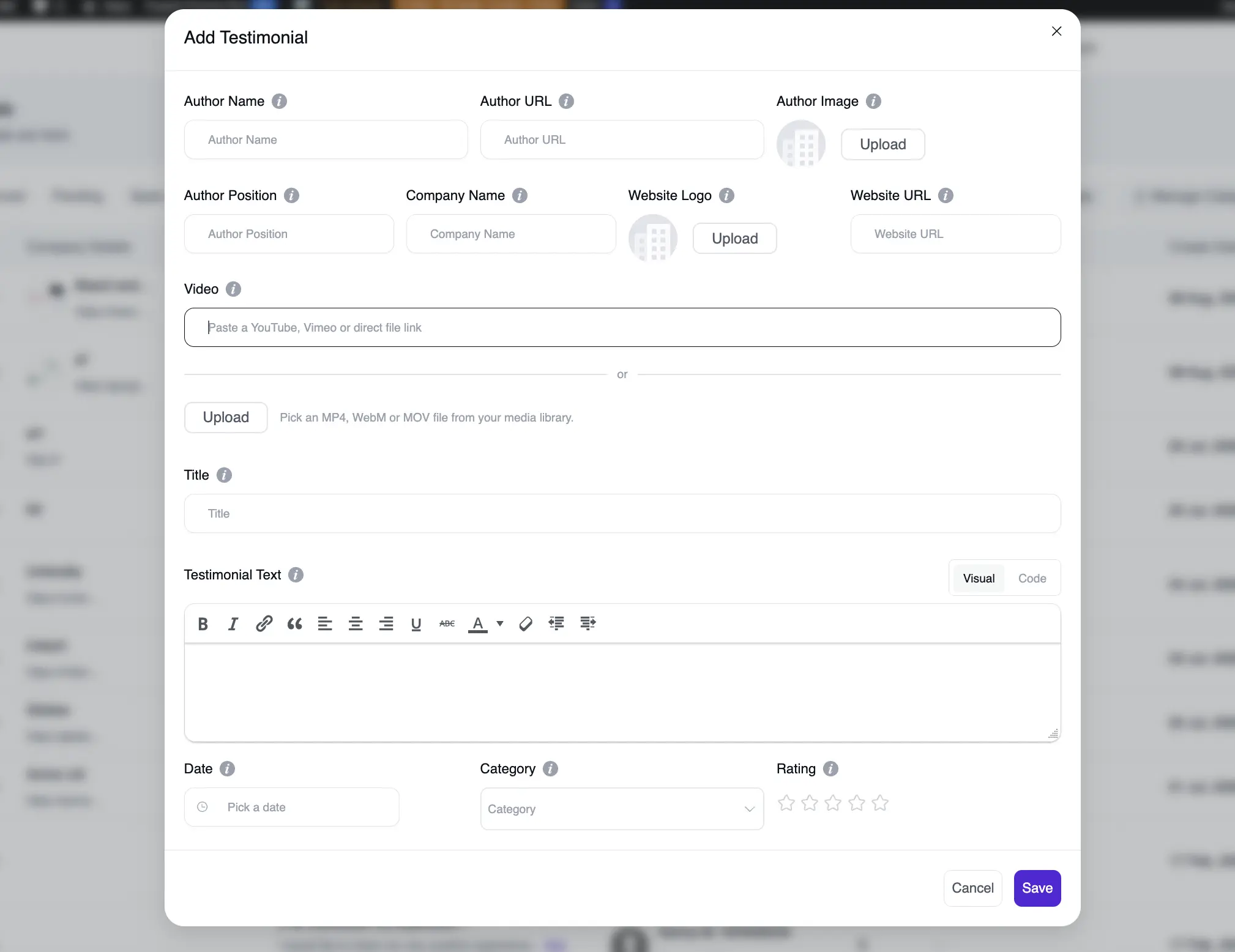
The new Video field takes a YouTube link, a Vimeo link, a direct file URL, or an upload from your media library. Your visitors then watch the clip in place, without leaving the page.
Upload a file and a Video Thumbnail field appears underneath, so you can choose the still frame from the WordPress media library. Without one, an uploaded video starts as a black box. A YouTube or Vimeo link already carries its own thumbnail, so WP Social Ninja hides that field.
How It Works
Playback runs through FluentPlayer, and you pick the player per template. WP Social Ninja loads the player only when a video can actually appear, so a page with no video stays as light as before.
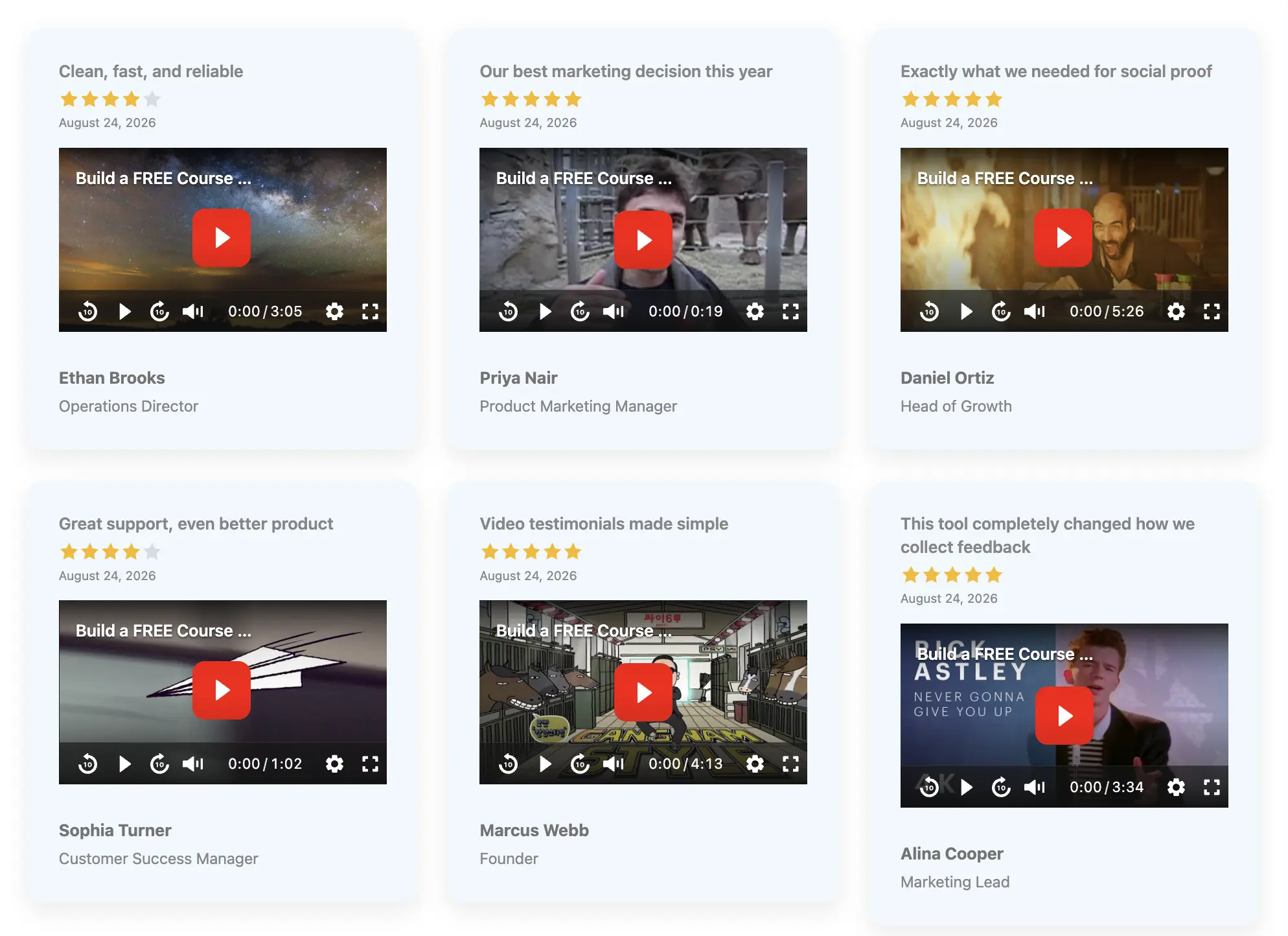
Native review forms can now target testimonials too. Add author fields and a logo upload, then collect testimonials with the same form builder you already use for reviews. Both features ship in Pro. The testimonials documentation walks through the whole workflow.
Let visitors search, sort, and filter your reviews
A long review feed asks a lot of your visitors. They scroll, they skim, and they often give up before finding the review that answers their question. The new visitor toolbar hands over control to them.
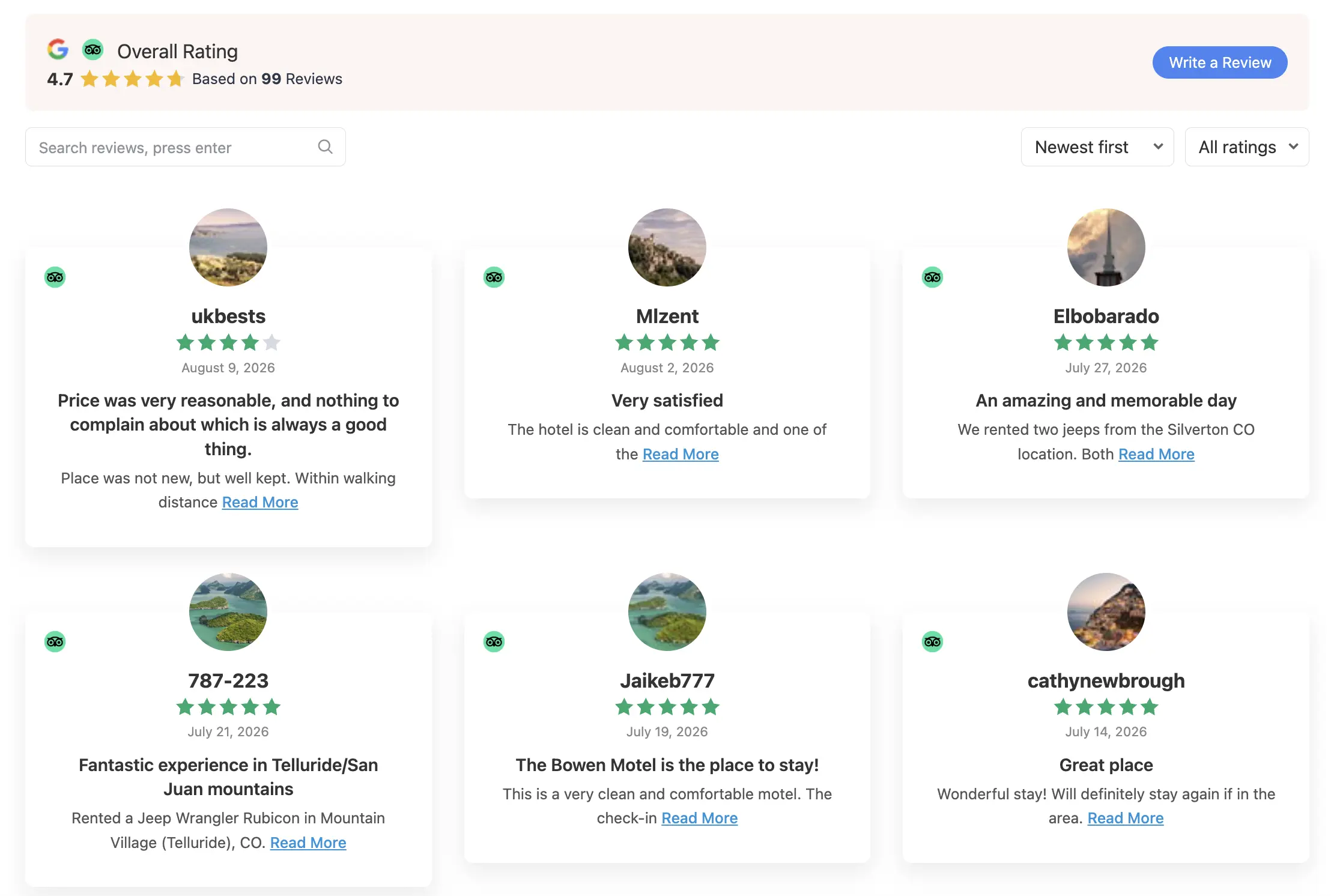
Visitors can now search your review feed as they type. They can re-sort the feed, and they can filter it down to an exact star rating. Someone shopping for a specific product can type its name and read only the reviews that mention it.
Setting It Up
The toolbar stays off until you turn it on, so no existing template changes on its own. Open your review template, then find the Let Visitors Search, Sort & Filter setting. Switch it on, and the toolbar appears above the feed.
- Live search across the review text that your cards actually display
- Sorting options that reorder the feed without a page reload
- Star filters that match one exact rating, not a range
- Support for slider, random, and popup review feeds
- A preview of the toolbar inside the template editor
The toolbar ships with WP Social Ninja Pro. To see the rest of the settings that sit alongside it, read the review template layouts documentation.
See what your license actually covers
The old license screen told you very little. It showed a status, a date, and a renewal link. Your store account already held far more than that, and we simply threw it away.
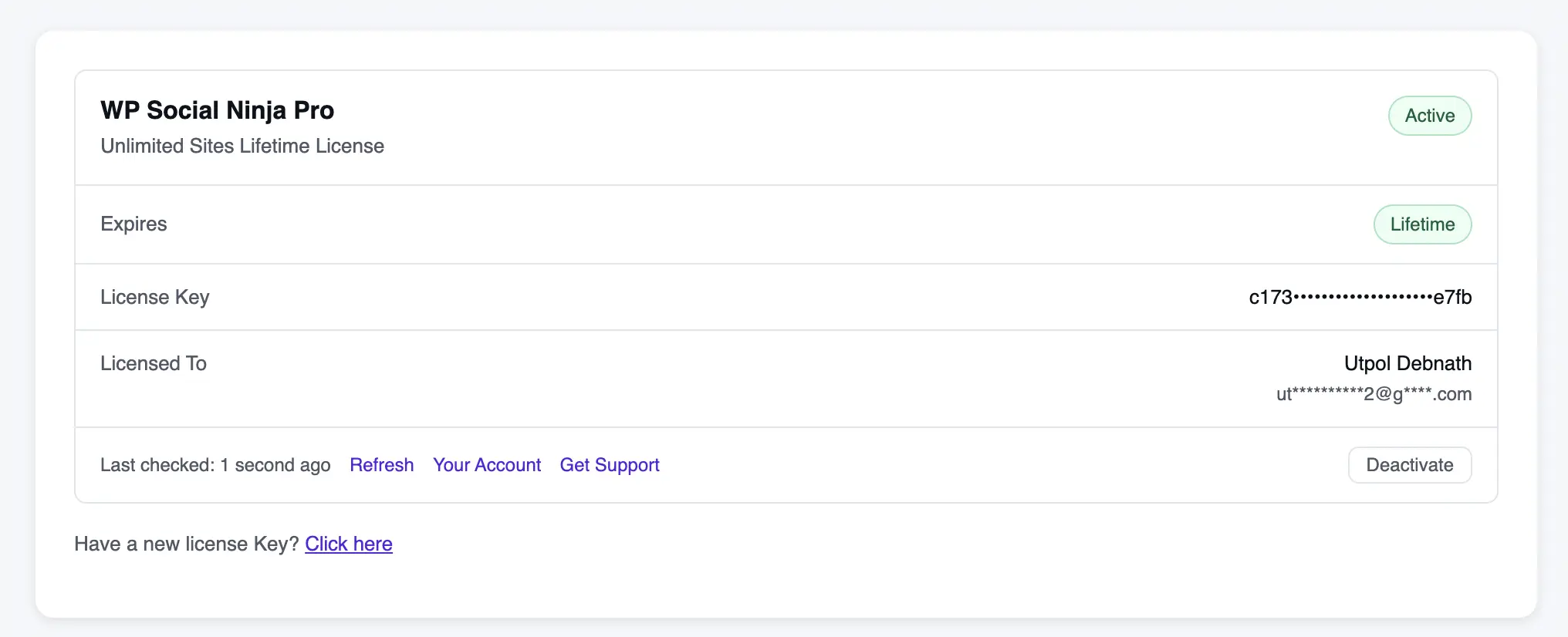
The rebuilt License Management screen now shows what you actually pay for. Find it under Settings, then License Management. It names your product and plan, masks your key, and lists your subscription and customer details alongside the expiry date.
The grace period finally has a name
When a license expires, our store keeps it active for roughly fifteen more days. That window exists so a late renewal never breaks a live site. The old screen had no way to say so.
It showed a green Active badge next to a date that had already passed, which reads like a bug. The screen now shows a Grace Period badge instead, so you know exactly where you stand. We also fixed a real bug along the way: renewing a license never updated the stored expiry date.
Signed and Verified Plugin Updates
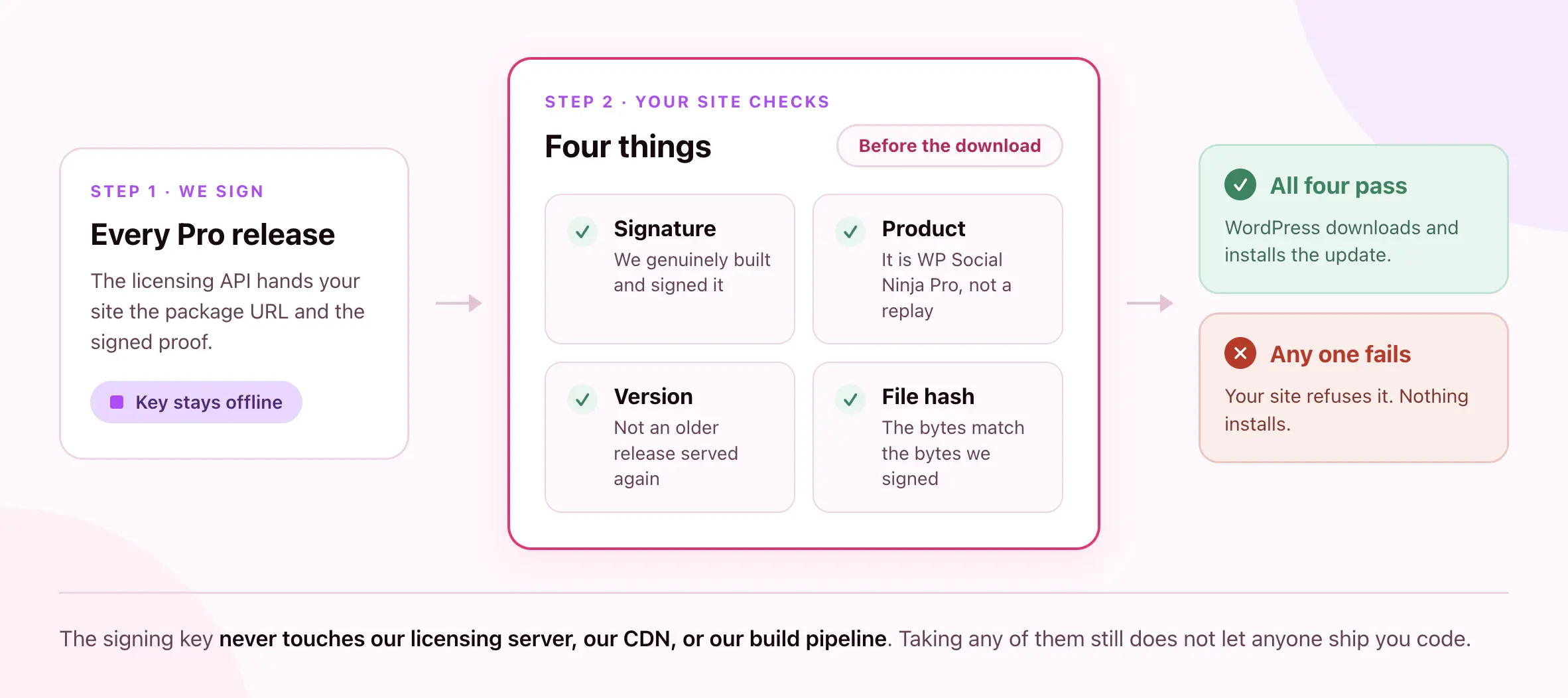
We now sign every WP Social Ninja Pro release with a key that stays offline. It never touches our licensing server, our CDN, or our build pipeline. The matching public key ships inside the plugin, so your site fetches nothing at update time to run the check.
From 4.4.0 onward, the plugin verifies four things before WordPress downloads an update:
- Signature: We genuinely built and signed this package.
- Product: The package is WP Social Ninja Pro, not a real package for another product replayed under our name.
- Version: The release is not an older one, served again for a vulnerability it already carried.
- File hash: The bytes you receive match the bytes we signed.
If any check fails, your site refuses the update and installs nothing. Most of this runs before the download starts. A forged update therefore costs a signature check rather than a multi-megabyte transfer.
Why the Version Check Matters
An attacker does not always need new code to hurt you. Handing your site a genuine, correctly signed release from a year ago works just as well, because that release still carries whatever we fixed since. Your site now turns those down too.
You configure none of this, and you will never watch it run. Updates work the way they always have. The difference is that our licensing API now hands your site both the download and the proof, and only the offline key can mint that proof. Someone who takes our API or our download host still cannot ship you code.
Tripadvisor retires its old API
Tripadvisor has replaced its legacy Content API with the Terra platform, and this release adds Terra support. Legacy API keys stop working on August 31, 2026.
Create a key on the new Tripadvisor developer platform before that date, then save it in your Tripadvisor settings. The plugin detects which API your key belongs to, so you never pick a version. Until then, your existing key keeps syncing, and a reminder sits on the settings screen. The Tripadvisor configuration docs cover creating the new key.
Organize your reviews with categories
Once a site collects a few hundred reviews, finding the right one turns into a chore. Review categories give you a reusable label you can apply across your whole review library.
Group reviews by product line, by service, by location, or by campaign. Select several reviews at once, then assign or remove a category in a single action. The review list shows a count beside each category, so you can see where your social proof is thin.
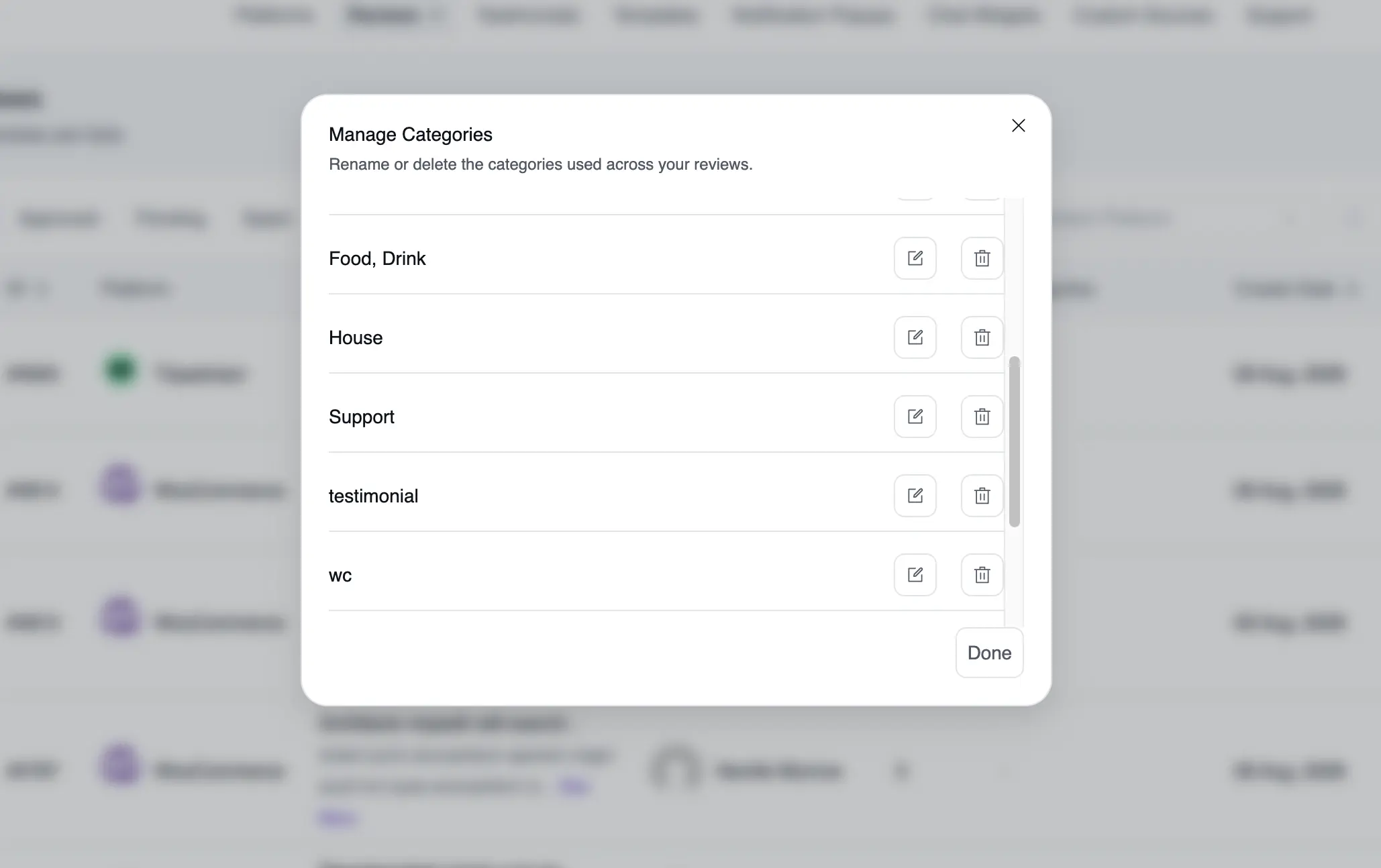
What You Can Do
- Manage your categories in a dedicated modal
- Assign or remove categories on many reviews at once
- Reuse one category across every platform you have connected
- See per-category review counts in the review list
- Carry multiple categories through CSV import and export in Pro
You will find categories in the review list. All the reviews documentation covers that screen, and the import and export guide explains how categories travel through a CSV file.
Turn your YouTube feed into a lead source with FluentPlayer
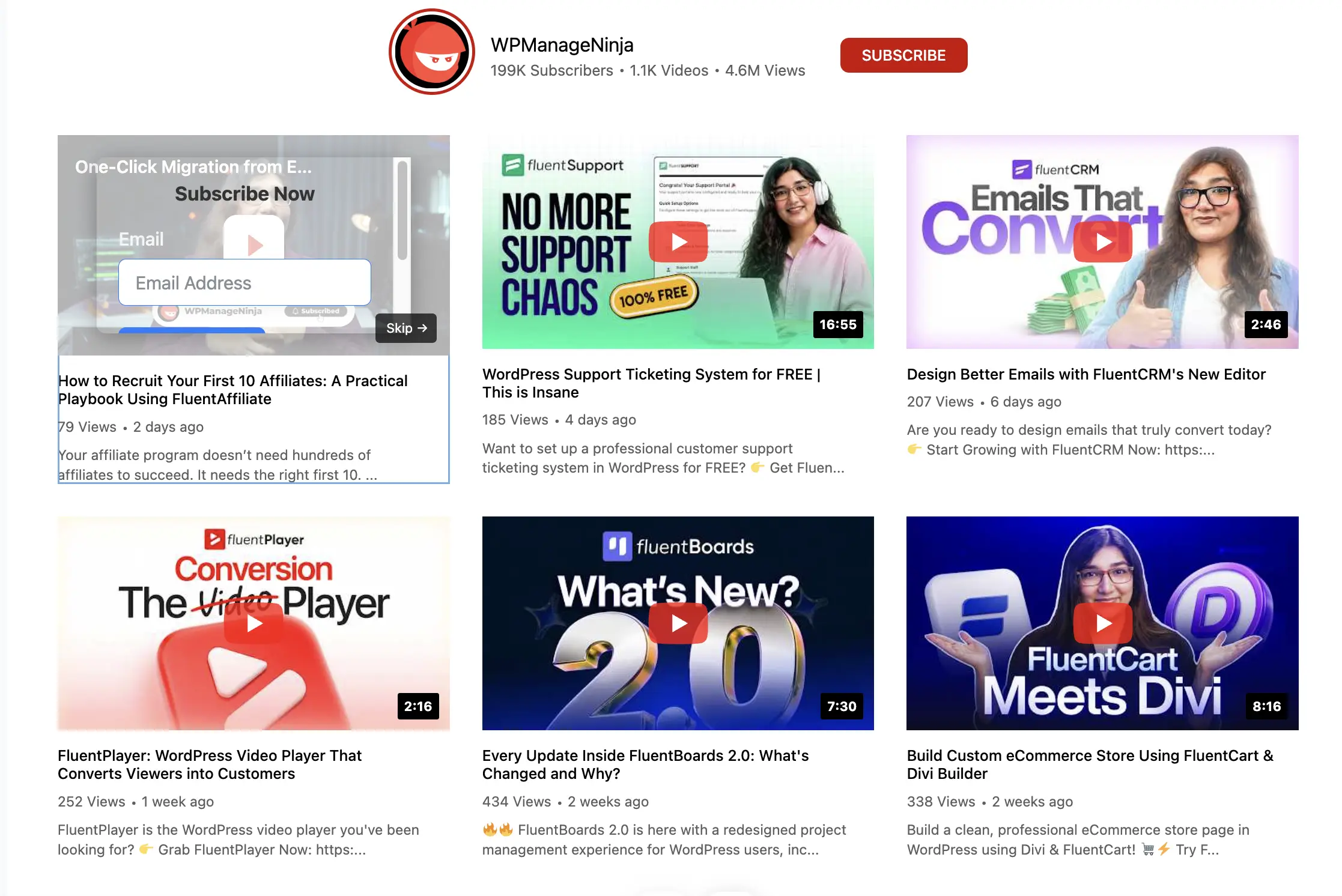
The YouTube player gives you no room to ask a viewer for anything. It shows its own branding and its own suggested videos. If you already run FluentPlayer, your YouTube feed can now use that player instead.
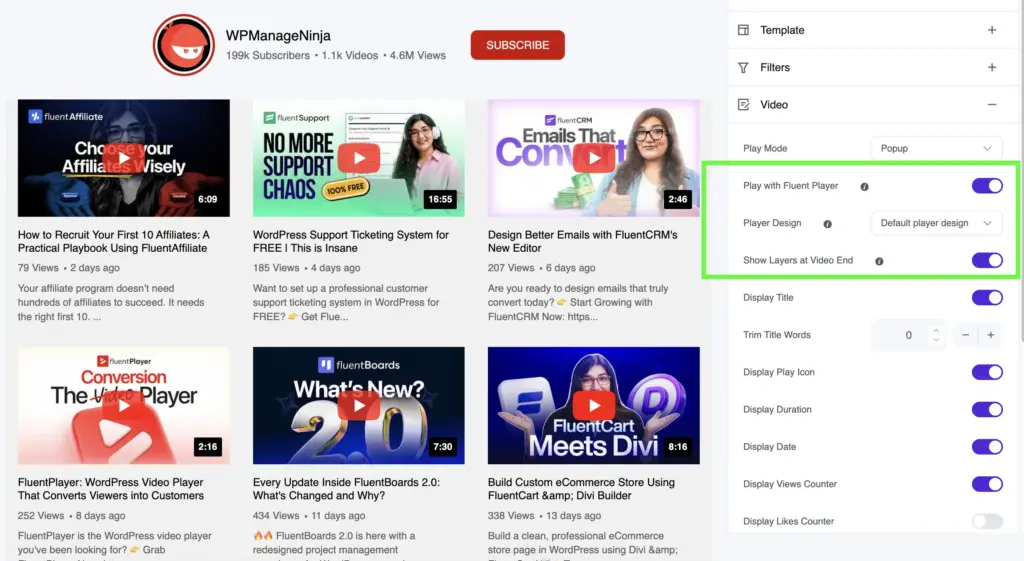
Open your YouTube feed settings and switch on Play with FluentPlayer. The videos still stream from YouTube. Only the player around them changes, and the change applies to inline playback and to the video popup.
Reuse a player design and its layers
This is the part that matters for your marketing. Pick a Player Design and your feed borrows the design of one of your existing FluentPlayer videos, along with its layers. That means a call to action or an email capture form now sits on top of your YouTube feed videos.
A viewer who watches a video in your feed can subscribe or click through without leaving the page. Your feed stops being only something to watch.
Layers that also land on short videos
FluentPlayer layers fire at a fixed timestamp. A layer set for the four-minute mark never appears on a ninety-second video, and a feed mixes long uploads with short ones.
Switch on Show Layers at Video End to solve that. WP Social Ninja re-anchors each layer to the end of whichever video is playing. It places them five seconds before the finish, so your viewer sees the layer while the video still runs.
These settings appear only when you have FluentPlayer installed. Without it, your YouTube feeds keep using the YouTube player exactly as before. One note on the editor: the preview always draws the YouTube player, so check the frontend to see your FluentPlayer design. You will find these options in your feed’s video settings, documented in the YouTube feed settings guide.
Bug Fixes and Performance Improvements
Performance and Improvements
- Added support for multiple review categories in CSV import and export. (Pro)
- Improved keyboard accessibility across feed cards, popups, album and video controls, and shoppable actions.
- Improved editor previews to display video posts in Instagram Templates 2, 3, and 4, and support more than 6 reviews in slider, badge, and notification layouts.
Bug Fixes
- Fixed TikTok word and hashtag filters not matching video captions.
- Fixed Airbnb business information retrieval and rating parsing.
- Fixed Facebook warnings caused by malformed identifiers and incorrect start-date handling.
- Fixed CSV imports clearing author website fields. (Pro)
- Fixed long words overflowing review cards and masonry layouts not updating correctly when videos change card height.
- Fixed the Review Images option appearing for platforms that do not support review images.
- Fixed image optimization incorrectly treating the same image from different platforms as one image.
- Fixed the review cache cursor advancing before a refresh was attempted.
- Fixed remaining Vue 3 lifecycle issues in the Facebook popup.
What’s New in WP Social Ninja 4.4.0
This release gives your visitors a way to explore your reviews, gives you a way to organize them, and gives your testimonials a voice on video. Every feature above has a step-by-step guide in the WP Social Ninja documentation.
Win your customers’ hearts with exceptional features
Discover how WP Social Ninja can assist you in designing outstanding customer experiences.
Drop by our WP Social Ninja Community, share what’s working, and share what isn’t. Requests posted there shaped most of what you just read. If WP Social Ninja is helping your business, leaving a review on WordPress.org means a lot to us.
Until then, keep collecting reviews, keep building trust, and let WP Social Ninja handle the rest.
Full Changelog
- Added a new frontend visitor toolbar for review feeds, allowing visitors to search, sort, and filter reviews by rating. (Pro)
- Added reusable review categories with bulk assign/remove, category management, and category counts.
- Added video support for testimonials with video URL/upload, poster images, player selection, and FluentPlayer playback. (Pro)
- Added Instagram Templates 3 and 4, plus a new Highlights layout. (Pro)
- Added Facebook Templates 3 and 4, including a Mosaic layout that reveals post text on hover. (Pro)
- Added TikTok Templates 3 and 4, including the Spotlight Hero layout. (Pro)
- Added YouTube Templates 4 and 5.
- Added FluentPlayer support for YouTube feed videos with a new “Show Layers at Video End” option.
- Added testimonial support to native review forms with author fields and logo upload. (Pro)
- Added Tripadvisor Terra API support with automatic detection of legacy API connections, so existing connections continue working without reconnecting.
- Added a Minimal header layout for YouTube, Instagram, Facebook, and TikTok feeds.
- Added support for multiple review categories in CSV import and export. (Pro)
- Improved feed template names to clearly describe each layout instead of using generic names like “Template 1–5.”
- Improved keyboard accessibility across feed cards, popups, album and video controls, and shoppable actions.
- Improved editor previews to display video posts in Instagram Templates 2, 3, and 4, and support more than 6 reviews in slider, badge, and notification layouts.
- Fixed TikTok word and hashtag filters not matching video captions.
- Fixed Airbnb business information retrieval and rating parsing.
- Fixed Facebook warnings caused by malformed identifiers and incorrect start-date handling.
- Fixed CSV imports clearing author website fields. (Pro)
- Fixed long words overflowing review cards and masonry layouts not updating correctly when videos change card height.
- Fixed the Review Images option appearing for platforms that do not support review images.
- Fixed image optimization incorrectly treating the same image from different platforms as one image.
- Fixed the review cache cursor advancing before a refresh was attempted.
- Fixed remaining Vue 3 lifecycle issues in the Facebook popup.

Subscribe To Get
Weekly Email Newsletter
Connect, Customize, and Display Social Feeds, Reviews, and Chat widgets





Leave a Reply