

FluentCRM Review Tagging: Automate Review Follow-ups with WP Social Ninja


You send a post-purchase email asking customers to leave a review. Some of them might leave a review, but most customers usually forget. And you have no way to tell who did what, so everyone gets the same follow-up. The customer who wrote a review gets the same email as the one who ignored it.
For a long time, this issue has been a major headache for store owners. But the good news is, WP Social Ninja can easily fix this issue with FluentCRM review tagging.
It automatically tells FluentCRM which customers reviewed and which ones didn’t. Once FluentCRM knows, you can treat each group differently. You can thank the reviewer with a coupon code and send a reminder to the rest.
This guide covers what FluentCRM review tagging is, why it matters for your store, and how to set it up from start to finish.
TL;DR:
- Most store owners send review request emails after a purchase, but have no way to know who reviewed and who didn’t. Everyone ends up getting the same follow-up.
- WP Social Ninja introduces FluentCRM review tagging. When a WooCommerce or FluentCart review is approved, it automatically tags the reviewer’s contact in FluentCRM.
- That tag lets you separate reviewers from non-reviewers inside FluentCRM. You can reward reviewers with a thank-you email and send reminders to the rest.
- The setup has two parts. Enable the tag in WP Social Ninja settings, then build a follow-up automation funnel in FluentCRM.
- Both plugins run inside WordPress, so there are no third-party tools or manual tracking involved. One setup, and it runs on its own.
What is FluentCRM review tagging and how does it work?
FluentCRM review tagging is a pro feature of WP Social Ninja that links your product reviews to your email marketing. When a review gets approved, WP Social Ninja automatically tags the reviewer’s FluentCRM contact. That tag then triggers your follow-up automations inside FluentCRM.
Here is how the review tagging works:
- A customer submits a product review on a FluentCart or WooCommerce store. This can be through your native review form or any review collection method you have set up.
- The review goes through your approval process. You can approve it manually from the moderation panel, or let your auto-publish rules handle it automatically.
- Once approved, WP Social Ninja looks up the reviewer’s email in FluentCRM and applies your chosen tag. If no contact exists for that email yet, it creates one and tags it.
- Any FluentCRM automation that watches for that tag fires right away. This is where your follow-up emails, coupon rewards, or reminder sequences take over.
Win your customers’ hearts with exceptional features
Discover how WP Social Ninja can assist you in designing outstanding customer experiences.

Benefits of FluentCRM review tagging with WP Social Ninja
Most store owners collect reviews and send follow-up emails as two separate activities. Review tagging connects them as a part of your central e-commerce social proof management.
Here is what that connection makes possible:
- Stop sending review requests to customers who already reviewed. Without tagging, your follow-up emails treat every customer the same. A customer who left a 5-star review still gets the “please leave a review” email three days later. That feels careless. Tagging fixes it.
- Reward reviewers automatically. When someone leaves a review, you can trigger a thank-you email with a discount code or a loyalty offer. No manual list building or CSV exports. The tag does the work.
- Recover reviews from customers who ignored the first ask. FluentCRM can check if a customer has the review tag after a set number of days. If they don’t, it sends a reminder. If they do, it skips them. This way, you follow up without annoying people who already helped.
- Identify your most engaged customers. Customers who take the time to write reviews are your most loyal buyers. Tagging them lets you create a segment in FluentCRM for repeat offers, early access, or referral campaigns.
- Keep your review and email data in one place. WP Social Ninja handles the review collection and tagging. FluentCRM handles the email automation. Both run inside WordPress. No third-party SaaS fees, no data leaving your site.
- Works with both WooCommerce and FluentCart. Whether you run your store on WooCommerce or FluentCart, the same tagging flow applies. One setup covers both.
How to set up FluentCRM review tagging with WP Social Ninja
This section covers two parts. First, you enable the review tag inside WP Social Ninja. Then, you build a simple automation funnel in FluentCRM that uses that tag.
Part 1: Enable review tagging in WP Social Ninja
Before you start, make sure these three plugins are active on your site: WP Social Ninja, FluentCRM, and either WooCommerce or FluentCart. The review tagging settings only appear when FluentCRM is installed.
- Open your WordPress dashboard and go to WP Social Ninja → Settings
- In the left sidebar, click Reviews Platforms, then select Global Review Settings
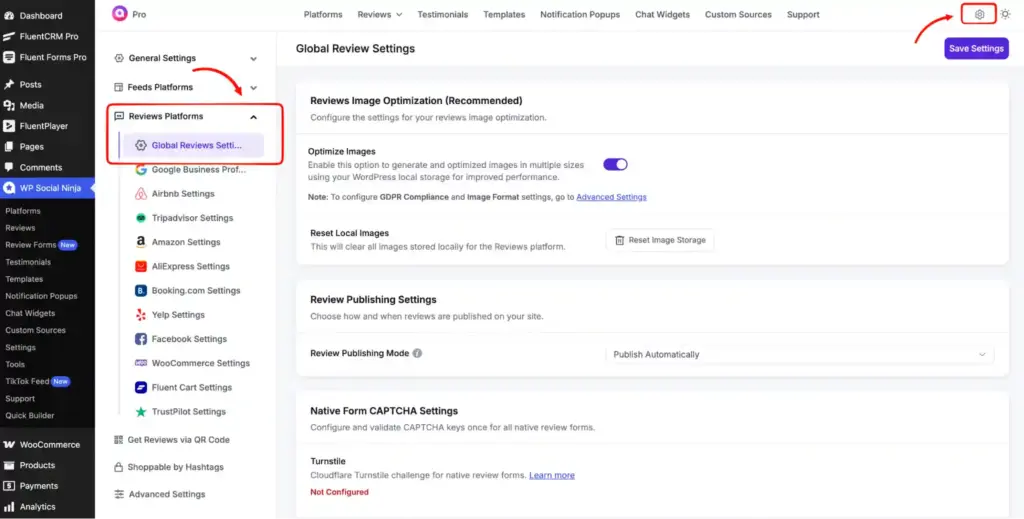
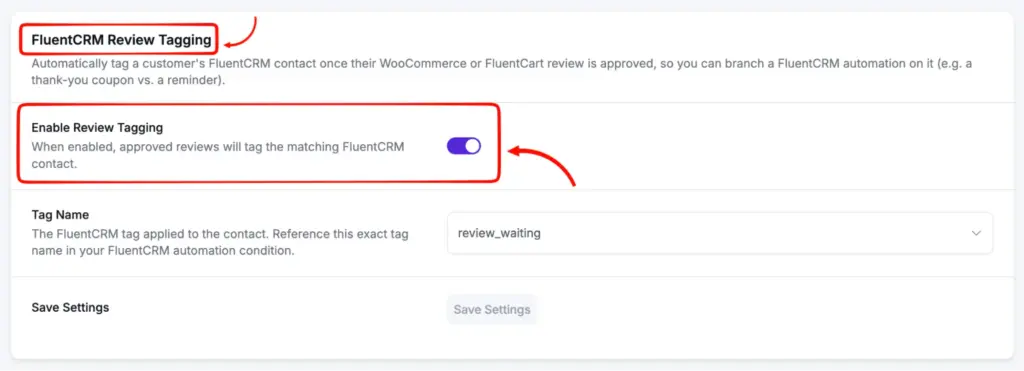
- Find the FluentCRM Review Tagging card and turn on the Enable Review Tagging toggle
- Choose a Tag Name from the dropdown. The dropdown pulls your existing FluentCRM tags, so you won’t need to type anything manually. It defaults to review_submitted, but you can pick any tag that fits your workflow and click Save Settings. I have chosen a tag I built before.
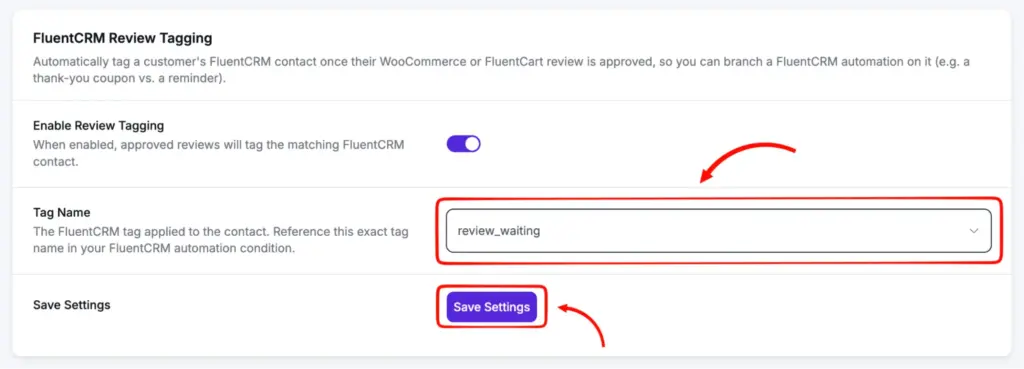
That’s it for the WP Social Ninja side. From this point, every WooCommerce or FluentCart review that gets approved will automatically tag the reviewer’s FluentCRM contact with the tag you chose.
One thing to note: write down the exact tag name you selected. You will need it when building your FluentCRM automation in the next step.
Part 2: Build a review follow-up automation in FluentCRM
Now that WP Social Ninja is tagging reviewers, you need FluentCRM to act on that tag. Here is a simple “ask for a review, then reward or remind” funnel you can build.
Step 1: Create a new automation funnel
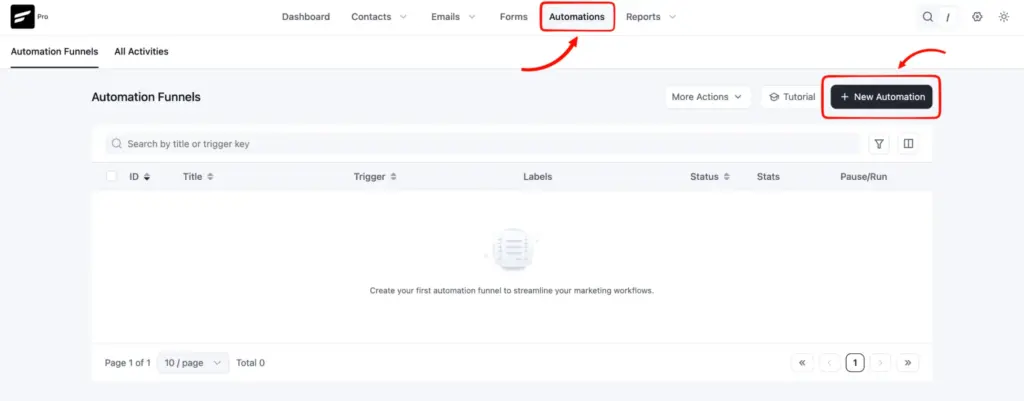
- Go to FluentCRM → Automations and click the +New Automation button
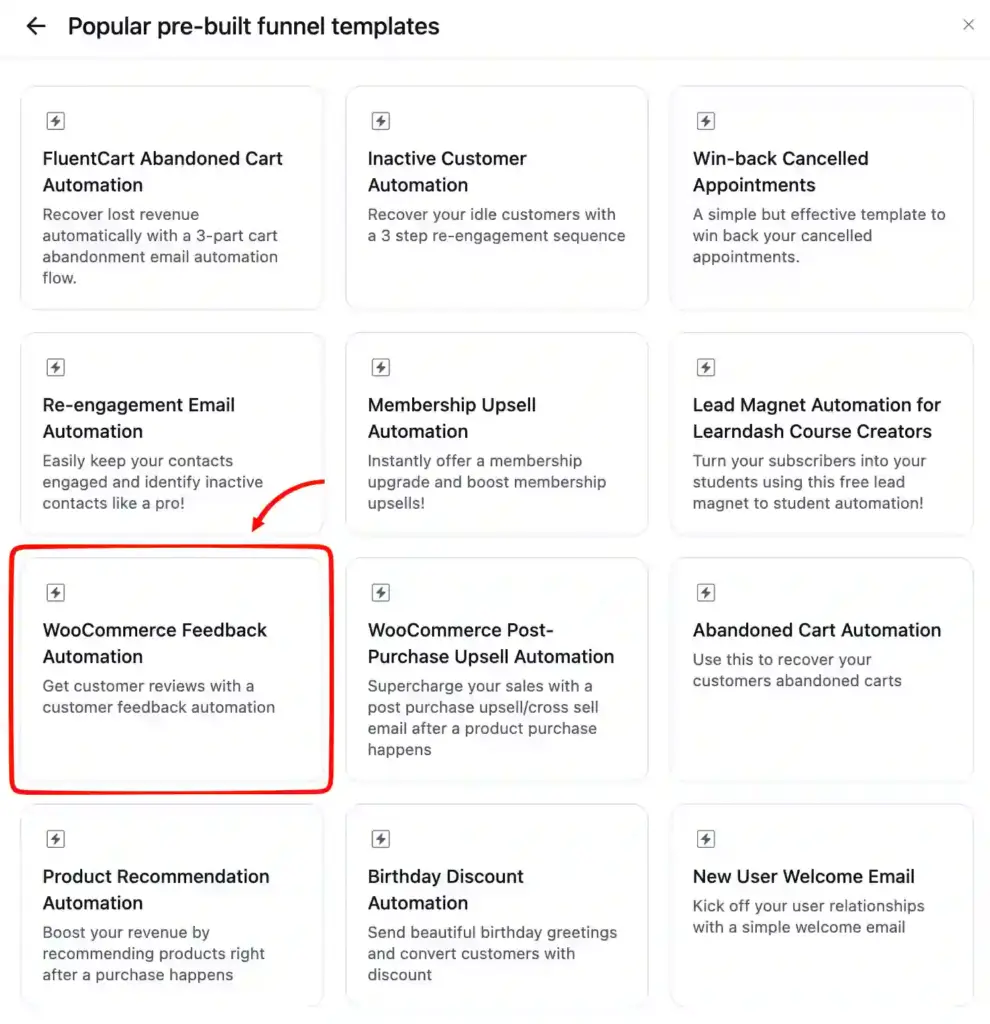
- Choose a trigger. You’ll find plenty of pre-built templates to choose from. For this funnel, select the trigger that fires when a WooCommerce or FluentCart order is completed. I have chosen WooCommerce Feedback Automation and customized it for demonstration purposes.
- Name your funnel something clear, like Post-Purchase Review Follow-up
Step 2: Send a review request email
- Add an action to send an email after the order is completed
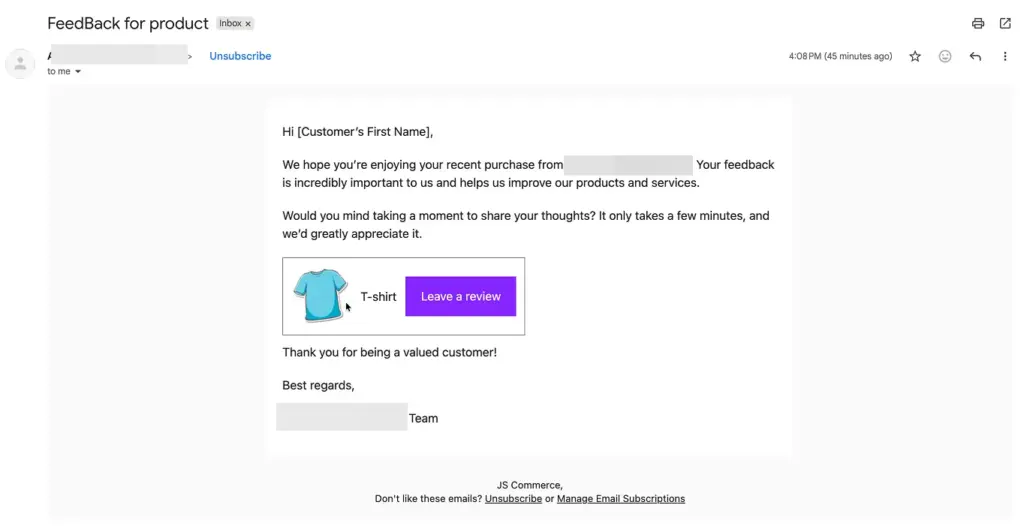
- Write a short email asking the customer to leave a product review
- Add a direct link to the review form on your product page
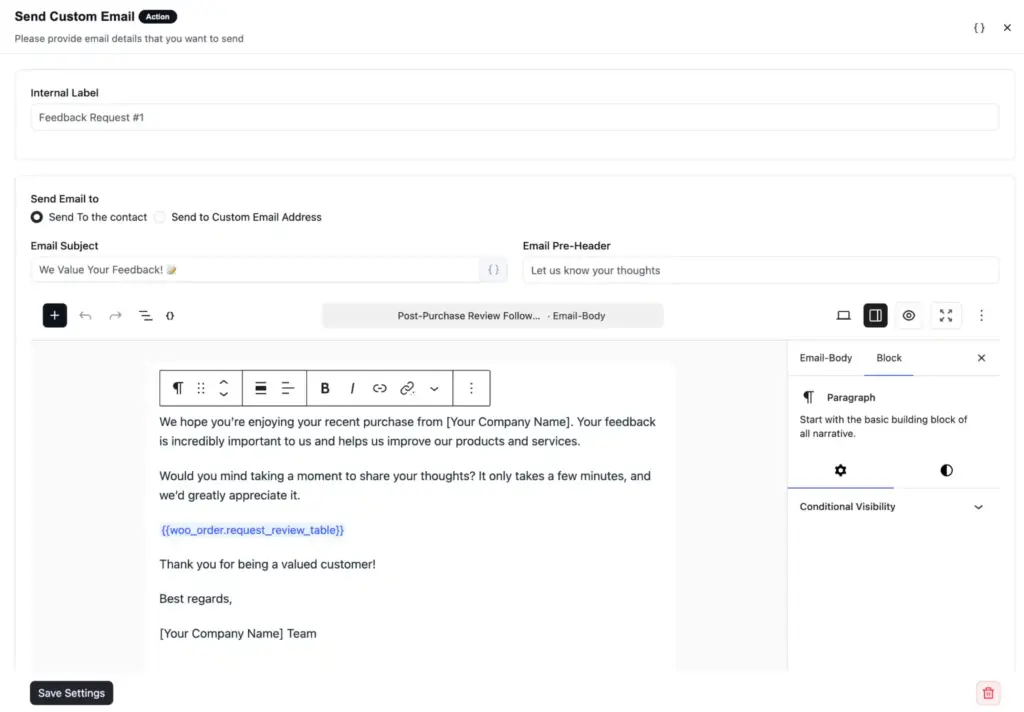
- You can add a delay before this email (for example, 3 to 5 days after the order) so the customer has time to receive and use the product.
Step 3: Wait and check the review tag
- Add a delay step. A good starting point is 5 to 7 days after the review request email
- After the delay, add a conditional check that looks at whether the contact has your review tag (for example, review_sent)
Step 4: Set up the two paths
- If the customer has the tag (meaning they left a review): send a thank-you email. You can include a discount coupon, a loyalty reward, or a simple appreciation message. This closes the loop and strengthens the relationship.
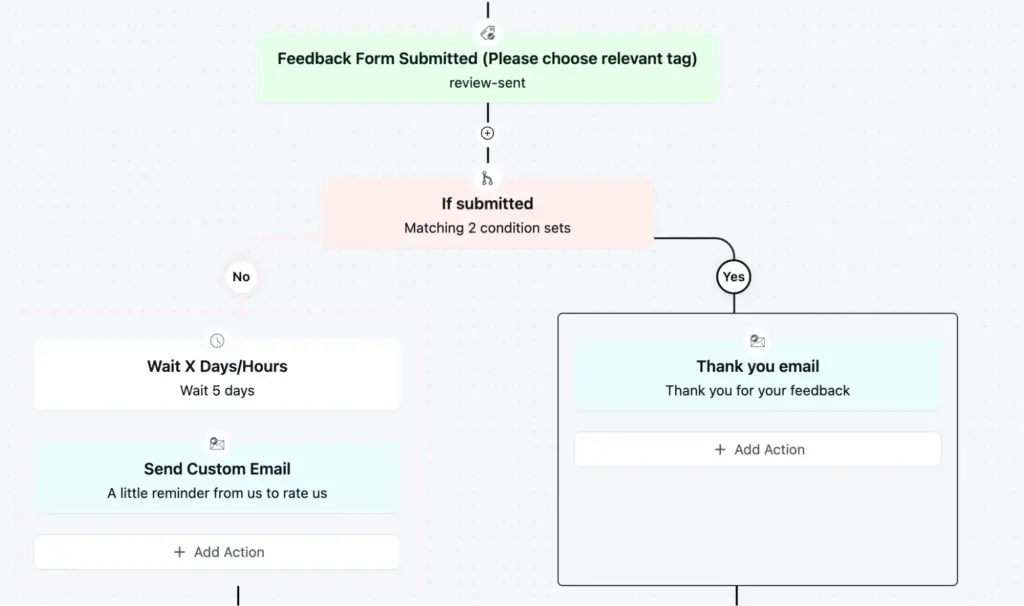
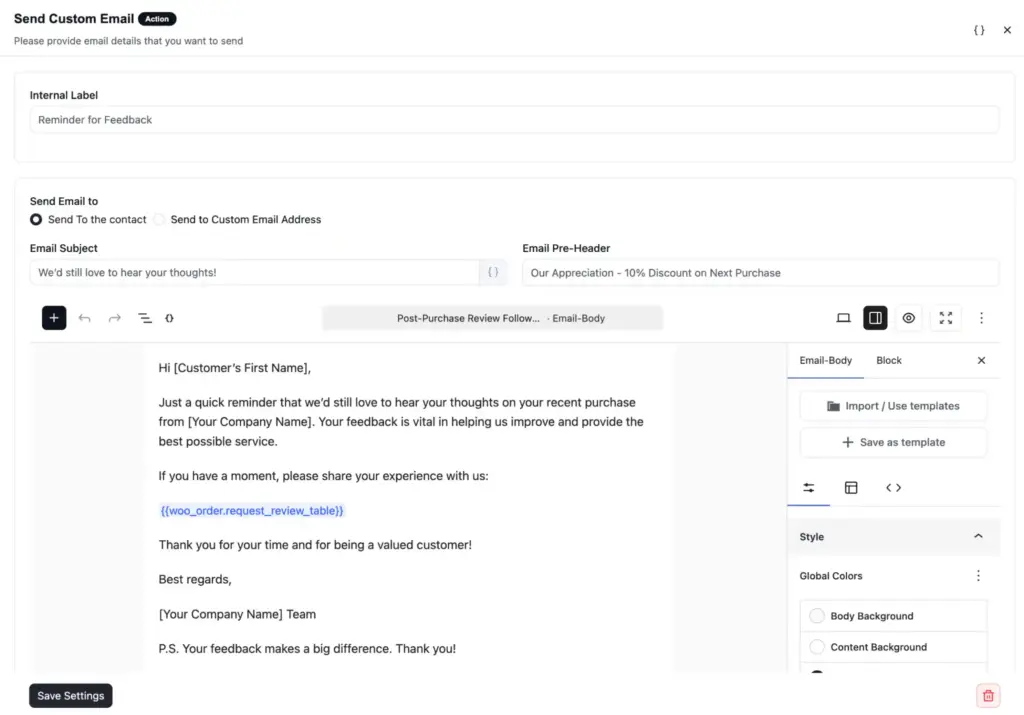
- If the customer does not have the tag (meaning they haven’t reviewed yet): send a gentle reminder email. Keep it short and friendly. One reminder is usually enough. You can add a second reminder after another delay if needed, but don’t overdo it.
Step 5: Activate the funnel
- Review the full funnel flow once
- Make sure the tag name matches exactly what you set in WP Social Ninja
- Set the funnel status to Active
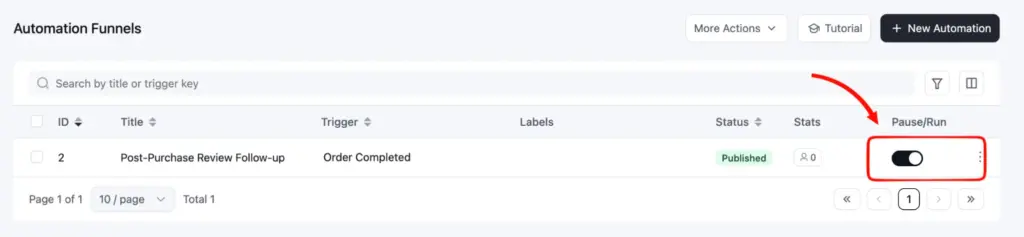
From this point forward, every new order will enter this funnel automatically. WP Social Ninja handles the review tagging. FluentCRM handles the email flow. You don’t need to touch it again unless you want to change the email copy or timing.
A few things to keep in mind:
- The tag only applies when a review is approved, not when it is submitted. If you use manual moderation, the tag gets applied after you approve the review. If you use auto-publish rules, the tag applies the moment the review passes your filters.
- Make sure the email address your customer uses to leave the review matches their FluentCRM contact email. If they don’t match, the tag won’t connect.
- You can change the tag name at any time in WP Social Ninja settings. But if you do, update it in your FluentCRM automation too, or the conditional check will stop working.
Connect your reviews to your email marketing
FluentCRM review tagging removes the guesswork from your post-purchase emails. You know exactly who reviewed and who didn’t, and your email marketing responds accordingly.
The setup is simple. Enable the tag in WP Social Ninja, build a follow-up funnel in FluentCRM, and let it run on its own. No manual tracking. No third-party tools. Everything stays inside WordPress.
If you are already collecting reviews on your store, this is the missing piece. Get WP Social Ninja Pro and start turning your reviews into automated follow-ups today.
Win your customers’ hearts with exceptional features
Discover how WP Social Ninja can assist you in designing outstanding customer experiences.

Subscribe To Get
Weekly Email Newsletter
Connect, Customize, and Display Social Feeds, Reviews, and Chat widgets






Leave a Reply