


How To Drive Local SEO Growth for WordPress with Review Schema and Speed Caching


WP Social Ninja helps local SEO in two concrete ways. It marks up your reviews with Schema.org structured data so search engines and AI systems can understand your business entity, and it caches review images locally so displaying those reviews doesn’t wreck your page speed.
What it will not do, and what no plugin can do, is force star-rich snippets onto a local business SERP listing based on the business’s own reviews. Google blocks that. This guide explains what actually works, and how to configure it.
We build on WordPress every day, and review schema is one of the most misunderstood topics in WordPress local SEO. Most articles promise stars you cannot get. This one sticks to what Google actually allows and what moves local rankings.
The good news for a small business is you do not need to hire a local SEO expert or pay for ongoing local SEO services to set it up. The right business review or local SEO tools inside WordPress do most of the work.
TL;DR:
- WP Social Ninja outputs Schema.org review structured data (Business type plus rating data) through a built-in Schema Snippet toggle; no separate SEO plugin needed.
- Google does not show star rich snippets for a business’s own reviews of itself. Self-serving LocalBusiness and Organization review markup is ineligible for the star feature.
- The real local SEO wins are: crawlable review content on your pages, keyword-rich review text for long-tail queries, entity signals, and fast load times.
- WP Social Ninja’s local image caching keeps a review-heavy page fast and Core Web Vitals friendly.
What is review schema, and can your own reviews earn star rich snippets?
Review schema is structured data (usually JSON-LD) that labels rating information so search engines can read it, using types like Review and AggregateRating. It tells Google “this is a 4.8 average from 220 reviews” in a machine-readable format. But labeling reviews does not guarantee stars in search results.
Here is the part most guides get wrong, and it is the real answer to the review schema local business rich snippet question. Google does not display star rich snippets for reviews that a business controls about itself.
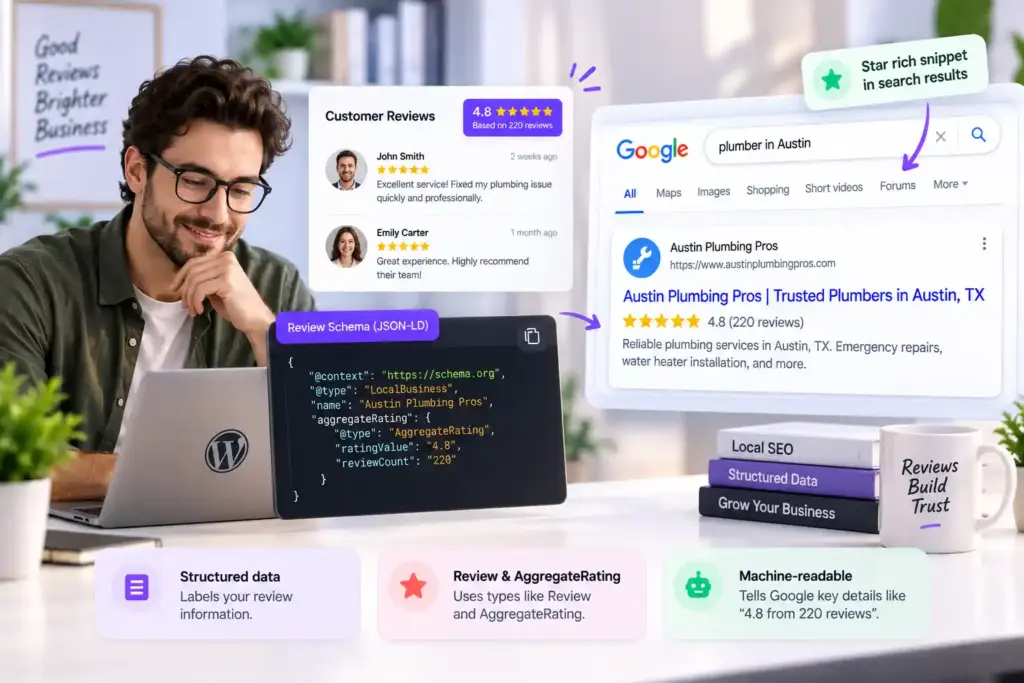
Google’s official Review Snippet documentation states it directly: “If the entity that’s being reviewed controls the reviews about itself, their pages that use LocalBusiness or any other type of Organization structured data are ineligible for star review feature.”
Google’s own example names a review “placed on the website of entity A, either directly in their structured data or through an embedded third-party widget (for example, Google Business reviews or Facebook reviews widget).” This has been Google’s policy since 2019.
So if you are a local business displaying your own Google reviews on your homepage, adding AggregateRating markup will not put gold stars next to your listing. Plan around that, not against it.
What is review schema actually good for?
Losing the star snippet does not make the markup useless. Review schema still does real work in how search engines and AI systems read and trust your review data; it just does it behind the scenes instead of in the SERP. Three things, all real:
- Entity clarity for search engines: The markup confirms your business name, type, location, and rating data, which strengthens how Google understands your entity. That supports your presence in local results even without visible stars.
- AI and answer-engine extraction: ChatGPT, Perplexity, Claude, and Google’s AI features read structured data. Clean review schema makes your rating data easy for them to pull and cite.
- Rich results where they are eligible: Review stars can appear for eligible page types like Product, Service, Recipe, Course, and others when the reviews are genuinely user-sourced. If you sell products or services, that is where review markup can earn visible stars.
Treat the schema as an entity and machine-readability tool, not a guaranteed SERP star generator. That framing keeps your markup clean and your expectations correct.
Inside WP Social Ninja’s review schema output
The WP Social Ninja schema feature is a built-in Schema Snippet under Business Reviews, so you do not need a separate schema plugin to mark up your review widget. You enable it, supply your business details, and the plugin generates the structured data for the block.
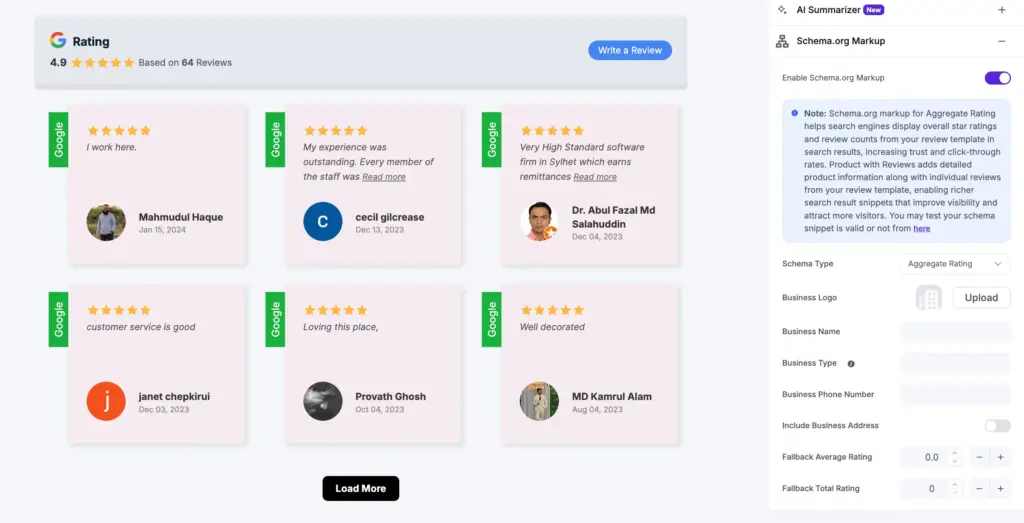
When you turn on the Schema Snippet, you provide:
- Schema Type
- Business Logo
- Business Name
- Business Type (chosen from the Schema.org business type list, which maps to LocalBusiness and its subtypes)
- Business Phone Number
- An Average Fallback Rating and Total Rating Count
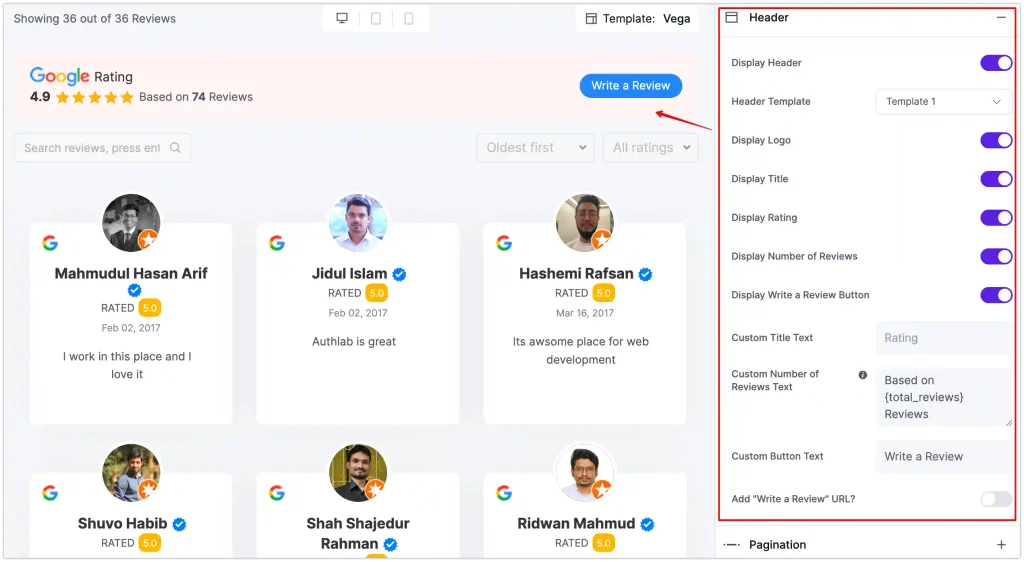
One configuration detail matters: The snippet only outputs when your template shows the business header, not when you display reviews alone. If you build a reviews-only layout, the schema will not render, so include the business header block.
A simplified version of the markup this produces looks like the example below. Note the @type and the aggregateRating object. This is accurate and useful structured data. Just remember the rule on aggregateRating and self-serving reviews above: it governs where stars can and cannot appear.
{

  "@context": "https://schema.org",

  "@type": "LocalBusiness",

  "name": "Your Business Name",

  "image": "https://yoursite.com/logo.png",

  "telephone": "+1-555-000-0000",

  "aggregateRating": {

    "@type": "AggregateRating",

    "ratingValue": "4.8",

    "reviewCount": "220"

  }

}
Note on tiers: Confirm in your own dashboard whether the Schema Snippet toggle is available on your plan before you promise it to a client.
The hidden impact of review plugins on site speed and Core Web Vitals
Most review widgets slow pages because they fetch data live and load reviewer avatars from external servers on every visit. Each of those requests is a round trip the browser waits on, and a review block with a dozen avatars is a dozen external image requests. That drags down Largest Contentful Paint, the load-time metric Google grades.
Two problems compound it. Live API calls delay the initial render. And images that load without reserved dimensions cause layout shift, which hurts your Cumulative Layout Shift score as content jumps around during load.
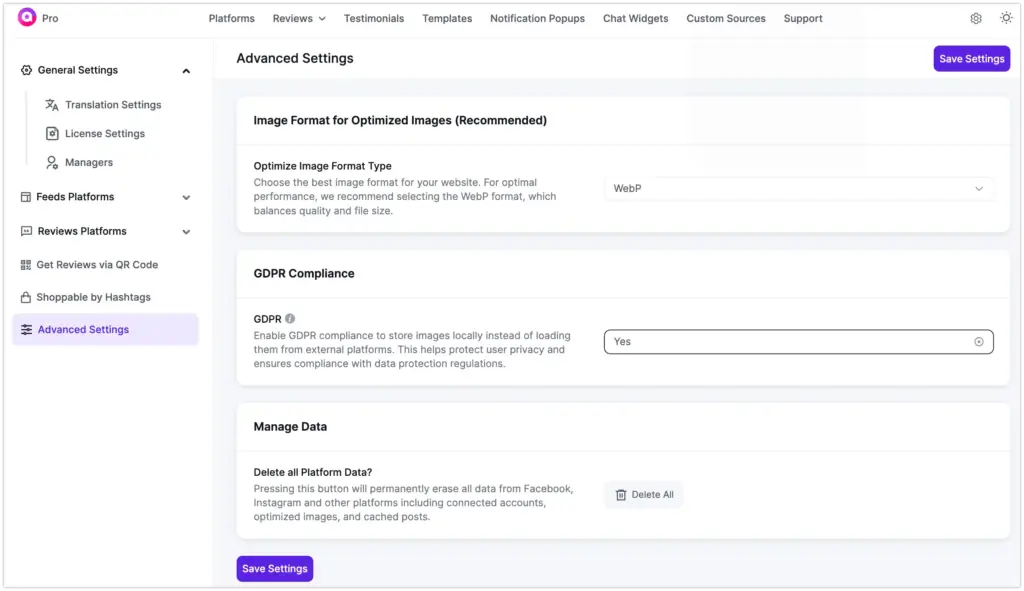
WP Social Ninja addresses both. Turn on local image storage in Advanced Settings, and the plugin fetches each review image once, converts it to an optimized format (WebP recommended, JPG available), and saves the copy to your own server.
Your pages then serve those images locally instead of calling remote hosts on every load. Fewer external requests means faster LCP, and it doubles as a GDPR safeguard because no third-party request fires to expose a visitor’s IP. A single “Delete All Platform Data” control clears the cache when you need to.
How fresh reviews actually boost Local Map Pack rankings
Reviews influence local rankings, but through content and profile signals, not through on-site star markup. This is the heart of small business local SEO, and where local SEO reviews in WordPress earn their keep. For Local SEO for small businesses, fresh content and profile signals beat chasing markup tricks. Here is what actually moves the needle.
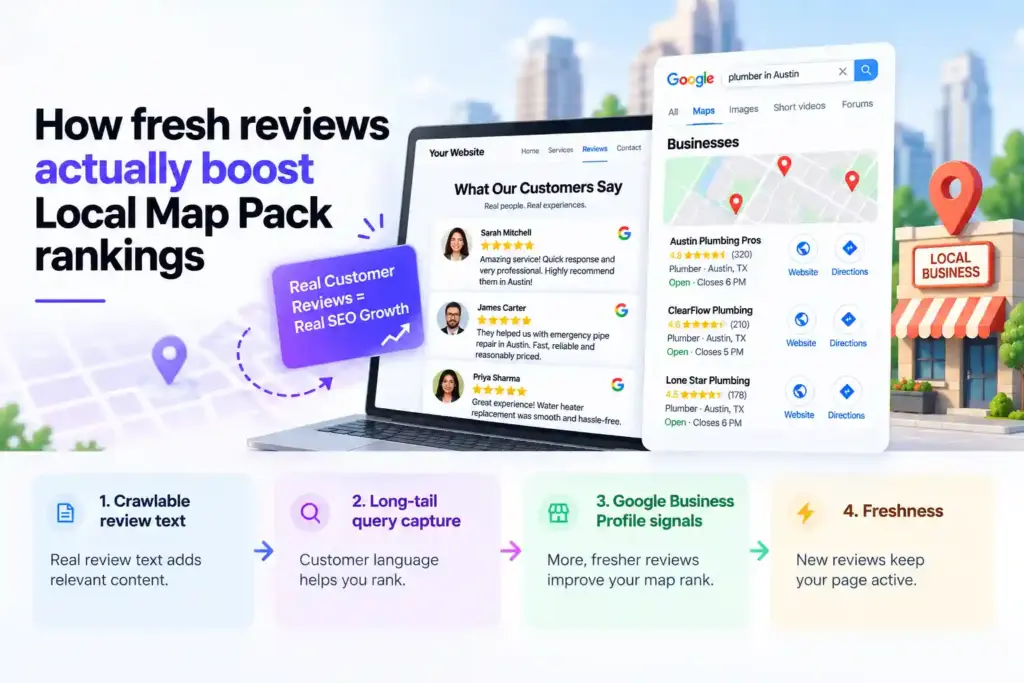
Crawlable review text on your pages
When WP Social Ninja renders reviews as real HTML content, Google can read that text. Customer reviews naturally mention your services, your city, and the phrases real buyers use, which adds relevant, unique content to the page and reinforces what your business is about. That entity relevance supports local rankings.
Long-tail query capture
Review language is keyword gold you did not have to write. A plumber’s reviews mention “emergency pipe repair in Austin” or “water heater replacement” in the customer’s own words. Displayed as HTML, that text helps the page surface for long-tail local searches that your marketing copy might never phrase naturally.
Google Business Profile signals
Your Local Map Pack position is driven heavily by your Google Business Profile: review volume, review recency, and rating. WP Social Ninja connects to your Google Business Profile in one click and displays those reviews on-site, which reinforces the same entity across Google’s own surface and your website. Keep collecting fresh reviews on your profile, because recency is a ranking factor for the map pack.
Freshness
A review section that updates as new reviews come in keeps the page fresh, which both search engines and AI systems weight positively.
Enabling schema and optimizing review display (Step-by-step)
Here is the full setup, from connecting Google to shipping a fast, schema-marked review block. It takes about 5 minutes and no code. Follow the steps in order, since the schema snippet depends on how you build the template.
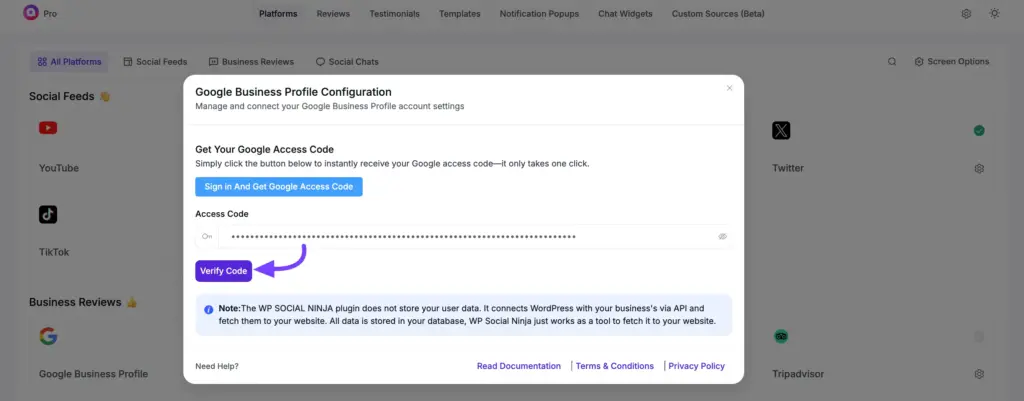
1. Connect Google Business Profile
In WP Social Ninja, open Platforms, select Google, click “Sign in and Get Google Access Code,” and authorize. No API key or Place ID required.
2. Build a review template
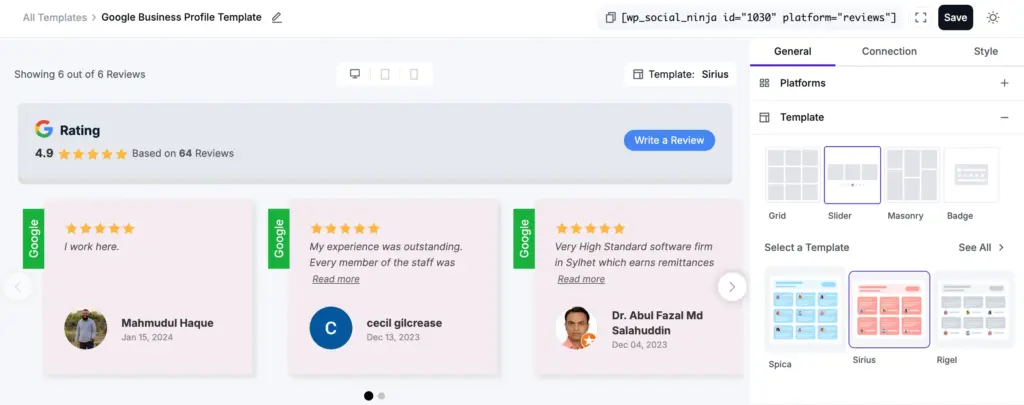
Create a template, choose a layout, and filter by minimum star rating so your strongest reviews lead.
3. Include the business header
Make sure the template shows your business header, not reviews only, or the schema snippet will not output.
4. Enable the Schema Snippet
In Business Reviews settings, turn on the Schema Snippet and fill in your business logo, name, business type, phone, and rating fields.
5. Turn on local image storage
In Advanced Settings, enable local image storage and pick WebP so avatars are served from your own server.
6. Embed below the fold
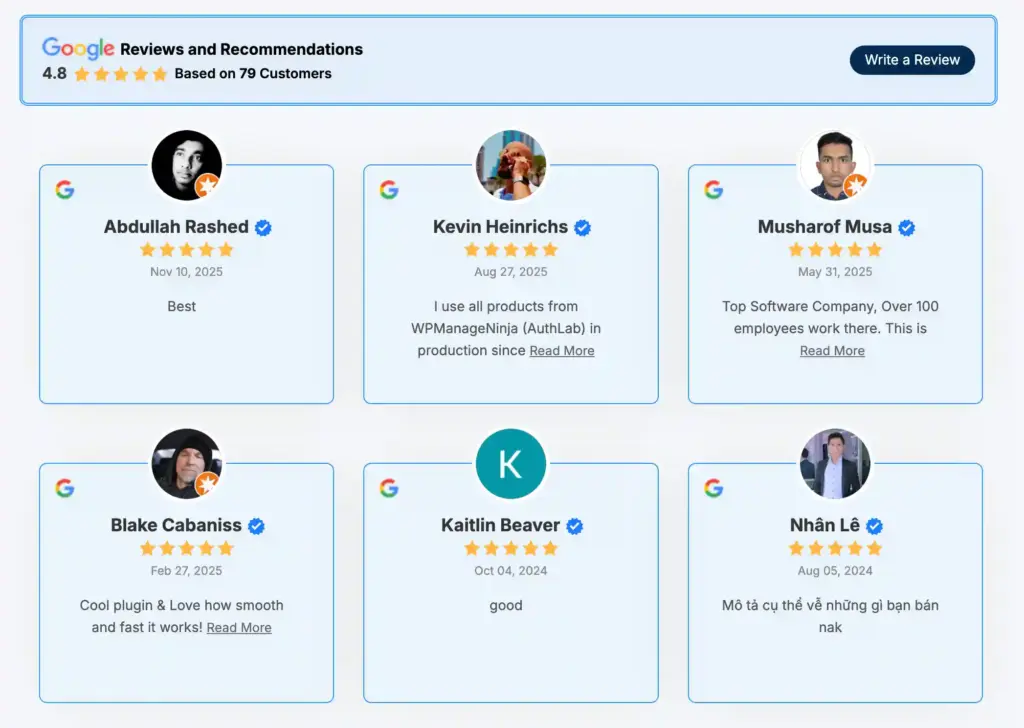
Add the block or shortcode, place it below your hero content, and set image dimensions to avoid layout shift.
7. Validate
Run the page through Google’s Rich Results Test to confirm the structured data parses cleanly, and keep your eligibility expectations realistic for a local business.
That gives you clean, valid review schema, a fast review section, and crawlable review content working together, which is the combination that actually supports local SEO.
The honest bottom line
Do not chase star snippets you cannot get. Use WP Social Ninja’s schema to make your review data clean and machine-readable, use local caching to keep the page fast, and let the review content itself do the local SEO work through relevance, freshness, and long-tail language.
Win your customers’ hearts with exceptional features
Discover how WP Social Ninja can assist you in designing outstanding customer experiences.
That is the durable play, and it makes WP Social Ninja a practical local SEO solution for small business owners who want results without a specialist on retainer.
Start with WP Social Ninja or explore the review features, built by WPManageNinja, the team behind Fluent Forms and FluentCRM.

Subscribe To Get
Weekly Email Newsletter
Connect, Customize, and Display Social Feeds, Reviews, and Chat widgets


Trending Posts
-
 Mashfik Upal Aumy
 -
-
 Mashfik Upal Aumy





Leave a Reply