


Google Seller Ratings Explained: A Complete Guide for 2026


Almost every new business owner I talk to about star ratings on Google Ads asks the same questions. What are Google seller ratings exactly? Do I qualify for them? And why don’t my regular Google reviews ever show up on my ads?
If you’ve been asking any of these, you’re not alone. The confusion comes from two places, and I’ll clear both up in this guide.
First, Google renamed the program from “Seller Ratings” to “Store Ratings” in 2023, so half the internet uses the old name and half uses the new one. Second, it gets mixed up with two other Google review programs that work in completely different ways.
I’ll walk you through everything I know about Google seller ratings. What they are, where they appear in 2026, who qualifies, how to get them, and how they differ from Product Ratings and Google Business Profile reviews.
Let’s get started.
TL;DR:
- Google seller ratings are business-level star ratings shown on Google Ads and Shopping listings that reflect your overall customer experience.
- Google renamed the program to “Store Ratings” in 2023, but both names refer to the same system.
- Since October 2024, they also appear in organic shopping search results across five markets (the US, UK, Canada, Australia, and India), so you no longer need to run Google Ads to benefit.
- To qualify, you need at least 100 reviews per country from the last 5 years and an average of 3.5 stars or higher for ads.
- Reviews must come from Google Customer Reviews (free) or one of 30 approved partners like Trustpilot or Feefo, not from Google Business Profile, Yelp, or Facebook.
- Seller ratings, Product Ratings, and Google Business Profile reviews are three separate Google systems that people constantly mix up.
- Google’s official data shows text ads with seller ratings get a 2% higher click-through rate on average, and the program itself is free to use.
What are Google seller ratings?
Google seller ratings are business-level star ratings shown on Google Ads, Shopping listings, and organic search results. They reflect your overall customer experience, drawn from verified post-purchase reviews collected by Google or its approved partners.
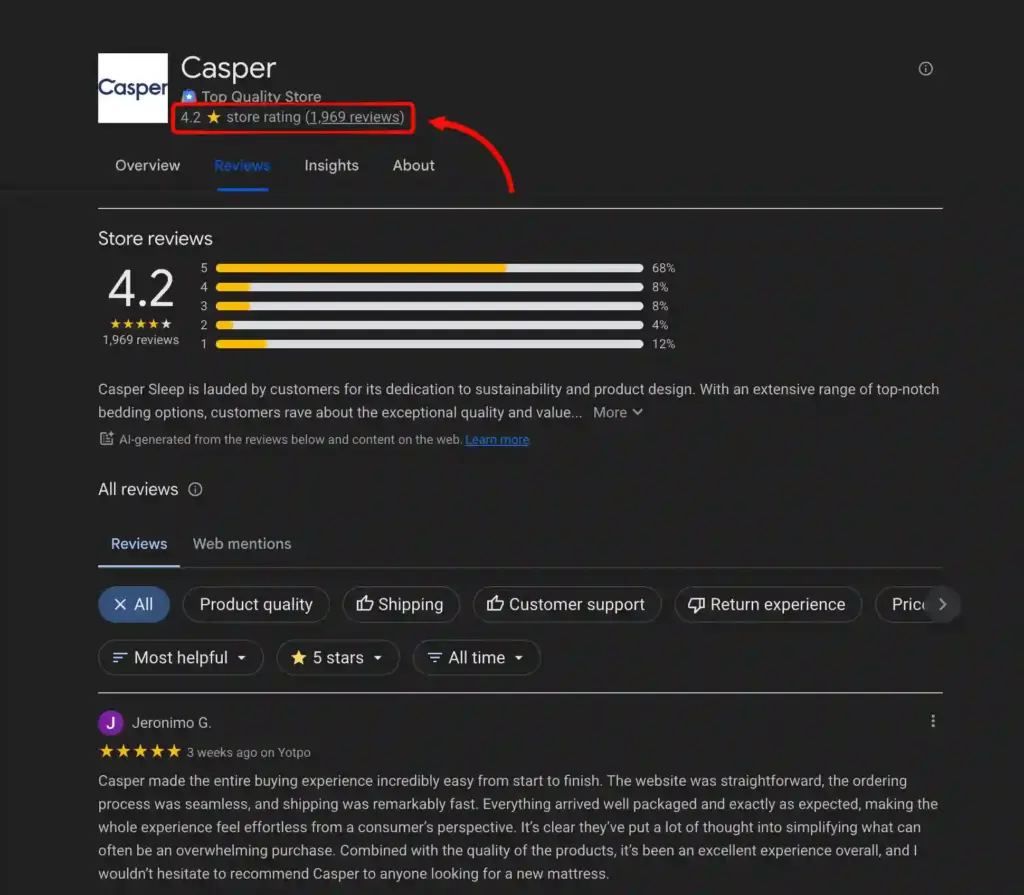
Google renamed the feature to “Store Ratings” in 2023, but the underlying program is the same. The rating shows out of 5 stars, along with the number of reviews and a link to a Google-hosted page where shoppers can read them.
How do Google seller ratings work?
Google seller ratings work by collecting reviews from customers who bought from you, filtering out fake or spammy ones, and calculating an average rating for each country. Google then shows that rating on your ads and listings once you qualify.
There are three data source types Google pulls from:
- Google Customer Reviews. A free program managed in Google Merchant Center that emails your buyers after purchase to ask for a rating.
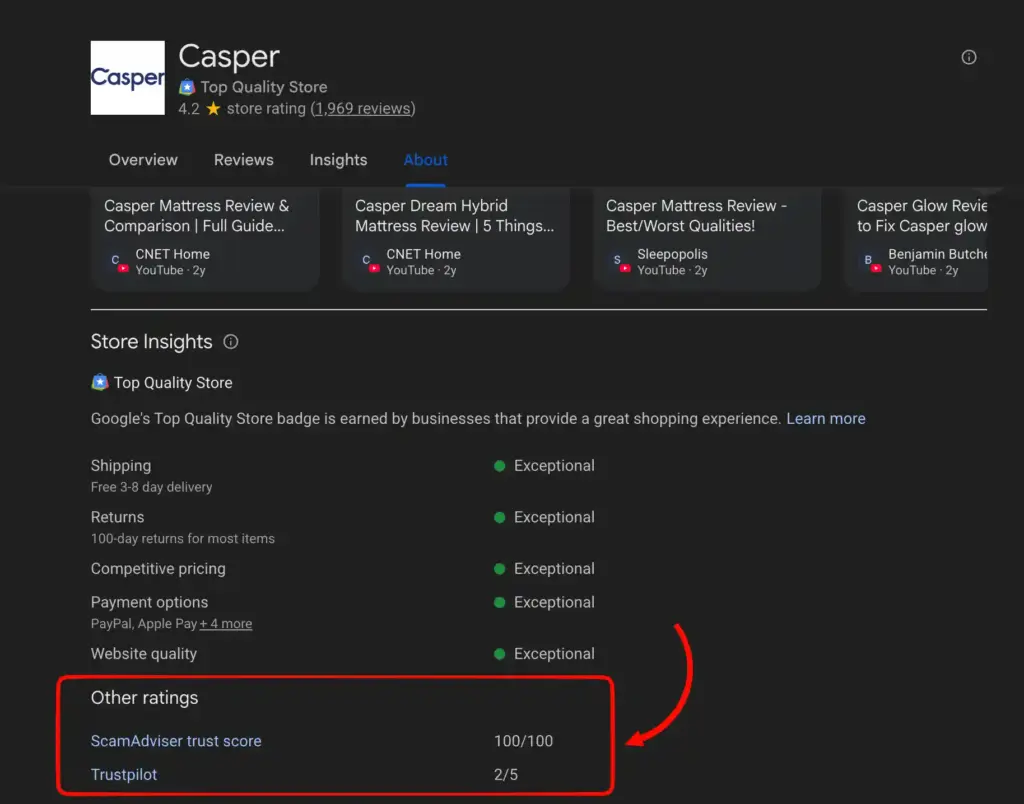
- Approved review partners. About 30 review platforms including Trustpilot, Feefo, Yotpo, Shopper Approved, Bazaarvoice, Reviews.io, and PowerReviews. If you already collect reviews on one of these, ask them to submit your feed to Google.
- Google-led evaluations. Google occasionally builds ratings for merchants using its own Search and shopping research data.
If you follow the Google review policy and the platform has enough qualifying reviews, it calibrates them, filters spam, weights sources differently, and produces one composite score. You do not submit or manage the rating yourself. Google handles the calculation.
Where do Google seller ratings appear?
Google seller ratings appear next to text ads on Google Search, next to Shopping ads, next to your merchant name in free product listings, and next to your domain in organic shopping search results.
The four placements for Google seller ratings:
- Text ads on Google Search. Your star rating shows below the ad headline with the review count. This is the classic seller ratings placement.
- Shopping ads. Ratings appear on paid Shopping listings in the Shopping tab and carousel.
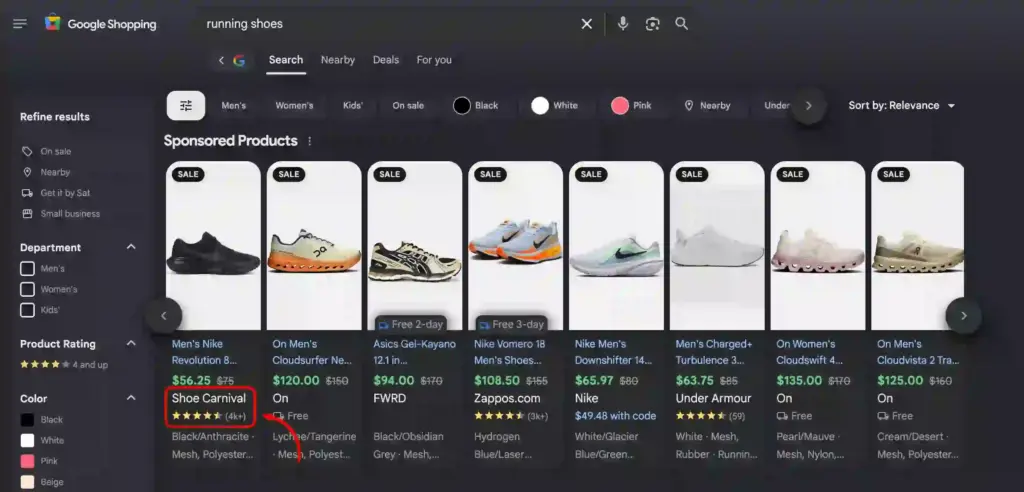
- Free product listings. Ratings show next to the merchant name for shoppers browsing organic Shopping results.
- Organic search results. Since Google’s October 2024 update, seller ratings now show in organic Shopping search results across the US, UK, Canada, Australia, and India. You no longer need to run Google Ads to benefit from seller ratings in search.
Pro Tips: If you are a new business, check our guide on Google Map Pack SEO to grow your visibility fast in front of the right customers.
What are the requirements to qualify for Google seller ratings?
To qualify for Google seller ratings, you need enough verified reviews from Google-approved sources, a strong average rating for ads, and reviews tied to the specific website you’re advertising.
Here’s how each requirement breaks down:
- At least 100 reviews per country. Google says most businesses need around 100 reviews to earn a rating, though the exact number can vary.
- An average of 3.5 stars or higher for ads. Free listings and organic search can show lower ratings, but ads cannot.
- Reviews must come from real customers. Only reviews linked to an actual purchase count, and reviews from Google Business Profile, Yelp, or Facebook do not qualify.
- Your ad’s website must match the review website. If your reviews are for yourstore.com but your ad points to yourstore.co.uk, you’ll need to collect a separate set of reviews for the UK site.
- Reviews are counted by country. Reviews from US customers only count toward your US rating, and the same rule applies to every other country.
The 100-review number is the total across all your review sources combined. If you have 60 reviews on Trustpilot and 50 on Google Customer Reviews, that adds up to 110, and your business qualifies.
Pro Tips: Learn how to ask for Google reviews in a professional way to grow your review count and qualify for store ratings fast.
How do I get Google seller ratings for my business?
To get Google seller ratings, you collect reviews through one of three paths: Google Customer Reviews, an approved third-party review partner, or a Google-led evaluation. Once you meet the review thresholds, Google displays your rating automatically.
Path 1: Google Customer Reviews (free, easiest to start)
If you are not already collecting reviews on a Google-approved platform, this is the fastest starting point. It is free, and it integrates directly with Google Merchant Center. Here’s the basic process:
- Sign up for Google Merchant Center if you do not already have an account.
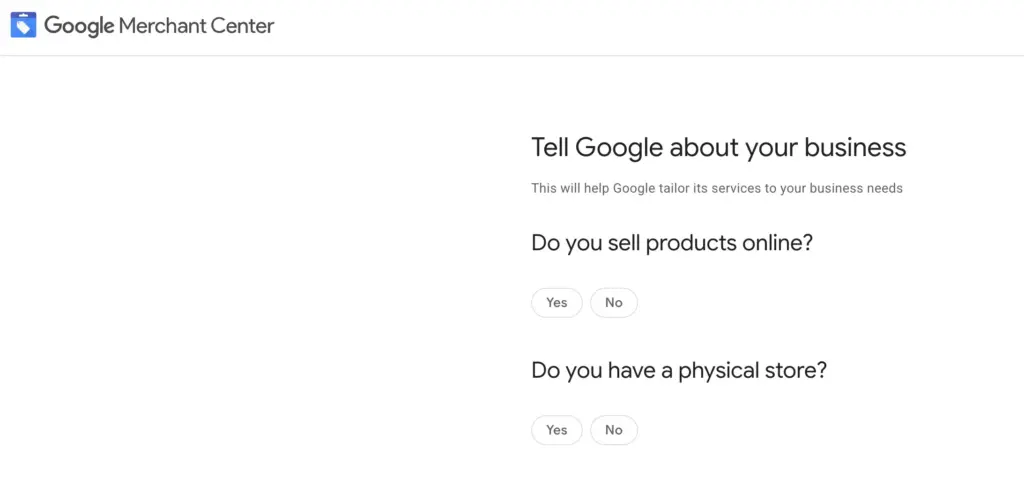
- Enable the Google Customer Reviews program from your Merchant Center dashboard.
- Add the survey opt-in code to your order confirmation page.
- Add the badge code to your website (optional but recommended for signaling trust).
Once buyers opt in, Google emails them roughly a week after the estimated delivery date to ask for a rating. That’s it. No survey design or extra tools needed.
Bonus Tip: You can create a Google reviews link generator to reach out to more customers and collect reviews faster.
Path 2: An approved review partner
If you already use a review platform like Trustpilot, Feefo, Yotpo, Shopper Approved, or Reviews.io, ask your account manager to submit your review feed to Google. Every Google-approved partner offers this, but not every business turns it on by default.
If you are not using any yet and want more control than Google Customer Reviews offers (like custom review questions, product-level reviews, or richer moderation), an approved partner is a stronger long-term choice.
Path 3: Google-led evaluation
You do not apply for this one. Google occasionally builds ratings for merchants using its own research and Search data. Signing up for Google Merchant Center makes you more visible to this process, but it is not something you can trigger yourself.
For most businesses I see, the fastest path is starting with Google Customer Reviews and layering in a paid review partner once volume grows.
How do I check if I already have Google seller ratings?
To check if you already have Google seller ratings, replace “yourdomain.com” in this URL with your homepage domain and open it in a browser: https://www.google.com/storepages?q=yourdomain.com.
If you meet the threshold, Google shows your current rating and review count. If not, the page will not load.
If you run separate domains for different countries, run the check for each one. If you use one domain across countries, change the country code in the URL (like &c=US, &c=UK, &c=CA) to see country-specific ratings.
One thing to keep in mind. Having a rating does not guarantee it shows on every ad. Google decides display based on ad auction dynamics, so even qualifying accounts sometimes see the rating appear inconsistently.
Bonus Tips: Check the detailed guide on how to see your Google reviews if you still have any confusion.
Google seller ratings vs Product Ratings vs Google Business Profile reviews
Three separate Google systems for three different jobs. Seller ratings are for advertisers running Google Ads. Product Ratings are for product sellers on Google Shopping. Google Business Profile reviews are for local businesses with a physical location.
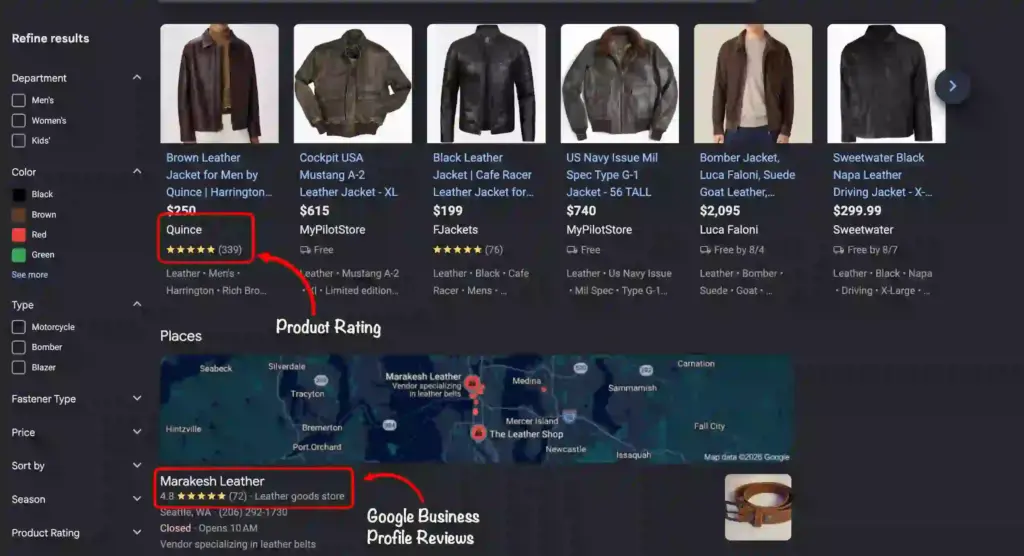
Here’s how they compare side by side:
| Compare by | Google seller ratings | Google product ratings | Google Business Profile reviews |
| What it measures | Overall business experience | Individual product quality | Local business location experience |
| Where it appears | Text ads, Shopping ads, free listings, organic search | Shopping ads, Shopping tab, free product listings | Google Maps, local Google Search, Google Business Profile |
| Review sources | Google Customer Reviews, approved review partners, Google research | Google Customer Reviews (product reviews), approved review partners | Direct reviews left on Google Business Profile |
| Merchant Center required | No (text ads) / Yes (Shopping and free listings) | Yes | No |
| Best for | Ecommerce and service businesses running Google Ads | Product sellers on Google Shopping | Local businesses with physical locations |
The biggest confusion I see is between seller ratings and Google Business Profile reviews. A restaurant with a 4.8-star Google Business Profile won’t see those stars on Google Ads. They’re separate systems that Google doesn’t connect.
If you run a local service business without an online store, seller ratings probably aren’t for you. Focus on Google Business Profile reviews and local SEO instead.
Bonus Tips: I would understand if you feel overwhelmed by seeing different types of reviews. If so, you can check this guide on Google reviews management that will help you maintain your reputation like a pro.
How do I display a Google reviews badge on my website?
If you have just started your local business and have only a few Google reviews, you can display a Google reviews badge on your website. It is not the same as Google seller ratings, but it gives visitors a real sense of what customers think of your business.
Over time, this trust signal helps you earn more customers and more reviews, which is exactly what qualifies you for bigger programs like seller ratings later on. If your site is on WordPress, a Google reviews plugin like WP Social Ninja lets you set this up in minutes.
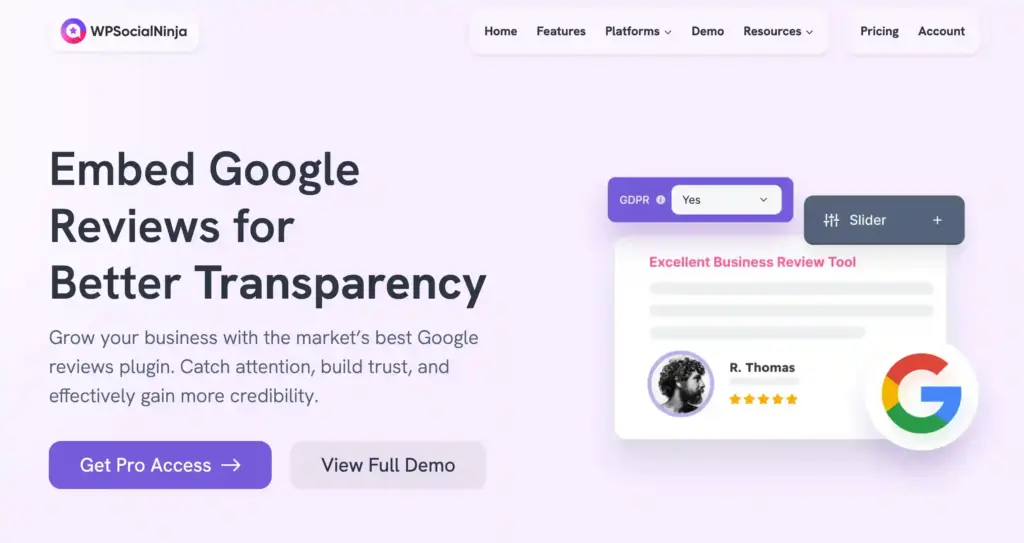
Here are the key features you will like about this plugin:
- Connect your Google Business Profile in one click. WP Social Ninja links directly to your account and pulls your latest reviews automatically, so you never have to update the widget by hand.
- Choose from multiple review templates. In addition to badges, you can display reviews as a slider, grid, or carousel and style them to match your site’s brand.
- Customize every visual element to match your brand. Adjust colors, fonts, star icons, and layout spacing, or add custom CSS for full control over how your badge looks on your site.
- Summarize long review lists with AI. WP Social Ninja can generate a short AI summary of your Google reviews, so first-time visitors get the gist of what customers say without scrolling through dozens of individual reviews.
- Filter reviews by star rating. Show only your best reviews on important pages like your homepage or product pages, and keep lower-rated feedback off the first impression.
- Set auto-publish rules for new reviews. You can decide which reviews go live automatically based on rating and keywords, so low-star or spammy feedback stays off your site without any manual work.
- Boost local SEO with review schema. WP Social Ninja adds review schema markup automatically, which helps your business show star ratings in regular Google search results and strengthens local SEO.
- Collect more reviews with a QR code. Generate a QR code that takes customers straight to your Google review form, so you can grow your review count from in-store visits, business cards, or receipts.
Start earning your Google seller ratings
You now know exactly how Google seller ratings work, who qualifies, and how they differ from every other Google review program. Most business owners never get this clear picture, and it puts you a step ahead.
If you sell online and run Google Ads, your fastest next step is signing up for Google Customer Reviews inside Merchant Center. Add the opt-in code to your checkout page and start feeding real customer reviews into the program. Google handles the rest as your review count grows.
And if you want your Google Business Profile reviews working just as hard on your own website, WP Social Ninja is the WordPress plugin I use to display them with a customizable badge on any page. Every review you collect today is one step closer to seller ratings, and one more reason a visitor chooses you.
Frequently asked questions (FAQs)
How much do Google seller ratings cost?
Google seller ratings are free. You do not pay Google to display them, though some review partners like Trustpilot or Feefo charge for their service. Google Customer Reviews is free.
How long does it take to earn a Google seller rating?
It depends on how fast you collect reviews. Once you hit 100 reviews per country at 3.5 stars or higher, Google usually shows your rating within a few weeks.
Do Google Business Profile reviews count toward Google seller ratings?
No. Google Business Profile reviews and Google seller ratings are separate systems. Your Business Profile stars appear in Google Maps and local search, but they do not feed into your seller rating or appear on your ads.
Are Amazon reviews accepted for Google seller ratings?
No. Amazon is not a Google-approved review partner, so Amazon reviews do not count. Only reviews from Google Customer Reviews or one of the ~30 approved partners qualify.
Do old reviews still count toward my seller rating?
Google counts reviews from the last 5 years. Reviews older than that stop contributing to your rating, so steady review collection helps keep your rating active.
What happens if my rating drops below 3.5 stars?
Your rating stops showing on Google Ads, but it can still appear on organic search results and free product listings. Ads become eligible again once your average moves back above 3.5 stars.
Can I dispute or remove a bad review from my seller rating?
You cannot dispute reviews through Google Merchant Center. To request removal, contact the review site hosting the review, like Trustpilot or Feefo.
Do Google seller ratings improve my ad performance?
Yes, indirectly. Google’s official data shows text ads with store ratings see an average 2% improvement in click-through rate on the Search Network. Higher CTR can also lift your Quality Score, which can lower your cost per click over time.

Subscribe To Get
Weekly Email Newsletter
Connect, Customize, and Display Social Feeds, Reviews, and Chat widgets











Leave a Reply