

7 Best WooCommerce Review Plugins in 2026 (Tested and Compared)


A shopper comes across your product page. They like the price. They like the description. Then they scroll down looking for reviews and find nothing. That hesitation often costs you the sale.
WooCommerce gives you a basic review system, but that is where the built-in experience ends. If you want to show and collect more reviews, photo or video uploads, stronger schema support, or better control over how reviews appear, you need a plugin.
This guide breaks down the best WooCommerce review plugins in 2026, what each one does well, where it falls short, and which type of store it fits best.
WooCommerce review plugins help store owners collect, display, and manage customer reviews with features like photo uploads, schema markup, moderation, and review request emails.
WooCommerce review plugins at a glance
Here is the quick comparison before we get into the details.
| Plugin | Best for | Free version | Paid price | Schema snippet |
| 1. WP Social Ninja | Displaying WooCommerce reviews | Yes | Starts from about $89/year (after a discount) | Yes |
| 2. ReviewX | Multi-criteria + visual reviews | Yes | From $79/year | Yes |
| 3. Site Reviews | Simple free review management | Yes | From €89/year | Yes |
| 4. Customer Reviews for WooCommerce | Automation + verified reviews | Yes | From $59/year | Yes |
| 5. Photo Reviews for WooCommerce | Photo review collection | Yes | From $29/year | No |
| 6. Faview – Virtual Reviews for WooCommerce | Curated social proof display | Yes | $22 (One-time payment) | No |
| 7. Review Schema – Review & Structure Data Schema Plugin | Review schema and structured data | Yes | From $29/year | Yes |
How we evaluated these plugins
We did not compile this plugin list based on feature count alone. We focused on the parts that actually influence how reviews are collected, displayed, trusted, and maintained over time.
To keep the comparison useful, we judged each plugin against five practical criteria:
- WooCommerce compatibility: We checked whether the plugin works smoothly with WooCommerce product pages, checkout flows, and order-based review workflows. A good review plugin should fit into the store without creating layout issues, broken review forms, or conflicts with product data.
- Review collection: We looked at how easily each plugin lets stores collect customer reviews. This includes how simple the submission process is, support for verified buyers, and whether customers can add photos or videos to make their feedback more useful and trustworthy.
- Display and design: We compared how the plugin presents reviews on the product page and beyond it. Strong review plugins do more than store feedback. They make reviews easier to read, more persuasive, and more usable in places like homepage sections, landing pages, badges, popups, and sidebars.
- SEO support: We checked whether the plugin adds review schema or structured data that can help search engines better understand the content. This matters because properly implemented schema can support richer search appearances, which is a meaningful advantage for product pages.
- Maintenance and support: We also looked at whether the plugin is actively maintained, updated for current WooCommerce versions, and backed by reliable documentation or support.
1. WP Social Ninja (Best for displaying reviews)
WP Social Ninja is one of the best WooCommerce review plugins for building trust and increasing your sales. If your WooCommerce product reviews are being overlooked on product pages, highlighting them better and using them as strong social proof throughout your store can help.

What it does best:
WP Social Ninja lets you showcase your WooCommerce product reviews in a way that feels natural and grabs attention. It lets you pull in reviews and display them in flexible layouts like grids, carousels, masonry and badge.

This gives you the freedom to show reviews on your homepage, landing pages, and even near checkout, where customers are more likely to make decisions.
It also lets you collect customer reviews directly using its native review form or by integrating with Fluent Forms, so you can gather feedback and display it in one place. If you want to set this up step by step, follow this guide on how to add WooCommerce reviews using WP Social Ninja.
Key features:
- Multiple Layouts like Grid, carousel, and masonry layouts
- Review badge display to show ratings and reviews in a compact way
- Review filtering by rating, keyword, or hashtag
- Add a verified reviewer badge to show authenticity
- Adding a CTA button is available to get new reviews from the review template
- Provides a notification pop-up to highlight product reviews, ratings, and recommendations
- Smart review moderation with auto or manual approval options
- Adds review schema markup to improve search visibility
- QR code generator allows for collecting reviews
- Visual builder for no-code setup
- 100% responsive on desktop, mobile, and tablet
Pros
- Strong for homepage and landing page social proof
- Clean templates with minimal setup
- Flexible enough for broader social proof use cases
- Good if you want a review display, not another collection system
- GDPR compliance reviews feed
- Compatible with Elementor, Beaver, and Oxygen theme builder
- 24/7 customer support available
Cons
It needs to be upgraded to the pro version if you want to unlock all its premium features
Pricing
Free version available. Paid plans start at $44/year (after a discount).
Best for
Store owners who already have reviews and want to reuse them more effectively across the site.
2. ReviewX (Multi-criteria and visual reviews)
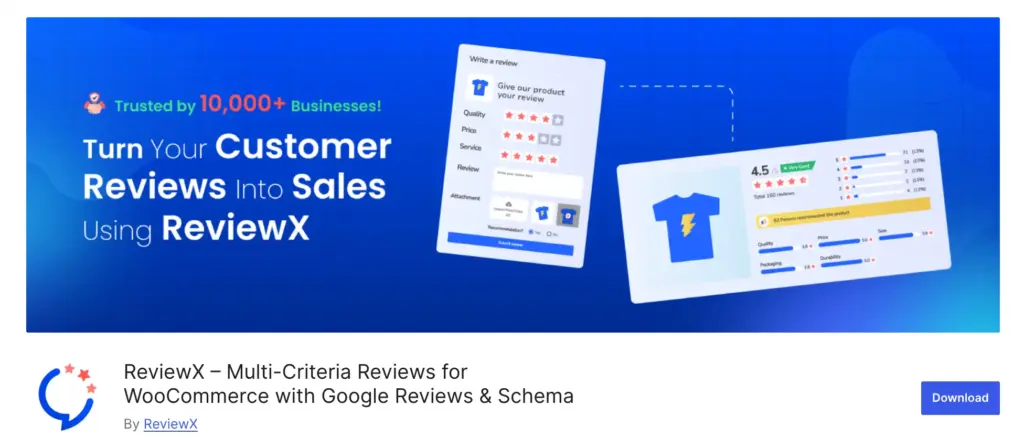
ReviewX is a better fit when one star rating is not enough. It lets customers rate products on multiple criteria, which is especially useful if buyers care about different things such as fit, quality, durability, or value.
What it does best
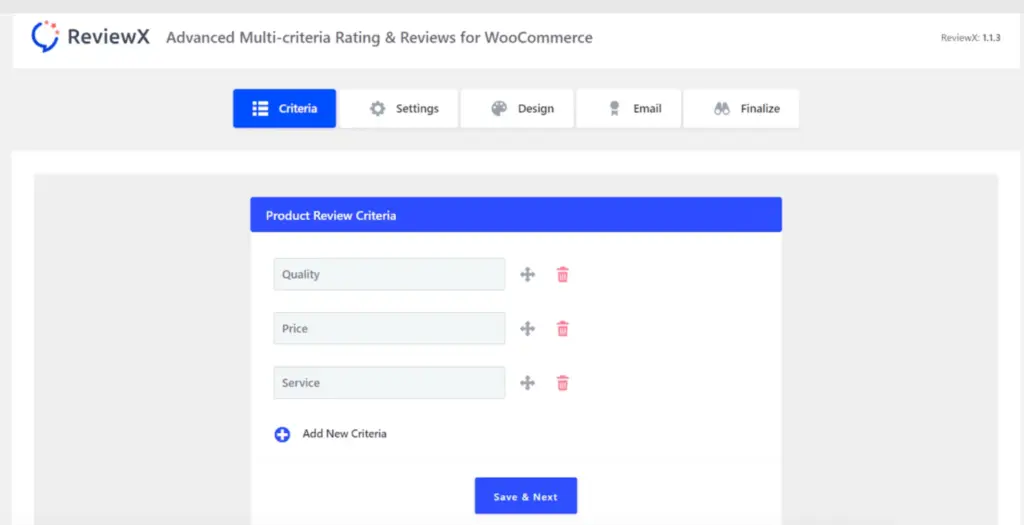
ReviewX turns standard reviews into richer feedback. Instead of only asking for an overall score, it can ask for ratings across several categories. That makes the review section more useful and more convincing.
Key features:
- Multi-criteria rating system
- Photo and video review uploads
- Verified purchase badges
- Card-based review layouts
- Automated review emails in Pro
- Schema markup for SEO
Pros
- More helpful than a single-star system
- Clean modern interface
- Good for products that need detailed buyer feedback
Cons
- Automation is tied to paid plans
- Heavier setups can sometimes conflict with custom themes
- Support can be slower than some competitors
Pricing
Free version available. Paid plans start at $79/year.
Best for
Fashion, electronics, beauty, home goods, and any store where different product qualities matter.
3. Site Reviews (Simple review management)
Site Reviews is another good choice if your budget is zero and your needs are basic. It gives you a straightforward way to collect and display reviews with moderation, schema support, and flexible placement.

What it does best
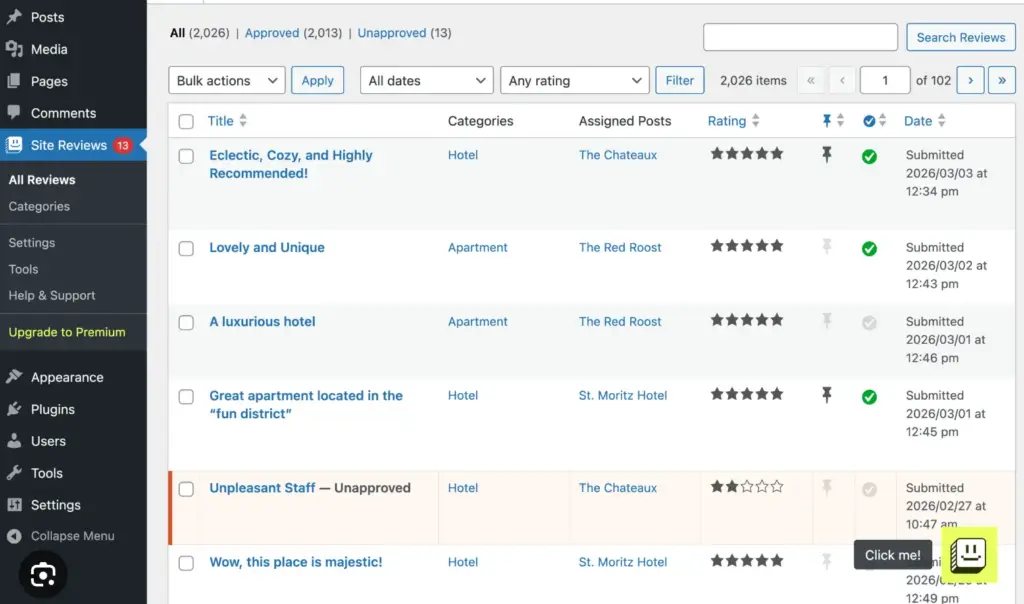
Site Reviews works more like a classic site-wide review system. Customers submit reviews through a form, you approve them, and then they appear on the site. It is simple, stable, and easy to understand.
Key features
- Star ratings and review forms
- Moderation workflow
- Pinned reviews
- Schema markup for SEO
- Shortcodes and blocks
- WooCommerce integration for product-linked reviews
- Spam protection
Pros
- Easy to use
- Good for manual review collection
Cons
- No automated review emails
- No photo or video review support in the free version
- Less visual polish than premium tools
Pricing
Free. Premium version starts at €89/year.
Best for
New or small websites that want a dependable review setup without relying on paid tools or third-party platforms.
4. Customer Reviews for WooCommerce (Best for automation)
CusRev (Customer Reviews for WooCommerce) is a strong choice if your main challenge is getting customers actually to leave reviews. It focuses on automating the post-purchase review process inside WooCommerce, so store owners can consistently collect feedback without manual effort.

What it does best
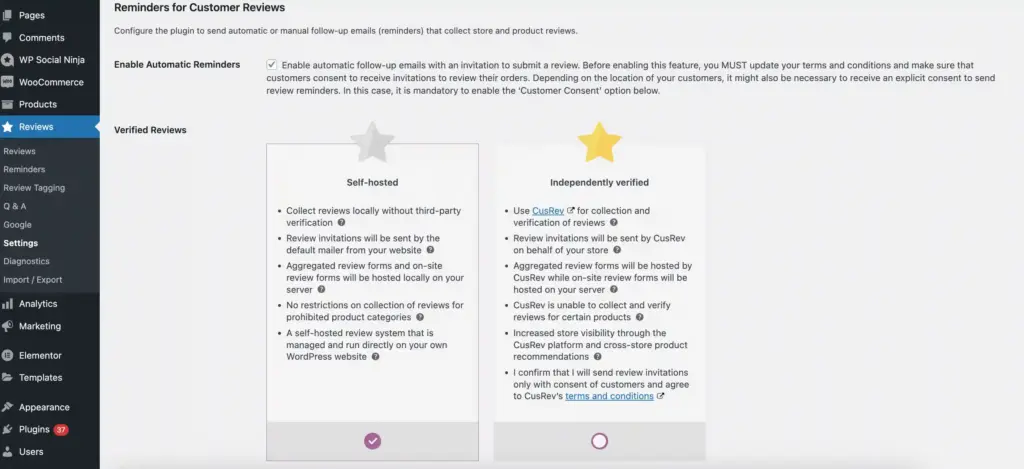
CusRev works best when you want review collection to happen automatically after a purchase. It sends review request emails tied directly to WooCommerce orders and can include reminders to increase response rates. Customers can leave text reviews along with product photos, and all reviews are marked with verified buyer badges for added trust.
Key features
- Automated review reminder emails after WooCommerce order completion
- Optional reminder emails with delay settings to improve response rate
- Photo review support for more authentic feedback
- Coupon incentives for leaving reviews
- Verified buyer badges for trust and authenticity
- Structured data (rich snippets) for SEO
- Shortcodes and widgets to display reviews
Pros
- Lightweight compared to setting up with WooCommerce
- Good fit for stores that want a consistent review flow
Cons
- Display customization is limited unless you add CSS
- Some engagement features depend on add-ons or integrations
Pricing
Free version available. Paid plans start at about $24/year.
Best for
Small to medium WooCommerce stores that want to collect more product reviews without manually following up with customers.
5. Photo Reviews for WooCommerce (Focused on customer photo reviews)
Photo Reviews for WooCommerce is a great option if you want customers to leave product reviews with images. It helps make your reviews more realistic and trustworthy, especially for visual products like fashion, beauty, home decor, and lifestyle items where appearance plays a big role in buying decisions.

What it does best
This plugin focuses on collecting and displaying photo-based reviews to make your product pages feel more authentic. It encourages customers to share real usage images along with their feedback, helping reduce “generic-looking” reviews and improving trust for new buyers.
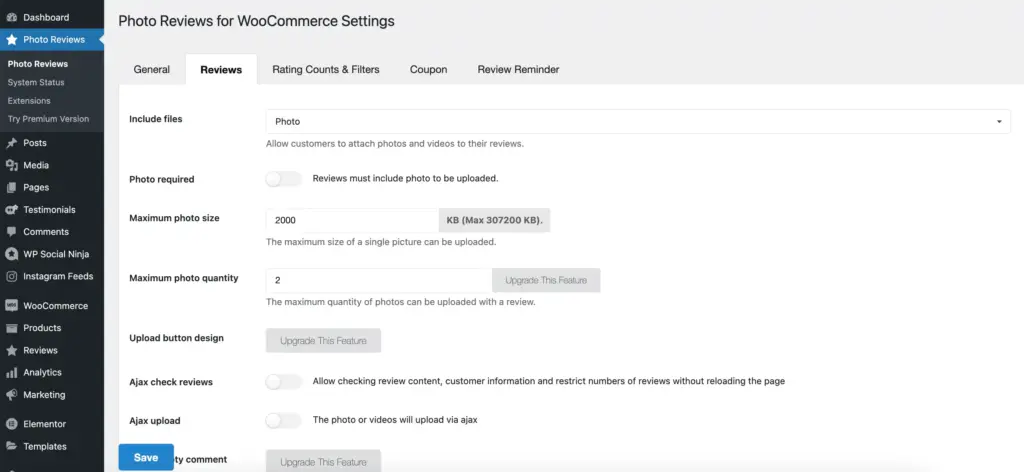
Key features
- WooCommerce-focused workflow
- Photo review submissions from customers
- Review display customization
- Verified owner badge support via WooCommerce orders
- Coupon-based incentives for encouraging reviews
- Review moderation and approval controls
- Basic structured data support for reviews
- Lightweight review collection and display system
Pros
- Strong for visual trust signals
- Good for stores where product appearance matters
- Makes review sections feel more real and useful
Cons
- More focused on photo reviews than full review management systems
- Limited automation compared to advanced review tools
- Styling and design flexibility may require theme adjustments or CSS
Pricing
Free version available. Paid plan starts from $29/year.
Best for
Stores that want customer photos to be a major part of the review strategy.
6. Faview (Virtual Reviews for WooCommerce)
Faview is mainly used to improve how your product reviews look on your store without relying solely on real customer submissions. It is more focused on creating a polished social proof section, making it useful for stores seeking better-looking testimonials and review layouts to build higher trust.

What it does best
This plugin is not focused on collecting real customer feedback. Instead, it helps you display or generate virtual or imported reviews to improve the appearance of your product pages. It works well when your priority is controlling how social proof is presented rather than building a full review collection system.
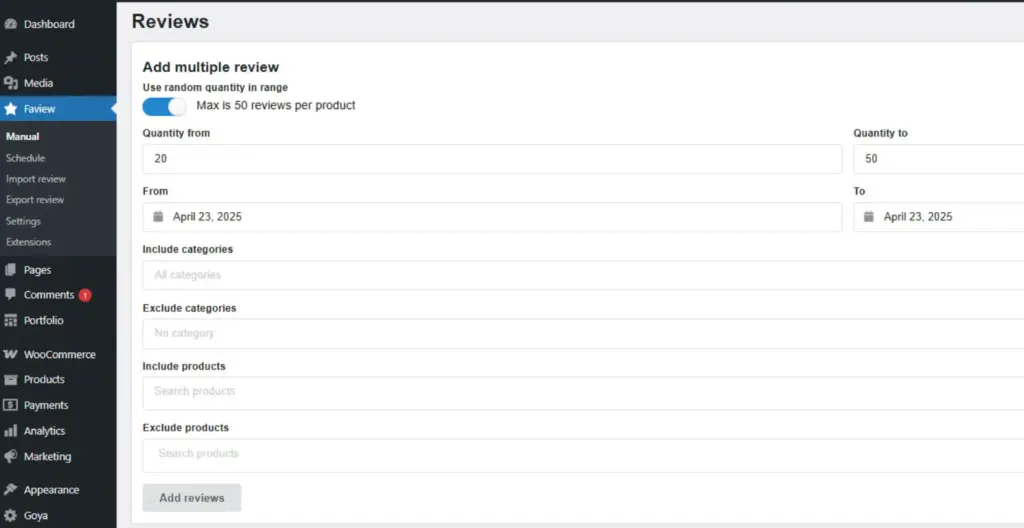
Key features
- Virtual or imported review display system
- Pre-designed social proof layouts for product pages
- Custom review presentation styling
- WooCommerce product page integration
- Lightweight review display layer
Pros
- Useful for stores that want clean, controlled testimonial sections
- Lightweight and easy to implement without complex setup
Cons
- Not a real customer review collection tool
- No strong automation or review request system
- Limited functionality compared to full review management plugins
Pricing
One-time purchase price is $22.
Best for
Stores that prefer a polished, curated review display rather than collecting traditional customer reviews.
7. Review Schema (Helps in schema support)
Review Schema is a lightweight plugin designed for adding structured data to your website. It is best suited for stores and websites that already manage their reviews but want to improve how those reviews appear in search results through proper schema markup.

What it does best
This plugin helps add reviews and structured data markup to your WooCommerce pages. It does not handle review collection or display; it simply improves how your existing review data is interpreted by search engines.
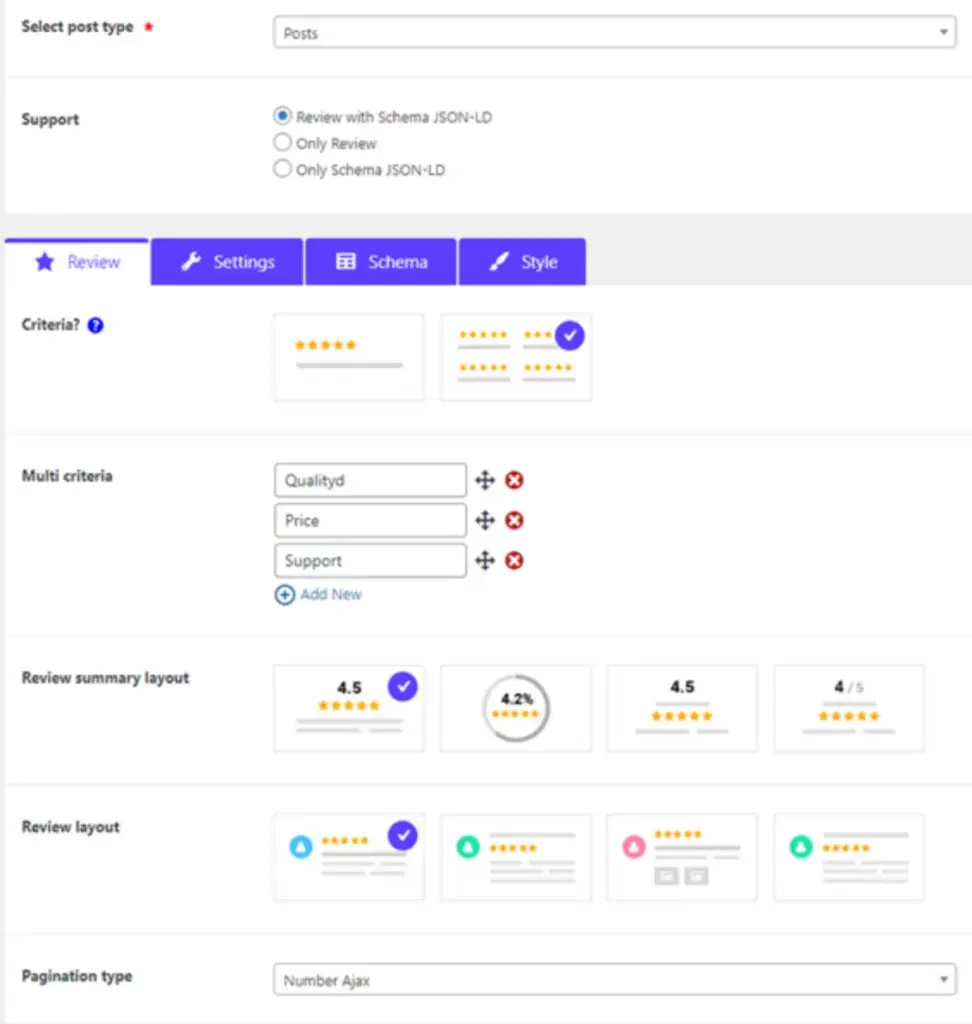
Key features
- Review schema markup for search engines
- Supports WooCommerce product pages
- Simple configuration without complex setup
Pros
- Focused only on the schema without extra features
- Lightweight and easy to implement
- Good add-on for SEO-focused WooCommerce stores
- Works well alongside other review plugins
Cons
- Not a full review management system
- Does not collect or display reviews
- Needs another plugin for review functionality
Pricing
Starting at $29/year.
Best for
Stores that already manage reviews well but want better structured data support.
Bonus: WP Ultimate Review (Lightweight option for basic review needs)
WP Ultimate Review is not the most advanced plugin in this list, but it deserves a mention because it is lightweight, free, and enough for simple setups.

This plugin focuses on basic but useful review functionality like star ratings, custom rating criteria, reviewer details, moderation controls, and basic structured data support. It keeps things simple, making it easy to add and manage reviews without a complex setup.
Key features
- Star ratings with custom rating criteria
- Reviewer name and basic review details
- Basic review schema / structured data support
- Admin review moderation controls
Pros
- Lightweight and does not slow down the site
- Easy to set up and manage for beginners
- Custom criteria make reviews more detailed
Cons
- Limited advanced features compared to other plugins
- No built-in automation for review collection
- Design flexibility is decent, but not highly polished
Pricing
Free version is available. Paid plans start around $29/year for a single site.
Best for
Beginners or small stores that want a no-cost review plugin with minimal setup.
How to choose the right WooCommerce review plugin
Most people make the same mistake; they compare feature lists and still end up with a tool that doesn’t solve their real problem. Instead, start with what you actually need your reviews to do.
Choose a better way to showcase existing reviews
If your WooCommerce product pages already have reviews but they’re not getting enough attention, focus on a better presentation.
WP Social Ninja works well here because it helps you pull existing reviews and show them in cleaner layouts that are easier for shoppers to notice and trust.
Choose automation if you’re not getting enough reviews
If customers are buying but not leaving feedback, the issue is collection, not display.
Customer Reviews for WooCommerce is a strong free option to start with because it helps you collect reviews after purchase through email-based requests.
Choose photo reviews if visual proof matters
If your products depend on how they look in real life, text reviews are not enough.
Photo Reviews for WooCommerce is a better fit because it encourages customers to share real product images along with their feedback.
Choose trust signals if credibility is the issue
If buyers are unsure whether your reviews are real, you need stronger verification signals.
CusRev and ReviewX help here with features like verified purchases and structured review validation that make feedback feel more reliable.
Choose SEO focus if search visibility matters
If your goal is to improve how product reviews appear in search results, schema support becomes important.
Review Schema is focused mainly on structured data. CusRev, ReviewX, and WP Social Ninja also support SEO-friendly review markup to different degrees.
Choose scalability if your store is growing
If your store is expanding and getting more orders, you need systems that can handle volume without extra manual work.
CusRev works well for automated review collection at scale, while WP Social Ninja is useful for reusing and displaying reviews across multiple products and content pages in a cleaner format.
Migration checklist if you are switching plugins
If you’re moving from one WooCommerce review plugin to another, don’t rush the process. A small mistake can lead to missing reviews or incorrect ratings on your products.
Don’t forget to follow this step-by-step checklist:
- Back up your site and database first: Always take a full backup before touching reviews or plugins. This is your safety net if anything breaks.
- Export reviews from your current plugin: Make sure you export all reviews, including ratings, customer details, and metadata.
- Check import support in the new plugin: Confirm the new plugin supports importing reviews (CSV or built-in migration tools).
- Set up and test on a staging site: Install the new plugin on staging and test the full import process before going live.
- Import reviews and verify data accuracy: Check if ratings, names, dates, and product connections are correctly mapped.
- Check review display and layout: Make sure reviews appear properly on product pages and match your design.
- Confirm schema markup is still working: Test structured data to ensure review ratings still show correctly for search engines.
- Verify review counts and ratings: Double-check totals on product pages to avoid mismatched numbers.
- Clear cache and CDN after going live: This ensures updated reviews and layouts load properly for users.
- Only delete the old plugin after full verification: Keep the old plugin inactive (not deleted) until everything is confirmed working.
Which WooCommerce review plugin should you pick?
By now, you’ve seen that there’s no single “best” plugin for every store, and that’s actually a good thing. Each tool solves a different part of the review problem.
Instead of overthinking features, focus on one simple question:
What is stopping your reviews from helping your store right now?
- If you already have reviews but they’re not getting attention, improve how you present them
- If customers are not leaving reviews, fix your collection process
- If trust is low, add stronger proof like verified buyers or photos
- If search visibility matters, make sure your schema setup is solid

Get exclusive social media marketing tips and tutorials in your inbox!
Once you fix that one gap, everything else becomes easier to optimize. The goal is not to install the most powerful plugin. It’s to make your reviews actually work, to build trust, reduce hesitation, and help customers feel confident enough to buy.
Start with the plugin that solves your biggest problem today. You can always expand your setup later as your store grows.
Frequently asked questions
What is the best WooCommerce review plugin?
It depends on the requirements. WP Social Ninja is the best pick for display and collecting reviews, Customer Reviews for WooCommerce is best for automation, and ReviewX is the best option for multi-criteria reviews.
How do I add WooCommerce reviews to my website?
You can add WooCommerce product reviews to your website with WP Social Ninja using the simplest steps. Here are the steps:
- On the WP Social Ninja dashboard, choose WooCoomerce from Social Reviews
- Configure your profile; select the product you want to fetch reviews
- Now, click on Create a Template and set up your review template
- After customization, Save the template and copy your shortcode
- Paste the shortcode on the page you want to show on your website
How do I customize my WooCommerce review?
WP Social Ninja offers extensive customization options to enhance the appearance of your WooCommerce review template. The settings panel enables you to arrange your reviews using various templates such as Slider, Grid, and Masonry. Additionally, you can utilize advanced filtering options to hide or display reviews containing specific keywords, as well as showcase only those with 5-star ratings. Furthermore, the plugin provides additional features such as customizing the Header, Pagination, Schema, Number of reviews, and comprehensive style settings for your reviews template.
Does WooCommerce have a built-in review system?
Yes. It includes basic star ratings and text reviews, but it does not automate requests or give you much design control.
Can I collect photo and video reviews on WooCommerce?
Yes. CusRev, ReviewX, and Photo Reviews for WooCommerce support media reviews in different ways. For WP Social Ninja users, they can add photos with Fluent Forms and also can collect reviews.
Can I display WooCommerce reviews on my homepage or landing pages?
Yes, you can. Tools like WP Social Ninja let you take your WooCommerce reviews and show them on your homepage, landing pages, or any section where you want to build trust.
Can I add reviews from other platforms too?
Surely, you can! Not only customer reviews for WooCommerce, but WP Social Ninja also has more integrations with other social review platforms like Google, Yelp, Amazon, Facebook and more. Moreover, you can easily embed your social feeds from Facebook, Instagram, YouTube, and TikTok. Additionally, you can include social chat widgets like Facebook Messenger, WhatsApp, and more.

Subscribe To Get
Weekly Email Newsletter
Connect, Customize, and Display Social Feeds, Reviews, and Chat widgets


Trending Posts
-

-
 Mashfik Upal Aumy
 -








Leave a Reply