
The Ultimate Guide to WordPress Social Proof in 2026


Your WordPress website looks perfect. The copy is strong, the design is clean, yet visitors remain unsure about making a purchase. Why? In 2026, being polished does not mean being trusted anymore.
AI-generated content is currently flooding the internet, and your visitors can feel it. Brands no longer earn trust on their own; people do.
Studies show 97% of consumers read online reviews before making a purchase, and that number keeps climbing as AI content becomes harder to distinguish from the real thing. That is where social proof comes in
Real reviews, ratings, testimonials, and social media content show visitors that real people trust your brand, and not just what you are saying on your website.
In this guide, you’ll learn what social proof is, the most effective types of social proof, and how to implement it into your WordPress site using such tools as WP Social Ninja, regardless of whether you operate a local business, on WooCommerce, or as an agency, or even a blog.
Let’s get started!
TL;DR
- WordPress social proof is the display of real customer feedback, ratings, testimonials, and social content on your WordPress site to show that others trust and use your business
- In 2026, trust comes from people, not just polished content or brand claims
- Key types include customer reviews, testimonials, social feeds, notification popups, UGC, and FOMO elements
- Each type plays a role. Some build trust, some create urgency, and others show authority
- Using a mix of social proof increases engagement and improves conversions significantly
- People rely on social validation, authority, and others’ actions before making decisions
- The 3-layer framework (trust, urgency, authority) helps you place the right proof at the right time
- Different businesses need different social proof based on their goals and audience
- Social proof also supports SEO by improving clicks, engagement, and search visibility with schema markup
- WP Social Ninja makes it easy to add reviews, feeds, testimonials, and popups without coding
- Best practices include using real feedback, avoiding overload, optimizing for mobile, and testing placements
- Trends in 2026 focus on personalization, privacy-first data, video testimonials, and social commerce
- Start simple: add reviews, show testimonials, and place trust signals where visitors make decisions
What Is WordPress Social Proof?
WordPress social proof is actual evidence of real people, which includes reviews, ratings, testimonials, and live activity displayed on your WordPress site to make the visitors trust you quicker and take action.
It is based on a universal human fact that people trust other people more than they trust brands. As soon as a visitor identifies that other people have already purchased, reviewed, or suggested something, their hesitation drops.
Displaying reviews on a product page can significantly increase conversions. Products with at least five reviews are 270% more likely to be purchased than those with none. Even a few reviews can build trust and help customers feel confident about buying, making ratings and reviews a powerful conversion driver for online businesses.
- Research by Spiegel Research Center
Types of Social Proof for WordPress Websites
Social proof comes in many forms, and each one plays a role in building trust and encouraging visitors to take action. Using a mix of these types on your WordPress site can help your audience feel confident and engaged.
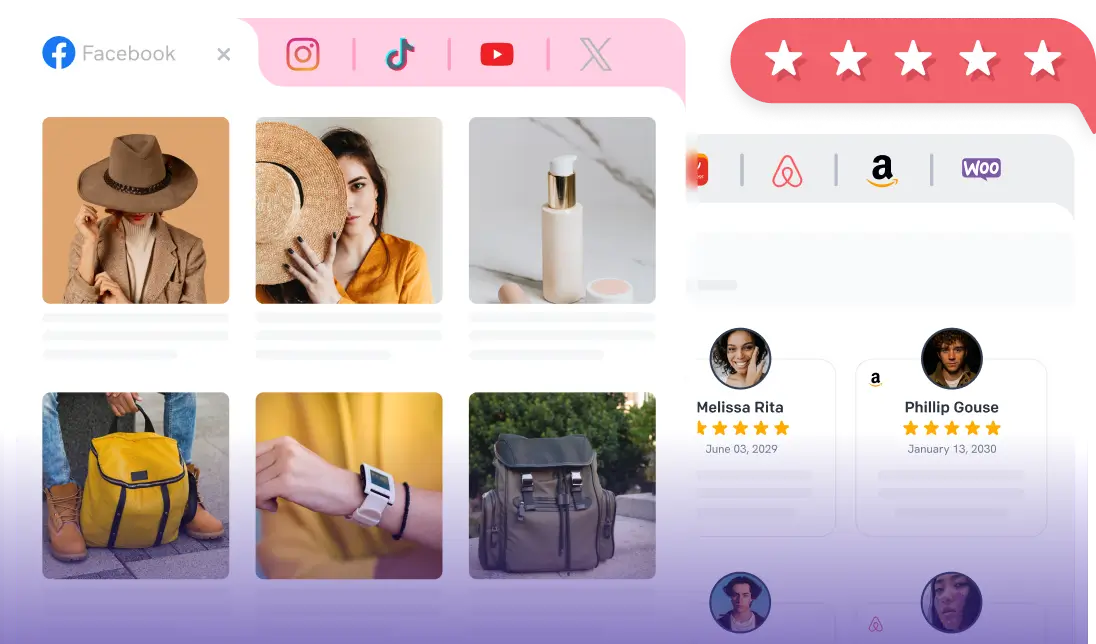
Build trust and boost conversions on your WordPress site with social proof. Use reviews, testimonials, social feeds, notification popup, UGC, and FOMO timers to show real engagement and credibility.
1. Customer Reviews
Customer reviews are real feedback from users about your products or services on platforms like Google, Facebook, Yelp or others.
- Helps visitors see what others think about your business
- Works best when paired with star ratings or badges
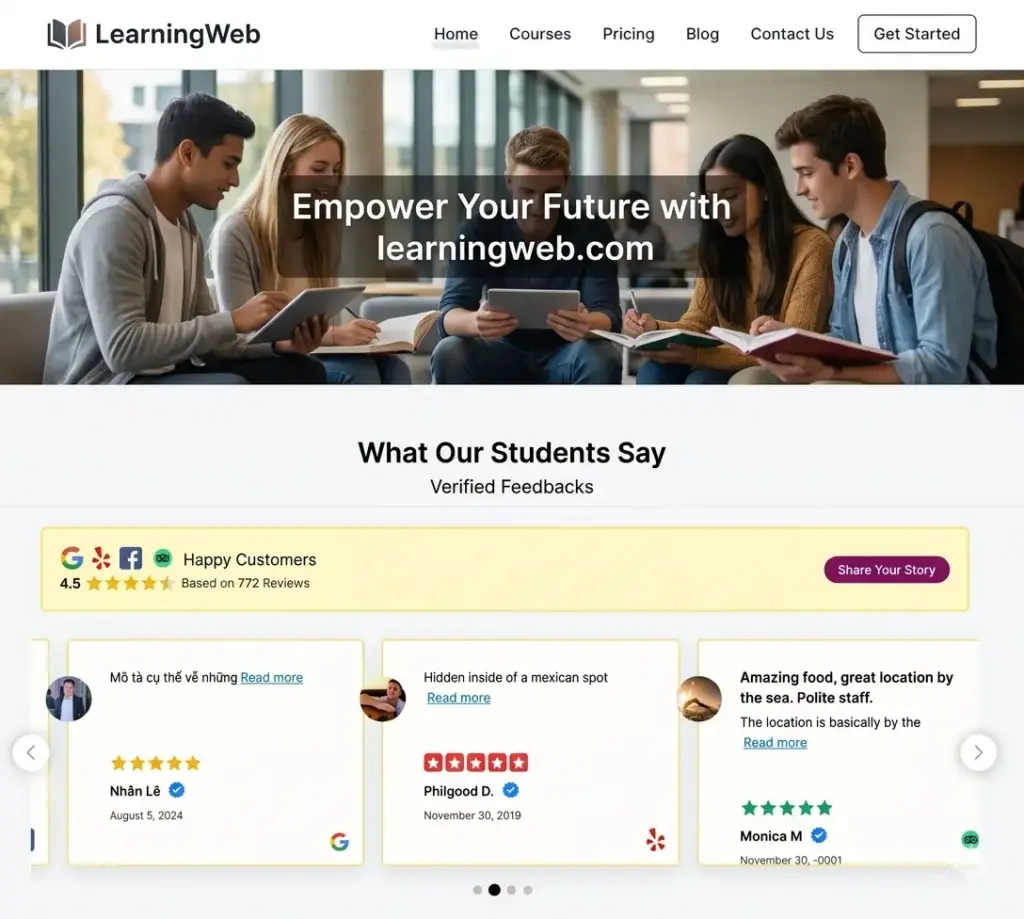
Show authentic customer reviews from multiple platforms directly on your website to build trust and influence visitor decisions.
Tip: WordPress review plugins offer several ways to showcase customer feedback. However, review badges are one of the most popular and compact formats. These review badges display your average rating along with the total review count in locations such as sidebars, footers, or floating corners, helping visitors instantly recognize your brand’s credibility.
2. Testimonials
Customer testimonials are one of the most powerful forms of social proof. They show real experiences, help build trust, and make your brand feel more human.
- Include the customer’s name to make the testimonial believable
- Add a photo to make the review relatable and real
- Show a star rating or score for a quick visual of satisfaction
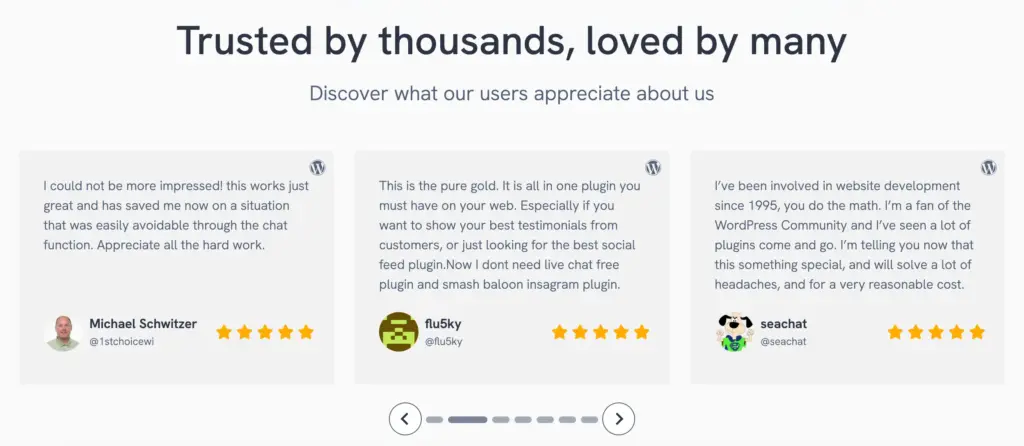
Use customer testimonials effectively on your WordPress site with a visually appealing testimonial slider that highlights real feedback and builds trust.
Video Testimonials or Case Study
Short videos from happy customers show their real experiences. Watching real people talk about your product makes it more believable and trustworthy.
- Great for landing pages or high-value product pages
- Website visitors can share your videos from your site to their social media, helping you reach more potential customers
Always keep it real. Fake reviews destroy trust faster than having none. In 2026, visitors are trained to spot AI-generated testimonials. Authentic, specific feedback from real people is what actually helps in conversions.
3. Notification Popups
Real-time pop-ups show recent activity, such as “James just left a 5-star rating” or the latest reviews.
- Grab attention and make your site feel active
- Combines social proof, urgency, and trust in a subtle way
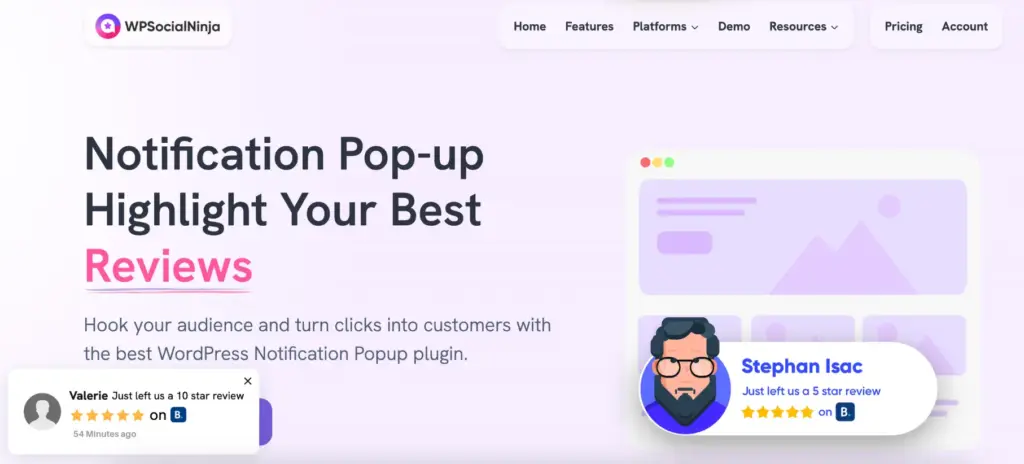
Looking for a simple way to grab attention and increase conversions on your website?
4. Social Media Feeds
Social media feeds display live posts from social media platforms like Instagram, Facebook, YouTube, and TikTok directly on your website. They show your latest social activity, highlight user engagement, and keep your website content fresh.
- Shows your audience is engaged and interacting with your brand
- Keeps your website content fresh and authentic

Show your live social media activity and make your website feel more dynamic.
5. User-Generated Content (UGC)
User-Generated Content (UGC) includes photos, videos, or social media posts that real customers share about their experiences with your brand, products, or services.
- Demonstrates real usage of your products or services
- Builds authenticity and encourages new visitors to take action
You can build stronger social proof by displaying user-generated content (UGC) like customer photos, videos, and social posts that highlight real product experiences. Explore the 9 best UGC platforms to boost your brand.
“An estimated 90% of consumers say user‑generated content (UGC) holds more influence over their buying decisions than promotional emails and search engine results.”
6. FOMO Timers & Urgency Elements
FOMO timers and urgency elements are features that create a time-based or limited-availability pressure, encouraging visitors to act quickly. These include countdown timers, limited-stock alerts, or time-sensitive offers.
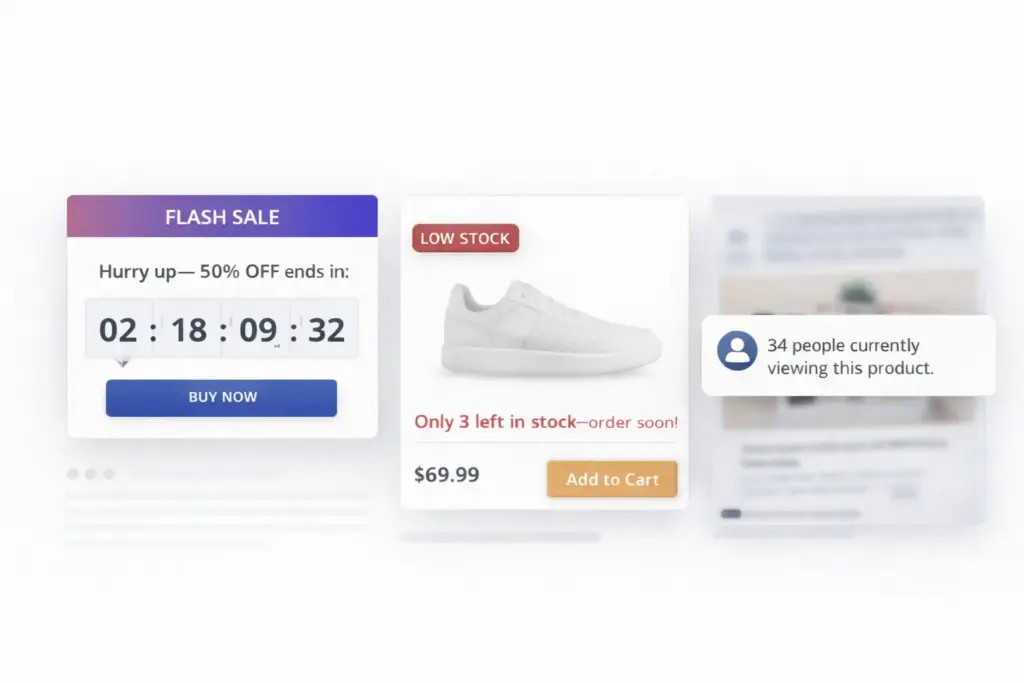
They help reduce hesitation and encourage visitors to act faster before the opportunity is gone. These 10 FOMO marketing examples show how small triggers can turn interest into action and boost conversions
Social Proof Types for WordPress: Quick Comparison
See different types of social proof at a glance. Know their benefits, best uses, and how they build trust and drive action on your WordPress site.
| Type | Pros | Best Use Case | Implementation Difficulty |
| Customer Reviews | Builds credibility with real feedback | Product pages, landing pages | Easy |
| Testimonials | Show multiple reviews at once | Landing pages, homepage | Medium |
| Notification Popups | Creates momentum & urgency | Checkout pages, product pages | Medium |
| Social Media Feeds | Shows live engagement | Blogs, homepages | Medium |
| User-Generated Content (UGC) | Adds authenticity and relatability | Product pages, galleries | Medium |
| FOMO Timers & Urgency | Encourages immediate action | Checkout pages, limited offers | Medium |
The takeaway is always keep it real. Fake reviews or misleading notifications can destroy trust faster than having none at all.
See real examples of social proof in action and discover how each type can build trust and confidence on your website.
The Psychology Behind Social Proof
People rarely make decisions on their own. Rather, they check on what other people are doing and go with what is popular or reputable. It is this instinct of nature that makes social proof so effective.
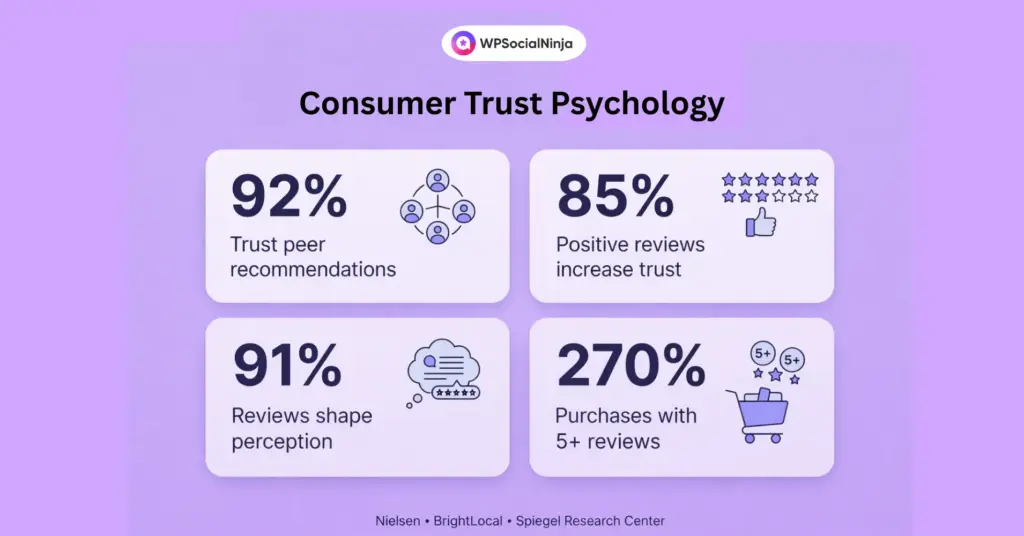
The following are the main psychological principles that explain the power of social proof.
1. Social Validation: The Core Principle
The primary cause of social proof’s effectiveness is social validation. Human beings observe others’ actions to make decisions about what is safe, right, or worth attempting.
When visitors see others reviewing products, rating them, or interacting with a service, they perceive this as an indicator of trust.
Consumer trust is highly influenced by social validation. A research study indicates that 85% of consumers will have a positive experience with a business when they read a positive review, underscoring how visible feedback signals add credibility for new visitors.
Social validation usually comes out on the WordPress website as:
- Star ratings
- Review counts
- Testimonials
- Live activity notifications.
For example, the visuals showing 4.8 stars based on 1,247 verified buyers instantly give visitors the impression that many people already have confidence in the product.
Pro tip: The testimonial feature in WP Social Ninja lets you add detailed reviews with the reviewer’s name, contact details, a website, company, and a photo. Even images of the product or service by adding custom reviews using Fluent Forms. This will help you display authentic feedback, making your site more reliable and influential to visitors.
2. Cialdini’s Principle of Social Proof
According to psychologist Robert Cialdini, people tend to follow others’ behaviour, particularly when they are unsure about a choice.
On websites, this principle manifests itself with such signs as:
- Customer ratings
- Review badges
- Popular product labels
- Messages indicating new purchases or new subscriptions
“We view a behaviour as more correct in a given situation to the degree that we see others performing it.”
– Robert B. Cialdini, Influence: The Psychology of Persuasion.
3. Authority Bias
People prefer to believe facts presented by professionals, confirmed clients, or renowned personalities.
That is why the word of an expert, authoritative buyer reviews, or recommendations from an influencer can have a powerful impact. When guests find out that reputable people have expressed their opinion about it, they are more assured that the product or service is trustworthy.
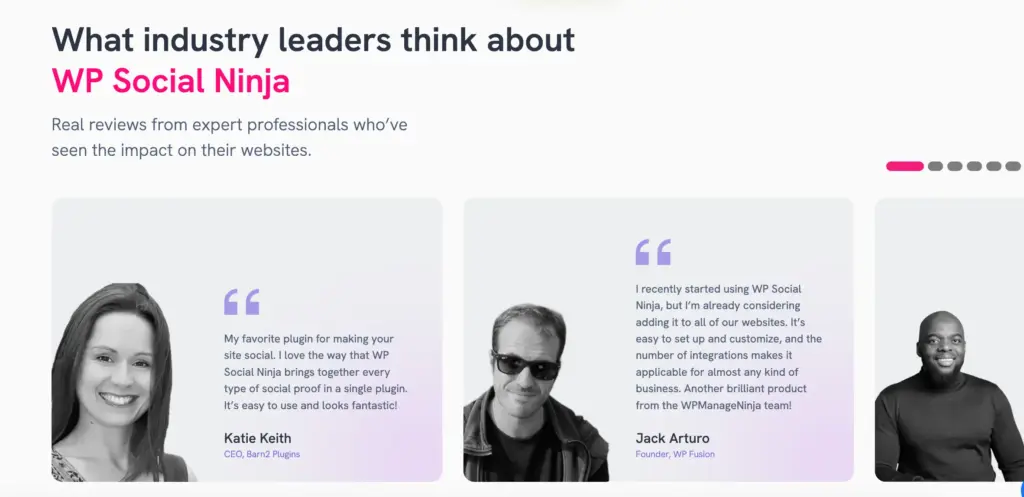
Authority signals reduce indecision and help users make decisions much faster.
4. Combining Triggers for Maximum Impact
The best websites combine several social proof elements rather than relying on a single one.
For example:
- Pop-up notification messages about reviews of other people generate social proof and urgency
- Testimonial grids show actual customer feedback
- Authenticity and credibility are enhanced through user-generated content
When such signals are used in combination, they naturally lead visitors to make a choice.
Social proof turns browsers into buyers. Explore practical strategies to display trustworthy social signals on your website.
The 3-Layer Social Proof Framework: Build Trust, Urgency, and Authority
Not all social proof works the same way. The 3-layer framework shows how to combine different types: reviews and ratings build trust, live activity notifications create urgency, and testimonials or case studies establish authority.
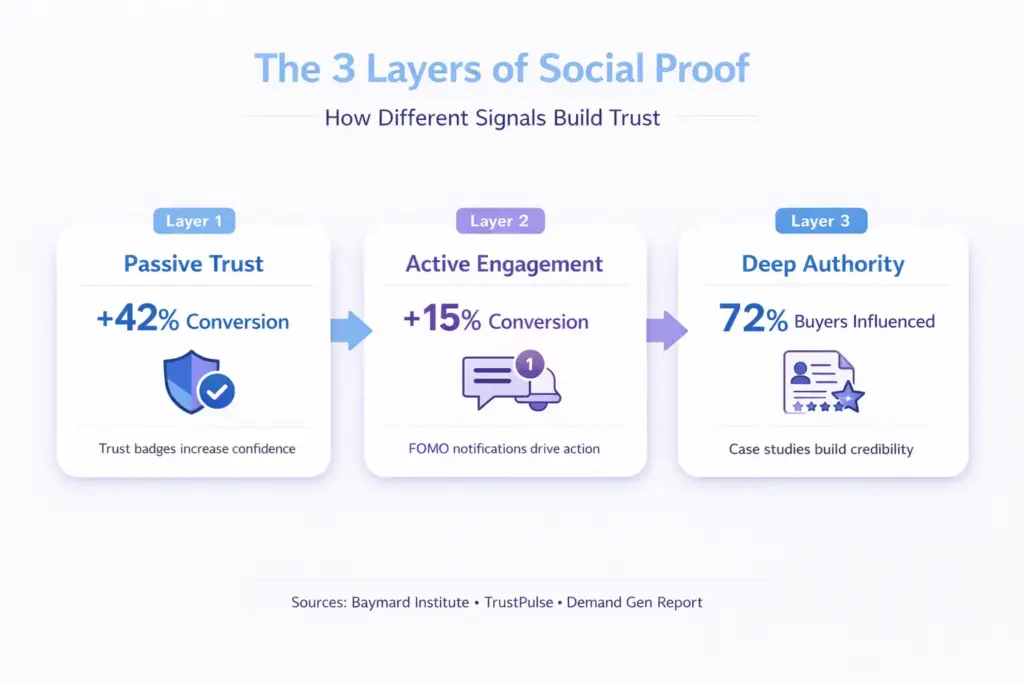
Understanding these three layers makes it easy to apply the right proof at the right time to maximise impact.
Layer 1: Passive Trust Signals
Passive trust signals are subtle elements on your website that quietly show credibility. They don’t actively push visitors to act; instead, they reassure them while they browse naturally.
What qualifies as passive:
- Review badges showing star ratings and review counts
- Verified payment or certifications icons
- Security icons around the checkout.
- Platform badges (Google Partner, Verified Seller)
Locations: headers, footers, sidebars, closer calls-to-action, and product pages.
How they work: These work like whispering, “this is what others believe. They are seen unconsciously by the visitors, and therefore, trust is built without thinking.
Best for: Quick credibility on pages where visitors need reassurance before taking action.
Layer 2: Active Engagement Signals
Active engagement signals are real-time indicators that show people are interacting with your product or service. They create a sense of urgency without being intrusive.
What qualifies as active:
- Live sales messages (“Sarah of Texas has just made a purchase”)
- Recent activity pop-ups of downloads or sign-ups
- Social shares in real time
- “X people viewing this product” displays
Position: Product pages, price pages, checkout pages, and conversion-oriented pages.
The way they operate: They create movement and urgency. FOMO helps eliminate hesitation when visitors observe others doing something.
Best for: Pages you want to drive visitors to conversion, particularly e-commerce.
Layer 3: Deep Authority Signals
Deep authority signals are strong proof that your brand delivers real results. They provide detailed, credible evidence that convinces visitors that your product or service works as promised.
What qualifies as deep authority:
- Case studies that are detailed and have metrics
- Video testimonials from actual customers
- User-generated content galleries
- Expert endorsements with credentials
- References in the media of credible publications
Where to place them: Landing pages, about pages, testimonial sections, service pages, etc.
How they work: They give facts that transform non-believers into believers. An emotional connection will develop when one reads an elaborate success story or even a video testimonial.
Best for: High-value products, B2B services, or any purchase requiring significant consideration.
Why Combining All 3 Layers Works
One single badge or testimonial creates a little trust. However, when the three layers collaborate, trust is multiplied exponentially.
The visitor journey with layered proof:
- Lands on homepage → Sees badge (Layer 1) → “Okay, they have reviews”
- Clicks product page → Sees live notification (Layer 2) → “People are buying this now”
- Scrolls down → Views/Reads video testimonial/expert endorsement (Layer 3) → “This actually works for people like me”
Each layer strengthens the previous one. Hesitation fades as proof shows up.
If you want to boost trust on your site, WP Social Ninja lets you add verified reviewer badges next to reviewer names, making every review look authentic and credible.
Which Social Proof Is Right for Your Business Type?
Different websites demand varying social proof. Choosing the correct one will help visitors trust your site more and act more quickly.
New and Small Business Websites
New and small businesses need to earn trust fast. Showcasing happy customers with detailed testimonials that include recognizable client logos instantly makes your business appear reliable. Even a few genuine reviews can convince first-time visitors to take action and explore your products or services with confidence.
Purpose: Build credibility and attract first customers.
Recommended social proof: Customer testimonials, star ratings, client logos, and small review badges.
Why it is effective: Visitors feel confident when they see others have trusted and benefited from your business.
Grow your small business without breaking the bank! Discover 13+ free advertising strategies that attract new customers, increase engagement, and strengthen your brand’s online presence.
E‑Commerce Sites
E-commerce sites succeed when visitors feel confident buying. Highlighting product reviews, star ratings, and notification pop-ups reassures shoppers and encourages them to complete their purchases.
Purpose: Increase purchase confidence and reduce cart abandonment.
Recommended social proof: Live sales notifications, product reviews, star ratings, trust badges, and customer photos.
Why it is effective: Shoppers trust products more when they see others purchasing and sharing positive experiences.
B2B Service and Technology Companies
B2B companies gain clients faster when they showcase proven results. Displaying client logos, case studies, and video testimonials demonstrates your expertise and builds credibility. Social proof shows potential clients that businesses like theirs have succeeded with your solutions.
Purpose: Showcase authority and earn client trust.
Recommended social proof: Case studies, client logos, video testimonials, awards, and certifications.
Why it is effective: Decision-makers feel confident hiring you when they see real results and satisfied clients in similar industries.
Hospitality Businesses
Hospitality businesses attract more bookings by highlighting guest experiences. Sharing reviews, photos, and ratings from happy travellers reassures potential guests and inspires trust. Social proof gives visitors a peek into the positive experiences they can expect at your property.
Purpose: Build trust and attract more bookings.
Recommended social proof: Guest reviews, star ratings, testimonials, booking notifications, photos of happy guests or rooms.
Why it is effective: Travellers book faster when they see proof of previous guests’ enjoyable experiences.
Strengthen guest confidence and drive more bookings with social proof. Explore our detailed guide on hospitality marketing solutions for actionable tips.
WooCommerce Stores
WooCommerce stores sell more when they display live activity and customer feedback. Reviews, star ratings, and product photos show shoppers that others trust your products. Social proof encourages buyers to act quickly and complete their purchases.
Purpose: Increase purchase confidence.
Recommended social proof: Notification Popup, review badges, review grids, trust badges at checkout, and customer photos from Instagram.
Why it is effective: Seeing others buy and review products convinces shoppers your store is reliable.
Agencies and Freelancers
Agencies and freelancers win clients by showing real results. Displaying client logos, case studies, and testimonials proves your skill and builds credibility. Social proof reassures potential clients that you deliver quality outcomes and makes them more likely to hire you.
Purpose: Show credibility and build trust with potential clients.
Recommended social proof: Client logos with testimonials, case studies, video testimonials, before/after examples, and awards.
Why it is effective: Clients hire faster when they see proven results and know you are trustworthy.
Does WordPress Social Proof Help SEO?
The answer is yes, social proof helps to enhance your SEO. It does not have a direct impact on Google rankings, but it makes your pages look better in search results and how people interact with them.
Search results with rich media (such as review stars or ratings) improved, yielding up to a 26% increase in clicks compared with plain results, even outperforming higher-ranked local business listings.
Review Schema Improves Search Visibility
When reviews include schema markup, search engines can display star ratings directly in search results. Reviews that display a rating, such as 4.8 based on 200+ reviews, are visually appealing and tend to be clicked more.
You can use plugins such as WP Social Ninja that add this structured data when you show reviews on your site.
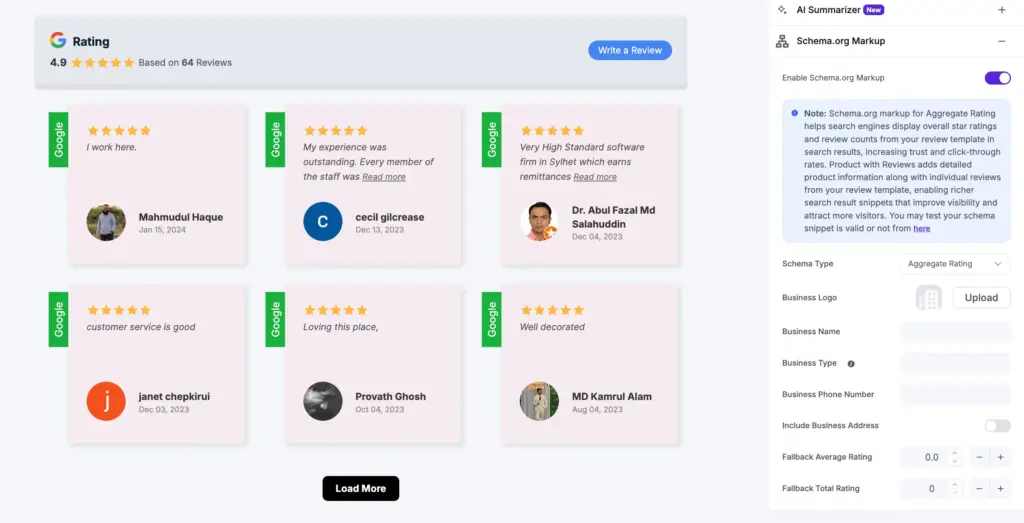
Better Engagement Signals
Social proof also affects visitors’ behaviour on your site. Whenever individuals look at reviews, testimonials, or customer content, they tend to spend more time searching.
This can help SEO because:
- Reviews and feedback help visitors to spend more time on them
- The bounce rates reduce as the user engages with more content
- Real customer stories inspire sharing and backlinks
Stronger Local SEO
Displaying Google reviews on your site increases trust and local relevance to local businesses. Regular updates to your site and business profile will help search engines relate your brand to actual customers.
Customer reviews are more than a source of trust, as they also affect search visibility. Discover the benefits of using Google reviews for local seo, and why they are among the strongest local seo indicators.
Special Note: What Social Proof Cannot Do for SEO
Social proof is a trust booster, not a search optimizing platform. It will fix poor content, slow load times, or missing backlinks. The basics of SEO have to be established initially, and the social proof enriches it with improved engagement rates and more clicks.
3 Best WordPress Social Proof Plugins (Detailed Comparison)
Choosing the right WordPress social proof plugin determines implementation ease, feature availability, and long-term results. This comparison evaluates the top three plugins based on features, pricing, performance, and 2026 capabilities, including AI integration and privacy compliance.
1. WP Social Ninja (Top Choice for Comprehensive Social Proof)
WP Social Ninja is the most comprehensive social proof WordPress plugin, combining reviews, testimonials, a notification pop-up, social media feeds, and chat widgets into one plugin. It connects to 9+ review sites, including Google Reviews, WooCommerce Product reviews, Yelp reviews, and others.
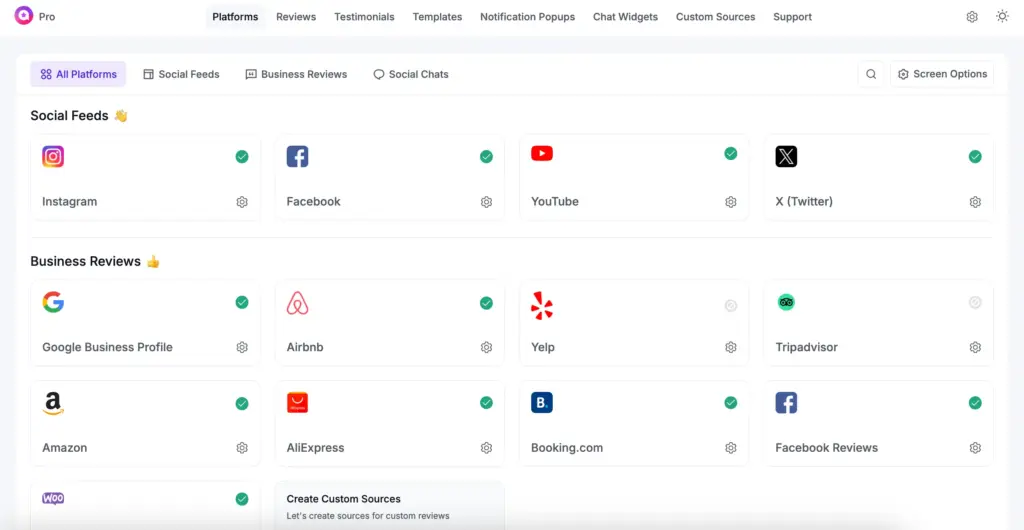
This plugin offers badge layouts, grid view, auto-scrolling sliders, and user-editable templates. No set-up or customization code is required. You can filter reviews by star rating, hashtags/keywords, or source, and style them to fit any WordPress theme.
It also has a QR code generator to gather reviews. AI summarizer concises long reviews into main points, sorts spam reviews, displays custom templates on a site, and automatically adds schema markup to increase search visibility.
It works smoothly with page builders like Elementor, Gutenberg, Beaver Builder, and Oxygen Builder, and also integrates with Fluent Forms to collect reviews.
Core Features:
- Display social feeds from 4+ platforms in one place
- Connect multiple accounts to show reviews and feeds template
- Create shoppable Instagram feeds
- Multiple layout and template options: slider, grid, masonry, and more
- Advanced filter settings: search terms, hashtags, or keywords
- Collect reviews from 9+ platforms and add testimonials
- Auto/Manual synchronization and has custom review source
- Custom “Write a Review” button and in-depth styling options
- GDPR compliant, fast, mobile-friendly, and easy to manage
Pricing:
- Free version available
- Pro version starts at $44/year (After Discount)
Get started with the free version or see all the features in the WP Social Ninja pricing plans.
Best for: WordPress site owners who want everything in one place, especially eCommerce stores, local businesses, agencies, marketers, creators, personal brands, and hospitality or travel businesses that rely on reviews, feeds, and customer engagement.
Still wondering how it will look on your website? Take a look at the live demo and see the features in action.
2. NotificationX (Best for Real-Time Alerts & FOMO Social Proof)
NotificationX focuses on FOMO (fear-of-missing-out) notifications on WordPress. It will show the recent sales of WooCommerce, Easy Digital Downloads, or any other custom conversion. The download counts, review alerts, and email-signup messages are also displayed with this tool, providing a social impression through these pop-ups.
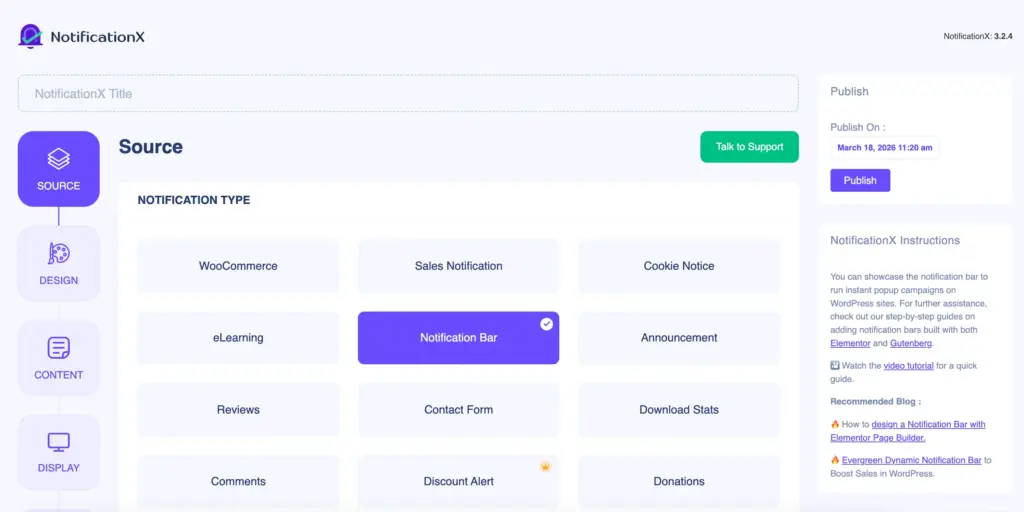
It has integrations with WooCommerce, Freemius, Envato, and LearnDash. It also includes a collection of notification templates and lets you customize some fundamental style options.
Through the analytics dashboard, you can monitor how many times your notifications have been seen and clicked, giving you a picture of their performance.
Core Features:
- Freemius sales notifications for plugin and theme developers
- Envato sales tracking for ThemeForest and CodeCanyon sellers
- LearnDash course enrollment notifications
- Comment popup notifications
Pricing:
- Free version available
- Pro version starts at $49/year
Best for: Budget-conscious WooCommerce store owners who need basic sales notification pop-ups without comprehensive review management. Good for stores with low review volume, which are more urgency-oriented rather than authority-oriented.
3. Site Reviews (Best Review Management Plugin for WordPress)
Site Reviews is a review-oriented product that does not connect with any external services, such as Google or Facebook. Reviews are posted by visitors using specific forms that you have created.
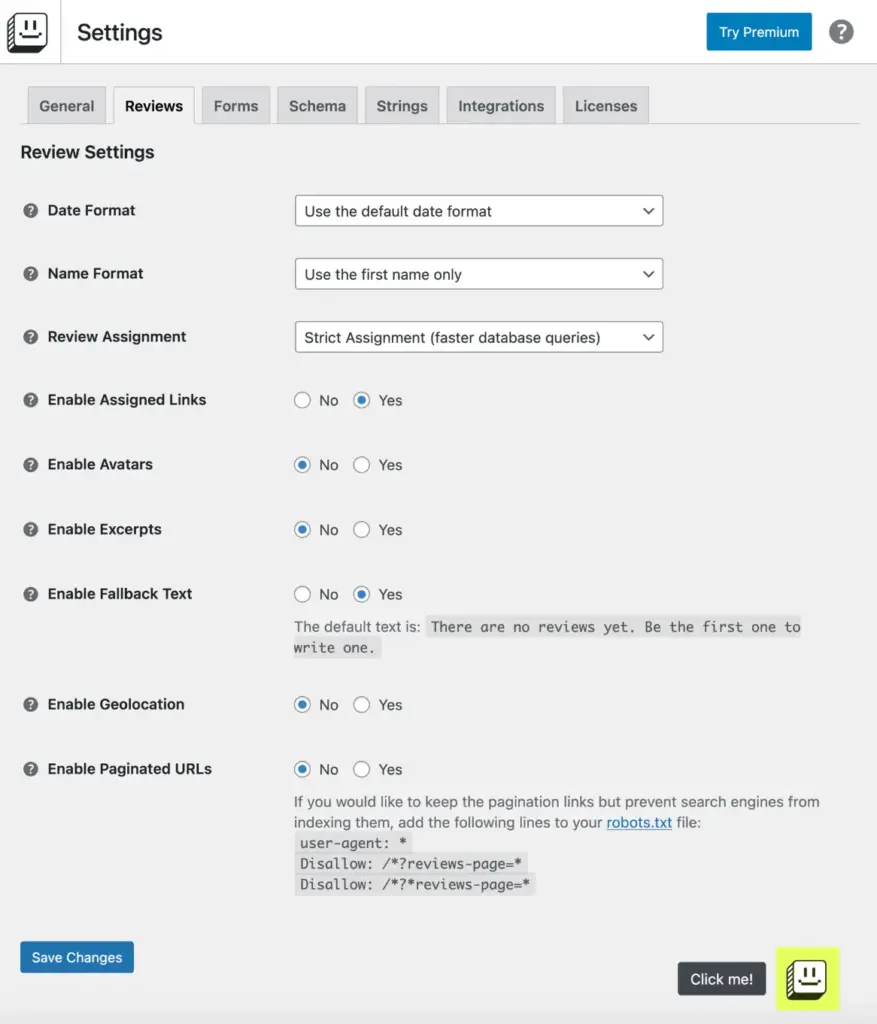
This plugin will create review schemas for SEO, display reviews as a grid or list, and can also be filtered by rating. Includes shortcodes and Gutenberg blocks for easy use. Has review moderation, spam detection and custom form fields.
Core features:
- Unlimited-field custom review forms
- Notifications of new reviews with Slack
- Review summaries
- Multiple-layer spam protection
- Integration of WooCommerce and SureCart
Pricing:
- Free version available
- Premium version starts at $25/year
Best for: WordPress websites that need their own review systems without using Google or Facebook. Best suited for niche enterprises, B2B services, or industries that do not require external review services. Need to gather reviews actively.
3 Best Social Proof Plugins (Quick Comparison Table)
With so many social proof plugins out there, it’s easy to feel unsure about which one to choose. To keep things simple, here’s a quick comparison of three popular options so you can see the differences and pick what works best for your site.
| Feature | WP Social Ninja | NotificationX | Site Reviews |
| Review Platforms | 9+ (Google, Facebook, Yelp, Airbnb, and more) | Limited | None (self-hosted only) |
| Live Notifications | Yes | Yes | No |
| Review Grids | Yes | No | Yes |
| Social Feeds | Yes | No | No |
| AI Features | Yes | No | No |
| Schema Markup | Yes | No | Yes |
| Free Version | Yes | Yes | Yes |
| Pro Price | $44/year | $49/year | $25/year (add-ons) |
| Best For | Social proof marketing | Basic FOMO popups | Custom reviews |
| No-Code Setup | Yes | Yes | Yes |
Choose The Right Social Proof Plugin for Your Site
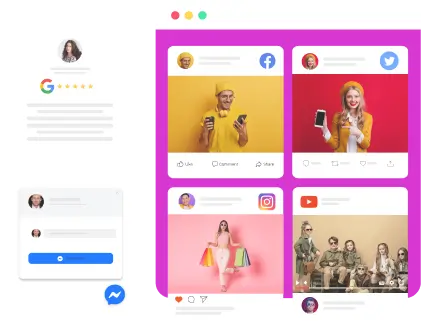
After comparing the top three social proof plugins, the question is simple: if you had to pick just one, which would it be? For most site owners, the answer is clear: WP Social Ninja. Unlike others that cover only bits and pieces, it combines everything you need in one plugin; reviews, ratings, testimonials, social feeds, notification popups, and shoppable feeds.
Win your customers’ hearts with exceptional features
Discover how WP Social Ninja can assist you in designing outstanding customer experiences.
How to Add Social Proof to WordPress (Complete Step-by-Step)
Showing that other people trust your business strengthens your website’s impact. With a good social proof plugin, you can easily display reviews, ratings, and recommendations on your WordPress site without any coding or tech skills.
Easily showcase social proof on your WordPress site: Install WP Social Ninja → Connect your review and social accounts → Choose a display (badge, carousel, grid, or popup) → Customize style, filters, and visuals → Place the widget anywhere on your site.
For the detailed guide, you can follow the following steps.
Step 1: Install WP Social Ninja
Go to your WordPress plugin repository and search for “WP Social Ninja”. Download it from here and activate it.
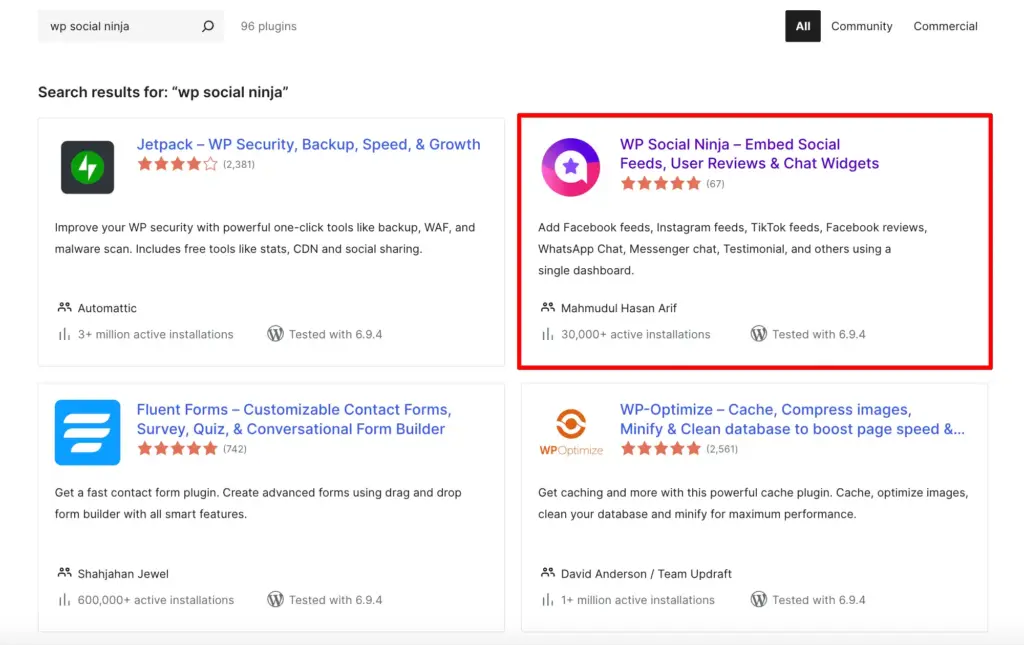
The plugin will be available in your WordPress sidebar as soon as you complete the activation.
Step 2: Connect Your Platforms
Go to WP Social Ninja > Platforms in your dashboard. You’ll find connection options for Google Reviews, Facebook Reviews, Yelp, TripAdvisor, Airbnb, Instagram and more. Click the platform you would like to connect.
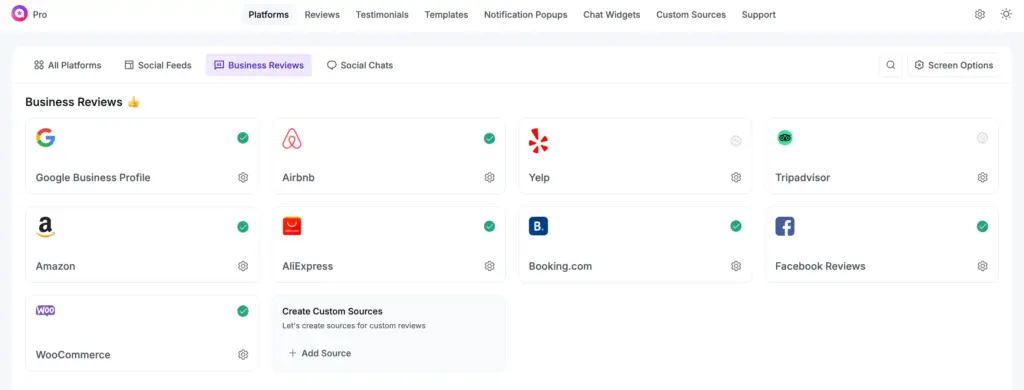
If Google Reviews are your system of choice, click on Google Business Profile from the Business Reviews option and authorize access to your Google Account.
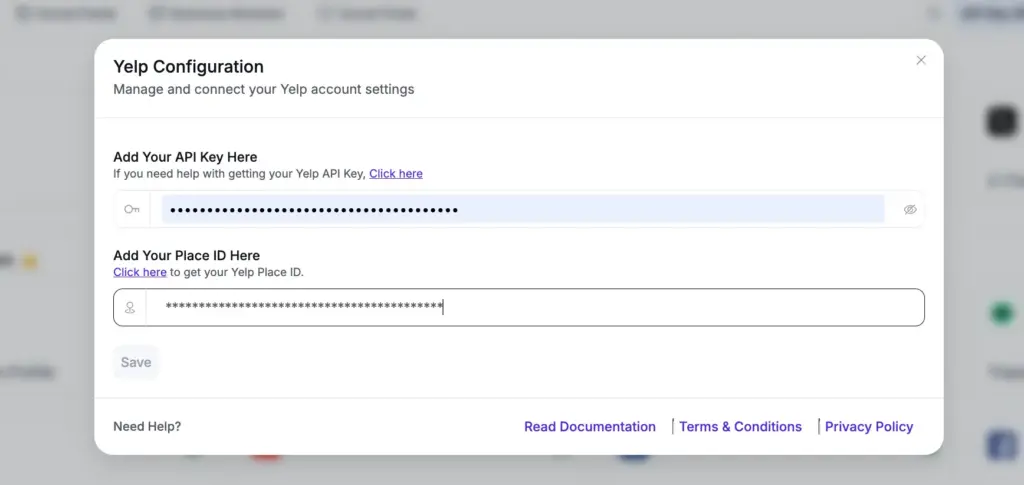
For Instagram feed, authenticate your Instagram Account. For Yelp, type in your Yelp Business ID. Each platform requires authentication and takes a few seconds to complete the configuration.
Step 3: Choose Your Social Proof Type
After connecting platforms, go to WP Social Ninja > Reviews or Social Feeds. Click Create New Template. Select from four main display types:
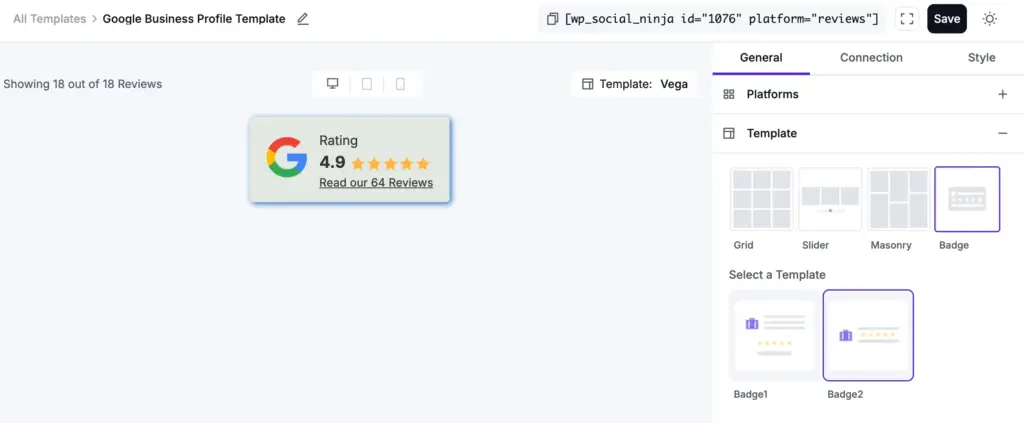
- Badge: For reviews template, compact widget showing aggregate rating (displays “4.8 stars from 287 reviews”)
- Slider: Show multiple reviews or social posts in a smooth sliding display. This layout keeps visitors engaged by highlighting different feedback without taking up too much page space, making your social proof dynamic and easy to browse.
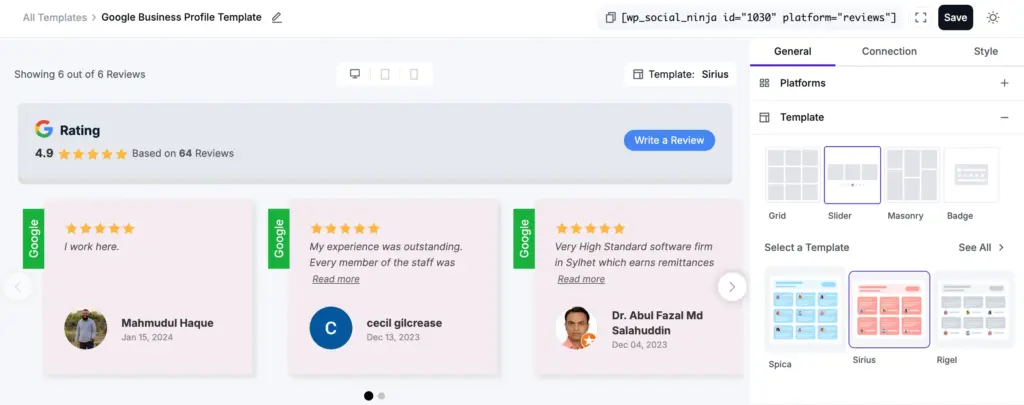
Google reviews Template in Slider Template layout
Pro Tip: You can also add your social feeds with sliders. Easily add an Instagram slider to your WordPress site to show your posts, highlight authentic social proof, and keep visitors engaged.
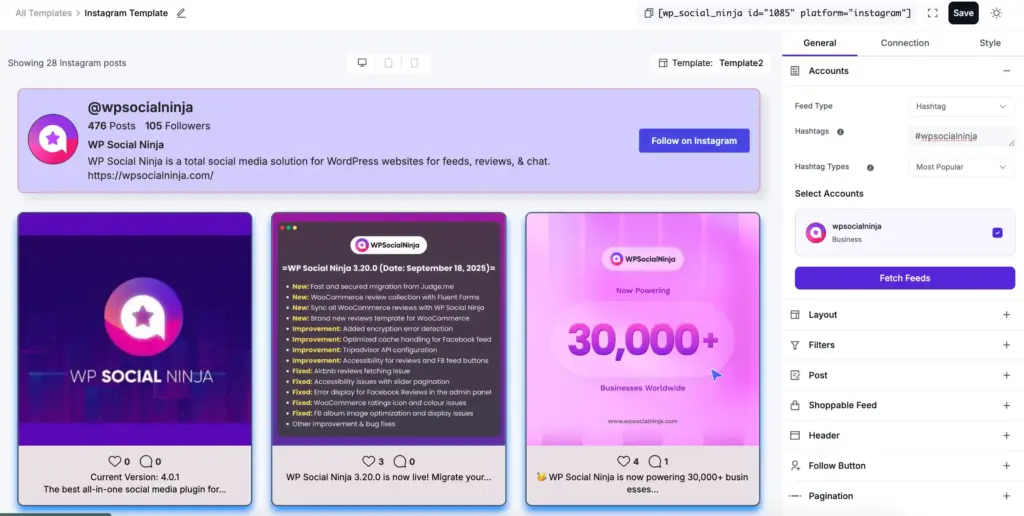
- Hashtag Feed: Displays social media posts collected from a specific hashtag used by your customers.
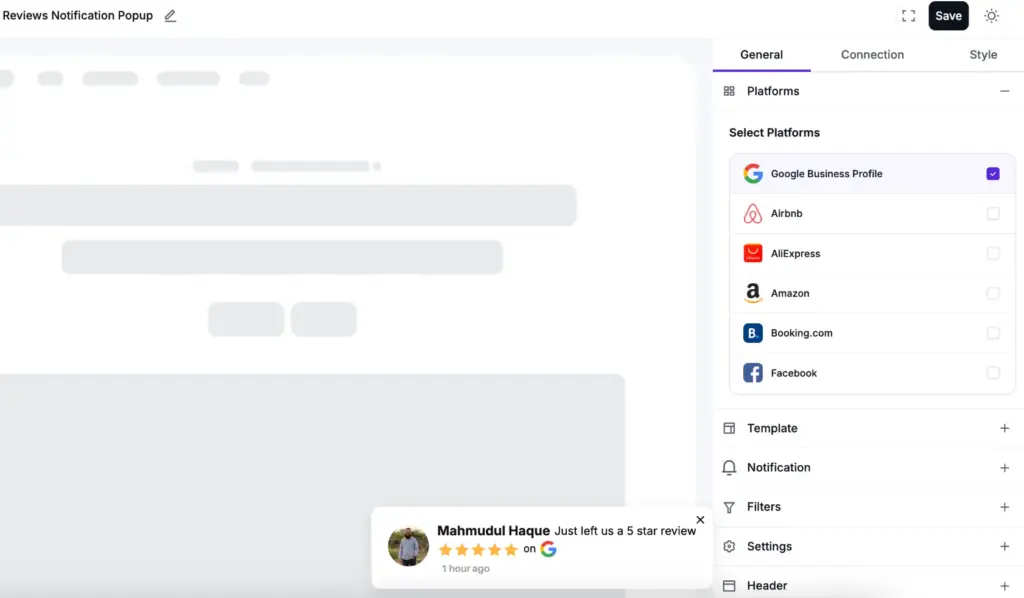
- Notification Popup: Show user reviews, ratings, or recommendations with Notification Pop-up. This draws attention to recent feedback and helps build trust with your visitors.
Choose the type that matches your goal. Badges work for passive trust. Grids build authority. Notifications create urgency.
Step 4: Customize Using Visual Builder
The no-code visual builder lets you customize without touching code. Select your template style from pre-designed options. Adjust colours to match your WordPress theme.
Customize layout styling (set the number of columns for grids, tweak carousel settings).
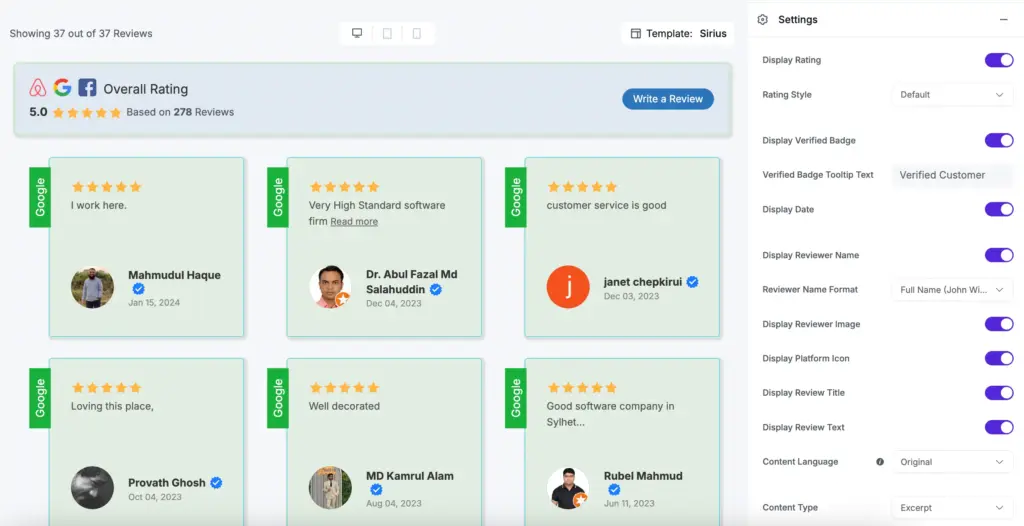
Also, set in-depth settings (show only 4-5 star reviews, display/hide header section, Name, Image, Platform icon, Verified badges and more. Configure display settings (show reviewer photos, display dates, include platform logos).
Step 5: Place Widget on Your Pages
Copy the shortcode from your template settings. Paste it anywhere in your website. We’re showing a preview of Google reviews on the website.

Make your site’s social proof more impactful and engaging. Follow our guide to create a custom review template that organizes reviews beautifully.
Set up and manage social proof on your WordPress site step by step with detailed documentation of WP Social Ninja. From connecting platforms to customizing displays, everything is explained to help you get started smoothly and use every feature.
Advanced Social Proof Strategies
Showing proof at the right time, using smart targeting, and combining various types of proof can build more trust and bring more visitors to act, without making your site feel crowded.
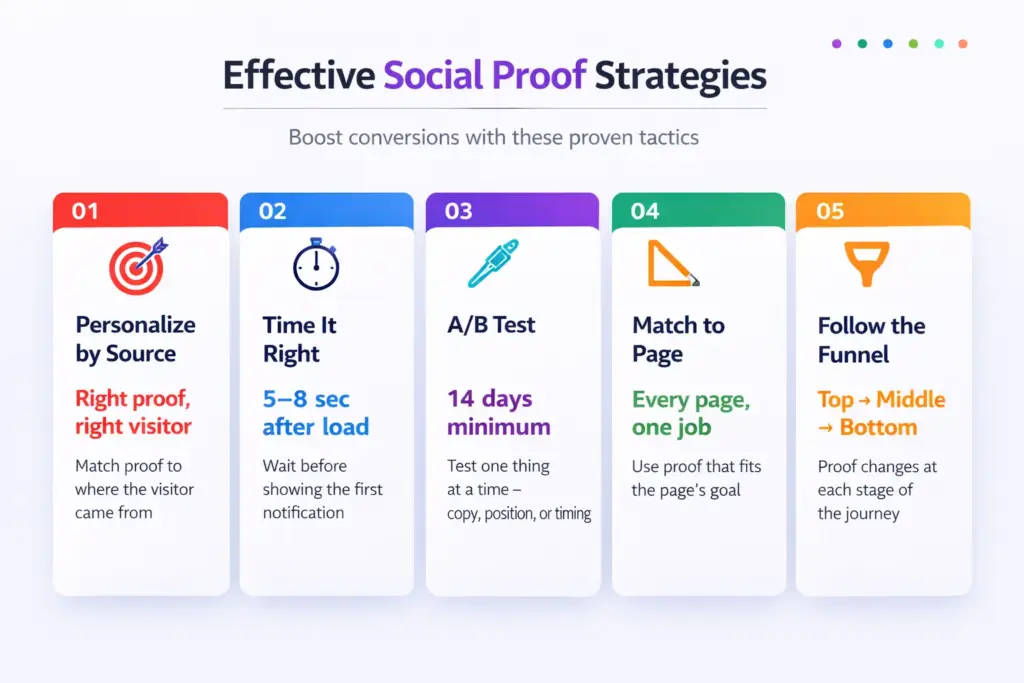
Once you have added social proof on your WordPress website, it will be even more effective with these advanced strategies.
Personalization
Show proof that feels relevant. For example, display a testimonial from a customer who bought the same product or belongs to the same target audience. Highlight expert reviews for high-value products and the urgency of low-cost products. On mobile, reduce the number of notifications and the size of pop-ups to avoid blocking screens.
This applies to dynamic social proof, such as relevant product reviews, recommendations, and urgency pop-ups.
Timing & Frequency
Timing and frequency matter when showing notification‑style social proof. Allow visitors a few seconds to explore the page before displaying a popup, because studies analyzing over 1.24 billion popup displays found that popups shown after 6-10 seconds convert best at around 2.4%.
Research from Omnisend also shows that more than 10% of website visitors convert through popups on average when they are timed and placed correctly.
A/B Testing
Test multiple copies, positions and designs. Compare top-right vs. bottom-left, bottom-right popups. Test layout variations, such as sliders, masonry, or badges, on your pages.
This also applies to notification-style social proof, where you can test different copies, designs, and placements to see what works best.
Layer Stacking
Use a mix of social proof to be more effective. For the homepage: a badge at the top (trust), a floating notification (active engagement). Product pages: star rating at the top, review grid at the bottom.
Funnel-Based Placement
Give visitors the right proof at the right time in their buying journey. Awareness (blog posts, first pages): highlight testimonials and author credentials. Attention (product/landing pages): show reviews and add testimonials. Decision (checkout/pricing): security badges and guarantees to eliminate last hesitations.
Adding social media to your website helps you display real activity, grow engagement, and strengthen brand trust. Learn the best strategies for social media integration on websites with tools and examples.
2026 Trends in WordPress Social Proof
The current social proof strategy in WordPress is shifting as privacy laws have stricter rules, AI tools are being opened, and social sites are being integrated with e-commerce.
“35% of consumers now use AI tools at the discovery stage of their purchase journey, making on‑site trust signals critical before visitors even reach your page.”
Here are five key trends that are changing how businesses show trust signals in 2026:
AI-Driven Notifications
WordPress plugins can now show social proof based on visitor behaviour and source. LinkedIn visitors see professional testimonials, and Instagram visitors see customer photos. Notifications pop up when visitors pause or hesitate, making the content feel relevant.
According to a Forrester Total Economic Impacttm study, businesses with deep personalization and targeted messaging saw engagement with their customers rise by 33% using more relevant, behaviour-based marketing campaigns.
Privacy-First Strategies
GDPR and CCPA are reshaping how consumer data appears on WordPress sites.
- Full names were also changed to partial identifiers: ‘A customer from California’
- Tracking via cookies was replaced with server-side methods
- Social proof is now secured by a consent-based modern plugin, where only after the acceptance of cookies will the proof be loaded
Size of Community versus Personal Testimonials
‘Join 12,847 members’ outperforms a single testimonial quote. People want to belong to an active group, not just hear from one person.
- Community member counts and forum activity are now primary trust signals
- User-generated content is more effective than a testimonial grid
Video Testimonials/Shorts
Raw, unpolished 30-60 second phone videos of actual customers work better than edited videos since they are real.
- Ambient noise, imperfect framing, and unscripted delivery signal genuine experience
- Embed via YouTube with video shortcode, or by using a YouTube plugin in WordPress pages
Social Commerce Integration
E-commerce websites built on WordPress can now integrate Instagram product feeds via WooCommerce catalogues, allowing visitors to tap a customer photo and add the product to their cart without leaving the site.
Pro tip: With WP Social Ninja, you can add a shoppable Instagram feed to your website, letting visitors explore real product photos from social media and purchase directly from those posts.
Businesses are turning social media into a powerful sales channel. Explore how social commerce works and how brands use it to engage audiences and grow their online presence.
Case Studies from Real-World Examples
It is inspiring to see how social proof and effective strategies help businesses. The following are two practical cases in which businesses have enhanced customer interactions and optimized their operations with the right solutions.
Case Study 1: ChitroGolpo Photography (Made Client Communication Easier)
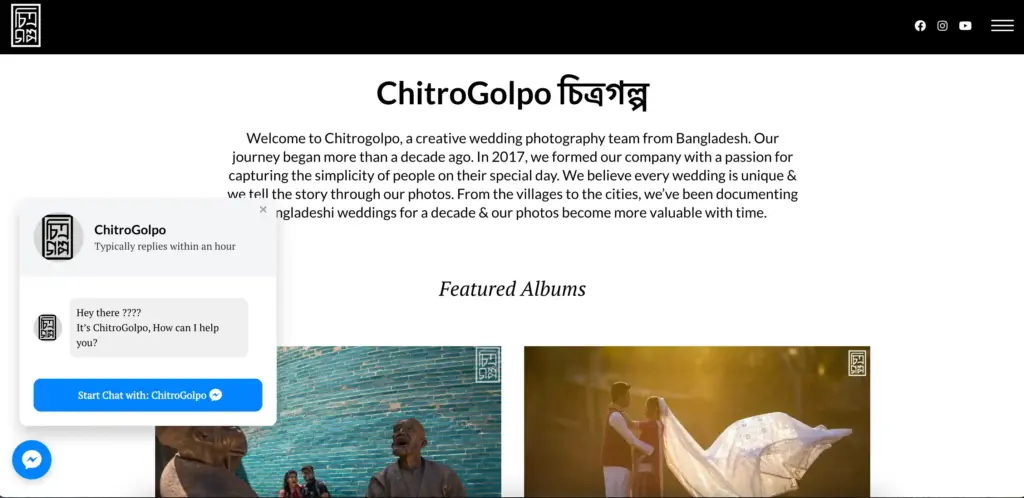
ChitroGolpo is a bridal studio photography business in Bangladesh. They had beautiful work on their business websites, but their communication was not up to date. Email responses took hours. Phone calls went unanswered during shoots.
The team was not easily accessible to potential clients, who had to contact them through other social platforms. Most of the questions were dropped before they were answered.
Implementation:
They included the WP Social Ninja chat widget, which is linked to their Facebook Messenger Account. The floating chat button is visible on all pages and has a simple custom message: “It’s ChitroGolpo, how can I help you?”
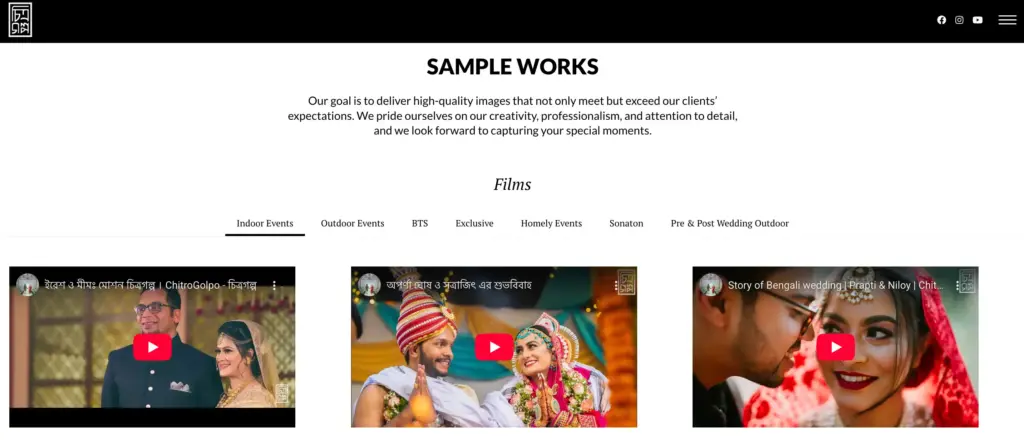
They have also added their YouTube feed to the Sample Work page, which displays their work and behind-the-scenes videos from recent weddings. This gives visitors a deeper perspective on their work and character, beyond simple pictures.
Results:
People who have been visiting galleries started to ask questions. The time spent responding decreased to minutes. The team observed an estimated 30%-40% increase in direct inquiries from website visitors, as people could now ask quick questions without leaving the site.
The YouTube feed also encouraged visitors to watch full wedding videos and behind-the-scenes moments, which likely increased average time on site by around 20-30%. Consultation rates related to booking improved (15%-25% estimated rise) as a result of reduced response friction.
Case Study 2: Medical Practice (Displaying Reviews to Build Patient Trust)
Orchard Park Child Neurology, a children’s neurology medical centre, wanted to help parents feel more comfortable finding special treatment for their children.
Although they already had positive Google Reviews, visitors to their website could not see them. It is very common for parents to read the real-life story of other families before making an appointment.
Implementation:
They implemented WP Social Ninja to display their reviews and testimonials on their WordPress website. They used a grid structure to display their patient reviews and longer testimonials of families as a way of presenting their customer feedback.
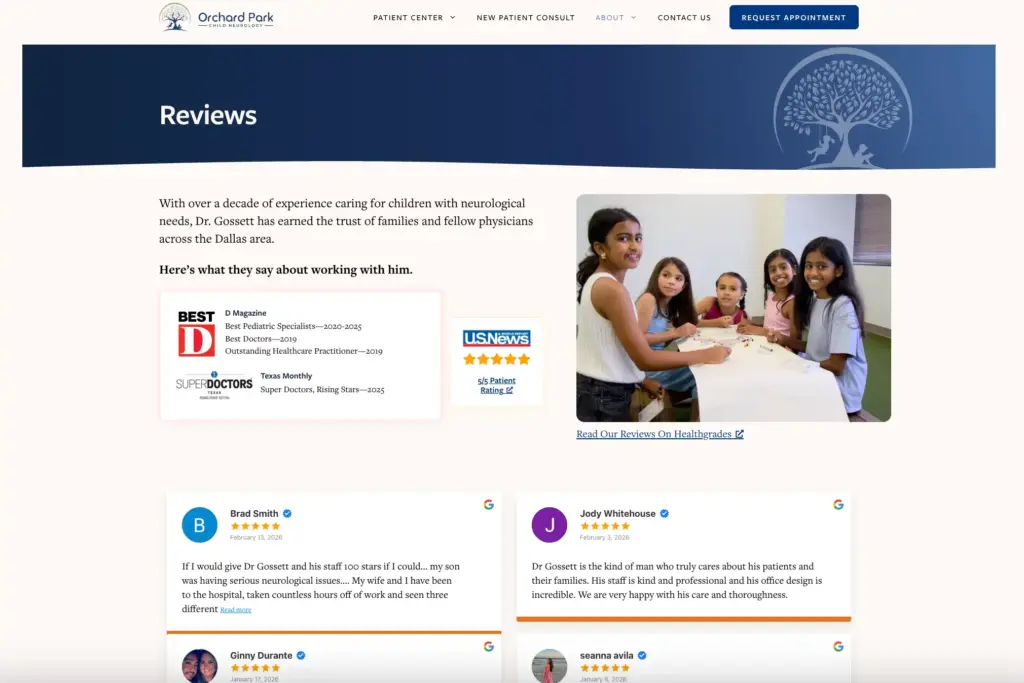
This gave visitors an actual experience and allowed them to understand how other patients perceived the care they received. The layout kept everything organized and easy to browse.
Result:
Visitors can now read patient experiences and learn about the practice in one place instead of searching on other sites. This easier access to reviews helped visitors stay longer on the page, with the team observing around a 20-30% increase in time spent on review sections.
Making reviews visible helped visitors feel more confident about the practice. The team observed an estimated 25-35% increase in appointment inquiries, as parents could move from researching to contacting the clinic more easily.
Bonus Tips: Common Mistakes to Avoid
Social proof can help build trust, but only if you use it correctly. If you make certain mistakes, it can hurt your conversions. Here are some common pitfalls and how you can avoid them:
Fake Reviews/Testimonials
Vague, generic praise without specific detail is detected by visitors familiar with AI-generated content. Beyond credibility damage, fake reviews violate FTC regulations and similar consumer protection laws.
Rule: A small number of genuine, specific reviews are better than a mass of fake ones, always.
Show your visitors that real customers trust your products and services. With testimonial widgets WordPress, you can easily display reviews, detailed feedback, and user stories directly on your site to build credibility, boost engagement, and inspire more conversions.
Overuse of Urgency Popups
Messages that come often, every few seconds, are not informative but manipulative. The visitors close them, leave them or ignore them.
- No more than one notification in one minute
- There must always be a permanent close option
- Don’t overdo urgency; visitors will spot it
Overloading the page with too much information
Badges and notification popups, as well as floating widgets + testimonial grids + social feeds on a single page, generate visual noise which decreases the usefulness of everything.
- Use the maximum number of proofs on a page is 2-3, depending on the objective of the page
Ignoring Mobile Optimization
More than 60% of visitors are on mobile. Social proof that blocks screens, displays too small to read, or has tiny close buttons frustrates rather than reassures.
- Test all elements on mobile before publishing
- Reduce notification frequency and size for mobile users
Not doing A/B testing
Without testing, implementing social proof assumes that the first version is the best – this is rarely the case.
- Test one variable at a time
- Execute each test at least two weeks apart
Bad performance monitoring
Poorly implemented social proof, especially multiple unoptimized image feeds, can slow page load times and hurt both experience and rankings.
- Monitor speed before and after adding proof elements
- Enable lazy loading for review images
- Check load times monthly using Google PageSpeed Insights
Build immediate credibility with actual customer ratings and reviews. Get the social proof widgets to increase engagement and conversions on your WordPress site.
How Social Proof May Evolve
Displaying reviews on a page is common today. In the upcoming years, social proof may become dynamic and personalized.
Visitors could see reviews that matter to them, based on where they are or what they like.
“In the coming years, social proof may become more adaptive, helping visitors see the customer stories that matter most to them.”
That level of personalization can make trust stronger and faster.
Your Social Proof Action Plan: What to Do Next
At the end of the day, people trust people more than social media marketing. A visitor may read your product description, but seeing real customers share their experience can strongly influence their decision. It makes the choice feel safer and more real.
That is why social proof works so well on WordPress websites.
Start with these 5 steps:
- Install WP Social Ninja (the free version works well to begin)
- Connect your social platforms to collect reviews and testimonials
- Add a floating review badge to show trust signals across your site
- Display review or testimonial grids on key pages like your homepage
- Track the results over the next 30 days to see how visitors respond
Your customer reviews are making sales pitches 24/7, turning uncertain visitors into confident buying customers.
Ready to start?
Pick one page on your website today and add real customer feedback where visitors make decisions.
Related Guides on WordPress Social Proof
- The 12-Minute Social Media Marketing Checklist That Doubled Our Engagement
- Social Media for Small Business (Success Stories & Tips)
- 7 Low-Cost Social Media Marketing Tactics
- 5 Surefire Testimonial Advertising Examples for WordPress
- Social Media for Small Business (Success Stories & Tips)
Frequently Asked Questions
What is WordPress social proof?
WordPress social proof is evidence of trust, including testimonials from people who have used, purchased, or recommended your site. This will involve customer reviews, star ratings, live activities and notifications, testimonials, and social media feeds on your WordPress site.
Is social proof good for SEO?
Yes, indirectly. Social proof boosts user engagement factors (Increased time on site, decreased bounce rate), which Google uses in ranking pages. Review schema markup enables rich snippets with stars in search results, leading to a 20-35% increase in click-through rates.
What is the best social proof plugin for WordPress?
WP Social Ninja is the best choice for social proof on WordPress. It offers a diverse set of features like business reviews, social feeds, notification pop-ups, testimonials, and chat widgets; all in one plugin, so you don’t need multiple plugins to cover different needs.
How many social proof elements should I use on one page?
Use 2-3 types maximum per page. Example: floating review badge + 1 live notification/Notification Popup on product pages would be effective. The homepage may include a review badge, a testimonial grid and a social feed. Checkout should have only trust badges.
Can I use fake social proof?
Never. Fake social proof violates FTC standards and can ruin trust if discovered. It might even lead to legal trouble. Always show real customer actions, genuine reviews, and authentic testimonials.
Will social proof slow down my website?
No, though it can depend on which plugin you use. Some social proof plugins may load heavy scripts or multiple iFrames that affect page speed. WP Social Ninja, however, is optimized for performance: it avoids iFrames, uses smart caching and lazy loading, and only loads the images or videos you actually display, ensuring your site stays fast and smooth.
How do I get more reviews for social proof?
Send emails to customers requesting a review after purchase, offer small incentives like discounts on their next purchase, and make it easy by adding a write a review button on your website. Respond to every review to encourage more submissions, and automate review request emails through your CRM to save time and ensure consistency.
Should I show negative reviews?
Yes. Showing only perfect reviews can feel unrealistic. When visitors see a mix of feedback, including a few 2-4‑star reviews, it makes the reviews look more genuine and trustworthy.
Does social proof work for all business types?
Yes, social proof works for all business types, including both B2C and B2B. It builds trust, reduces buyer risk, and helps improve conversions. The key is to use the right type: eCommerce brands rely on reviews and ratings, local businesses use Google reviews and UGC, while B2B and blogs benefit more from testimonials, case studies, and subscriber signals.

Subscribe To Get
Weekly Email Newsletter
Connect, Customize, and Display Social Feeds, Reviews, and Chat widgets

Trending Posts
-
 Mashfik Upal Aumy
 -
 Mashfik Upal Aumy
 -





Leave a Reply